

[Nexacro N] Grid Grouping — 그룹핑 처리
Nexacro N Dataset.group() 함수와 Grid의 GroupBand를 연동해 계층적 그룹 구조를 표시하는 방법, 다단 그룹, 그룹 집계, 그룹 해제를 설명합니다.
지난 글에서 합계 행 구성 방법을 살펴봤습니다. 이번에는 Dataset의 group() 함수와 Grid의 GroupBand를 연동해 계층적 그룹 구조를 표시하는 방법을 다룹니다. 부서별·월별처럼 동일 카테고리 데이터를 묶어 표현할 때 활용합니다.
그룹핑의 원리
Nexacro N의 그룹핑은 두 단계로 이루어집니다.
- Dataset.group(): Dataset에 그룹 구조를 적용합니다. 그룹 키 컬럼의 값이 같은 행들을 묶고, 각 그룹의 시작에
ROWTYPE: NGROUP인 헤더 행을 자동 삽입합니다. - Grid GroupBand: Grid에
GroupBand를 선언해 NGROUP 행을 그룹 헤더 스타일로 렌더링합니다.
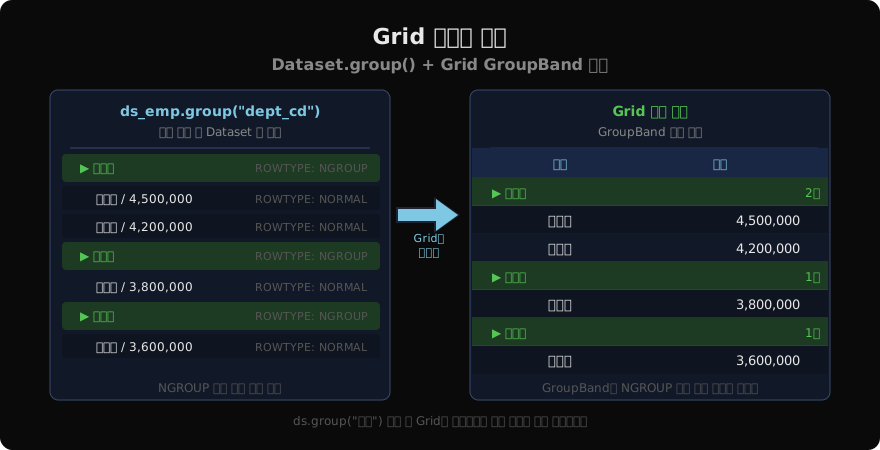
Dataset.group() 사용법
function fn_applyGroup() {
  // 부서 코드 기준으로 그룹 적용
  this.ds_emp.group("dept_cd");
}
group(컬럼명) 형태로 호출합니다. 호출 전에 Dataset이 그룹 기준 컬럼으로 정렬되어 있어야 올바른 그룹이 만들어집니다.
function fn_searchAndGroup() {
  var svc = "getEmpList";
  var inDs = "";
  var outDs = "ds_emp=ds_emp";
  var args = "";
  var callback = "fn_searchCallback";
  this.transaction(svc, this.getSvcUrl(svc),
    inDs, outDs, args, callback);
}

function fn_searchCallback(svc, errCode, errMsg) {
  if (errCode == 0) {
    // 정렬 후 그룹 적용
    this.ds_emp.sort("dept_cd A, emp_nm A");
    this.ds_emp.group("dept_cd");
  }
}
트랜잭션 콜백에서 정렬 후 그룹을 적용하는 전형적인 패턴입니다.
Grid GroupBand XFD 설정
XFD에서 Grid의 Format 안에 GroupBand 요소를 선언합니다.
<Grid id="grd_emp" bindDataset="ds_emp">
  <Formats>
    <Format>
      <Columns>
        <Column size="200"/>
        <Column size="120"/>
        <Column size="120"/>
      </Columns>
      <!-- GroupBand: dept_cd 기준 그룹 -->
      <GroupBand groupcol="dept_cd">
        <GroupBand_Head height="28">
          <Cell col="0" datacolumn="dept_nm"
            colspan="3"
            halign="left"/>
        </GroupBand_Head>
      </GroupBand>
      <!-- 일반 Body 행 -->
      <Body>
        <Cell col="0" datacolumn="emp_nm"/>
        <Cell col="1" datacolumn="sal_amt"
          halign="right" displayformat="#,##0"/>
        <Cell col="2" datacolumn="bonus"
          halign="right" displayformat="#,##0"/>
      </Body>
    </Format>
  </Formats>
</Grid>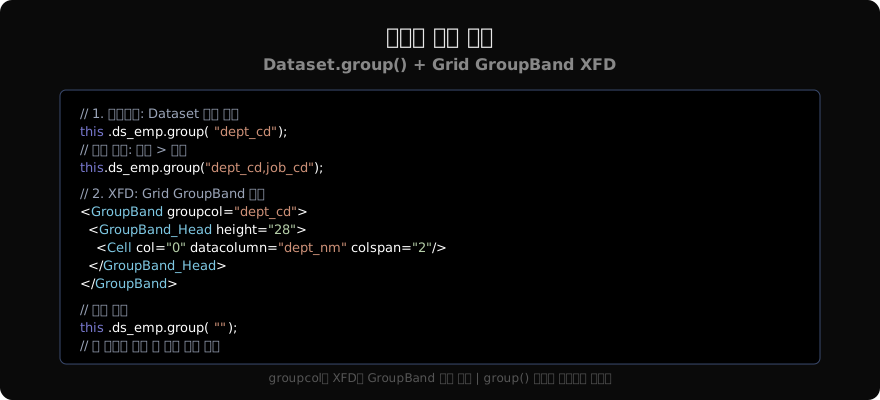
GroupBand의 groupcol 속성에 ds_emp.group() 호출 시 사용한 컬럼명과 동일한 값을 지정합니다. GroupBand_Head는 그룹 헤더 행을 정의하며, 여기에 선언된 셀이 각 그룹의 첫 번째 행(NGROUP 행)에 표시됩니다.
다단 그룹 (Multi-level Grouping)
두 단계 이상의 그룹 구조가 필요하면 여러 컬럼을 쉼표로 구분해 지정합니다.
// 부서 → 직급 2단 그룹
this.ds_emp.group("dept_cd,job_cd");
XFD에서도 GroupBand를 중첩 선언합니다.
<!-- 부서 그룹 (1단) -->
<GroupBand groupcol="dept_cd">
  <GroupBand_Head height="28">
    <Cell col="0" datacolumn="dept_nm"
      colspan="3"/>
  </GroupBand_Head>
  <!-- 직급 그룹 (2단, 중첩) -->
  <GroupBand groupcol="job_cd">
    <GroupBand_Head height="24">
      <Cell col="0" datacolumn="job_nm"
        colspan="3"/>
    </GroupBand_Head>
  </GroupBand>
</GroupBand>
2단 그룹은 부서 헤더 → 직급 헤더 → 개인 행 순서로 계층적으로 표시됩니다.
그룹 헤더에 집계 표시
GroupBand_Head 안의 셀에 sumtext, counttext 등을 설정하면 해당 그룹 내 집계 값을 헤더에 표시합니다.
<GroupBand_Head height="30">
  <Cell col="0" datacolumn="dept_nm"/>
  <!-- 그룹 내 인원 수 -->
  <Cell col="1" counttext="emp_id"
    text_suffix="명" halign="right"/>
  <!-- 그룹 내 급여 합계 -->
  <Cell col="2" sumtext="sal_amt"
    displayformat="#,##0" halign="right"/>
</GroupBand_Head>
GroupBand 스타일
그룹 헤더 행은 StyleSet의 Grid:grouphead 셀렉터로 스타일을 지정합니다.
<Style selector="Grid:grouphead">
  background: #1d3a22;
  color: #55c555;
  font-weight: 700;
  border-bottom: 1px solid #2a5a2a;
</Style>
그룹 해제
group("")(빈 문자열)을 전달하면 그룹 구조를 해제하고 일반 목록 상태로 돌아갑니다.
function fn_clearGroup() {
  this.ds_emp.group("");
  // 그룹 해제 후 원래 정렬 복원
  this.ds_emp.sort("emp_id A");
}
그룹핑 주의사항
- Dataset.group()은 반드시 정렬 후에 호출해야 같은 그룹 값이 연속으로 묶입니다
- GroupBand의
groupcol값은 Dataset 컬럼 ID와 정확히 일치해야 합니다 - 그룹이 적용된 상태에서 행을 추가/삭제하면 그룹 구조가 무너질 수 있습니다. 편집 모드에서는 그룹을 해제하거나 저장 후 재적용합니다
- NGROUP 행의
rowtype은"NGROUP"이므로 Dataset 순회 시 이를 구분해야 합니다
function fn_iterateGrouped() {
  for (var i = 0; i < this.ds_emp.rowcount; i++) {
    var rowType = this.ds_emp.getRowType(i);
    if (rowType == Dataset.ROWTYPE_NGROUP) {
      // 그룹 헤더 행 — 건너뜀
      continue;
    }
    var empNm = this.ds_emp.getColumn(i, "emp_nm");
    trace(empNm);
  }
}
정리
Dataset.group(컬럼명)으로 그룹 구조를 적용하고, Grid XFD에 GroupBand와 GroupBand_Head를 선언해 그룹 헤더를 표시합니다. 다단 그룹은 GroupBand를 중첩하고, 그룹 헤더에 sumtext/counttext로 집계도 함께 표시할 수 있습니다.
지난 글: Nexacro N Grid Summary — 합계 행 구성
다음 글: Nexacro N Grid Sort & Filter — 정렬과 필터
읽어주셔서 감사합니다. 😊
PALDYN / ARTICLE AI
글의 개념, 수식, 코드에 대해 물어보세요.
질문과 관련된 문단을 골라 답변의 문맥으로 사용합니다.생각 중 · 0초