

[Nexacro N] Nexacro Platform에서 N으로 마이그레이션
Nexacro Platform에서 최신 버전인 Nexacro N으로 마이그레이션하는 방법을 설명합니다. 두 버전의 구조적 차이, 호환성 점검 스크립트, 폐기 API 교체, 마이그레이션 전략과 단계별 접근법을 다룹니다.
지난 글에서 ActiveX 기반 Nexacro 14를 HTML5 기반 Platform으로 전환하는 방법을 살펴보았다. 이번에는 이미 Nexacro Platform을 사용 중인 팀이 최신 버전인 Nexacro N으로 업그레이드할 때 무엇을 확인하고 어떻게 진행해야 하는지 다룬다. Nexacro Platform에서 N으로의 전환은 14→Platform 전환보다 충격이 훨씬 작다. 대부분의 코드가 그대로 동작하며, 일부 폐기 API만 교체하면 된다.
Platform과 N의 관계
Nexacro N은 Nexacro Platform의 후속 버전이다. Platform에서 HTML5 기반으로 재설계된 런타임을 더욱 최적화하고, 현대 브라우저 환경에 맞게 성능과 API를 개선했다. API의 99%는 Platform과 호환되며, 일부 폐기(deprecated)된 API만 교체가 필요하다.
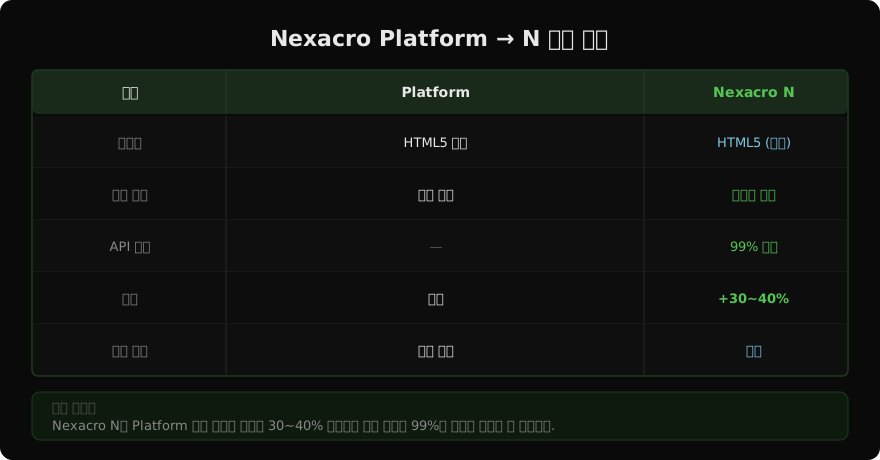
Nexacro N의 주요 개선사항:
- 렌더링 엔진 최적화 (초기 로딩 30~40% 개선)
- 대용량 Dataset 처리 성능 향상
- Grid 가상화 기본 적용
- 최신 브라우저 API 활용 (CSS Grid, Web Workers)
- 모바일 반응형 지원 강화
- Tree shaking으로 번들 크기 감소
호환성 점검 스크립트
마이그레이션 전 기존 코드에 폐기된 API가 있는지 자동으로 검사한다.
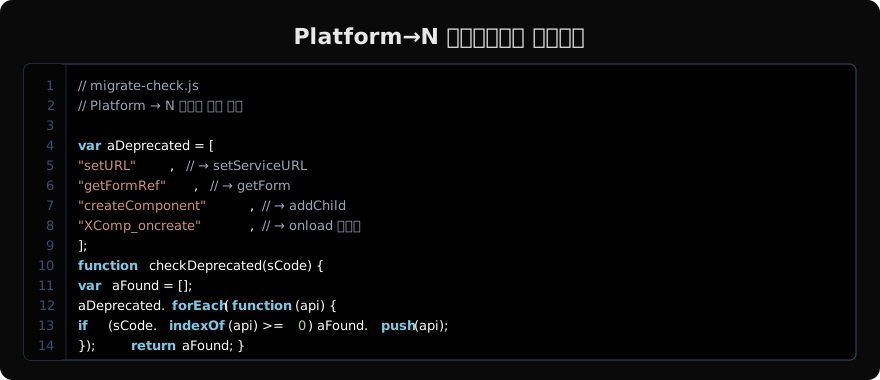
// scripts/migrate-check.js
// Platform → N 호환성 사전 점검 스크립트

const fs   = require("fs");
const path = require("path");
const glob = require("glob");

// Platform에서 폐기, N에서 변경된 API 목록
const DEPRECATED_APIS = [
  {
    pattern: /\.setURL\s*\(/g,
    replacement: ".setServiceURL(",
    desc: "setURL → setServiceURL"
  },
  {
    pattern: /\.getFormRef\s*\(/g,
    replacement: ".getForm(",
    desc: "getFormRef → getForm"
  },
  {
    pattern: /\.createComponent\s*\(/g,
    replacement: ".addChild(",
    desc: "createComponent → addChild"
  },
  {
    pattern: /XComp_oncreate\b/g,
    replacement: "onload",
    desc: "XComp_oncreate 이벤트 → onload"
  },
  {
    pattern: /this\.application\.getActiveForm\b/g,
    replacement: "nexacro.getApplication().getActiveForm()",
    desc: "application 직접 참조 → nexacro.getApplication()"
  },
];

const files = glob.sync("**/*.xfdl", { cwd: process.cwd() });
const report = [];

files.forEach(file => {
  const content = fs.readFileSync(file, "utf8");
  const issues  = [];

  DEPRECATED_APIS.forEach(api => {
    const matches = content.match(api.pattern);
    if (matches) {
      issues.push({
        api:   api.desc,
        count: matches.length,
        fix:   api.replacement,
      });
    }
  });

  if (issues.length > 0) {
    report.push({ file, issues });
  }
});

// 리포트 출력
if (report.length === 0) {
  console.log("✓ 폐기 API 없음 — 마이그레이션 준비 완료");
} else {
  console.log(`\n폐기 API 발견 (${report.length}개 파일):`);
  report.forEach(({ file, issues }) => {
    console.log(`\n  ${file}`);
    issues.forEach(i => {
      console.log(`    - ${i.api} (${i.count}건)`);
    });
  });
}
이 스크립트를 실행해 보고서를 확인한 뒤 마이그레이션 작업 규모를 파악한다.
폐기 API 일괄 교체
점검 결과 폐기 API가 많다면 자동 교체 스크립트를 활용한다.
// scripts/migrate-replace.js
// 폐기 API 일괄 교체 (백업 후 실행)

const fs   = require("fs");
const glob = require("glob");

const REPLACEMENTS = [
  {
    from: /\.setURL\s*\(/g,
    to:   ".setServiceURL("
  },
  {
    from: /\.getFormRef\s*\(/g,
    to:   ".getForm("
  },
  {
    from: /\.createComponent\s*\(/g,
    to:   ".addChild("
  },
];

// 실행 전 반드시 git commit 또는 백업
const files = glob.sync("**/*.xfdl");
let totalReplaced = 0;

files.forEach(file => {
  let content = fs.readFileSync(file, "utf8");
  let fileChanged = false;

  REPLACEMENTS.forEach(({ from, to }) => {
    const before = content;
    content = content.replace(from, to);
    if (content !== before) {
      fileChanged = true;
      totalReplaced++;
    }
  });

  if (fileChanged) {
    fs.writeFileSync(file, content);
    console.log("수정:", file);
  }
});

console.log(`\n총 ${totalReplaced}건 교체 완료`);
반드시 git으로 변경 전 상태를 커밋하거나 백업한 뒤 실행한다.
TypeDef.xml 변경사항
Nexacro N에서 TypeDef.xml 구조 자체는 Platform과 거의 동일하다. 다만 몇 가지 새로운 속성이 추가되었다.
<!-- TypeDef.xml — N 신규 속성 적용 -->
<TypeDefinition>
  <!-- N에서 추가된 성능 옵션 -->
  <RuntimeInfo>
    <Option id="VirtualScroll" value="true"/>    <!-- Grid 가상 스크롤 -->
    <Option id="LazyRender"    value="true"/>    <!-- 폼 지연 렌더링 -->
    <Option id="WorkerThread"  value="true"/>    <!-- 백그라운드 처리 -->
  </RuntimeInfo>

  <ServiceInfo>
    <Service id="SVC"
      url="%SERVER_URL%/nexacro/"
      protocol="NexaProtocol"
      timeout="30000"/>
  </ServiceInfo>
</TypeDefinition>
Platform에서 사용하던 TypeDef.xml을 그대로 쓰면서 N의 신규 옵션을 점진적으로 추가한다.
단계별 마이그레이션 전략
한 번에 전체를 교체하는 빅뱅 방식보다 화면 단위로 점진적으로 마이그레이션하는 방식이 안전하다.
Phase 1: 개발 환경 검증 (1~2주)
- Nexacro N 런타임 개발 환경 적용
- 자동화 점검 스크립트 실행
- 발견된 폐기 API 교체
- 핵심 화면 20개 동작 확인
Phase 2: 스테이징 검증 (2~4주)
- 전체 화면 N 런타임으로 전환
- 회귀 테스트 체크리스트 실행
- 성능 비교 측정
Phase 3: 운영 전환 (계획된 점검 시간)
- 이전 버전 백업
- 런타임 교체 배포
- 핵심 기능 스모크 테스트
- 모니터링 강화 (1~2주)
# 성능 비교 측정 스크립트
# Lighthouse로 Platform vs N 측정

npx lighthouse http://stg-platform.example.com \
  --output json --output-path platform-perf.json

npx lighthouse http://stg-n.example.com \
  --output json --output-path n-perf.json

node scripts/compare-perf.js platform-perf.json n-perf.json
롤백 계획
만약 N 전환 후 문제가 발생하면 이전 Platform 런타임으로 즉시 돌아갈 수 있어야 한다.
# rollback-to-platform.sh
# Nexacro N → Platform 롤백

BACKUP_DIR="/deploy/backup/platform-last"

if [ ! -d "$BACKUP_DIR" ]; then
  echo "ERROR: Platform 백업 없음"
  exit 1
fi

# 현재 N 버전 임시 보관
cp -r /deploy/prod /deploy/backup/n-rollback-$(date +%Y%m%d_%H%M%S)

# Platform 버전 복원
rsync -av "${BACKUP_DIR}/" /deploy/prod/
echo "Platform 버전 복원 완료"
N으로 전환하기 전 Platform 버전 전체를 /deploy/backup/platform-last에 보관해 두면 언제든 롤백할 수 있다.
정리
Nexacro Platform에서 N으로의 마이그레이션은 레거시 전환에 비해 훨씬 수월하다. 코드의 대부분은 그대로 동작하며, 폐기 API 교체와 TypeDef.xml의 신규 옵션 추가가 주요 작업이다. 자동화 점검 스크립트로 영향 범위를 파악하고, 단계별로 검증하며 진행하면 전환 리스크를 최소화할 수 있다. 무엇보다 전환 전 Platform 버전의 완전한 백업을 남겨 두는 것이 가장 중요한 안전장치다.
지난 글: [Nexacro N] Nexacro 14에서 Platform으로 마이그레이션
다음 글: [Nexacro N] v24 주요 변경 사항 총정리
읽어주셔서 감사합니다. 😊
PALDYN / ARTICLE AI
글의 개념, 수식, 코드에 대해 물어보세요.
질문과 관련된 문단을 골라 답변의 문맥으로 사용합니다.생각 중 · 0초