

동적 OG 이미지 — ImageResponse로 SNS 카드 생성
Next.js의 ImageResponse API로 SNS 공유 시 표시되는 Open Graph 이미지를 동적으로 생성하는 방법을 설명합니다. 파일 기반 opengraph-image, Route Handler 방식, 한글 폰트 로딩, CSS 제약 사항을 다룹니다.
지난 글에서 generateMetadata로 페이지별 메타데이터를 동적으로 생성했다. 메타데이터 중 가장 눈에 띄는 요소는 SNS 공유 시 표시되는 Open Graph 이미지다. 이번 글에서는 ImageResponse를 사용해 텍스트와 데이터를 기반으로 이미지를 동적으로 생성하는 방법을 다룬다.
ImageResponse란
next/og에서 제공하는 ImageResponse는 JSX를 PNG 이미지로 변환하는 API다. 내부적으로 Satori가 JSX를 SVG로 변환하고, resvg-js가 이를 PNG로 래스터화한다. Edge Runtime에서 실행되므로 빠르고 서버 비용이 낮다.
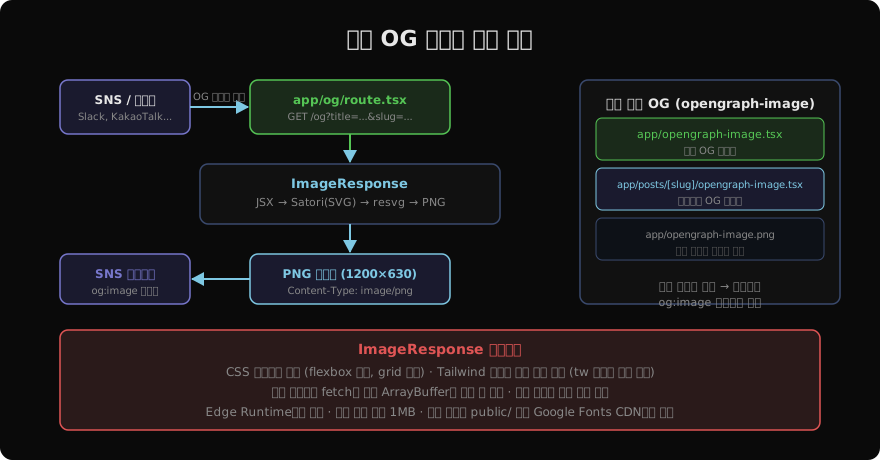
방법 1: 파일 기반 — opengraph-image.tsx
가장 간단한 방법은 app/ 디렉터리 안에 opengraph-image.tsx 파일을 만드는 것이다. Next.js가 자동으로 해당 경로의 og:image 메타태그를 생성한다.
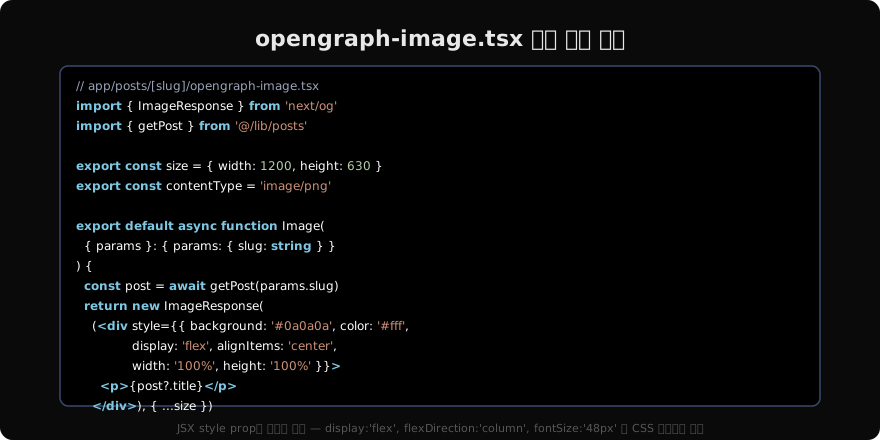
// app/posts/[slug]/opengraph-image.tsx
import { ImageResponse } from 'next/og'
import { getPost } from '@/lib/posts'

export const size = { width: 1200, height: 630 }
export const contentType = 'image/png'
export const runtime = 'edge'

export default async function Image({
  params,
}: {
  params: { slug: string }
}) {
  const post = await getPost(params.slug)

  return new ImageResponse(
    (
      <div
        style={{
          background: '#0a0a0a',
          width: '100%',
          height: '100%',
          display: 'flex',
          flexDirection: 'column',
          justifyContent: 'center',
          padding: '80px',
        }}
      >
        <p
          style={{
            color: '#888',
            fontSize: '24px',
            marginBottom: '24px',
          }}
        >
          PALDYN Blog
        </p>
        <h1
          style={{
            color: '#ffffff',
            fontSize: '60px',
            fontWeight: '700',
            lineHeight: '1.2',
            margin: '0',
          }}
        >
          {post?.title ?? 'Not Found'}
        </h1>
      </div>
    ),
    { ...size }
  )
}
방법 2: Route Handler — 쿼리 파라미터 방식
여러 페이지에서 공용 OG 이미지 생성기를 쓰고 싶다면 Route Handler로 만든다.
// app/api/og/route.tsx
import { ImageResponse } from 'next/og'
import { NextRequest } from 'next/server'

export const runtime = 'edge'

export async function GET(request: NextRequest) {
  const { searchParams } = request.nextUrl
  const title = searchParams.get('title') ?? 'PALDYN'
  const description = searchParams.get('description') ?? ''

  return new ImageResponse(
    (
      <div
        style={{
          background: 'linear-gradient(135deg, #0a0a0a 0%, #1a1a2e 100%)',
          width: '100%',
          height: '100%',
          display: 'flex',
          flexDirection: 'column',
          justifyContent: 'space-between',
          padding: '60px',
        }}
      >
        <span style={{ color: '#7ec8e3', fontSize: '28px', fontWeight: '700' }}>
          PALDYN
        </span>
        <div>
          <h1 style={{ color: '#ffffff', fontSize: '56px', margin: '0 0 24px' }}>
            {title}
          </h1>
          <p style={{ color: '#888', fontSize: '28px', margin: '0' }}>
            {description}
          </p>
        </div>
      </div>
    ),
    { width: 1200, height: 630 }
  )
}
이후 generateMetadata에서 이 URL을 참조한다.
export async function generateMetadata({ params }: Props): Promise<Metadata> {
  const post = await getPost(params.slug)

  return {
    openGraph: {
      images: [
        {
          url: `/api/og?title=${encodeURIComponent(post?.title ?? '')}&description=${encodeURIComponent(post?.summary ?? '')}`,
          width: 1200,
          height: 630,
        },
      ],
    },
  }
}
한글 폰트 로딩
ImageResponse는 기본적으로 한글을 지원하지 않는다. 한글 텍스트를 렌더링하려면 폰트 파일을 별도로 로드해야 한다.
// app/api/og/route.tsx
import { ImageResponse } from 'next/og'

async function loadFont() {
  // public/fonts/NotoSansKR-Bold.ttf 파일 사용
  const font = await fetch(
    new URL('/fonts/NotoSansKR-Bold.ttf', process.env.NEXT_PUBLIC_BASE_URL)
  )
  return font.arrayBuffer()
}

export async function GET(request: NextRequest) {
  const fontData = await loadFont()
  const title = request.nextUrl.searchParams.get('title') ?? ''

  return new ImageResponse(
    (<div style={{ fontFamily: 'NotoSansKR', fontSize: '48px' }}>{title}</div>),
    {
      width: 1200,
      height: 630,
      fonts: [
        {
          name: 'NotoSansKR',
          data: fontData,
          weight: 700,
          style: 'normal',
        },
      ],
    }
  )
}
폰트 파일은 public/fonts/에 두거나, Google Fonts CDN에서 직접 fetch해도 된다. 폰트 파일은 Edge Runtime의 번들 크기 제한(1MB)에 포함되므로 필요한 서브셋만 사용하는 것이 좋다.
CSS 지원 범위
ImageResponse는 모든 CSS를 지원하지 않는다. Satori의 제약이 있다.
| 지원 | 미지원 |
|---|---|
display: flex | display: grid |
flexDirection, justifyContent, alignItems | position: absolute (제한적) |
fontSize, fontWeight, color | CSS animation |
margin, padding, border | backdrop-filter |
borderRadius | 복잡한 pseudo-selector |
background, backgroundImage | calc() 일부 |
인라인 스타일 객체만 사용하며, 클래스명은 동작하지 않는다. Tailwind를 쓰고 싶다면 tw 유틸리티 함수(@vercel/og 또는 서드파티)를 사용해 클래스를 인라인 스타일로 변환해야 한다.
캐싱
ImageResponse는 기본적으로 캐시되지 않는다. 운영에서는 CDN 캐싱을 추가하거나, Route Handler에 revalidate 설정을 추가한다.
// 정적으로 캐시 (빌드 시 생성, 이후 ISR)
export const revalidate = 3600 // 1시간마다 갱신

// 또는 Cache-Control 헤더 직접 설정
return new ImageResponse(jsx, {
  width: 1200,
  height: 630,
  headers: {
    'Cache-Control': 'public, max-age=86400, stale-while-revalidate',
  },
})
지난 글: generateMetadata — 동적 메타데이터 심화
다음 글: sitemap.xml과 robots.txt — 검색 엔진 크롤링 제어
읽어주셔서 감사합니다. 😊
PALDYN / ARTICLE AI
글의 개념, 수식, 코드에 대해 물어보세요.
질문과 관련된 문단을 골라 답변의 문맥으로 사용합니다.생각 중 · 0초