

Middleware matcher — 실행 범위 제어
Next.js Middleware의 matcher 설정으로 실행 경로를 제한하는 방법을 설명합니다. path-to-regexp 패턴, 정규식 부정 lookahead, has/missing 조건부 매칭까지 실전 패턴을 다룹니다.
지난 글에서 Middleware의 기본 구조와 NextResponse API를 살펴봤다. export const config 없이 Middleware를 작성하면 모든 경로에 실행되는데, 정적 파일과 _next/ 내부 경로까지 포함되어 불필요한 오버헤드가 생긴다. 이번 글에서는 matcher 설정으로 실행 범위를 정밀하게 제어하는 방법을 다룬다.
matcher 기본 구조
middleware.ts 파일 하단에 config 객체를 named export하면 된다.
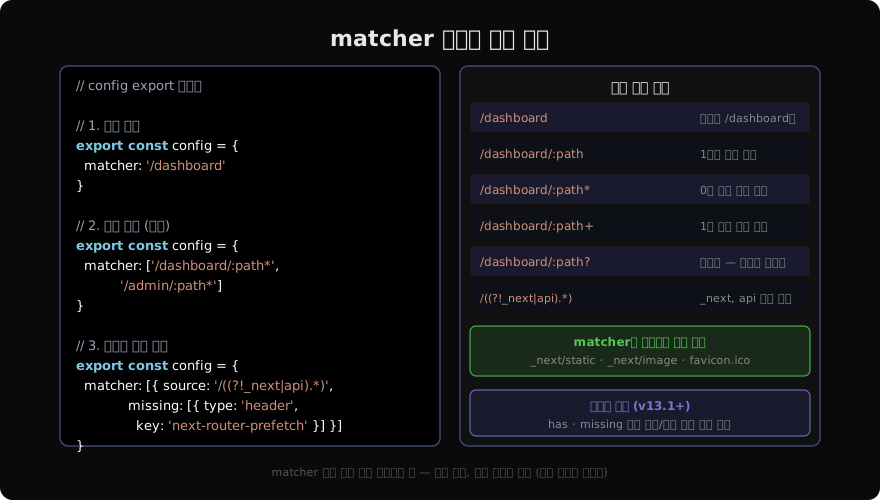
export const config = {
  matcher: '/dashboard/:path*',
}matcher는 문자열 하나, 문자열 배열, 또는 객체 배열을 받는다. 매칭된 경로에만 Middleware가 실행된다.
path-to-regexp 패턴
Next.js matcher는 path-to-regexp 라이브러리의 패턴을 따른다. 주요 와일드카드는 다음과 같다.
| 패턴 | 의미 | 예시 매치 |
|---|---|---|
/dashboard | 정확한 경로 | /dashboard |
/dashboard/:id | 1단계 파라미터 | /dashboard/abc |
/dashboard/:path* | 0개 이상 하위 경로 | /dashboard, /dashboard/a/b |
/dashboard/:path+ | 1개 이상 하위 경로 | /dashboard/a, /dashboard/a/b |
/dashboard/:path? | 선택적 파라미터 | /dashboard, /dashboard/abc |
:path*가 가장 자주 쓰인다. 대시보드 루트(/dashboard)와 그 하위 경로를 모두 보호할 때 사용한다.
export const config = {
  matcher: ['/dashboard/:path*', '/admin/:path*', '/profile'],
}
정규식 부정 lookahead로 “제외” 패턴 만들기
“특정 경로를 제외한 모든 경로”를 매칭할 때는 정규식 부정 lookahead를 사용한다. 이 방식이 Next.js 공식 문서에서 권장하는 패턴이다.
export const config = {
  matcher: ['/((?!_next/static|_next/image|favicon.ico|api/).*)'],
}
패턴 분해:
/(...)— 전체 경로 캡처(?!_next/static|_next/image|favicon.ico|api/)— 이 문자열로 시작하지 않음을 의미하는 부정 lookahead.*— 나머지 모든 문자
이렇게 하면 Next.js 내부 리소스와 API 라우트는 건너뛰고, 실제 페이지 경로에만 Middleware가 실행된다.
// 실전 권장 패턴 — 정적 파일, 이미지, API 제외
export const config = {
  matcher: [
    '/((?!_next/static|_next/image|favicon.ico|.*\\.(?:svg|png|jpg|ico|css|js)$).*)',
  ],
}
has / missing: 조건부 매칭
경로 패턴만으로는 부족할 때, 헤더·쿠키·쿼리 조건을 추가할 수 있다.
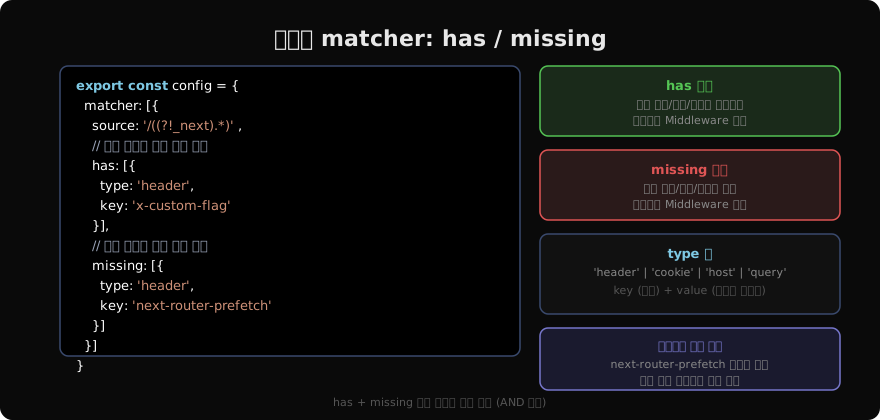
export const config = {
  matcher: [
    {
      source: '/((?!_next).+)',
      // x-middleware-prefetch 헤더가 없을 때만 실행
      missing: [
        { type: 'header', key: 'next-router-prefetch' },
        { type: 'header', key: 'purpose', value: 'prefetch' },
      ],
    },
  ],
}
missing 조건은 Next.js의 링크 프리페치 요청(Link 컴포넌트 hover 시 발생)에 인증 미들웨어가 실행되지 않도록 제외할 때 유용하다. 프리페치는 실제 탐색이 아니므로 인증 처리할 필요가 없다.
has 예시:
{
  source: '/dashboard',
  has: [
    { type: 'cookie', key: 'beta-user', value: 'true' },
  ],
}
이 설정은 beta-user=true 쿠키가 있는 요청이 /dashboard로 올 때만 Middleware를 실행한다.
자주 쓰는 실전 조합
인증 Middleware
// middleware.ts
import { NextResponse } from 'next/server'
import type { NextRequest } from 'next/server'

export function middleware(request: NextRequest) {
  const token = request.cookies.get('auth-token')?.value
  const { pathname } = request.nextUrl

  if (!token) {
    const url = new URL('/login', request.url)
    url.searchParams.set('callbackUrl', pathname)
    return NextResponse.redirect(url)
  }

  return NextResponse.next()
}

// 보호할 경로만 지정
export const config = {
  matcher: ['/dashboard/:path*', '/admin/:path*', '/settings/:path*'],
}
전역 보안 헤더 + 정적 파일 제외
export function middleware(request: NextRequest) {
  const response = NextResponse.next()
  response.headers.set('X-Frame-Options', 'DENY')
  response.headers.set('X-Content-Type-Options', 'nosniff')
  return response
}

export const config = {
  matcher: [
    '/((?!_next/static|_next/image|favicon\\.ico).*)',
  ],
}
matcher 작성 시 주의사항
정적 분석 필수: matcher 값은 빌드 타임에 정적으로 분석된다. 변수, 환경 변수 참조, 함수 호출 등 동적 값은 사용할 수 없다. 아래는 동작하지 않는 예다.
// ❌ 동작 안 함 — 변수 참조 불가
const PROTECTED = '/dashboard'
export const config = { matcher: PROTECTED }

// ❌ 동작 안 함 — process.env 참조 불가
export const config = { matcher: process.env.MATCHER_PATH }

// ✅ 리터럴만 가능
export const config = { matcher: '/dashboard/:path*' }_next/static, _next/image, favicon.ico는 항상 자동 제외: matcher에 명시하지 않아도 이 경로들은 Middleware를 거치지 않는다. 하지만 정규식 부정 패턴을 쓸 때는 명시적으로 포함시켜야 의도대로 동작한다.
지난 글: Middleware — 요청 가로채기와 전처리
다음 글: 인증 구현 — 세션과 토큰 기반 인증
읽어주셔서 감사합니다. 😊
PALDYN / ARTICLE AI
글의 개념, 수식, 코드에 대해 물어보세요.
질문과 관련된 문단을 골라 답변의 문맥으로 사용합니다.생각 중 · 0초