

지식
JavaScript
http · https · http2 · Node.js 네트워크 서버
Node.js 내장 http 모듈로 서버를 구축하는 방법, Request·Response 객체 활용, https TLS 설정, HTTP/2 멀티플렉싱과 서버 푸시, http 클라이언트 요청 패턴, 실전 구조 패턴을 정리합니다.
지난 글에서 Buffer와 Stream의 동작 원리를 살펴봤습니다. 이번에는 Node.js 내장 http, https, http2 모듈로 직접 네트워크 서버를 구축하는 방법을 다룹니다.
http.createServer — 기본 HTTP 서버
import http from 'http';

const server = http.createServer((req, res) => {
  // req: http.IncomingMessage (Readable Stream)
  // res: http.ServerResponse (Writable Stream)

  console.log(`${req.method} ${req.url}`);
  console.log('헤더:', req.headers['user-agent']);

  res.writeHead(200, { 'Content-Type': 'text/plain; charset=utf-8' });
  res.end('안녕하세요\n');
});

server.listen(3000, '0.0.0.0', () => {
  console.log('서버 실행: http://localhost:3000');
});

// 우아한 종료
process.on('SIGTERM', () => {
  server.close(() => {
    console.log('서버 종료 완료');
    process.exit(0);
  });
});
Request 파싱
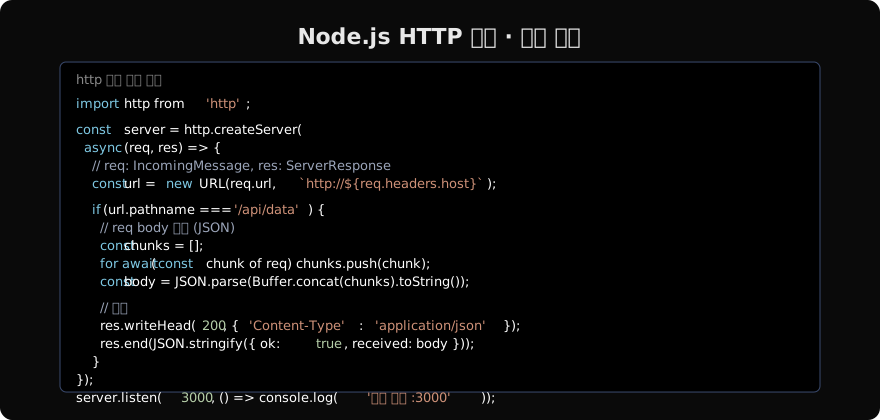
import http from 'http';
import { URL } from 'url';

http.createServer(async (req, res) => {
  const url = new URL(req.url, `http://${req.headers.host}`);

  // URL 구성요소
  console.log(url.pathname);                    // '/api/users'
  console.log(url.searchParams.get('page'));    // '2'

  // 요청 바디 읽기 (스트림 기반)
  const body = await new Promise((resolve, reject) => {
    const chunks = [];
    req.on('data', chunk => chunks.push(chunk));
    req.on('end', () => resolve(Buffer.concat(chunks).toString()));
    req.on('error', reject);
  });

  // JSON 파싱
  if (req.headers['content-type']?.includes('application/json')) {
    const json = JSON.parse(body);
    console.log(json);
  }

  res.writeHead(200, { 'Content-Type': 'application/json' });
  res.end(JSON.stringify({ path: url.pathname, method: req.method }));
}).listen(3000);
라우팅 패턴
const routes = new Map([
  ['GET /api/users', getUsers],
  ['POST /api/users', createUser],
  ['GET /api/health', () => ({ status: 'ok' })],
]);

http.createServer(async (req, res) => {
  const url = new URL(req.url, `http://${req.headers.host}`);
  const key = `${req.method} ${url.pathname}`;
  const handler = routes.get(key);

  if (!handler) {
    res.writeHead(404, { 'Content-Type': 'application/json' });
    res.end(JSON.stringify({ error: 'Not Found' }));
    return;
  }

  try {
    const result = await handler(req, url);
    res.writeHead(200, { 'Content-Type': 'application/json' });
    res.end(JSON.stringify(result));
  } catch (err) {
    res.writeHead(500, { 'Content-Type': 'application/json' });
    res.end(JSON.stringify({ error: err.message }));
  }
}).listen(3000);
HTTP/1.1 vs HTTP/2 비교
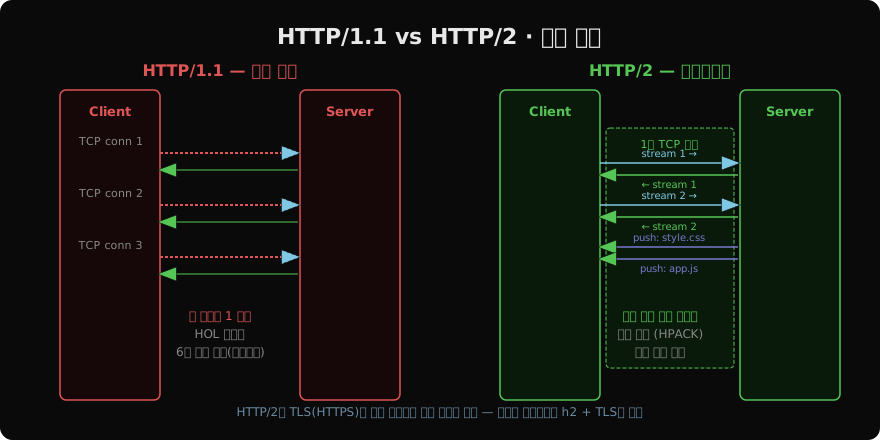
HTTP/2의 핵심 개선사항:
- 멀티플렉싱: 하나의 TCP 연결에서 여러 요청/응답을 동시에
- 헤더 압축 (HPACK): 반복되는 헤더를 효율적으로 압축
- 서버 푸시: 클라이언트 요청 전에 리소스를 미리 전송
- 스트림 우선순위: 중요한 리소스를 먼저 처리
https — TLS 서버
import https from 'https';
import { readFileSync } from 'fs';

const options = {
  key: readFileSync('./cert/private.key'),
  cert: readFileSync('./cert/certificate.crt'),
  // 선택: CA 체인
  ca: readFileSync('./cert/ca.crt'),
};

const server = https.createServer(options, (req, res) => {
  res.writeHead(200, { 'Content-Type': 'text/html' });
  res.end('<h1>HTTPS 서버</h1>');
});

server.listen(443, () => console.log('HTTPS 서버 :443'));

// 개발용 자체 서명 인증서 생성
// openssl req -x509 -newkey rsa:4096 -keyout key.pem -out cert.pem -days 365 -nodes
http2 — HTTP/2 서버
import http2 from 'http2';
import { readFileSync } from 'fs';

const server = http2.createSecureServer({
  key: readFileSync('./cert/key.pem'),
  cert: readFileSync('./cert/cert.pem'),
});

server.on('stream', (stream, headers) => {
  const path = headers[':path']; // HTTP/2는 pseudo-header
  const method = headers[':method'];

  stream.respond({
    ':status': 200,
    'content-type': 'text/html; charset=utf-8',
  });

  // 서버 푸시 (클라이언트가 HTML을 받기 전에 CSS를 미리 전송)
  if (path === '/') {
    stream.pushStream(
      { ':path': '/style.css' },
      (err, pushStream) => {
        if (err) return;
        pushStream.respond({ ':status': 200, 'content-type': 'text/css' });
        pushStream.end('body { margin: 0; }');
      }
    );
  }

  stream.end('<html><head><link rel="stylesheet" href="/style.css"></head></html>');
});

server.listen(443);
http 모듈로 클라이언트 요청
import https from 'https';

// GET 요청
function httpsGet(url) {
  return new Promise((resolve, reject) => {
    const req = https.get(url, (res) => {
      const chunks = [];
      res.on('data', chunk => chunks.push(chunk));
      res.on('end', () => resolve(JSON.parse(Buffer.concat(chunks).toString())));
    });
    req.on('error', reject);
  });
}

const data = await httpsGet('https://api.example.com/users');
실전에서는 내장 http/https 클라이언트보다 Node 내장 fetch(Node 18+)나 undici 라이브러리를 사용하는 것이 더 편리합니다.
// Node 18+ 내장 fetch
const res = await fetch('https://api.example.com/users');
const users = await res.json();
지난 글: Buffer & Stream · 바이너리 데이터와 스트리밍
다음 글: EventEmitter · Node.js 이벤트 패턴
읽어주셔서 감사합니다. 😊
PALDYN / ARTICLE AI
글의 개념, 수식, 코드에 대해 물어보세요.
질문과 관련된 문단을 골라 답변의 문맥으로 사용합니다.생각 중 · 0초