

OpenAI SDK 완전 정복
Python openai 패키지로 GPT-4o부터 o1까지 — Chat Completions, 스트리밍, Function Calling, 임베딩, 비전, Structured Outputs, 배치 API, 비동기 클라이언트, 에러 핸들링, tiktoken 토큰 계산까지 실전 예제로 완벽 정리
지난 글에서 Anthropic SDK로 Claude API를 호출하고 툴 사용, 스트리밍, 비전을 다뤘다. 이번에는 현재 AI 개발 생태계에서 가장 넓게 쓰이는 OpenAI Python SDK를 정면으로 해부한다. openai 패키지 하나로 Chat Completions부터 Function Calling, 임베딩, 이미지 입력, Structured Outputs, 비동기 클라이언트, 배치 API까지 전부 커버한다.
설치와 클라이언트 초기화
pip install openai tiktokenopenai v1.x부터는 OpenAI() 클라이언트 객체를 명시적으로 생성한다. 환경 변수 OPENAI_API_KEY가 세팅되어 있으면 api_key 인자 없이도 동작한다.
from openai import OpenAI
import os

client = OpenAI(api_key=os.environ["OPENAI_API_KEY"])AsyncOpenAI를 쓰면 비동기 환경에서도 동일한 인터페이스를 사용할 수 있다(뒤에서 자세히 다룬다).
Chat Completions: 핵심 API
OpenAI API의 중심은 client.chat.completions.create()다. 대화 맥락을 messages 리스트로 관리하는 것이 가장 중요한 패턴이다.
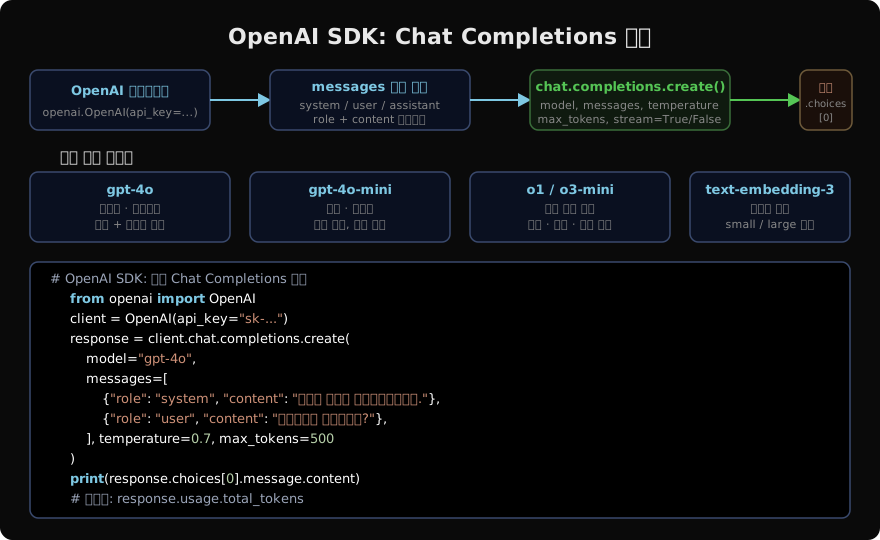
역할(Role) 시스템
메시지 리스트는 세 가지 역할로 구성된다.
- system: 모델의 행동 방식을 지시한다. 대화 내내 유지되는 지시사항을 여기에 넣는다.
- user: 사용자의 입력이다.
- assistant: 모델이 이전에 생성한 응답이다. 멀티턴 대화에서 컨텍스트를 쌓을 때 직접 추가한다.
response = client.chat.completions.create(
    model="gpt-4o",
    messages=[
        {"role": "system", "content": "당신은 파이썬 전문가입니다."},
        {"role": "user", "content": "리스트 컴프리헨션을 설명해주세요."},
    ],
    temperature=0.7,
    max_tokens=800,
)
print(response.choices[0].message.content)
응답 객체에서 response.usage.prompt_tokens, response.usage.completion_tokens로 토큰 사용량을 확인할 수 있다.
모델 선택 가이드
gpt-4o
현재 OpenAI의 플래그십 모델이다. 텍스트, 이미지, 오디오를 네이티브로 처리하는 멀티모달 모델이며, 이전 세대인 GPT-4 Turbo보다 빠르고 저렴하다. 복잡한 추론, 코드 생성, 문서 분석 등 대부분의 고품질 작업에 기본으로 사용한다.
gpt-4o-mini
gpt-4o의 경량 버전이다. 가격이 훨씬 저렴하고 응답 속도도 빠르다. 분류, 요약, 단순 Q&A, 대량 처리처럼 정밀 추론이 필요하지 않은 작업에 적합하다. 비용을 절감하면서도 충분한 품질을 얻을 수 있는 첫 번째 선택지다.
o1 / o3-mini
OpenAI의 추론 특화 모델 시리즈다. 응답을 생성하기 전에 내부적으로 “생각(thinking)“을 수행해 수학 문제, 알고리즘 설계, 복잡한 논리 퍼즐에서 압도적인 성능을 보인다. 단, temperature, system 메시지 등 일부 파라미터가 지원되지 않으며 응답 시간이 길다.
스트리밍
stream=True를 설정하면 응답을 청크 단위로 실시간 수신한다. 긴 응답을 기다리지 않고 첫 토큰부터 즉시 출력할 수 있어 사용자 경험이 크게 향상된다.
with client.chat.completions.create(
    model="gpt-4o",
    messages=[{"role": "user", "content": "우주의 탄생을 설명해주세요."}],
    stream=True,
) as stream:
    for chunk in stream:
        delta = chunk.choices[0].delta.content
        if delta:
            print(delta, end="", flush=True)
Function Calling (Tool Use)
Function Calling은 모델이 외부 함수를 호출하도록 지시하는 메커니즘이다. 모델이 직접 함수를 실행하지는 않는다. 대신 “이 함수를 이 인자로 호출해”라는 JSON 지시를 반환하면, 개발자 코드에서 실제 함수를 실행하고 결과를 다시 모델에 전달한다.
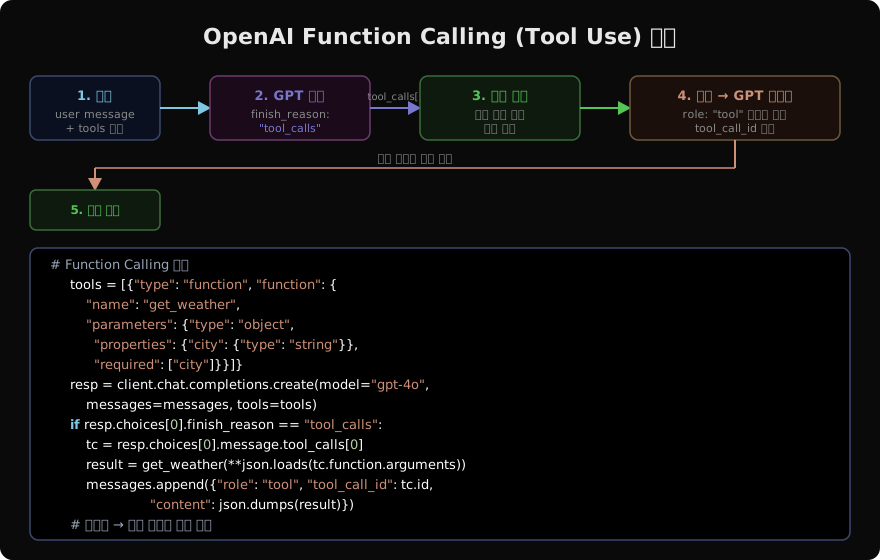
import json

tools = [
    {
        "type": "function",
        "function": {
            "name": "get_stock_price",
            "description": "주식 티커 심볼로 현재 주가를 조회합니다.",
            "parameters": {
                "type": "object",
                "properties": {
                    "ticker": {
                        "type": "string",
                        "description": "주식 티커 (예: AAPL, TSLA)",
                    }
                },
                "required": ["ticker"],
            },
        },
    }
]

messages = [{"role": "user", "content": "애플 주가가 얼마야?"}]

resp = client.chat.completions.create(
    model="gpt-4o", messages=messages, tools=tools
)

if resp.choices[0].finish_reason == "tool_calls":
    tc = resp.choices[0].message.tool_calls[0]
    args = json.loads(tc.function.arguments)
    # 실제 함수 실행 (예시)
    result = {"ticker": args["ticker"], "price": 189.50, "currency": "USD"}
    messages.append(resp.choices[0].message)
    messages.append({
        "role": "tool",
        "tool_call_id": tc.id,
        "content": json.dumps(result),
    })
    final = client.chat.completions.create(model="gpt-4o", messages=messages)
print(final.choices[0].message.content)tool_choice="required"로 설정하면 모델이 반드시 도구를 호출하도록 강제할 수 있다.
임베딩 API
임베딩은 텍스트를 고차원 벡터로 변환해 의미적 유사도를 계산하는 기반 기술이다. RAG(Retrieval-Augmented Generation), 시맨틱 검색, 추천 시스템 등에 광범위하게 사용된다.
OpenAI는 현재 text-embedding-3-small과 text-embedding-3-large 두 모델을 제공한다. small은 저비용·고속, large는 더 높은 정확도가 필요할 때 선택한다.
texts = [
    "오늘 날씨가 매우 맑습니다.",
    "The weather today is very clear.",
    "파이썬으로 웹 스크래핑을 배워봅시다.",
]

resp = client.embeddings.create(
    model="text-embedding-3-small",
    input=texts,
)

# 각 텍스트의 벡터 (1536차원)
vectors = [item.embedding for item in resp.data]
print(f"벡터 차원: {len(vectors[0])}")  # 1536
dimensions 파라미터로 벡터 차원을 줄여 저장 공간과 검색 비용을 절감할 수 있다.
이미지 입력 (Vision)
gpt-4o는 이미지를 메시지에 포함시켜 분석할 수 있다. URL 방식과 Base64 인코딩 방식 모두 지원한다.
import base64

with open("chart.png", "rb") as f:
    image_data = base64.b64encode(f.read()).decode("utf-8")

response = client.chat.completions.create(
    model="gpt-4o",
    messages=[
        {
            "role": "user",
            "content": [
                {
                    "type": "image_url",
                    "image_url": {
                        "url": f"data:image/png;base64,{image_data}",
                        "detail": "high",  # "low" | "high" | "auto"
                    },
                },
                {"type": "text", "text": "이 차트의 주요 추세를 분석해주세요."},
            ],
        }
    ],
)
print(response.choices[0].message.content)
detail: "low"는 저비용 빠른 분석, "high"는 세밀한 이미지 이해가 필요할 때 사용한다.
Structured Outputs
response_format을 사용하면 모델이 특정 JSON 스키마를 반드시 따르도록 강제할 수 있다. Pydantic 모델을 직접 사용하는 parse() 메서드가 가장 편리하다.
from pydantic import BaseModel
from typing import List

class NewsItem(BaseModel):
    title: str
    summary: str
    sentiment: str  # "positive" | "negative" | "neutral"
    keywords: List[str]

response = client.beta.chat.completions.parse(
    model="gpt-4o",
    messages=[
        {"role": "system", "content": "뉴스 기사를 분석해 구조화된 데이터로 반환합니다."},
        {"role": "user", "content": "OpenAI가 새로운 모델 o3를 발표했습니다..."},
    ],
    response_format=NewsItem,
)

news = response.choices[0].message.parsed
print(f"제목: {news.title}")
print(f"감성: {news.sentiment}")
print(f"키워드: {news.keywords}")
Pydantic 모델을 넘기면 SDK가 JSON 스키마로 자동 변환하고, 응답을 파싱해 타입이 보장된 객체를 반환한다.
비동기 클라이언트
FastAPI, asyncio 기반 서비스에서는 AsyncOpenAI를 사용한다. 동기 클라이언트와 인터페이스가 완전히 동일하므로 client = AsyncOpenAI()로 교체하고 await만 붙이면 된다.
import asyncio
from openai import AsyncOpenAI

async def process_batch(prompts: list[str]) -> list[str]:
    aclient = AsyncOpenAI()
    tasks = [
        aclient.chat.completions.create(
            model="gpt-4o-mini",
            messages=[{"role": "user", "content": p}],
        )
        for p in prompts
    ]
    responses = await asyncio.gather(*tasks)
    return [r.choices[0].message.content for r in responses]

results = asyncio.run(process_batch(["파이썬이란?", "자바스크립트란?", "러스트란?"]))asyncio.gather()로 여러 요청을 병렬 처리하면 순차 호출 대비 처리량을 크게 높일 수 있다.
배치 API
배치 API는 대량의 요청을 비동기적으로 처리한다. 즉각적인 응답이 필요 없는 작업(데이터셋 분류, 대규모 임베딩 생성 등)을 24시간 이내에 처리하고, 비용을 50% 절감할 수 있다.
import json

# 1. JSONL 파일 업로드
requests = [
    {"custom_id": f"req-{i}", "method": "POST", "url": "/v1/chat/completions",
     "body": {"model": "gpt-4o-mini",
              "messages": [{"role": "user", "content": f"항목 {i} 요약"}]}}
    for i in range(100)
]

with open("batch_input.jsonl", "w") as f:
    for req in requests:
        f.write(json.dumps(req, ensure_ascii=False) + "\n")

with open("batch_input.jsonl", "rb") as f:
    file_obj = client.files.create(file=f, purpose="batch")

# 2. 배치 작업 생성
batch = client.batches.create(
    input_file_id=file_obj.id,
    endpoint="/v1/chat/completions",
    completion_window="24h",
)
print(f"배치 ID: {batch.id}, 상태: {batch.status}")
배치 완료 후 client.batches.retrieve(batch.id).output_file_id로 결과 파일을 다운로드한다.
에러 핸들링
프로덕션 코드에서는 반드시 예외를 명시적으로 처리해야 한다.
from openai import (
    OpenAI,
    RateLimitError,
    APIConnectionError,
    APIStatusError,
    AuthenticationError,
)
import time

client = OpenAI()

def call_with_retry(messages, max_retries=3):
    for attempt in range(max_retries):
        try:
            return client.chat.completions.create(
                model="gpt-4o",
                messages=messages,
            )
        except RateLimitError:
            wait = 2 ** attempt  # 지수 백오프
            print(f"Rate limit. {wait}초 후 재시도...")
            time.sleep(wait)
        except AuthenticationError:
            raise  # API 키 오류는 재시도 불가
        except APIConnectionError as e:
            print(f"연결 오류: {e}")
            time.sleep(1)
        except APIStatusError as e:
            print(f"API 오류 {e.status_code}: {e.message}")
            raise
    raise RuntimeError("최대 재시도 횟수 초과")
주요 예외 클래스: RateLimitError(429), AuthenticationError(401), NotFoundError(404), APIConnectionError(네트워크), APIStatusError(기타 HTTP 오류).
tiktoken으로 토큰 계산
비용 예측과 컨텍스트 관리를 위해 API 호출 전에 토큰 수를 미리 계산할 수 있다. OpenAI의 공식 토크나이저 라이브러리인 tiktoken을 사용한다.
import tiktoken

def count_tokens(messages: list[dict], model: str = "gpt-4o") -> int:
    enc = tiktoken.encoding_for_model(model)
    total = 0
    for msg in messages:
        # 메시지 오버헤드 (역할 토큰 등)
        total += 4
        total += len(enc.encode(msg.get("content", "")))
    total += 2  # 응답 시작 토큰
    return total

messages = [
    {"role": "system", "content": "당신은 도움이 되는 어시스턴트입니다."},
    {"role": "user", "content": "머신러닝을 입문하려면 어떻게 해야 하나요?"},
]
print(f"예상 프롬프트 토큰: {count_tokens(messages)}")
모델별 컨텍스트 한도를 초과하지 않도록 count_tokens()를 호출해 잘라내거나 요약하는 로직을 붙이는 것이 좋은 패턴이다.
실전 팁 정리
모델 선택 전략: 기본은 gpt-4o-mini로 시작하고, 품질이 부족할 때만 gpt-4o로 올린다. 수학·코드 추론이 핵심이라면 o1을 검토한다.
비용 절감: 배치 API는 50% 할인, 프롬프트 캐싱(반복되는 system 프롬프트)은 75% 절감 효과가 있다.
컨텍스트 관리: 긴 대화에서 오래된 메시지를 요약하거나 제거해 컨텍스트 한도 안에서 유지한다. tiktoken으로 매 요청 전에 토큰 수를 확인하는 습관을 들인다.
Structured Outputs: JSON 파싱 실패를 방지하고 타입 안정성을 보장한다. json_object 모드보다 Pydantic 스키마를 사용하는 parse() 메서드가 훨씬 안정적이다.
스트리밍: 응답 길이가 길거나 사용자가 기다리는 체감 시간을 줄이고 싶을 때 항상 스트리밍을 사용한다.
지난 글: Anthropic SDK로 Claude API 활용하기
다음 글: Google Gemini SDK 활용 가이드
읽어주셔서 감사합니다. 😊