

에이전트 시스템 처음부터 구축하기: 실전 프로젝트
프레임워크 없이 순수 Python으로 Tool Use 에이전트를 구축한다. ReAct 루프, 도구 레지스트리, 메모리, 중단 조건까지 에이전트의 핵심 구성 요소를 손으로 직접 구현한다.
지난 글에서 순수 Python으로 RAG 시스템을 직접 구축했다. 임베딩부터 청킹, 검색, 생성까지 파이프라인 전체를 손으로 조립하면서 LangChain이 내부적으로 무엇을 하는지 투명하게 파악했다. 이번에는 한 단계 더 나아가 에이전트 시스템을 밑바닥부터 만든다. 프레임워크 없이 순수 Python과 Anthropic API만으로 ReAct 루프를 구현하면, 에이전트가 왜 그렇게 동작하는지, 어디서 무엇이 잘못될 수 있는지 뼛속까지 이해할 수 있다.
에이전트 아키텍처 개요
에이전트는 LLM에 행동 능력을 부여한 시스템이다. 단순 챗봇과의 차이는 하나다: 에이전트는 도구를 호출하고 결과를 다시 추론에 활용한다. 그 과정을 반복하다가 충분한 정보가 모이면 최종 답변을 낸다.
구성 요소는 다섯 가지다.
- LLM 코어 — 추론과 도구 선택을 담당 (여기서는 Claude claude-sonnet-4-6)
- 도구 레지스트리 — 사용 가능한 도구 목록과 스키마 관리
- 실행 엔진 — 도구 선택 → 실제 호출 → 결과 반환
- 메모리 — 단기(대화 히스토리) / 장기(벡터 저장소) 기억
- 루프 제어 — 반복 횟수, 토큰, 오류 기반 중단 조건
이 다섯 요소를 직접 구현하는 것이 이번 프로젝트의 목표다.
ReAct 루프: 추론-행동 사이클
ReAct(Reason + Act)는 에이전트 루프의 가장 단순하고 강력한 패턴이다. 세 단계가 순환한다.
- Thought: LLM이 현재 상황을 추론하고 다음 행동을 결정한다.
- Action: 선택한 도구를 파라미터와 함께 호출한다.
- Observation: 도구 실행 결과를 메시지 히스토리에 추가한다.
이 사이클이 반복되다가 LLM이 “Final Answer”를 결정하면 루프가 종료된다.
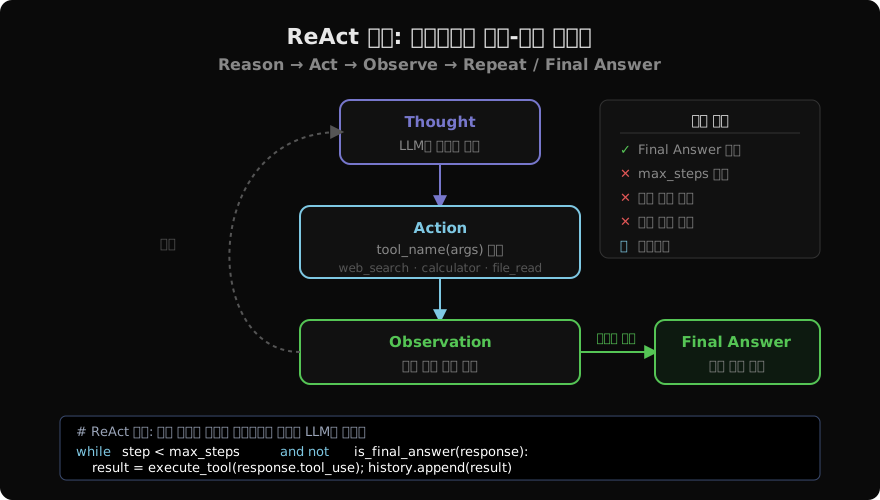
Anthropic의 Tool Use API는 이 구조에 자연스럽게 맞아떨어진다. LLM이 tool_use 블록을 반환하면 행동이고, text 블록만 반환하면 최종 답변이다.
import anthropic
import json
from typing import Any

client = anthropic.Anthropic()

def run_react_loop(
    user_query: str,
    tools: list[dict],
    tool_registry: "ToolRegistry",
    max_steps: int = 10,
) -> str:
    """ReAct 루프 핵심 구현."""
    messages = [{"role": "user", "content": user_query}]
    step = 0

    while step < max_steps:
        response = client.messages.create(
            model="claude-sonnet-4-6",
            max_tokens=4096,
            tools=tools,
            messages=messages,
        )

        # Final Answer: tool_use 없이 텍스트만 반환
        if response.stop_reason == "end_turn":
            return _extract_text(response)

        # Action: tool_use 블록 처리
        tool_results = []
        for block in response.content:
            if block.type == "tool_use":
                result = tool_registry.execute(block.name, block.input)
                tool_results.append({
                    "type": "tool_result",
                    "tool_use_id": block.id,
                    "content": json.dumps(result, ensure_ascii=False),
                })

        # Observation: 히스토리에 추가
        messages.append({"role": "assistant", "content": response.content})
        messages.append({"role": "user", "content": tool_results})
        step += 1

    return "최대 스텝 초과로 중단되었습니다."


def _extract_text(response) -> str:
    for block in response.content:
        if hasattr(block, "text"):
            return block.text
    return ""
핵심은 messages.append다. 도구 실행 결과를 히스토리에 누적해서 LLM에 다시 전달하는 것이 ReAct 루프의 전부다. 이 단순한 패턴이 복잡한 다단계 추론을 가능하게 한다.
도구 레지스트리 설계
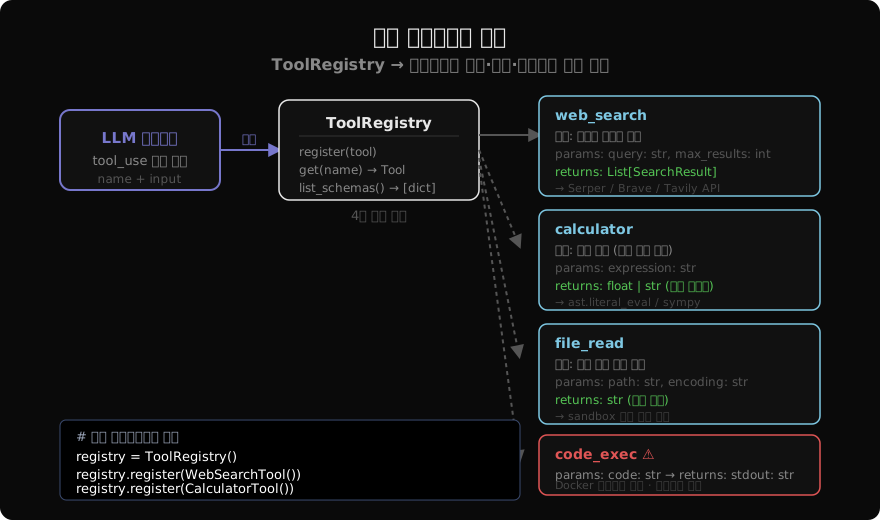
도구 레지스트리는 에이전트가 사용할 수 있는 도구의 목록과 호출 로직을 한 곳에서 관리한다. 각 도구는 세 가지를 제공해야 한다: 이름, JSON Schema로 기술된 파라미터, 실제 실행 함수.
from abc import ABC, abstractmethod
from typing import Any

class BaseTool(ABC):
    @property
    @abstractmethod
    def name(self) -> str: ...

    @property
    @abstractmethod
    def description(self) -> str: ...

    @property
    @abstractmethod
    def input_schema(self) -> dict: ...

    @abstractmethod
    def run(self, **kwargs) -> Any: ...

    def to_anthropic_schema(self) -> dict:
        return {
            "name": self.name,
            "description": self.description,
            "input_schema": self.input_schema,
        }


class ToolRegistry:
    def __init__(self):
        self._tools: dict[str, BaseTool] = {}

    def register(self, tool: BaseTool) -> None:
        self._tools[tool.name] = tool

    def get(self, name: str) -> BaseTool:
        if name not in self._tools:
            raise KeyError(f"도구 '{name}'이 등록되지 않았습니다.")
        return self._tools[name]

    def list_schemas(self) -> list[dict]:
        return [t.to_anthropic_schema() for t in self._tools.values()]

    def execute(self, name: str, inputs: dict) -> Any:
        try:
            return self.get(name).run(**inputs)
        except Exception as e:
            # 오류를 문자열로 반환해 LLM이 인지하게 한다
            return {"error": str(e), "tool": name}
도구 구현: 웹 검색, 계산기, 파일 읽기
실제로 동작하는 도구 세 가지를 구현한다.
import ast
import operator
import re
from pathlib import Path

# ── 웹 검색 ──────────────────────────────────────────────────
import httpx

class WebSearchTool(BaseTool):
    name = "web_search"
    description = "인터넷에서 최신 정보를 검색합니다. 실시간 뉴스, 가격, 날씨 등에 사용하세요."
    input_schema = {
        "type": "object",
        "properties": {
            "query": {"type": "string", "description": "검색 쿼리"},
            "max_results": {"type": "integer", "default": 3},
        },
        "required": ["query"],
    }

    def run(self, query: str, max_results: int = 3) -> list[dict]:
        # Serper API 예시 (환경 변수로 키 관리)
        import os
        resp = httpx.post(
            "https://google.serper.dev/search",
            json={"q": query, "num": max_results},
            headers={"X-API-KEY": os.environ["SERPER_API_KEY"]},
            timeout=10,
        )
        results = resp.json().get("organic", [])
        return [{"title": r["title"], "snippet": r["snippet"], "url": r["link"]}
                for r in results[:max_results]]


# ── 계산기 ───────────────────────────────────────────────────
_SAFE_OPS = {
    ast.Add: operator.add, ast.Sub: operator.sub,
    ast.Mult: operator.mul, ast.Div: operator.truediv,
    ast.Pow: operator.pow, ast.USub: operator.neg,
}

def _safe_eval(node):
    if isinstance(node, ast.Constant):
        return node.value
    if isinstance(node, ast.BinOp):
        return _SAFE_OPS[type(node.op)](_safe_eval(node.left), _safe_eval(node.right))
    if isinstance(node, ast.UnaryOp):
        return _SAFE_OPS[type(node.op)](_safe_eval(node.operand))
    raise ValueError(f"허용되지 않는 연산: {node}")

class CalculatorTool(BaseTool):
    name = "calculator"
    description = "수학 수식을 안전하게 계산합니다. LLM의 산술 오류를 방지하세요."
    input_schema = {
        "type": "object",
        "properties": {"expression": {"type": "string", "description": "계산할 수식 (예: '2**10 + 3*7')"}},
        "required": ["expression"],
    }

    def run(self, expression: str) -> dict:
        try:
            tree = ast.parse(expression, mode="eval")
            result = _safe_eval(tree.body)
            return {"result": result, "expression": expression}
        except Exception as e:
            return {"error": str(e)}


# ── 파일 읽기 ────────────────────────────────────────────────
class FileReaderTool(BaseTool):
    name = "file_read"
    description = "지정한 경로의 파일 내용을 읽어 반환합니다."
    input_schema = {
        "type": "object",
        "properties": {
            "path": {"type": "string", "description": "읽을 파일 경로"},
            "encoding": {"type": "string", "default": "utf-8"},
        },
        "required": ["path"],
    }
    # 허용 기본 경로 (보안)
    ALLOWED_BASE = Path("/workspace/data")

    def run(self, path: str, encoding: str = "utf-8") -> dict:
        target = (self.ALLOWED_BASE / path).resolve()
        if not str(target).startswith(str(self.ALLOWED_BASE)):
            return {"error": "허용되지 않는 경로입니다."}
        if not target.exists():
            return {"error": f"파일을 찾을 수 없습니다: {path}"}
        content = target.read_text(encoding=encoding)
        return {"content": content[:8000], "truncated": len(content) > 8000}
Anthropic Tool Use API 연동
도구 레지스트리의 스키마를 API에 넘기는 방법은 간단하다.
registry = ToolRegistry()
registry.register(WebSearchTool())
registry.register(CalculatorTool())
registry.register(FileReaderTool())

# 에이전트 실행
answer = run_react_loop(
    user_query="2024년 한국 GDP는 얼마인가요? 1인당 GDP도 계산해 주세요.",
    tools=registry.list_schemas(),
    tool_registry=registry,
    max_steps=8,
)
print(answer)
LLM이 tool_use 블록을 반환하면 block.name과 block.input을 꺼내어 레지스트리에 전달하면 된다. 결과는 tool_result 형식으로 히스토리에 추가한다.
메모리: 단기와 장기
단기 메모리: 대화 히스토리 버퍼
가장 단순한 단기 메모리는 messages 리스트 자체다. 문제는 루프가 길어질수록 토큰이 폭증한다는 것이다. 슬라이딩 윈도우로 히스토리를 잘라낼 수 있다.
def trim_history(messages: list[dict], max_tokens: int = 60_000) -> list[dict]:
    """토큰 예산 초과 시 오래된 tool_result 쌍부터 제거."""
    # 항상 첫 번째 user 메시지(원 질문)는 보존
    system_msg = messages[:1]
    body = messages[1:]

    while _estimate_tokens(body) > max_tokens and len(body) > 2:
        # assistant + user(tool_result) 쌍을 맨 앞에서 제거
        body = body[2:]

    return system_msg + body


def _estimate_tokens(messages: list[dict]) -> int:
    """간단한 추정: 문자 수 / 3.5"""
    total = sum(len(str(m)) for m in messages)
    return int(total / 3.5)
장기 메모리: 벡터 저장소
여러 세션에 걸쳐 학습한 정보를 기억해야 한다면 벡터 저장소를 사용한다. 간단한 구현은 다음과 같다.
import numpy as np

class VectorMemory:
    def __init__(self, embed_fn, top_k: int = 3):
        self.embed_fn = embed_fn  # 텍스트 → numpy array
        self.memories: list[dict] = []
        self.vectors: list[np.ndarray] = []
        self.top_k = top_k

    def store(self, text: str, metadata: dict = None) -> None:
        vec = self.embed_fn(text)
        self.memories.append({"text": text, "meta": metadata or {}})
        self.vectors.append(vec)

    def recall(self, query: str) -> list[dict]:
        if not self.vectors:
            return []
        q_vec = self.embed_fn(query)
        scores = [_cosine(q_vec, v) for v in self.vectors]
        top_idx = sorted(range(len(scores)), key=lambda i: scores[i], reverse=True)[:self.top_k]
        return [self.memories[i] for i in top_idx]


def _cosine(a: np.ndarray, b: np.ndarray) -> float:
    return float(np.dot(a, b) / (np.linalg.norm(a) * np.linalg.norm(b) + 1e-8))
중단 조건 구현
에이전트를 제어하지 않으면 무한 루프에 빠지거나 토큰 비용이 폭증한다. 중단 조건을 명확히 구현해야 한다.
from dataclasses import dataclass
from enum import Enum

class StopReason(Enum):
    FINAL_ANSWER = "final_answer"
    MAX_STEPS = "max_steps"
    TOKEN_LIMIT = "token_limit"
    ERROR_THRESHOLD = "error_threshold"
    TIMEOUT = "timeout"

@dataclass
class AgentConfig:
    max_steps: int = 10
    max_tokens_total: int = 100_000
    max_consecutive_errors: int = 3
    timeout_seconds: float = 120.0


def check_stop(
    step: int,
    total_tokens: int,
    consecutive_errors: int,
    elapsed: float,
    cfg: AgentConfig,
) -> StopReason | None:
    if step >= cfg.max_steps:
        return StopReason.MAX_STEPS
    if total_tokens >= cfg.max_tokens_total:
        return StopReason.TOKEN_LIMIT
    if consecutive_errors >= cfg.max_consecutive_errors:
        return StopReason.ERROR_THRESHOLD
    if elapsed >= cfg.timeout_seconds:
        return StopReason.TIMEOUT
    return None
오류 처리와 복구
도구 실행이 실패했을 때 에이전트를 어떻게 복구시킬 것인가가 실전에서 가장 까다로운 문제다.
def execute_with_retry(
    registry: ToolRegistry,
    name: str,
    inputs: dict,
    max_retries: int = 2,
) -> dict:
    """도구 실행 실패 시 최대 max_retries 회 재시도."""
    import time
    last_error = None
    for attempt in range(max_retries + 1):
        try:
            result = registry.get(name).run(**inputs)
            # 도구가 {"error": ...}를 반환하면 실패로 취급
            if isinstance(result, dict) and "error" in result:
                raise RuntimeError(result["error"])
            return result
        except Exception as e:
            last_error = e
            if attempt < max_retries:
                time.sleep(2 ** attempt)  # 지수 백오프
    return {
        "error": f"{max_retries+1}회 시도 모두 실패: {last_error}",
        "tool": name,
    }
오류 결과를 LLM에 그대로 전달하면 LLM이 다른 접근법을 시도한다. 이것이 ReAct 루프의 자가 복구 능력이다.
실전 함정: 무한 루프와 토큰 폭증
함정 1: 동일 도구 반복 호출
LLM이 같은 도구를 같은 파라미터로 반복 호출하는 경우가 있다. 이전 호출 내역을 추적해서 탐지한다.
from collections import Counter

def detect_loop(history: list[tuple[str, dict]], threshold: int = 3) -> bool:
    """동일한 (tool, input) 조합이 threshold회 이상이면 루프로 판단."""
    call_counts = Counter(
        (name, json.dumps(inp, sort_keys=True))
        for name, inp in history
    )
    return any(count >= threshold for count in call_counts.values())
함정 2: 긴 Observation으로 컨텍스트 폭발
웹 검색 결과나 파일 내용이 너무 길면 컨텍스트를 모두 소모해 버린다. 도구 결과를 항상 잘라낸다.
MAX_OBSERVATION_CHARS = 2000

def truncate_observation(result: Any) -> str:
    text = json.dumps(result, ensure_ascii=False) if not isinstance(result, str) else result
    if len(text) > MAX_OBSERVATION_CHARS:
        return text[:MAX_OBSERVATION_CHARS] + f"\n...(이하 {len(text)-MAX_OBSERVATION_CHARS}자 생략)"
    return text
함정 3: 시스템 프롬프트 없는 에이전트
시스템 프롬프트 없이 에이전트를 실행하면 LLM이 도구를 과다하게 사용하거나 불필요한 추론을 장황하게 늘어놓는다. 항상 명확한 페르소나와 행동 지침을 제공한다.
SYSTEM_PROMPT = """당신은 정확한 정보를 제공하는 리서치 에이전트입니다.

규칙:
1. 확실하지 않은 정보는 반드시 web_search로 확인하세요.
2. 수치 계산은 반드시 calculator를 사용하세요. 직접 계산하지 마세요.
3. 충분한 정보가 모이면 즉시 답변하세요. 불필요한 추가 검색은 금지입니다.
4. 답변은 한국어로 작성하세요.
"""
전체 에이전트 조립
import time

def create_agent(config: AgentConfig = None) -> dict:
    cfg = config or AgentConfig()
    registry = ToolRegistry()
    registry.register(WebSearchTool())
    registry.register(CalculatorTool())
    registry.register(FileReaderTool())
    return {"registry": registry, "config": cfg}


def run_agent(query: str, agent: dict) -> dict:
    registry: ToolRegistry = agent["registry"]
    cfg: AgentConfig = agent["config"]
    tools = registry.list_schemas()

    messages = [{"role": "user", "content": query}]
    call_history: list[tuple[str, dict]] = []
    total_tokens = 0
    consecutive_errors = 0
    start = time.time()

    for step in range(cfg.max_steps):
        # 중단 조건 체크
        stop = check_stop(step, total_tokens, consecutive_errors, time.time() - start, cfg)
        if stop:
            return {"answer": f"중단: {stop.value}", "steps": step, "stop_reason": stop.value}

        # LLM 호출
        resp = client.messages.create(
            model="claude-sonnet-4-6",
            max_tokens=4096,
            system=SYSTEM_PROMPT,
            tools=tools,
            messages=messages,
        )
        total_tokens += resp.usage.input_tokens + resp.usage.output_tokens

        if resp.stop_reason == "end_turn":
            return {"answer": _extract_text(resp), "steps": step + 1, "stop_reason": "final_answer"}

        # 도구 실행
        tool_results = []
        for block in resp.content:
            if block.type == "tool_use":
                call_history.append((block.name, block.input))
                if detect_loop(call_history):
                    return {"answer": "무한 루프 감지로 중단", "steps": step, "stop_reason": "loop"}
                result = execute_with_retry(registry, block.name, block.input)
                if "error" in result:
                    consecutive_errors += 1
                else:
                    consecutive_errors = 0
                tool_results.append({
                    "type": "tool_result",
                    "tool_use_id": block.id,
                    "content": truncate_observation(result),
                })

        messages.append({"role": "assistant", "content": resp.content})
        messages.append({"role": "user", "content": tool_results})
        messages = trim_history(messages)

    return {"answer": "최대 스텝 초과", "steps": cfg.max_steps, "stop_reason": "max_steps"}


# 실행 예시
if __name__ == "__main__":
    agent = create_agent()
    result = run_agent("삼성전자 현재 주가와 시가총액을 검색하고, 1주당 배당금이 100원이라면 배당수익률을 계산해줘.", agent)
    print(f"[{result['stop_reason']} / {result['steps']} steps]")
    print(result["answer"])
핵심 교훈
직접 구현해보면 프레임워크가 숨겨두었던 진실을 마주하게 된다. ReAct 루프는 결국 while 반복문과 messages.append 두 줄이 전부다. LangChain의 AgentExecutor도, LlamaIndex의 ReActAgent도 내부는 동일하다. 다만 프레임워크는 스트리밍, 콜백, 직렬화, 다양한 LLM 지원 같은 관심사를 추가로 처리해 줄 뿐이다.
밑바닥 구현을 한 번 완성하면 그 다음부터는 프레임워크를 디버깅할 때 당황하지 않는다. 에이전트가 이상하게 동작한다면 히스토리를 출력해서 어느 단계에서 꼬였는지 확인하면 된다. 에이전트 디버깅의 99%는 메시지 히스토리를 눈으로 읽는 것에서 시작된다.
지난 글: RAG 시스템 처음부터 구축하기: 실전 프로젝트
다음 글: 파인튜닝 파이프라인 구축: 데이터부터 배포까지
읽어주셔서 감사합니다. 😊