

프롬프트 템플릿: 재사용 가능한 프롬프트 설계
프롬프트 템플릿의 4가지 핵심 패턴(추출·변환·생성·평가), Python 구현, Jinja2 활용, 입력 검증, 조건부 로직, 다국어 처리까지 한국어로 완전 해설한다.
지난 글에서 시스템 메시지로 LLM의 역할과 경계를 정의하는 방법을 다뤘다. 이번 글에서는 한 단계 더 나아가 프롬프트 템플릿을 살펴본다. 비슷한 구조의 프롬프트를 매번 새로 쓰는 것은 비효율적이며, 일관성도 보장되지 않는다. 잘 설계된 템플릿은 골격은 고정하고 가변 부분만 주입함으로써 코드처럼 관리 가능한 프롬프트를 만들어준다.
템플릿의 핵심 아이디어
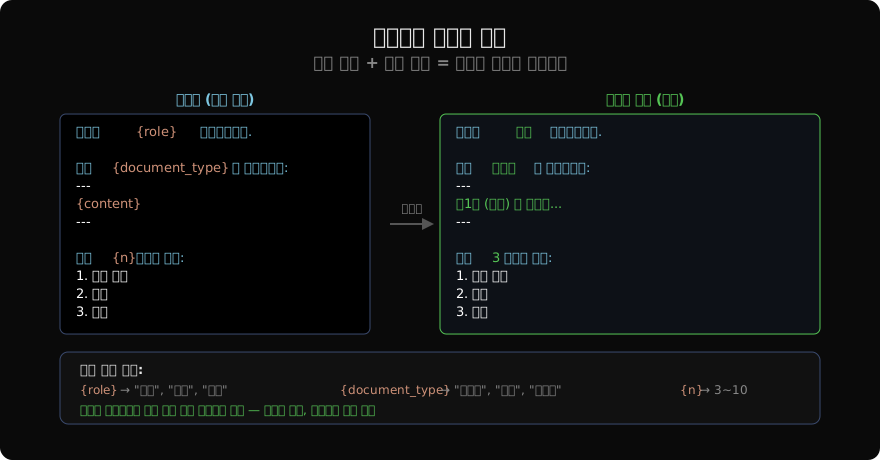
프롬프트 템플릿은 정적 골격(static skeleton)과 동적 변수(dynamic variables)를 분리하는 구조다. 골격은 태스크의 구조와 지시사항을 담고, 변수는 실행 시점에 채워진다.
# 가장 단순한 형태
template = """당신은 {role} 전문가입니다.

다음 {document_type}을 분석하세요:
---
{content}
---

{n}가지를 추출하세요: 핵심 주장, 근거, 결론."""

# 렌더링
prompt = template.format(
    role="법률",
    document_type="계약서",
    content="제1조 (목적) 본 계약은...",
    n=3,
)
4가지 핵심 패턴
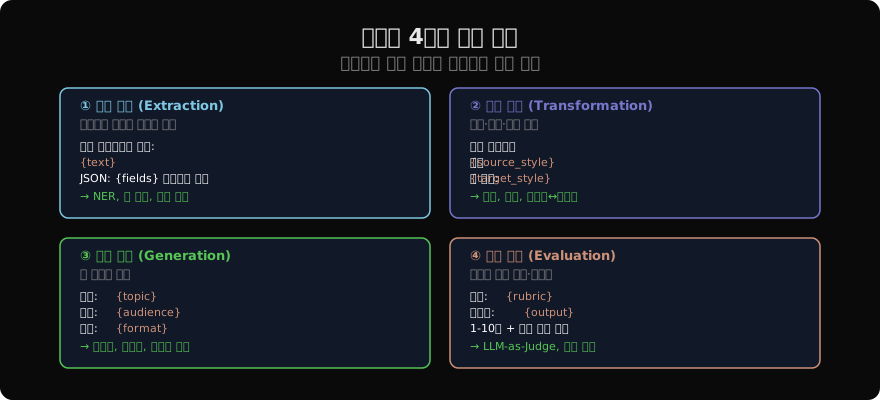
패턴 1: 추출 (Extraction)
문서에서 구조화된 데이터를 뽑는다. JSON 스키마를 미리 정의해 일관된 출력을 보장한다.
import anthropic
import json

client = anthropic.Anthropic()

EXTRACTION_TEMPLATE = """다음 텍스트에서 정보를 추출하세요.

텍스트:
{text}

다음 JSON 형식으로만 반환하세요 (다른 설명 없이):
{{
  "names": [],
  "dates": [],
  "amounts": [],
  "organizations": []
}}"""

def extract_entities(text: str) -> dict:
    prompt = EXTRACTION_TEMPLATE.format(text=text)
    response = client.messages.create(
        model="claude-opus-4-7",
        max_tokens=512,
        messages=[{"role": "user", "content": prompt}]
    )
    try:
        return json.loads(response.content[0].text)
    except json.JSONDecodeError:
        return {}

sample = "2026년 3월 15일, 삼성전자는 TSMC와 5억 달러 규모의 계약을 체결했다."
result = extract_entities(sample)
print(result)
# {"names": [], "dates": ["2026년 3월 15일"], "amounts": ["5억 달러"], ...}
패턴 2: 변환 (Transformation)
기존 콘텐츠의 형식, 어조, 언어를 바꾼다.
TRANSFORM_TEMPLATE = """다음 텍스트를 변환하세요.

원본 ({source_style}):
{content}

목표: {target_style}로 변환
제약: 의미는 그대로 유지, 길이는 ±20% 이내"""

transforms = [
    ("격식체", "구어체"),
    ("한국어", "영어"),
    ("전문 용어 포함", "일반인이 이해할 수 있는 표현"),
]
패턴 3: 생성 (Generation)
요구사항에 맞는 새 콘텐츠를 생성한다.
GENERATION_TEMPLATE = """다음 조건에 맞는 {content_type}을 작성하세요.

주제: {topic}
대상 독자: {audience}
길이: {length}
어조: {tone}
포함 요소: {elements}

작성:"""

def generate_content(
    content_type: str,
    topic: str,
    audience: str = "일반 독자",
    length: str = "500자",
    tone: str = "친근하고 명확하게",
    elements: list[str] | None = None,
) -> str:
    elements_str = ", ".join(elements) if elements else "서론, 본론, 결론"
    prompt = GENERATION_TEMPLATE.format(
        content_type=content_type,
        topic=topic,
        audience=audience,
        length=length,
        tone=tone,
        elements=elements_str,
    )
    response = client.messages.create(
        model="claude-opus-4-7",
        max_tokens=1024,
        messages=[{"role": "user", "content": prompt}]
    )
    return response.content[0].text

blog_post = generate_content(
    content_type="블로그 포스트",
    topic="양자 컴퓨팅이 암호화에 미치는 영향",
    audience="IT 비전공 직장인",
    elements=["실생활 비유", "현재 위협 수준", "대비 방법"],
)
패턴 4: 평가 (Evaluation)
출력물의 품질을 채점하고 피드백을 제공한다. LLM-as-Judge 패턴의 기반이다.
EVALUATION_TEMPLATE = """다음 결과물을 평가 기준에 따라 채점하세요.

평가 기준:
{rubric}

결과물:
{output}

평가 (JSON 형식):
{{
  "scores": {{"기준1": 점수, "기준2": 점수}},
  "total": 합계점수,
  "strengths": ["강점1", "강점2"],
  "improvements": ["개선점1", "개선점2"],
  "summary": "전반적 평가 한 줄"
}}"""
Jinja2로 고급 템플릿 관리
복잡한 조건부 로직이나 반복 구조가 필요하면 Jinja2 템플릿 엔진을 활용한다.
from jinja2 import Environment, BaseLoader, select_autoescape

env = Environment(
    loader=BaseLoader(),
    autoescape=select_autoescape(disabled_extensions=("txt", "md"))
)

JINJA_TEMPLATE = """당신은 {{ role }} 전문가입니다.

{% if context %}
배경 정보:
{{ context }}
{% endif %}

{% if examples %}
예시:
{% for ex in examples %}
입력: {{ ex.input }}
출력: {{ ex.output }}
{% endfor %}
{% endif %}

다음을 처리하세요:
{{ task }}

{% if output_format == "json" %}
JSON 형식으로만 반환하세요.
{% elif output_format == "markdown" %}
마크다운 형식으로 작성하세요.
{% else %}
자유 형식으로 작성하세요.
{% endif %}"""

def render_template(
    role: str,
    task: str,
    context: str = "",
    examples: list[dict] | None = None,
    output_format: str = "free",
) -> str:
    tmpl = env.from_string(JINJA_TEMPLATE)
    return tmpl.render(
        role=role,
        task=task,
        context=context,
        examples=examples or [],
        output_format=output_format,
    )

prompt = render_template(
    role="코드 리뷰어",
    task="아래 Python 함수를 리뷰하세요:\n```python\ndef add(a, b): return a+b\n```",
    context="FastAPI 백엔드 코드베이스",
    output_format="markdown",
)
입력 검증과 안전 처리
템플릿에 외부 입력을 주입할 때는 인젝션 공격에 주의해야 한다.
def safe_render(template: str, variables: dict, max_length: int = 4000) -> str:
    """안전한 템플릿 렌더링"""
    sanitized = {}
    for key, value in variables.items():
        if not isinstance(value, str):
            value = str(value)
        # 길이 제한
        if len(value) > max_length:
            value = value[:max_length] + "\n... (잘림)"
        # 위험한 패턴 탐지 (프롬프트 인젝션)
        injection_patterns = [
            "ignore previous instructions",
            "위의 지시를 무시",
            "system prompt",
        ]
        lower_val = value.lower()
        for pattern in injection_patterns:
            if pattern.lower() in lower_val:
                value = f"[필터링된 입력: 잠재적 인젝션 감지]"
                break
        sanitized[key] = value

    return template.format(**sanitized)
템플릿 라이브러리 구조화
실무에서는 템플릿을 파일로 분리해 관리한다.
from pathlib import Path
import yaml

class PromptLibrary:
    def __init__(self, template_dir: str = "prompts/"):
        self.templates: dict[str, str] = {}
        self._load_all(Path(template_dir))

    def _load_all(self, base: Path) -> None:
        for f in base.glob("**/*.txt"):
            key = str(f.relative_to(base)).replace("/", ".").removesuffix(".txt")
            self.templates[key] = f.read_text(encoding="utf-8")

    def render(self, key: str, **kwargs) -> str:
        if key not in self.templates:
            raise KeyError(f"템플릿 없음: {key}")
        return self.templates[key].format(**kwargs)

# 사용
library = PromptLibrary("prompts/")
prompt = library.render(
    "extraction.entity",
    text="삼성전자 이재용 회장은 2026년...",
)
프롬프트 템플릿은 코드처럼 버전 관리(Git), 테스트(단위 테스트), 문서화가 필요하다. 다음 글에서는 이 템플릿들이 외부 입력으로 악용될 때 발생하는 프롬프트 인젝션 공격과 방어법을 다룬다.
지난 글: 시스템 메시지 설계: LLM의 역할과 경계를 정의하다
다음 글: 프롬프트 인젝션 방어: LLM 보안의 첫 번째 전선
읽어주셔서 감사합니다. 😊