

asyncio 작업 취소
asyncio Task를 cancel로 취소하는 원리, CancelledError를 다루는 올바른 방법, asyncio.timeout과 wait_for로 시간 제한을 거는 법, shield로 취소를 막는 패턴을 설명합니다.
지난 글에서 create_task와 gather로 여러 코루틴을 동시에 실행했다. 그런데 실제 서비스에서는 작업을 도중에 멈춰야 할 때가 많다. 사용자가 요청을 취소했거나, 응답이 너무 오래 걸리거나, 다른 작업이 먼저 끝나 더 이상 필요 없어진 경우다. asyncio는 이를 취소(cancellation) 메커니즘으로 처리한다.
cancel()은 예외를 던지는 요청이다
task.cancel()을 호출하면 즉시 작업이 멈추는 것이 아니다. 취소가 요청으로 등록되고, 해당 코루틴이 다음 await 지점에 도달하는 순간 그 자리에서 asyncio.CancelledError가 발생한다. 즉 취소는 협력적이며, await 없이 도는 코드는 취소되지 않는다.
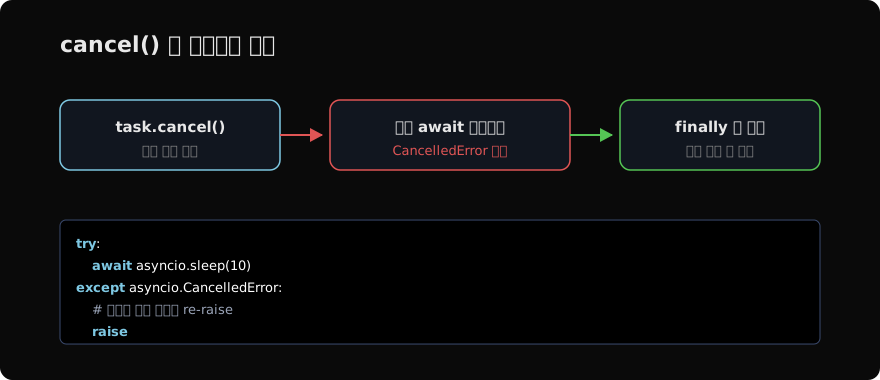
import asyncio

async def long_task():
    try:
        await asyncio.sleep(10)
    except asyncio.CancelledError:
        print("정리 작업 수행")
        raise          # 반드시 다시 던진다

async def main():
    task = asyncio.create_task(long_task())
    await asyncio.sleep(0.5)
    task.cancel()
    try:
        await task
    except asyncio.CancelledError:
        print("취소 확인됨")

asyncio.run(main())
CancelledError를 삼키지 말 것
가장 흔한 실수는 except CancelledError에서 정리만 하고 예외를 다시 던지지 않는 것이다. 그러면 취소가 무효화되어 작업이 계속 진행되고, gather나 TaskGroup이 취소 상태를 제대로 인식하지 못한다. 정리 코드를 넣되 마지막에 raise로 다시 던지거나, 더 간단히 finally에 정리만 넣는다.
async def worker():
    try:
        await asyncio.sleep(10)
    finally:
        # 취소든 정상 종료든 항상 실행되는 정리
print("연결 닫기, 자원 해제")CancelledError는 Python 3.8부터 BaseException을 상속한다. except Exception에 걸리지 않으므로, 광범위한 except Exception이 실수로 취소를 삼키는 일을 막아 준다.
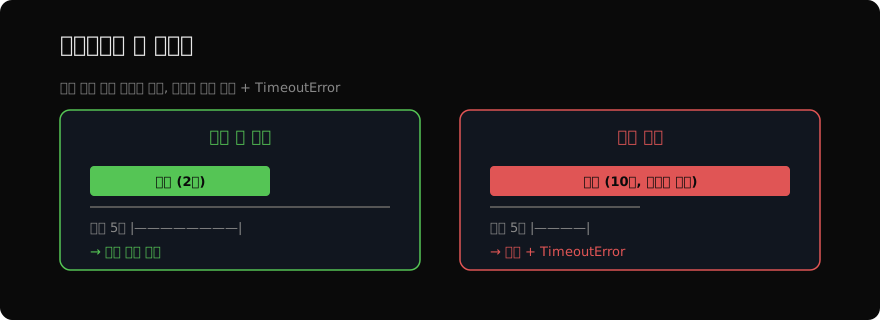
타임아웃은 곧 취소다
특정 시간 안에 끝나지 않으면 자동으로 취소하고 싶을 때가 많다. Python 3.11+에서는 asyncio.timeout() 컨텍스트 매니저가 가장 깔끔하다.
import asyncio

async def slow():
    await asyncio.sleep(10)
    return "완료"

async def main():
    try:
        async with asyncio.timeout(5):   # 5초 제한
            await slow()
    except TimeoutError:
        print("시간 초과로 취소됨")

asyncio.run(main())
블록 안의 작업이 제한 시간을 넘기면 자동으로 취소되고 TimeoutError가 발생한다. 단일 코루틴에 시간을 거는 예전 방식인 asyncio.wait_for(slow(), timeout=5)도 여전히 유효하다.
shield로 취소로부터 보호하기
이미 시작한 중요한 작업(예: 결제 커밋)이 바깥의 취소나 타임아웃에 휩쓸려 중단되면 안 될 때가 있다. asyncio.shield()는 감싼 코루틴이 외부 취소로부터 보호되도록 한다.
import asyncio

async def critical():
    await asyncio.sleep(3)
    return "커밋 완료"

async def main():
    task = asyncio.create_task(critical())
    try:
        # 바깥은 1초만 기다리지만 critical은 보호되어 계속 진행
        await asyncio.wait_for(asyncio.shield(task), timeout=1)
    except TimeoutError:
        print("대기는 포기, 그러나 작업은 살아있음")
        print(await task)   # 3초 뒤 "커밋 완료"

asyncio.run(main())shield는 신중하게 써야 한다. 보호된 작업이 영영 끝나지 않으면 누수가 되므로, 결국 어딘가에서는 그 작업의 완료나 취소를 책임져야 한다. 다음 글에서는 지금까지 써 온 async와 await 문법 자체를 정밀하게 들여다본다.
지난 글: asyncio Task와 gather
다음 글: async / await 문법
읽어주셔서 감사합니다. 😊
PALDYN / ARTICLE AI
글의 개념, 수식, 코드에 대해 물어보세요.
질문과 관련된 문단을 골라 답변의 문맥으로 사용합니다.생각 중 · 0초