

상태를 가진 데코레이터
함수 속성, 클로저 변수, 클래스 인스턴스를 활용해 데코레이터에 상태를 저장하는 세 가지 패턴과 각각의 장단점을 설명합니다.
지난 글에서 중첩 데코레이터의 적용 순서와 실행 순서를 살펴봤다. 이번 글에서는 데코레이터가 호출 횟수, 캐시, 마지막 실행 시각 같은 상태를 유지하는 방법을 다룬다. 상태를 저장하는 방식은 세 가지가 있고, 각각 적합한 상황이 다르다.
왜 상태가 필요한가
기본 데코레이터는 호출할 때마다 독립적으로 동작한다. 하지만 다음 같은 기능은 이전 호출을 기억해야 한다.
- 호출 횟수 카운터
- 결과 캐싱 (같은 인자면 재계산 없이 반환)
- Rate limiting (일정 시간 내 최대 호출 횟수 제한)
- 마지막 호출 시각 기록
방법 1: 함수 속성
가장 단순한 방법은 wrapper 함수 자체에 속성을 붙이는 것이다.
from functools import wraps

def count_calls(func):
    @wraps(func)
    def wrapper(*args, **kwargs):
        wrapper.calls += 1
        return func(*args, **kwargs)
    wrapper.calls = 0   # 초기화
    return wrapper

@count_calls
def greet(name):
    print(f"Hello, {name}")

greet("Alice"); greet("Bob")
print(greet.calls) # 2wrapper.calls는 공개 속성이므로 외부에서 직접 접근하거나 리셋할 수 있다. 단순하고 직관적이지만, 같은 함수에 데코레이터를 두 번 적용하면 wrapper 객체가 달라져 calls가 분리된다.
방법 2: 클로저 변수 (nonlocal)
클로저에 상태를 저장할 수도 있다. 불변 타입을 변경하려면 nonlocal이 필요하다.
from functools import wraps

def count_calls(func):
    calls = 0   # 클로저 변수
    @wraps(func)
    def wrapper(*args, **kwargs):
        nonlocal calls
        calls += 1
        print(f"호출 #{calls}")
        return func(*args, **kwargs)
return wrappercalls는 정수(불변)이므로 calls += 1을 하려면 nonlocal 선언이 필요하다. 선언 없이 calls += 1을 쓰면 UnboundLocalError가 발생한다.
가변 컨테이너를 쓰면 nonlocal 없이도 변경할 수 있다.
def count_calls(func):
    state = {"calls": 0}   # 딕셔너리는 가변
    @wraps(func)
    def wrapper(*args, **kwargs):
        state["calls"] += 1   # nonlocal 불필요
        return func(*args, **kwargs)
    return wrapper
방법 3: 클래스 기반 (복잡한 상태에 권장)
상태가 여러 개이거나 외부에서 조작할 메서드가 필요하면 클래스가 가장 깔끔하다.
from functools import update_wrapper

class CallCounter:
    def __init__(self, func):
        update_wrapper(self, func)
        self.func = func
        self.calls = 0
        self.errors = 0

    def __call__(self, *args, **kwargs):
        self.calls += 1
        try:
            return self.func(*args, **kwargs)
        except Exception:
            self.errors += 1
            raise

    def reset(self):
        self.calls = 0
        self.errors = 0

    def stats(self):
        return {"calls": self.calls, "errors": self.errors}

@CallCounter
def divide(a, b):
    return a / b

divide(10, 2); divide(8, 4)
print(divide.stats())   # {'calls': 2, 'errors': 0}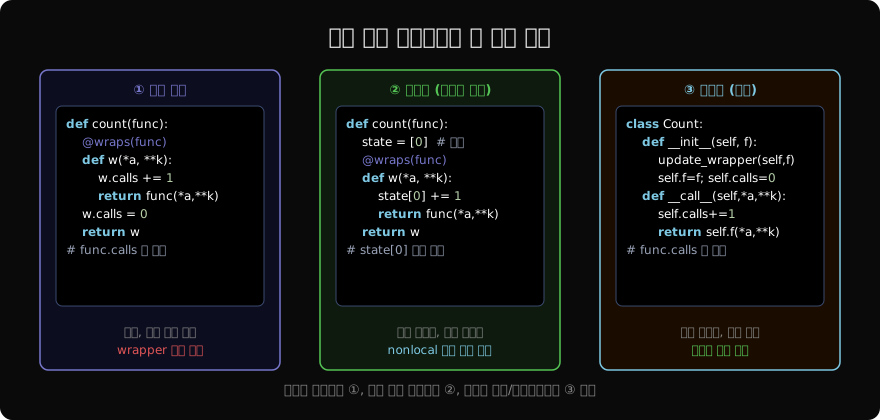
실용 예시: Rate Limiter
import time
from functools import wraps

def rate_limit(calls=5, period=1.0):
    def decorator(func):
        history = []   # 호출 시각 기록
        @wraps(func)
        def wrapper(*args, **kwargs):
            now = time.monotonic()
            history[:] = [t for t in history if now-t < period]
            if len(history) >= calls:
                raise RuntimeError("Rate limit")
            history.append(now)
            return func(*args, **kwargs)
        return wrapper
    return decorator

@rate_limit(calls=3, period=1.0)
def api_call(endpoint):
    return f"response from {endpoint}"
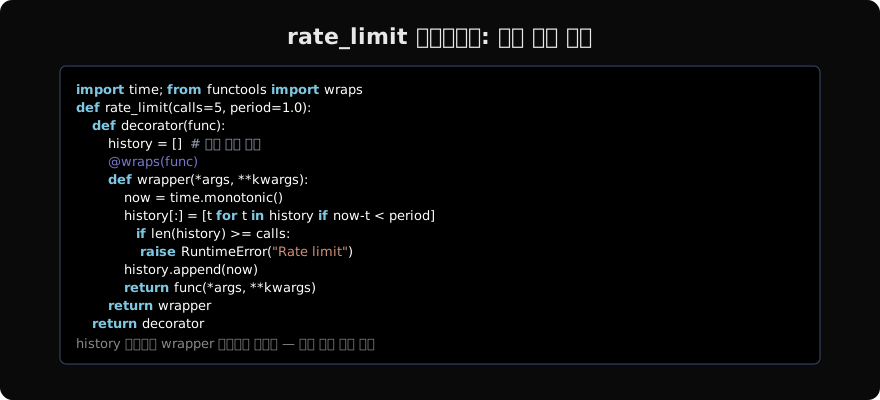
history 리스트는 wrapper 클로저에 캡처된다. 모든 호출에서 같은 history 객체를 공유하므로 period 초 내의 호출 기록이 누적된다.
상태 공유 주의점
같은 데코레이터를 여러 함수에 적용하면 상태가 각 함수별로 독립된다.
@count_calls
def add(a, b): return a + b

@count_calls
def mul(a, b): return a * b

add(1, 2); add(3, 4)
mul(2, 3)

print(add.calls)   # 2  (add 전용)
print(mul.calls)   # 1  (mul 전용)
각 @count_calls 적용은 새로운 wrapper 인스턴스(또는 클로저)를 만들므로 상태는 분리된다. 만약 모든 함수가 상태를 공유하길 원한다면 데코레이터 팩토리 밖에 상태를 두어야 한다.
스레드 안전성
멀티스레드 환경에서 상태를 가진 데코레이터는 경쟁 조건(race condition)에 취약하다.
import threading
from functools import wraps

def thread_safe_counter(func):
    _lock = threading.Lock()
    _count = [0]
    @wraps(func)
    def wrapper(*args, **kwargs):
        with _lock:
            _count[0] += 1
        return func(*args, **kwargs)
    wrapper.get_count = lambda: _count[0]
    return wrapper
카운터 업데이트를 threading.Lock으로 보호하면 여러 스레드가 동시에 호출해도 카운트가 정확히 유지된다.
지난 글: 중첩 데코레이터와 적용 순서
다음 글: 타입 힌트와 데코레이터
읽어주셔서 감사합니다. 😊
PALDYN / ARTICLE AI
글의 개념, 수식, 코드에 대해 물어보세요.
질문과 관련된 문단을 골라 답변의 문맥으로 사용합니다.생각 중 · 0초