

deprecated 경고 데코레이터
warnings 모듈을 활용해 deprecated 함수 경고 데코레이터를 구현하는 방법, stacklevel 파라미터의 의미, 경고 필터 제어, Python 3.13 내장 데코레이터를 설명합니다.
지난 글에서 캐시 데코레이터를 살펴봤다. 이번 글에서는 deprecated 경고 데코레이터를 다룬다. 라이브러리나 큰 코드베이스에서 오래된 API를 교체할 때, 기존 코드를 당장 깨지 않으면서 사용자에게 “이 함수는 곧 사라진다”는 경고를 보내는 패턴이다.
warnings 모듈 기초
Python의 warnings 모듈은 DeprecationWarning, UserWarning, FutureWarning 등 경고를 발행하고 필터링하는 표준 메커니즘이다.
import warnings

warnings.warn("이 기능은 삭제될 예정입니다", DeprecationWarning)
# DeprecationWarning: 이 기능은 삭제될 예정입니다
기본적으로 DeprecationWarning은 직접 실행 스크립트나 __main__에서만 보이고, 임포트된 라이브러리 코드에서는 억제된다. 개발 중 확인하려면 -W default 옵션을 쓰거나 필터를 설정한다.
@deprecated 데코레이터 구현
import warnings
from functools import wraps

def deprecated(reason=""):
    def decorator(func):
        msg = f"{func.__name__} is deprecated. {reason}".strip()
        @wraps(func)
        def wrapper(*args, **kwargs):
            warnings.warn(msg, DeprecationWarning, stacklevel=2)
            return func(*args, **kwargs)
        wrapper.__deprecated__ = True
        return wrapper
    return decorator

@deprecated("Use new_process() instead.")
def old_process(data):
    return data.strip()

old_process("  hello  ")
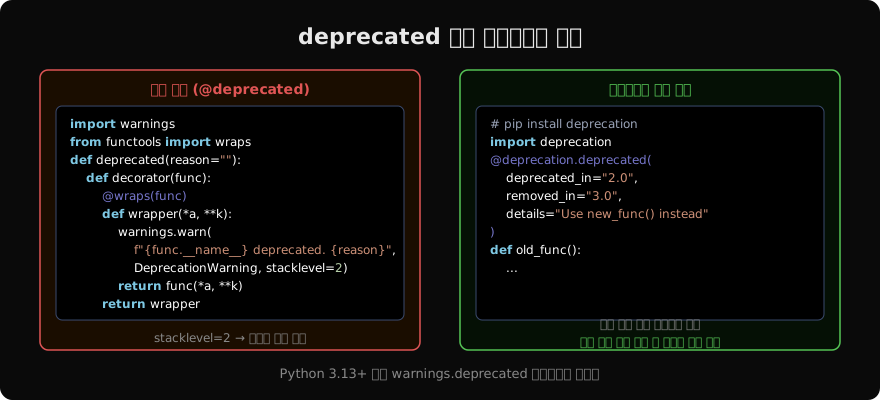
# DeprecationWarning: old_process is deprecated. Use new_process() instead.stacklevel=2가 핵심이다. stacklevel=1이면 경고 위치가 warnings.warn 호출 줄(wrapper 내부)을 가리킨다. stacklevel=2면 wrapper를 호출한 사용자 코드 줄을 가리킨다. 사용자 입장에서 자신의 코드 어디에서 deprecated API를 쓰고 있는지 바로 알 수 있다.
stacklevel 더 깊이 이해하기
# warnings.warn의 stacklevel 의미
# stacklevel=1: warn()을 호출한 줄 (wrapper 내부)
# stacklevel=2: wrapper를 호출한 줄 (사용자 코드)
# stacklevel=3: 사용자 코드를 호출한 줄 (한 단계 더 위)

def outer():
    old_process("data")   # ← stacklevel=2 시 이 줄 표시

outer()
데코레이터가 한 겹이면 stacklevel=2가 맞다. 데코레이터 안에서 다시 다른 함수를 호출하는 중첩 구조라면 stacklevel을 늘려야 한다.
클래스 메서드와 클래스 자체 deprecated
class MyAPI:
    @deprecated("Use MyAPI.new_method() instead")
    def old_method(self, x):
        return x * 2

    def new_method(self, x):
        return x * 2

# 클래스 deprecated
@deprecated("Use NewAPI class instead")
class OldAPI:
pass@deprecated는 함수뿐 아니라 클래스에도 적용된다. 클래스에 적용하면 OldAPI = deprecated(...)(OldAPI)가 실행되고, OldAPI()를 호출하면 __call__을 통해 경고가 발행된다.
경고 필터 제어
사용자 코드에서 경고 동작을 제어하는 방법이다.
import warnings

# 경고 억제
warnings.filterwarnings("ignore", category=DeprecationWarning)

# 첫 번째 발생 시에만 경고
warnings.filterwarnings("once", category=DeprecationWarning)

# 에러로 전환 (마이그레이션 강제)
warnings.filterwarnings("error", category=DeprecationWarning)

# 임시 필터: with 블록 안에서만 적용
with warnings.catch_warnings():
    warnings.simplefilter("ignore")
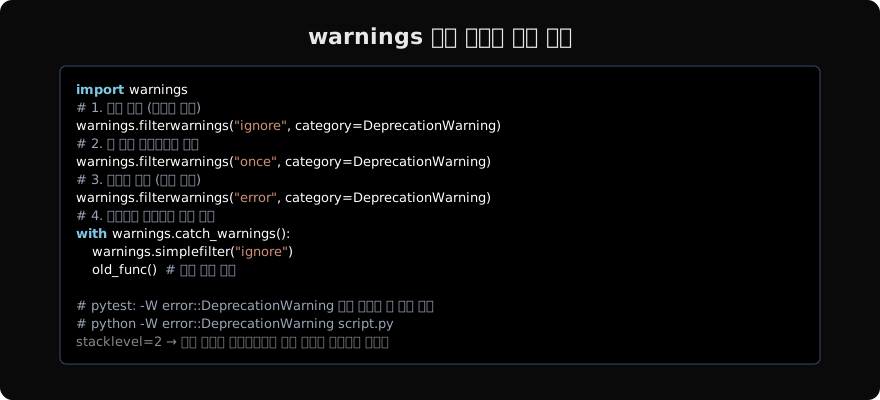
old_process("data") # 경고 없이 실행pytest에서는 pytest.ini에 filterwarnings = error::DeprecationWarning를 설정하면 deprecated API 사용 시 테스트가 실패한다. 코드베이스에서 deprecated API를 모두 제거했는지 자동으로 확인할 수 있다.
Python 3.13 내장 warnings.deprecated
Python 3.13에서 warnings.deprecated 데코레이터가 표준 라이브러리에 추가됐다.
# Python 3.13+
from warnings import deprecated

@deprecated("Use new_func() instead")
def old_func():
    pass

@deprecated("Use NewClass instead")
class OldClass:
    pass
타입 체커(mypy, pyright)도 @deprecated를 인식해서 deprecated API를 사용하는 코드에 경고를 표시한다. 3.12 이하에서는 typing_extensions.deprecated로 backport된다.
실무 권장 패턴
import warnings
from functools import wraps

def deprecated(since="", removed_in="", reason=""):
    """버전 정보 포함 deprecated 데코레이터"""
    def decorator(func):
        parts = [f"{func.__name__} is deprecated"]
        if since:
            parts.append(f"since {since}")
        if removed_in:
            parts.append(f"will be removed in {removed_in}")
        if reason:
            parts.append(reason)
        msg = ". ".join(parts) + "."

        @wraps(func)
        def wrapper(*args, **kwargs):
            warnings.warn(msg, DeprecationWarning, stacklevel=2)
            return func(*args, **kwargs)
        return wrapper
    return decorator

@deprecated(since="2.0", removed_in="3.0",
            reason="Use process_v2() instead")
def process(data):
    ...
버전 정보를 명시하면 사용자가 마이그레이션 일정을 계획하는 데 도움이 된다. removed_in 버전에서 실제로 함수를 제거하거나 에러로 전환하는 로직을 추가할 수도 있다.
여기까지 Python 데코레이터의 본질부터 타입 힌트, 상태 관리, 캐싱, 경고까지 실무에서 필요한 패턴을 모두 살펴봤다. 다음 글에서는 컨텍스트 매니저를 다룬다.
지난 글: 캐시 데코레이터: lru_cache와 cache
읽어주셔서 감사합니다. 😊
PALDYN / ARTICLE AI
글의 개념, 수식, 코드에 대해 물어보세요.
질문과 관련된 문단을 골라 답변의 문맥으로 사용합니다.생각 중 · 0초