

예외 그룹과 except*: Python 3.11의 새 문법
Python 3.11에서 추가된 ExceptionGroup과 except* 문법을 설명합니다. 비동기 작업의 여러 예외를 동시에 처리해야 할 때 어떻게 ExceptionGroup을 사용하는지, asyncio.TaskGroup과 함께 쓰는 방법도 다룹니다.
지난 글에서 예외 연결 메커니즘을 살펴봤다. Python 3.11은 예외 처리의 새로운 차원을 열었다—여러 예외를 한꺼번에 처리하는 ExceptionGroup과 except*다. 비동기 프로그래밍에서 동시에 실행하는 여러 태스크 중 일부가 실패할 때, 기존 방식으로는 이를 깔끔하게 처리하기 어려웠다.
기존 방식의 한계
import asyncio

async def main():
    results = await asyncio.gather(
        task1(),
        task2(),
        task3(),
        return_exceptions=True   # 예외를 결과로 반환
    )

    for result in results:
        if isinstance(result, Exception):
print(f"오류: {result}")return_exceptions=True로 모든 예외를 수집할 수는 있지만, 예외 타입별로 다르게 처리하기가 번거롭다. 또한 예외 정보가 결과 리스트에 섞여 있어 코드가 지저분해진다.
ExceptionGroup 소개
ExceptionGroup은 여러 예외를 하나의 컨테이너에 담는 예외다.
# Python 3.11+
eg = ExceptionGroup("여러 오류 발생", [
    ValueError("입력 오류"),
    TypeError("타입 오류"),
    RuntimeError("실행 오류"),
])

raise eg
출력:
  + Exception Group Traceback (most recent call last):
  |   ...
  | ExceptionGroup: 여러 오류 발생 (3 sub-exceptions)
  +-+---------------- 1 ----------------
    | Traceback:
    |   ...
    | ValueError: 입력 오류
    +---------------- 2 ----------------
    | TypeError: 타입 오류
    +---------------- 3 ----------------
    | RuntimeError: 실행 오류
트레이스백이 각 하위 예외를 모두 보여준다.
ExceptionGroup의 주요 속성과 메서드
try:
    raise ExceptionGroup("test", [ValueError("v"), TypeError("t")])
except ExceptionGroup as eg:
    print(eg.message)       # "test"
    print(eg.exceptions)    # (ValueError('v'), TypeError('t'))

    # 특정 타입 필터링
    match, rest = eg.split(ValueError)
    # match: ValueError만 포함한 ExceptionGroup
    # rest: 나머지 예외 포함한 ExceptionGroup (None이면 없음)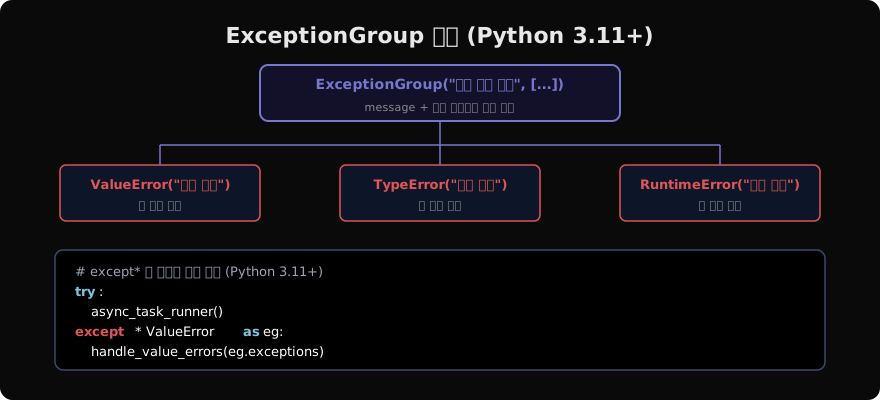
except* 문법
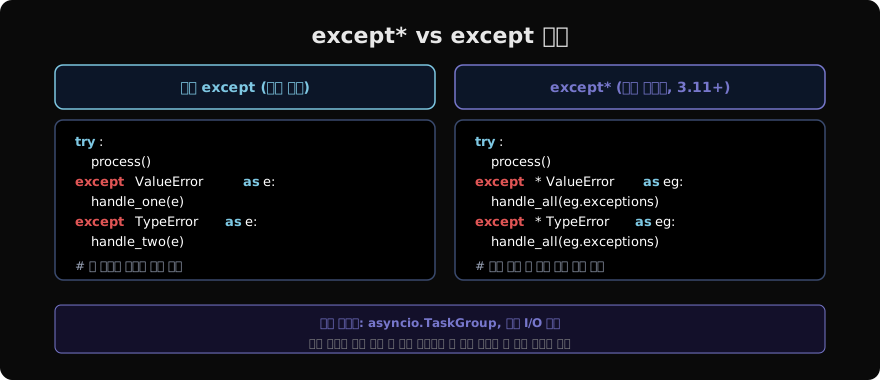
except*는 ExceptionGroup 전용 예외 처리 문법이다. 각 except* 절이 매칭되는 예외들을 그룹으로 수신한다.
try:
    raise ExceptionGroup("작업 실패", [
        ValueError("잘못된 값"),
        TypeError("타입 오류"),
        ValueError("또 다른 잘못된 값"),
    ])
except* ValueError as eg:
    print(f"ValueError 그룹: {eg.exceptions}")
    # (ValueError('잘못된 값'), ValueError('또 다른 잘못된 값'))
except* TypeError as eg:
    print(f"TypeError 그룹: {eg.exceptions}")
    # (TypeError('타입 오류'),)
핵심 차이: 기존 except는 첫 번째 매칭 절에서 예외 처리가 끝나지만, except*는 여러 절이 동시에 실행될 수 있다. 위 코드에서 두 except* 절이 모두 실행된다.
asyncio.TaskGroup과 함께 사용
except*의 핵심 사용처는 asyncio.TaskGroup이다.
import asyncio

async def fetch(url):
    # 실패 가능한 네트워크 요청
    ...

async def main():
    try:
        async with asyncio.TaskGroup() as tg:
            t1 = tg.create_task(fetch("https://api1.example.com"))
            t2 = tg.create_task(fetch("https://api2.example.com"))
            t3 = tg.create_task(fetch("https://api3.example.com"))
    except* ConnectionError as eg:
        print(f"연결 실패한 작업: {len(eg.exceptions)}개")
        for exc in eg.exceptions:
            print(f"  - {exc}")
    except* TimeoutError as eg:
print(f"타임아웃 발생: {len(eg.exceptions)}개")TaskGroup은 gather와 달리 태스크 중 하나가 실패하면 나머지도 취소한다. 그리고 실패한 예외들을 ExceptionGroup으로 묶어 던진다.
중첩 ExceptionGroup
ExceptionGroup 안에 또 다른 ExceptionGroup이 있을 수 있다.
inner_eg = ExceptionGroup("내부", [ValueError("v1"), ValueError("v2")])
outer_eg = ExceptionGroup("외부", [inner_eg, TypeError("t1")])

# except*는 자동으로 중첩을 평탄화
try:
    raise outer_eg
except* ValueError as eg:
    print(eg.exceptions)
# 내부 ExceptionGroup의 ValueError들이 모두 여기서 처리됨except*는 재귀적으로 그룹 안을 탐색해서 매칭되는 모든 예외를 수집한다.
BaseExceptionGroup
ExceptionGroup은 Exception을 상속받으므로 except Exception:으로 잡을 수 있다. SystemExit이나 KeyboardInterrupt 같은 BaseException 서브클래스를 그룹에 넣으려면 BaseExceptionGroup을 써야 한다.
from exceptiongroup import BaseExceptionGroup  # Python 3.10 백포트

# Python 3.11 내장
beg = BaseExceptionGroup("종료 그룹", [
    SystemExit(1),
    KeyboardInterrupt(),
])
일반적으로는 ExceptionGroup만 쓰면 된다.
직접 ExceptionGroup 만들기
여러 작업을 순서대로 실행하고 실패를 모아서 한 번에 보고하는 패턴이다.
def validate_all(items):
    errors = []
    for i, item in enumerate(items):
        try:
            validate(item)
        except ValidationError as e:
            errors.append(e)

    if errors:
        raise ExceptionGroup(
            f"{len(errors)}개 항목 검증 실패",
            errors
)try:
validate_all(user_inputs)
except* ValidationError as eg:
for err in eg.exceptions:
print(f"오류: {err}")except*를 쓸 때 주의사항
# except*와 일반 except 혼용 불가
try:
    ...
except* ValueError:
    ...
except TypeError:    # SyntaxError!
...except*가 하나라도 있으면 모든 절이 except*여야 한다.
또한 except* 절에서 예외를 다시 발생시킬 때는 반드시 ExceptionGroup을 발생시켜야 한다.
try:
    raise ExceptionGroup("g", [ValueError("v")])
except* ValueError as eg:
    # 일부 예외를 재발생시키고 싶다면 ExceptionGroup으로
raise ExceptionGroup("남은 오류", list(eg.exceptions))ExceptionGroup과 except*는 아직 Python 3.11 이상에서만 사용할 수 있다. 3.10 이하 환경을 지원해야 한다면 exceptiongroup 백포트 패키지를 쓰거나 기존 방식을 유지하는 것이 좋다. 다음 글에서는 warnings 모듈로 경고를 발생시키고 제어하는 방법을 배운다.
지난 글: 예외 연결: __cause__와 context
다음 글: warnings 모듈: 경고를 오류처럼 다루기
읽어주셔서 감사합니다. 😊
PALDYN / ARTICLE AI
글의 개념, 수식, 코드에 대해 물어보세요.
질문과 관련된 문단을 골라 답변의 문맥으로 사용합니다.생각 중 · 0초