

AI 개발을 위한 Python 핵심 라이브러리
NumPy, Pandas, Matplotlib, Scikit-learn부터 PyTorch, HuggingFace Transformers, Anthropic SDK까지 — AI 개발자가 반드시 알아야 할 Python 생태계 핵심 라이브러리를 체계적으로 정리합니다.
지난 글에서 AI 회의 요약 시스템까지 실전 애플리케이션 패턴을 살펴봤다. 이번 글에서는 도구와 라이브러리를 다룬다. AI 개발자가 매일 쓰는 Python 생태계를 계층별로 살펴본다.
Python이 AI/ML 표준 언어가 된 이유는 단순하다. 수치 계산(NumPy), 데이터 조작(Pandas), 시각화(Matplotlib), 전통 ML(Scikit-learn), 딥러닝(PyTorch/TensorFlow), 대형 언어 모델 연동(Transformers, Anthropic SDK, OpenAI SDK) 모두 Python 생태계 안에서 일관된 방식으로 연결된다.
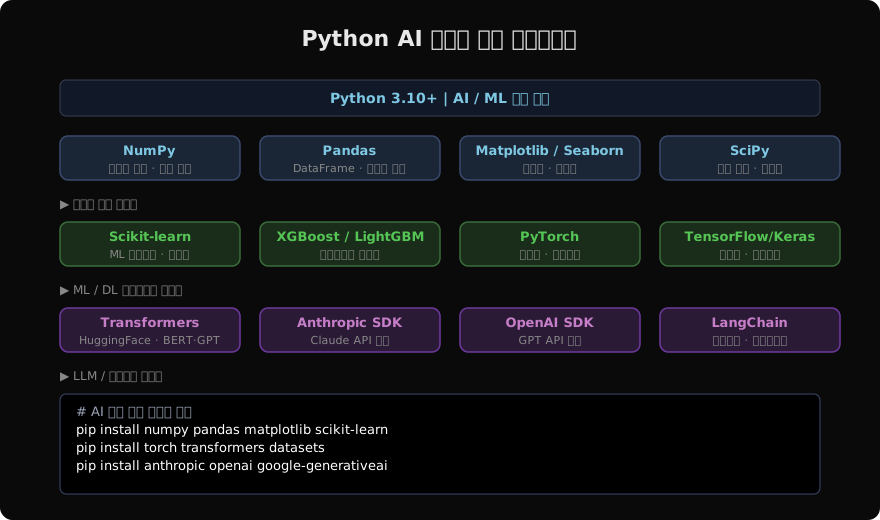
NumPy: AI의 기반이 되는 배열 연산
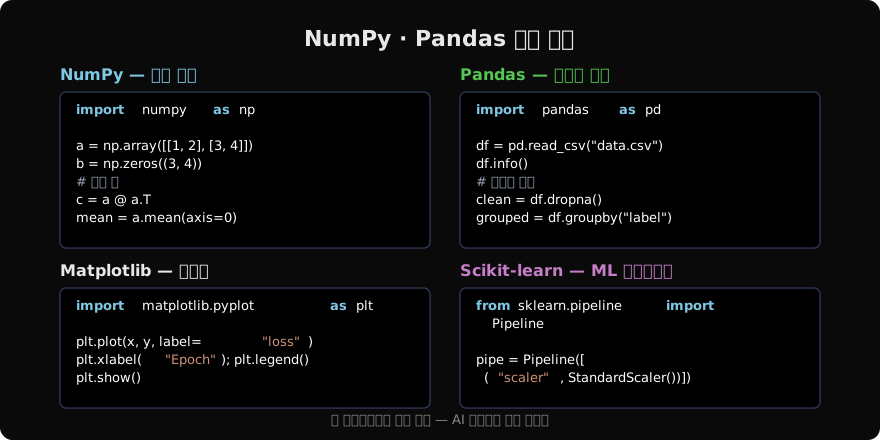
NumPy는 Python AI 생태계의 공통 기반이다. 거의 모든 ML 프레임워크가 내부적으로 NumPy 배열(ndarray)을 인터페이스로 사용한다.
import numpy as np

# 2차원 배열 생성
a = np.array([[1, 2, 3], [4, 5, 6]])   # shape: (2, 3)

# 브로드캐스팅 — 스칼라와 배열 연산
normalized = (a - a.mean()) / a.std()

# 행렬 곱 (@ 연산자)
W = np.random.randn(3, 4)
output = a @ W                          # shape: (2, 4)

# 유용한 인덱싱
mask = a > 3
filtered = a[mask] # [4, 5, 6]shape, dtype, reshape, transpose는 매일 쓰게 될 핵심 속성이다. np.random.randn은 신경망 가중치 초기화에, np.argmax는 분류 결과 추출에 자주 등장한다.
Pandas: 데이터 탐색과 전처리
실제 프로젝트에서 데이터는 CSV, 엑셀, 데이터베이스에서 온다. Pandas의 DataFrame은 이 데이터를 표 형태로 다루는 최적 도구다.
import pandas as pd

df = pd.read_csv("dataset.csv")

# 기본 탐색
print(df.shape)        # 행·열 수
print(df.dtypes)       # 컬럼 타입
print(df.isnull().sum())  # 결측값 수

# 필터링 + 그룹 집계
high_acc = df[df["accuracy"] > 0.9]
stats = df.groupby("model")["score"].agg(["mean", "std"])

# 피처 엔지니어링
df["text_len"] = df["text"].str.len()
df["label_enc"] = df["label"].map({"pos": 1, "neg": 0})dropna(), fillna(), merge(), pivot_table()은 데이터 전처리 단계에서 거의 매 프로젝트마다 쓰인다.
Matplotlib / Seaborn: 학습 과정 시각화
모델 학습 중 손실 곡선과 정확도 추이를 시각화하면 과적합, 학습률 문제를 빠르게 진단할 수 있다.
import matplotlib.pyplot as plt
import seaborn as sns

fig, axes = plt.subplots(1, 2, figsize=(12, 4))

# 학습 곡선
axes[0].plot(train_losses, label="Train")
axes[0].plot(val_losses,   label="Val")
axes[0].set_title("Loss Curve")
axes[0].legend()

# 혼동 행렬 히트맵
sns.heatmap(conf_matrix, annot=True, fmt="d", ax=axes[1])
axes[1].set_title("Confusion Matrix")

plt.tight_layout()
plt.savefig("training_result.png", dpi=150)
Seaborn은 Matplotlib 위에 구축되어 통계적 시각화를 간결하게 작성할 수 있다. sns.heatmap, sns.pairplot, sns.boxplot은 EDA(탐색적 데이터 분석)에서 즐겨 쓰인다.
Scikit-learn: 전통 ML의 표준
딥러닝 이전의 ML 알고리즘과 데이터 전처리 파이프라인은 Scikit-learn이 담당한다. API 일관성이 뛰어나서 fit → transform → predict 패턴이 모든 알고리즘에 동일하게 적용된다.
from sklearn.pipeline import Pipeline
from sklearn.preprocessing import StandardScaler
from sklearn.ensemble import RandomForestClassifier
from sklearn.model_selection import cross_val_score

pipe = Pipeline([
    ("scaler",     StandardScaler()),
    ("classifier", RandomForestClassifier(n_estimators=100)),
])

scores = cross_val_score(pipe, X, y, cv=5, scoring="f1_macro")
print(f"F1: {scores.mean():.3f} ± {scores.std():.3f}")

pipe.fit(X_train, y_train)
preds = pipe.predict(X_test)Pipeline을 사용하면 전처리와 모델을 하나의 객체로 묶어 교차 검증과 하이퍼파라미터 튜닝(GridSearchCV)을 데이터 누수 없이 수행할 수 있다.
딥러닝과 LLM 라이브러리 개요
데이터 레이어 위에는 딥러닝 프레임워크와 LLM 연동 SDK가 올라온다.
| 계층 | 라이브러리 | 주요 용도 |
|---|---|---|
| 딥러닝 | PyTorch | 연구·커스텀 모델·자동미분 |
| 딥러닝 | TensorFlow/Keras | 프로덕션 배포·모바일 |
| LLM | HuggingFace Transformers | 사전학습 모델 추론·파인튜닝 |
| API | Anthropic SDK | Claude 모델 연동 |
| API | OpenAI SDK | GPT 모델 연동 |
| API | Google GenAI SDK | Gemini 모델 연동 |
# 패키지 설치 한 줄 요약
pip install torch transformers datasets      # 오픈소스 딥러닝
pip install anthropic openai google-generativeai  # API SDK
이후 포스트에서 각 라이브러리를 코드 중심으로 깊게 다룬다. PyTorch 텐서와 자동미분부터 시작해 HuggingFace 생태계, 그리고 Anthropic·OpenAI·Gemini SDK까지 순서대로 다룰 예정이다.
환경 구성 팁
가상환경 없이 글로벌에 설치하면 패키지 충돌이 잦다. 프로젝트마다 독립적인 환경을 쓰는 것이 기본이다.
# uv (최신, 빠름)
uv venv .venv && source .venv/bin/activate
uv pip install numpy pandas torch transformers

# 또는 conda
conda create -n aidev python=3.11
conda activate aidev
conda install pytorch torchvision -c pytorch
CUDA GPU를 쓴다면 pip install torch --index-url https://download.pytorch.org/whl/cu121처럼 CUDA 버전을 명시해 설치해야 한다.
지난 글: AI 회의 요약 시스템: 음성 인식부터 인사이트 추출까지
다음 글: PyTorch 기초: 텐서와 자동미분
읽어주셔서 감사합니다. 😊