

줄 끝 문자: \n·\r\n·\r과 크로스 플랫폼 처리
Python 파일 처리에서 만나는 LF·CRLF·CR 줄 끝 문자의 차이와 Python의 Universal Newlines 처리 방식을 설명합니다. 줄 끝 감지·변환, newline 매개변수, .gitattributes·.editorconfig 설정까지 다룹니다.
지난 글에서 mmap으로 대용량 파일을 처리하는 방법을 살펴봤다. 파일 I/O 챕터의 마지막 주제는 줄 끝 문자(line endings)다. 개발자라면 누구나 한 번쯤 “Windows에서 작성한 파일이 Linux에서 이상하게 보인다”거나 “Git diff에서 줄 끝 경고가 뜬다”는 상황을 겪는다. 이 문제의 원인과 Python에서 처리하는 방법을 알아보자.
줄 끝 문자의 역사
세 종류의 줄 끝 문자가 혼재하는 이유는 역사적 맥락에 있다.
- LF (Line Feed,
\n, 0x0A): Unix/Linux/macOS. 커서를 다음 줄로 이동 - CRLF (Carriage Return + Line Feed,
\r\n, 0x0D 0x0A): Windows. CR은 커서를 줄 맨 앞으로, LF는 다음 줄로 이동 - CR (Carriage Return,
\r, 0x0D): 구버전 Mac OS (OS X 이전). 현재는 사실상 사라짐
타자기(typewriter)에서 온 용어다. 줄을 바꾸려면 종이를 당기는 동작(LF)과 타자 헤드를 맨 왼쪽으로 되돌리는 동작(CR)이 필요했다. 컴퓨터 초기에는 이 두 동작을 모두 표현했고(CRLF), Unix는 LF 하나로 간소화했다.
Python의 Universal Newlines
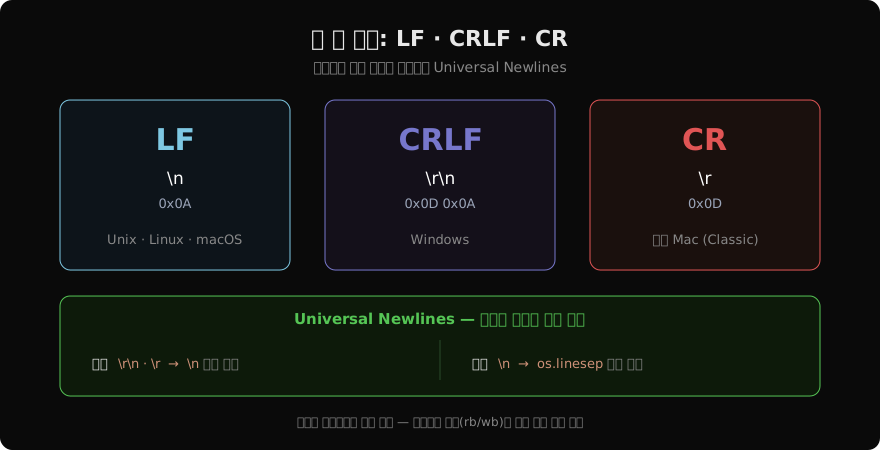
Python의 텍스트 모드 open()은 기본적으로 Universal Newlines를 적용한다.
- 읽기:
\r\n,\r모두\n으로 변환해서 반환 - 쓰기:
\n을 현재 OS의 기본 개행 문자로 변환
# Windows 파일 (CRLF 포함) 텍스트 모드로 읽기
with open("windows.txt", "r", encoding="utf-8") as f:
    lines = f.readlines()
# 각 줄 끝은 '\n' — '\r\n'이 자동으로 변환됨

# 이진 모드로 원본 확인
with open("windows.txt", "rb") as f:
    raw = f.read()
print(b"\r\n" in raw)   # True — 원본은 CRLF
이 자동 변환은 대부분의 경우에 편리하지만, CSV 처리나 이진 분석 시 원본을 그대로 봐야 할 때는 문제가 된다.
newline 매개변수 완전 정리
# newline=None (기본)
# 읽기: \r\n, \r → \n 변환
# 쓰기: \n → OS 기본값 변환

# newline=''
# 읽기: 변환 없음 (원본 그대로)
# 쓰기: 변환 없음 (\n → \n)
# → csv.reader/writer 사용 시 권장

# newline='\n'
# 읽기: \r\n → \n 변환, \r은 그대로
# 쓰기: 변환 없음

# newline='\r\n'
# 쓰기: \n → \r\n 강제
# → Windows 형식으로 파일 저장 시

# newline='\r'
# 읽기: \r을 특별 처리하지 않음

# CSV 처리 — csv 모듈이 직접 처리하도록 newline=''
import csv
with open("data.csv", "r", encoding="utf-8", newline="") as f:
    reader = csv.reader(f)
    for row in reader:
        print(row)
줄 끝 문자 감지
from pathlib import Path

def detect_line_endings(path: str) -> str:
    """파일의 줄 끝 문자 타입 감지"""
    raw = Path(path).read_bytes()

    crlf_count = raw.count(b"\r\n")
    cr_only = raw.count(b"\r") - crlf_count  # \r\n의 \r 제외
    lf_only = raw.count(b"\n") - crlf_count  # \r\n의 \n 제외

    if crlf_count > 0 and lf_only == 0 and cr_only == 0:
        return "CRLF (Windows)"
    elif lf_only > 0 and crlf_count == 0 and cr_only == 0:
        return "LF (Unix)"
    elif cr_only > 0 and crlf_count == 0 and lf_only == 0:
        return "CR (구 Mac)"
    elif crlf_count > 0 or lf_only > 0 or cr_only > 0:
        return "혼합 (Mixed)"
    else:
        return "개행 없음"

print(detect_line_endings("data.txt"))
줄 끝 변환
from pathlib import Path

def normalize_line_endings(path: str, target: str = "\n") -> None:
    """파일의 줄 끝 문자를 통일"""
    p = Path(path)
    raw = p.read_bytes()

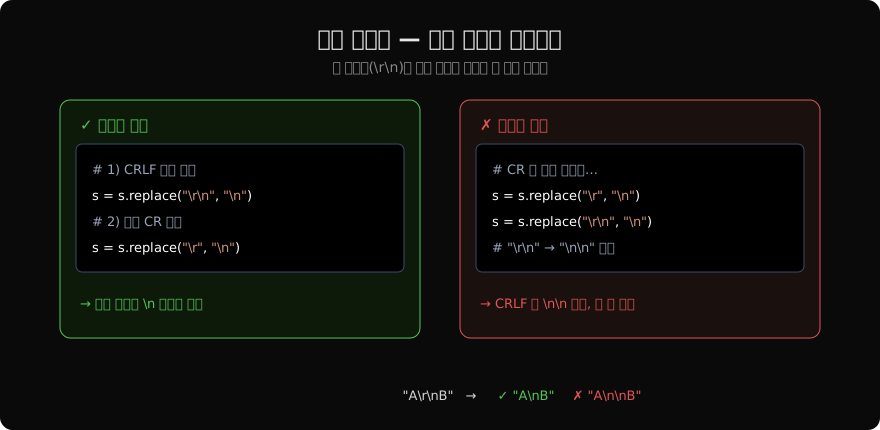
    # 순서 중요: \r\n을 먼저 처리해야 \r만 남지 않음
    normalized = raw.replace(b"\r\n", b"\n")  # CRLF → LF
    normalized = normalized.replace(b"\r", b"\n")   # CR → LF

    if target == "\r\n":
        normalized = normalized.replace(b"\n", b"\r\n")

    p.write_bytes(normalized)

# 여러 파일 일괄 처리
for f in Path("project").rglob("*.py"):
normalize_line_endings(str(f))중요: \r\n을 \r 보다 먼저 교체해야 한다. 반대로 하면 \r\n의 \r이 먼저 \n으로 바뀌어 \n\n(빈 줄 추가)이 된다.
파이썬 문자열에서 줄 끝 처리
line = "hello\r\n"

# 줄 끝 제거 방법
line.rstrip("\n")         # → 'hello\r'  (LF만 제거)
line.rstrip("\r\n")       # → 'hello'    (CR, LF 모두)
line.rstrip()             # → 'hello'    (모든 공백 포함)
line.strip()              # → 'hello'    (앞뒤 모두)

# splitlines() — 모든 줄 끝 문자 인식
text = "line1\r\nline2\nline3\rline4"
text.splitlines()   # ['line1', 'line2', 'line3', 'line4']
# keepends=True: 줄 끝 문자 포함
text.splitlines(keepends=True)
# ['line1\r\n', 'line2\n', 'line3\r', 'line4']splitlines()는 \r\n, \n, \r 외에도 \v, \f, \x1c, \x1d, \x1e, \x85,
,
등 유니코드 줄 구분자도 인식한다.
.gitattributes와 .editorconfig
팀 프로젝트에서 줄 끝 문자를 통일하려면 두 파일을 설정해야 한다.
# .gitattributes — Git 체크아웃·커밋 시 변환 규칙
* text=auto eol=lf    # 텍스트 파일은 LF로 통일
*.bat text eol=crlf   # Windows 배치 파일은 CRLF 유지
*.png binary          # 이진 파일은 변환 없음
*.jpg binary
*.pdf binary

# .editorconfig — 에디터가 저장할 때 적용
[*]
end_of_line = lf
insert_final_newline = true
trim_trailing_whitespace = true

[*.bat]
end_of_line = crlf
eol=lf 설정 후 기존 파일을 일괄 변환하려면:
git add --renormalize .
git commit -m "Normalize line endings to LF"
요약
| 상황 | 처리 방법 |
|---|---|
| 플랫폼 무관 읽기 | 기본 텍스트 모드 (newline=None) |
| CSV 읽기·쓰기 | newline='' + csv 모듈 |
| 원본 줄 끝 확인 | 이진 모드 읽기 |
| 줄 끝 변환 | 이진 읽기 → replace() → 이진 쓰기 |
| 팀 프로젝트 통일 | .gitattributes + .editorconfig |
Python의 파일 I/O 챕터를 마무리하면서, 파일을 안전하게 열고(open(), with), 올바른 인코딩으로 읽고(encoding="utf-8"), 줄 끝을 올바르게 처리(splitlines(), newline)하는 것이 견고한 코드의 기본임을 정리한다.
지난 글: mmap: 메모리 맵 파일로 대용량 처리
다음 글: 예외 기초: try·except로 오류를 우아하게 처리하기
읽어주셔서 감사합니다. 😊
PALDYN / ARTICLE AI
글의 개념, 수식, 코드에 대해 물어보세요.
질문과 관련된 문단을 골라 답변의 문맥으로 사용합니다.생각 중 · 0초