

ProcessPoolExecutor
concurrent.futures.ProcessPoolExecutor로 프로세스 풀을 관리하고 CPU 바운드 작업을 병렬화하는 방법, map과 submit 차이, as_completed, chunksize 튜닝을 설명합니다.
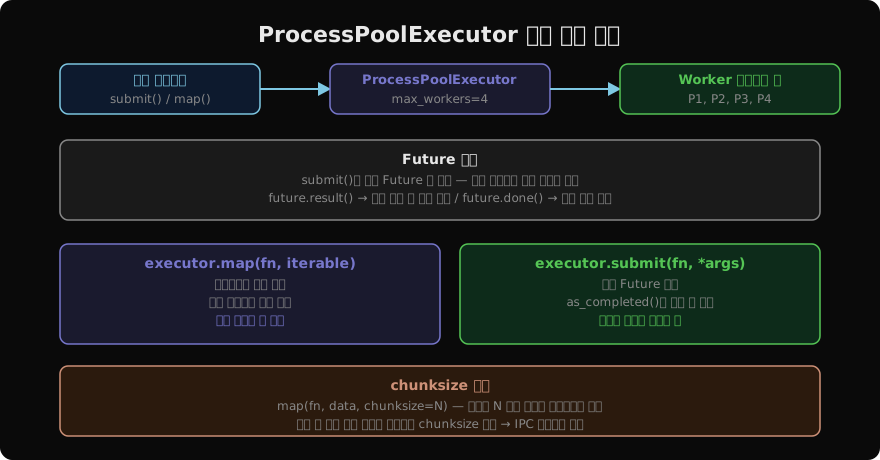
지난 글에서 multiprocessing.Process와 Pool로 프로세스를 직접 관리하는 방법을 살펴봤다. concurrent.futures.ProcessPoolExecutor는 같은 기능을 더 현대적인 API로 제공한다. ThreadPoolExecutor와 인터페이스가 동일해 스레드와 프로세스를 쉽게 바꿔 쓸 수 있다.
ProcessPoolExecutor 기본 구조
from concurrent.futures import ProcessPoolExecutor

def heavy(n):
    return sum(i * i for i in range(n))

if __name__ == "__main__":
    with ProcessPoolExecutor(max_workers=4) as executor:
        results = list(executor.map(heavy, [10**6] * 8))
    print(results)
with 블록을 나가면 executor.shutdown(wait=True)가 자동 호출되어 모든 프로세스가 완료되고 정리된다.
map — 순서 보장 병렬 실행
executor.map(fn, iterable)은 multiprocessing.Pool.map과 유사하다. 입력 순서대로 결과를 돌려준다.
if __name__ == "__main__":
    data = range(20)
    with ProcessPoolExecutor(max_workers=4) as ex:
        results = list(ex.map(heavy, data))
    # results[i] = heavy(data[i]) — 순서 보장
처리 중 하나에서 예외가 나면 list() 또는 이터레이션 시 해당 시점에 예외가 발생한다.
submit — Future 기반 비동기 실행
submit(fn, *args, **kwargs)는 즉시 Future 객체를 반환한다. 각 작업의 완료를 독립적으로 추적할 수 있다.
from concurrent.futures import ProcessPoolExecutor, as_completed

if __name__ == "__main__":
    tasks = [10_000, 20_000, 30_000]
    with ProcessPoolExecutor() as ex:
        futures = {ex.submit(heavy, n): n for n in tasks}
        for fut in as_completed(futures):   # 완료된 순서대로
            n = futures[fut]
            try:
                print(f"n={n}: {fut.result()}")
            except Exception as e:
                print(f"n={n}: 오류 — {e}")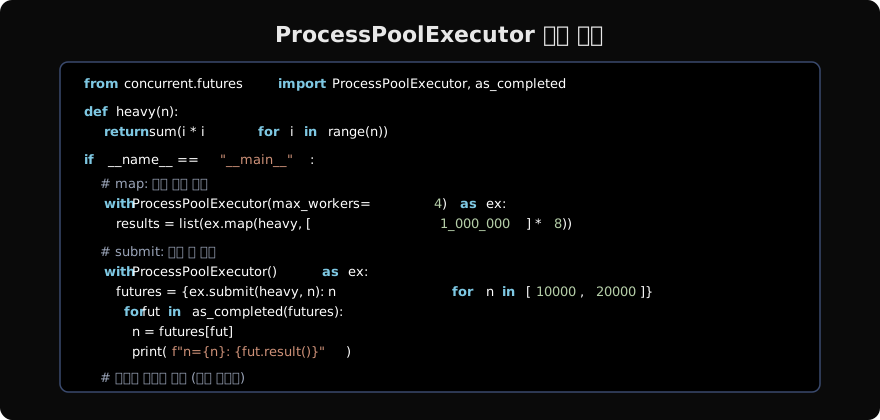
as_completed vs map 비교
| 항목 | map | submit + as_completed |
|---|---|---|
| 결과 순서 | 입력 순서 보장 | 완료된 순서 |
| 예외 처리 | 이터레이션 시 발생 | fut.result() 에서 |
| 개별 취소 | 불가 | fut.cancel() 가능 |
| 진행률 추적 | 어려움 | 쉬움 |
chunksize — 성능 튜닝
작업 수가 많고 각 작업이 짧을 때, 매 작업마다 IPC(프로세스 간 통신)가 발생하면 오버헤드가 크다. chunksize로 묶어서 보내면 효율이 올라간다.
data = range(100_000)

with ProcessPoolExecutor(max_workers=4) as ex:
    # 1000개씩 묶어서 프로세스에 전달
results = list(ex.map(square, data, chunksize=1000))multiprocessing.Pool.map의 기본 chunksize는 자동 계산이고, ProcessPoolExecutor.map의 기본값은 1이다. 작업 단위가 매우 작으면 명시적으로 설정한다.
max_workers 설정
import os
from concurrent.futures import ProcessPoolExecutor

# CPU 코어 수에 맞게 설정 (기본값)
with ProcessPoolExecutor() as ex:
    pass  # max_workers = os.cpu_count()

# I/O 가 섞인 경우 코어 수보다 더 많이
with ProcessPoolExecutor(max_workers=os.cpu_count() * 2) as ex:
    pass
CPU 바운드는 os.cpu_count()가 좋은 출발점이다. 그 이상으로 늘려도 CPU가 포화 상태라면 컨텍스트 스위칭 비용만 늘어난다.
예외 전파
def may_fail(n):
    if n == 3:
        raise ValueError(f"n={n} 오류")
    return n * n

if __name__ == "__main__":
    with ProcessPoolExecutor() as ex:
        futs = [ex.submit(may_fail, i) for i in range(5)]
        for f in futs:
            try:
                print(f.result())
            except ValueError as e:
                print(f"예외 잡음: {e}")
자식 프로세스의 예외는 직렬화(pickle)되어 부모 프로세스로 전달된다. fut.result() 호출 시 원래 예외로 다시 발생한다.
요약
ProcessPoolExecutor(max_workers=N)→ N개 프로세스 풀map(fn, iterable)→ 순서 보장 결과submit(fn, *args)→ Future 반환,as_completed()로 완료 순 처리chunksize설정으로 IPC 오버헤드 감소- CPU 바운드 작업의 GIL 우회에 적합
지난 글: multiprocessing 기초
다음 글: ThreadPoolExecutor
읽어주셔서 감사합니다. 😊
PALDYN / ARTICLE AI
글의 개념, 수식, 코드에 대해 물어보세요.
질문과 관련된 문단을 골라 답변의 문맥으로 사용합니다.생각 중 · 0초