

지식
Python
문자열 메서드: split, join, replace와 친구들
Python 문자열 메서드를 체계적으로 정리합니다. split/join 쌍, 검색·판별, 변환, 공백 처리 메서드와 실전 패턴까지 예제 중심으로 설명합니다.
지난 글에서 f-string으로 문자열을 포매팅하는 방법을 배웠다. 이번에는 Python 문자열 객체에 내장된 메서드들을 체계적으로 정리한다. 모든 메서드는 원본을 수정하지 않고 새 문자열을 반환한다.
대소문자 변환
s = "hello, World"

s.lower()        # "hello, world"
s.upper()        # "HELLO, WORLD"
s.title()        # "Hello, World"    — 각 단어 첫 글자 대문자
s.capitalize()   # "Hello, world"   — 첫 글자만 대문자
s.swapcase()     # "HELLO, wORLD"   — 대/소문자 뒤집기
대소문자를 무시한 비교에는 casefold()가 더 안전하다. lower()보다 더 적극적으로 변환한다(독일어 ß → ss 등).
"Straße".casefold()   # "strasse"
"Straße".lower()      # "straße"
공백 처리
s = "  Hello, Python!  "

s.strip()          # "Hello, Python!"   — 양쪽 공백 제거
s.lstrip()         # "Hello, Python!  " — 왼쪽만
s.rstrip()         # "  Hello, Python!" — 오른쪽만
s.strip(".") # 특정 문자 제거 (공백이 아닌 다른 문자도 가능)"...text...".strip(".") # "text"검색과 판별
s = "Hello, Python!"

# 위치 찾기 (없으면 -1)
s.find("Python")       # 7
s.find("java")         # -1
s.rfind("o")           # 11  — 오른쪽부터 검색

# 위치 찾기 (없으면 ValueError)
s.index("Python")      # 7

# 개수 세기
s.count("l")           # 2

# 시작/끝 확인
s.startswith("Hello")  # True
s.endswith("!")        # True
s.startswith(("Hi", "Hello"))   # 튜플로 여러 패턴 검사 가능
문자 판별 메서드
"123".isdigit()    # True  — 모두 숫자
"abc".isalpha()    # True  — 모두 알파벳
"abc123".isalnum() # True  — 모두 알파벳 또는 숫자
"  ".isspace()     # True  — 모두 공백
"HELLO".isupper()  # True
"hello".islower()  # True
"Hello World".istitle()  # True
치환과 분리
replace()
s = "Hello, World! World!"
s.replace("World", "Python")         # "Hello, Python! Python!"
s.replace("World", "Python", 1)      # "Hello, Python! World!" — 최대 1번
split()
"a,b,c".split(",")          # ['a', 'b', 'c']
"hello world".split()       # ['hello', 'world'] — 인수 없으면 공백 기준
"a::b::c".split("::", 1)    # ['a', 'b::c'] — maxsplit
"a\nb\nc".splitlines()      # ['a', 'b', 'c'] — 줄 단위 분리
split() 인수를 생략하면 연속 공백을 하나로 처리한다.
"a   b   c".split()    # ['a', 'b', 'c']
"a   b   c".split(" ") # ['a', '', '', 'b', '', '', 'c']  — 차이 주의!
partition()
구분자의 첫 등장을 기준으로 3-튜플 (앞, 구분자, 뒤)를 반환한다. 키=값 형식 파싱에 유용하다.
"key=value=extra".partition("=")    # ('key', '=', 'value=extra')
"key=value=extra".rpartition("=")   # ('key=value', '=', 'extra')
구분자가 없으면 (원본, '', '')를 반환한다.
join()
리스트를 하나의 문자열로 합친다. 구분자 문자열에 .join()을 호출한다.
words = ["Python", "is", "great"]
" ".join(words)    # "Python is great"
",".join(words)    # "Python,is,great"
"".join(words)     # "Pythonisgreat"
여러 문자열을 결합할 때는 + 반복보다 join()이 효율적이다. +는 매번 새 문자열을 생성하지만 join()은 한 번에 처리한다.
# 비권장 (느림)
result = ""
for word in big_list:
    result += word

# 권장 (빠름)
result = "".join(big_list)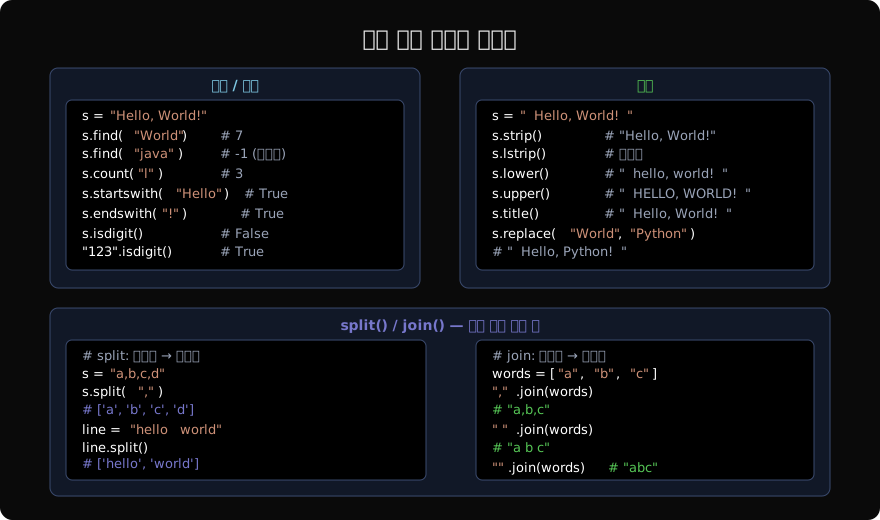
정렬과 채우기
"hi".center(10)      # "    hi    "
"hi".ljust(10)       # "hi        "
"hi".rjust(10)       # "        hi"
"hi".center(10, "*") # "****hi****"
"42".zfill(5)        # "00042"     — 숫자 앞을 0으로 채움
Python 3.9+ 신규 메서드
# removeprefix / removesuffix
"https://example.com".removeprefix("https://")   # "example.com"
"report.pdf".removesuffix(".pdf")                # "report"
기존 lstrip()/rstrip()은 문자 집합으로 제거했지만 이 메서드는 문자열을 정확히 제거한다.
"...aaa...".lstrip(".")   # "aaa..."  — 점 문자 제거
"...aaa...".removeprefix("...")  # "aaa..."  — 접두사 제거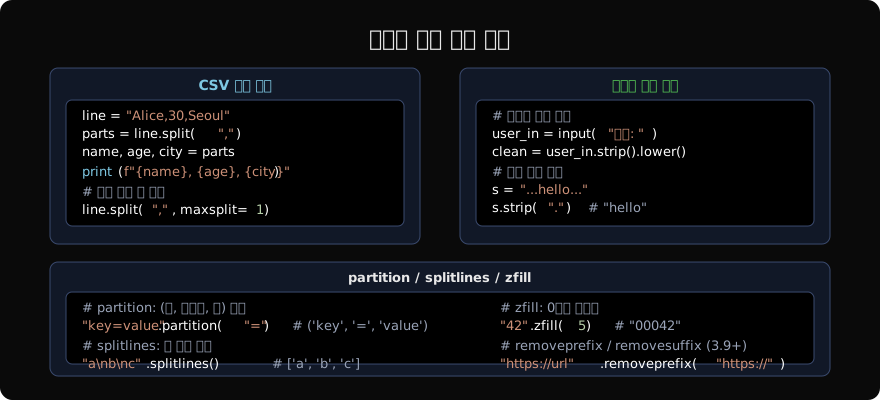
자주 쓰는 메서드 요약
| 범주 | 메서드 |
|---|---|
| 대소문자 | lower(), upper(), title(), capitalize(), casefold() |
| 공백 | strip(), lstrip(), rstrip() |
| 검색 | find(), rfind(), index(), count(), startswith(), endswith() |
| 판별 | isdigit(), isalpha(), isalnum(), isspace() |
| 치환 | replace() |
| 분리 | split(), rsplit(), splitlines(), partition() |
| 결합 | join() |
| 채우기 | center(), ljust(), rjust(), zfill() |
| 3.9+ | removeprefix(), removesuffix() |
지난 글: f-string: 파이썬 문자열 포매팅의 정석
읽어주셔서 감사합니다. 😊
PALDYN / ARTICLE AI
글의 개념, 수식, 코드에 대해 물어보세요.
질문과 관련된 문단을 골라 답변의 문맥으로 사용합니다.생각 중 · 0초