

AbortController로 fetch 요청 취소하기
AbortController와 AbortSignal의 구조, useEffect cleanup에서 controller.abort()로 요청을 취소하는 방법, AbortError 처리, 여러 요청 동시 취소, timeout 신호, 그리고 axios와의 연동을 다룹니다.
지난 글에서 경쟁 조건을 ignore 플래그로 해결하는 방법을 살펴봤다. ignore 패턴은 응답을 무시할 뿐 네트워크 요청 자체는 계속 진행된다. AbortController를 쓰면 진행 중인 요청 자체를 취소해 불필요한 네트워크 대역폭을 아낄 수 있다.
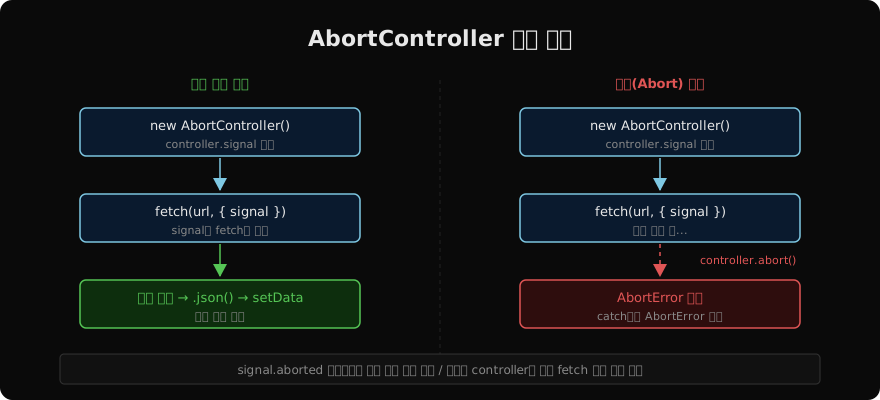
AbortController 구조
AbortController는 두 가지 부분으로 이루어진다.
const controller = new AbortController();
// controller.signal — AbortSignal 객체
// controller.abort() — 취소 명령controller.signal은 fetch에 연결되는 신호 객체다. controller.abort()를 호출하면 이 신호가 aborted 상태로 바뀌고, 연결된 fetch는 AbortError로 중단된다.
useEffect에서 사용하기
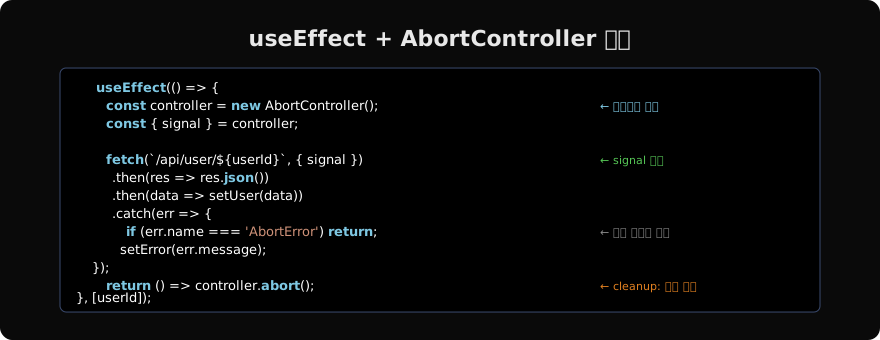
패턴은 단순하다. Effect 시작 시 컨트롤러를 만들고, cleanup에서 abort()를 호출한다.
function UserProfile({ userId }) {
  const [user, setUser] = useState(null);
  const [error, setError] = useState(null);
  const [isLoading, setIsLoading] = useState(true);

  useEffect(() => {
    const controller = new AbortController();
    setIsLoading(true);
    setError(null);

    fetch(`/api/users/${userId}`, { signal: controller.signal })
      .then(res => {
        if (!res.ok) throw new Error(`HTTP ${res.status}`);
        return res.json();
      })
      .then(data => {
        setUser(data);
        setIsLoading(false);
      })
      .catch(err => {
        if (err.name === 'AbortError') return; // 취소는 에러가 아님
        setError(err.message);
        setIsLoading(false);
      });

    return () => controller.abort(); // cleanup: 요청 취소
  }, [userId]);

  if (isLoading) return <Spinner />;
  if (error) return <ErrorMessage message={error} />;
  return <Profile user={user} />;
}userId가 바뀌면 cleanup이 실행되어 이전 요청이 취소되고, 새 Effect가 시작되어 새 요청이 만들어진다.
AbortError 처리
controller.abort()가 호출되면 fetch promise가 AbortError 타입의 에러로 reject된다.
.catch(err => {
  if (err.name === 'AbortError') {
    // 취소된 요청 — 아무것도 하지 않음
    return;
  }
  // 실제 에러만 처리
  setError(err.message);
})AbortError를 처리하지 않으면 Uncaught Error로 콘솔에 출력되거나, 에러 상태를 잘못 설정한다.
여러 요청 동시 취소
하나의 AbortController로 여러 fetch를 동시에 취소할 수 있다.
useEffect(() => {
  const controller = new AbortController();
  const { signal } = controller;

  // 두 요청 모두 같은 signal 사용
  Promise.all([
    fetch('/api/user', { signal }).then(r => r.json()),
    fetch('/api/posts', { signal }).then(r => r.json()),
  ]).then(([user, posts]) => {
    setUser(user);
    setPosts(posts);
  }).catch(err => {
    if (err.name === 'AbortError') return;
    setError(err.message);
  });

  return () => controller.abort(); // 두 요청 모두 취소
}, []);
컴포넌트 언마운트 시 두 요청이 동시에 취소된다.
Timeout과 결합
AbortSignal.timeout(ms)로 타임아웃을 설정할 수 있다.
useEffect(() => {
  const controller = new AbortController();

  // 5초 후 자동 취소 + cleanup 취소 모두 지원
  const timeoutSignal = AbortSignal.timeout(5000);

  // 두 신호 중 하나라도 abort되면 요청 취소
  const combinedSignal = AbortSignal.any([
    controller.signal,
    timeoutSignal,
  ]);

  fetch('/api/slow-endpoint', { signal: combinedSignal })
    .then(res => res.json())
    .then(setData)
    .catch(err => {
      if (err.name === 'AbortError') {
        if (timeoutSignal.aborted) {
          setError('요청 시간 초과');
        }
        return;
      }
      setError(err.message);
    });

  return () => controller.abort();
}, []);AbortSignal.timeout은 최신 브라우저에서 지원된다. 구형 환경에서는 setTimeout + controller.abort()를 함께 쓴다.
axios와 함께 사용
axios는 CancelToken 대신 최근 버전부터 AbortController를 지원한다.
useEffect(() => {
  const controller = new AbortController();

  axios.get(`/api/users/${userId}`, {
    signal: controller.signal,
  })
    .then(res => setUser(res.data))
    .catch(err => {
      if (axios.isCancel(err)) return; // axios 취소 감지
      setError(err.message);
    });

  return () => controller.abort();
}, [userId]);
axios는 취소된 요청을 axios.isCancel(err) 또는 err.name === 'CanceledError'로 감지한다.
커스텀 훅으로 추상화
반복되는 패턴을 커스텀 훅으로 만들 수 있다.
function useFetch(url) {
  const [data, setData] = useState(null);
  const [isLoading, setIsLoading] = useState(true);
  const [error, setError] = useState(null);

  useEffect(() => {
    if (!url) return;

    const controller = new AbortController();
    setIsLoading(true);

    fetch(url, { signal: controller.signal })
      .then(res => {
        if (!res.ok) throw new Error(`HTTP ${res.status}`);
        return res.json();
      })
      .then(data => { setData(data); setIsLoading(false); })
      .catch(err => {
        if (err.name === 'AbortError') return;
        setError(err.message);
        setIsLoading(false);
      });

    return () => controller.abort();
  }, [url]);

  return { data, isLoading, error };
}

// 사용
function UserPage({ userId }) {
  const { data: user, isLoading, error } = useFetch(`/api/users/${userId}`);
  // ...
}
실제 프로덕션에서는 TanStack Query나 SWR 같은 라이브러리가 이 모든 것을 처리해준다. 하지만 기본 원리를 이해하면 라이브러리의 동작도 더 잘 예측할 수 있다.
지난 글: Effect 경쟁 조건 — 오래된 응답이 나중에 도착할 때
읽어주셔서 감사합니다. 😊
PALDYN / ARTICLE AI
글의 개념, 수식, 코드에 대해 물어보세요.
질문과 관련된 문단을 골라 답변의 문맥으로 사용합니다.생각 중 · 0초