

커스텀 훅 만들기 — 로직을 훅으로 분리하는 법
React 커스텀 훅의 개념, 만드는 방법, 상태가 공유되지 않는 이유, 그리고 실용적인 예제(useFetch, useToggle, useWindowSize)를 코드와 함께 설명합니다.
지난 글에서 useCallback으로 함수를 캐싱하는 방법을 배웠다. 이제 훅을 직접 만드는 단계로 넘어간다. 커스텀 훅은 React 훅을 사용하는 함수를 컴포넌트 밖으로 꺼내 재사용 가능하게 만드는 패턴이다.
커스텀 훅이란
커스텀 훅은 이름이 use로 시작하는 JavaScript 함수다. 내부에서 useState, useEffect 등 다른 훅을 자유롭게 호출할 수 있다.
// 커스텀 훅 정의
function useLocalStorage(key, defaultValue) {
  const [value, setValue] = useState(() => {
    const saved = localStorage.getItem(key);
    return saved !== null ? JSON.parse(saved) : defaultValue;
  });

  const setAndStore = useCallback((newValue) => {
    setValue(newValue);
    localStorage.setItem(key, JSON.stringify(newValue));
  }, [key]);

  return [value, setAndStore];
}

// 컴포넌트에서 사용
function Settings() {
  const [theme, setTheme] = useLocalStorage('theme', 'dark');
  return (
    <button onClick={() => setTheme(t => t === 'dark' ? 'light' : 'dark')}>
      {theme === 'dark' ? '라이트 모드' : '다크 모드'}
    </button>
  );
}
핵심 규칙: 상태는 공유되지 않는다
커스텀 훅의 가장 중요한 특성이다. 같은 훅을 두 컴포넌트에서 쓰더라도 각 컴포넌트는 독립적인 상태를 가진다.
function useCounter(initial = 0) {
  const [count, setCount] = useState(initial);
  const inc = useCallback(() => setCount(c => c + 1), []);
  return { count, inc };
}

function ComponentA() {
  const { count, inc } = useCounter(); // 독립적인 count 상태
  return <button onClick={inc}>{count}</button>;
}

function ComponentB() {
  const { count, inc } = useCounter(10); // 또 다른 독립 count 상태
  return <button onClick={inc}>{count}</button>;
}
A와 B의 count는 완전히 별개다. 훅은 로직을 공유하되 상태를 공유하지 않는다. 상태를 여러 컴포넌트가 공유하려면 Context나 외부 상태 관리 라이브러리가 필요하다.
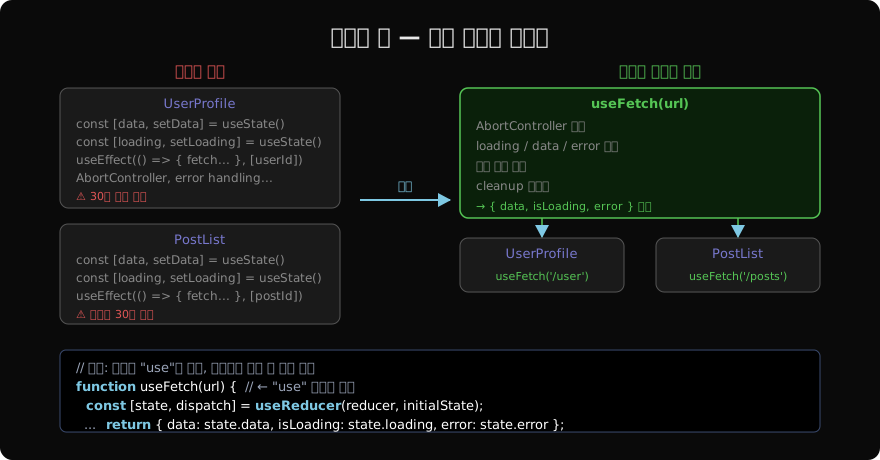
실용 예제 1: useFetch
function useFetch(url) {
  const [data, setData] = useState(null);
  const [isLoading, setIsLoading] = useState(true);
  const [error, setError] = useState(null);

  useEffect(() => {
    if (!url) return;
    const controller = new AbortController();
    setIsLoading(true);
    setError(null);

    fetch(url, { signal: controller.signal })
      .then(res => {
        if (!res.ok) throw new Error(`HTTP ${res.status}`);
        return res.json();
      })
      .then(data => { setData(data); setIsLoading(false); })
      .catch(err => {
        if (err.name === 'AbortError') return;
        setError(err); setIsLoading(false);
      });

    return () => controller.abort();
  }, [url]);

  return { data, isLoading, error };
}

// 사용처는 3줄
function UserPage({ id }) {
  const { data: user, isLoading, error } = useFetch(`/api/users/${id}`);
  if (isLoading) return <Spinner />;
  if (error) return <p>{error.message}</p>;
  return <UserCard user={user} />;
}
30줄짜리 useEffect 로직이 훅 안으로 들어가고, 컴포넌트는 3줄로 줄었다.
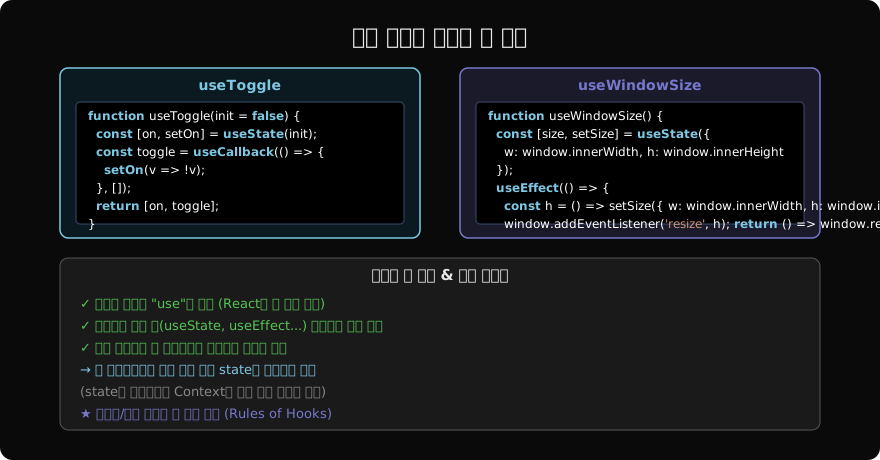
실용 예제 2: useToggle, useWindowSize
// useToggle — boolean 상태 토글
function useToggle(initial = false) {
  const [on, setOn] = useState(initial);
  const toggle = useCallback(() => setOn(v => !v), []);
  return [on, toggle];
}

// useWindowSize — 창 크기 추적
function useWindowSize() {
  const [size, setSize] = useState({
    width: window.innerWidth,
    height: window.innerHeight,
  });

  useEffect(() => {
    const handleResize = () => setSize({
      width: window.innerWidth,
      height: window.innerHeight,
    });
    window.addEventListener('resize', handleResize);
    return () => window.removeEventListener('resize', handleResize);
  }, []);

  return size;
}
훅으로 추출하는 기준
컴포넌트에서 관련된 useState + useEffect + 핸들러가 함께 움직이면 훅으로 추출할 후보다.
// 추출 전: 컴포넌트 안에 여러 관심사가 섞임
function ProductPage({ productId }) {
  // 관심사 1: 상품 데이터
  const [product, setProduct] = useState(null);
  useEffect(() => { fetchProduct(productId).then(setProduct); }, [productId]);

  // 관심사 2: 장바구니
  const [cart, setCart] = useState([]);
  const addToCart = useCallback(() => setCart(c => [...c, product]), [product]);

  // 관심사 3: 위시리스트
  const [wished, setWished] = useState(false);
  const toggleWish = useCallback(() => setWished(w => !w), []);

  // ...
}

// 추출 후: 각 관심사가 훅으로 분리
function ProductPage({ productId }) {
  const { data: product } = useFetch(`/api/products/${productId}`);
  const { cart, addToCart } = useCart();
  const [wished, toggleWish] = useToggle();
  // ...
}
훅으로 분리하면 컴포넌트는 렌더링에만 집중하고, 각 훅은 독립적으로 테스트할 수 있다.
훅에서 클린업 잊지 않기
커스텀 훅 안에서 addEventListener, setInterval, 외부 구독을 쓸 때 반드시 cleanup을 반환해야 한다.
function useOnlineStatus() {
  const [isOnline, setIsOnline] = useState(navigator.onLine);

  useEffect(() => {
    const setOnline = () => setIsOnline(true);
    const setOffline = () => setIsOnline(false);
    window.addEventListener('online', setOnline);
    window.addEventListener('offline', setOffline);
    return () => {
      window.removeEventListener('online', setOnline);
      window.removeEventListener('offline', setOffline);
    };
  }, []);

  return isOnline;
}
다음 글부터는 이 패턴을 응용한 useLocalStorage, useDebounce, useFetch 훅을 구체적으로 구현한다.
지난 글: useCallback 완전 정복 — 함수 메모이제이션
다음 글: useLocalStorage 커스텀 훅 — 브라우저 저장소 연동
읽어주셔서 감사합니다. 😊
PALDYN / ARTICLE AI
글의 개념, 수식, 코드에 대해 물어보세요.
질문과 관련된 문단을 골라 답변의 문맥으로 사용합니다.생각 중 · 0초