

useImperativeHandle — ref로 메서드 노출하기
useImperativeHandle로 forwardRef의 ref 노출 범위를 제한하는 방법, 커스텀 메서드를 부모에게 노출하는 패턴, 의존성 배열 사용법, 그리고 이 훅이 필요한 상황과 피해야 할 상황을 다룹니다.
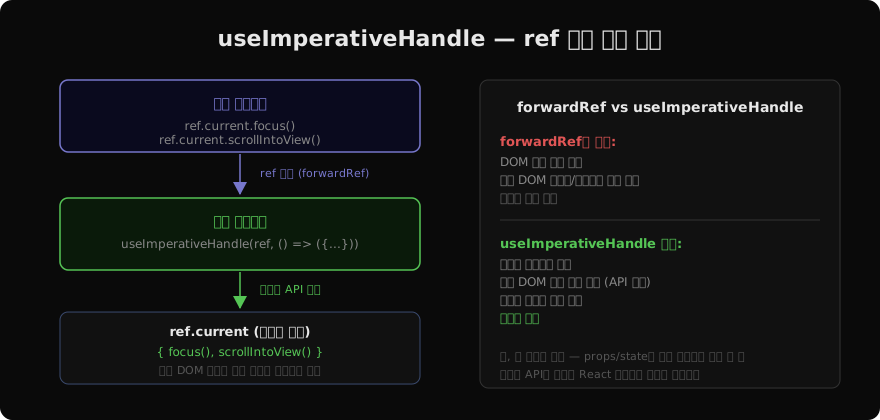
지난 글에서 forwardRef로 부모가 자식 DOM을 직접 가리킬 수 있게 하는 방법을 살펴봤다. forwardRef만 쓰면 부모는 자식의 DOM 요소 전체에 접근할 수 있다 — ref.current.style.color = 'red'처럼 마음대로 조작할 수 있다는 뜻이다. 이것은 캡슐화 측면에서 좋지 않다. useImperativeHandle은 부모에게 노출할 인터페이스를 자식이 직접 정의할 수 있게 해준다.
기본 개념
useImperativeHandle(ref, createHandle, deps?)은 세 가지 인수를 받는다.
ref:forwardRef에서 받은 refcreateHandle:ref.current에 넣을 객체를 반환하는 함수deps: (선택) 의존성 배열 — 변경 시 createHandle 재실행
useImperativeHandle(ref, () => ({
  focus() {
    inputRef.current.focus();
  },
  scrollIntoView() {
    inputRef.current.scrollIntoView({ behavior: 'smooth' });
  },
}));
부모에서 ref.current를 보면 실제 DOM 요소가 아니라 { focus, scrollIntoView } 객체다.
실제 사용 예시
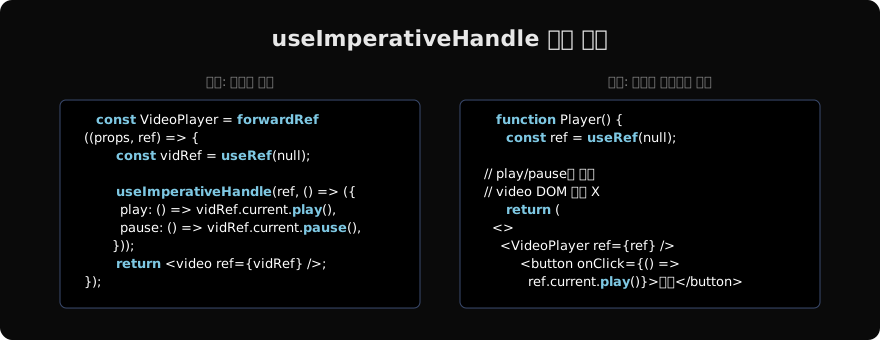
비디오 플레이어 컴포넌트를 구현해보자. 부모가 재생/일시정지를 명령할 수 있지만, 비디오 DOM의 나머지 속성은 건드리지 못하게 한다.
import { forwardRef, useRef, useImperativeHandle } from 'react';

const VideoPlayer = forwardRef(function VideoPlayer({ src }, ref) {
  const videoRef = useRef(null);

  useImperativeHandle(ref, () => ({
    play() {
      videoRef.current.play();
    },
    pause() {
      videoRef.current.pause();
    },
    // currentTime, volume 같은 다른 프로퍼티는 노출하지 않음
  }));

  return <video ref={videoRef} src={src} />;
});
부모는 ref.current.play()와 ref.current.pause()만 호출할 수 있다. ref.current.volume은 undefined다.
function Page() {
  const playerRef = useRef(null);

  return (
    <>
      <VideoPlayer ref={playerRef} src="/intro.mp4" />
      <button onClick={() => playerRef.current.play()}>재생</button>
      <button onClick={() => playerRef.current.pause()}>일시정지</button>
    </>
  );
}
커스텀 메서드 추가
useImperativeHandle의 진짜 힘은 실제 DOM 메서드를 그대로 노출하는 것이 아니라, 자식 컴포넌트 로직을 캡슐화한 커스텀 메서드를 만드는 데 있다.
const SearchInput = forwardRef(function SearchInput(props, ref) {
  const inputRef = useRef(null);
  const [query, setQuery] = useState('');

  useImperativeHandle(ref, () => ({
    focus() {
      inputRef.current.focus();
    },
    clear() {
      setQuery('');
      inputRef.current.value = '';
    },
    getValue() {
      return query;
    },
  }));

  return (
    <input
      ref={inputRef}
      value={query}
      onChange={e => setQuery(e.target.value)}
      {...props}
    />
  );
});clear()는 단순히 input.value = ''가 아니라, React state까지 함께 초기화한다. 이런 복합 동작을 명령형 API로 깔끔하게 제공할 수 있다.
의존성 배열
세 번째 인수로 의존성 배열을 줄 수 있다. 생략하면 매 렌더마다 핸들 객체가 재생성된다.
useImperativeHandle(ref, () => ({
  focus() {
    inputRef.current.focus();
  },
  scrollTo(y) {
    containerRef.current.scrollTo({ top: y, behavior: 'smooth' });
  },
}), []); // 의존성 없음 — 한 번만 생성
핸들 내부의 메서드가 클로저로 최신 ref를 참조한다면 빈 배열로 두어도 안전하다. ref 자체는 항상 동일한 객체이기 때문이다.
언제 쓰고, 언제 피해야 할까
useImperativeHandle은 명령형 API다. React의 선언적 방식과 맞지 않는다.
적절한 상황:
- 포커스, 스크롤, 애니메이션 트리거처럼 시각적 동작이 일회성 명령으로 처리될 때
- 서드파티 라이브러리 컴포넌트에 ref 기반 API를 제공해야 할 때
피해야 할 상황:
- props/state로 충분히 해결되는 데이터 흐름을 명령형으로 바꾸는 것
- 서버 컴포넌트나 Next.js 환경에서 과도하게 사용하는 것
// 잘못된 패턴 — 명령형으로 데이터 주입
ref.current.setData(newData); // state로 해결할 것

// 올바른 패턴 — 선언형
<Component data={newData} /> // props로 전달
규칙은 간단하다: UI 상태를 바꾸고 싶으면 props/state, 일회성 동작을 명령하고 싶으면 ref.
지난 글: forwardRef — 부모가 자식 DOM을 제어하는 방법
다음 글: Callback Refs — ref 콜백 패턴
읽어주셔서 감사합니다. 😊
PALDYN / ARTICLE AI
글의 개념, 수식, 코드에 대해 물어보세요.
질문과 관련된 문단을 골라 답변의 문맥으로 사용합니다.생각 중 · 0초