

useReducer — 복잡한 상태 로직을 컴포넌트 밖으로
useReducer의 구조와 useState와의 비교, reducer 함수 작성 원칙, 초기 상태 지연 초기화, 복잡한 폼 상태 관리 예제, 그리고 useContext와 함께 쓰는 전역 상태 패턴을 다룹니다.
지난 글에서 useContext로 Prop Drilling 없이 상태를 공유하는 방법을 살펴봤다. 이번에는 useReducer를 다룬다. 여러 개의 state가 서로 연관된 로직을 가질 때, useState를 여러 개 쓰는 것보다 useReducer로 관련 로직을 하나의 함수로 모으는 것이 훨씬 관리하기 쉽다.
useReducer 기본 구조
const [state, dispatch] = useReducer(reducer, initialState);reducer:(state, action) => newState— 순수 함수initialState: 초기 상태 값state: 현재 상태dispatch: action을 보내는 함수
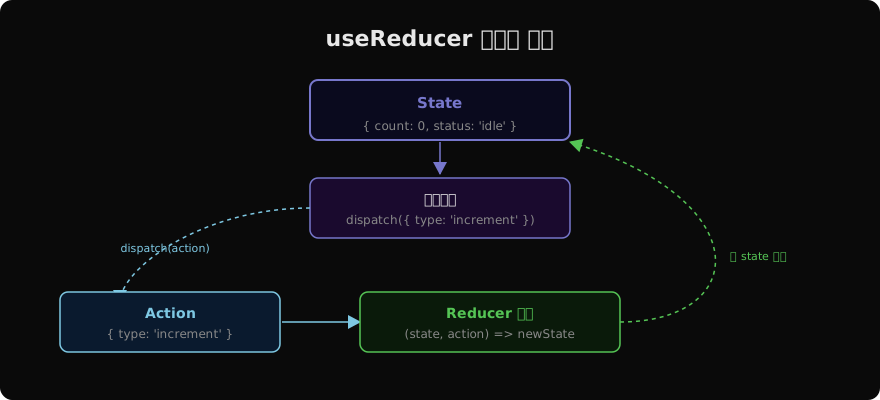
데이터 흐름은 단방향이다. 컴포넌트가 dispatch(action)을 호출하면, React가 현재 state와 action을 reducer에 넘겨 새 state를 얻고, 컴포넌트를 리렌더한다.
reducer 함수 작성
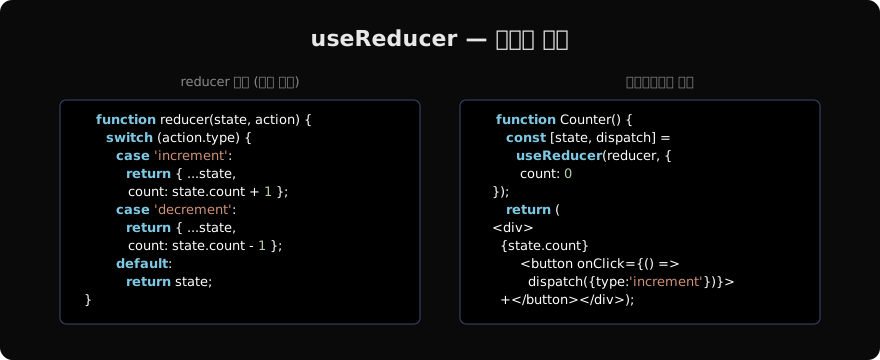
reducer는 현재 state와 action을 받아 새 state를 반환하는 순수 함수다.
function reducer(state, action) {
  switch (action.type) {
    case 'increment':
      return { ...state, count: state.count + 1 };
    case 'decrement':
      return { ...state, count: state.count - 1 };
    case 'reset':
      return { ...state, count: 0 };
    default:
      return state; // 알 수 없는 action은 state 그대로 반환
  }
}
중요한 규칙:
- 반드시 새 객체 반환 — state를 직접 변경하지 않음
- 사이드 이펙트 없음 — API 호출, random, 현재 시간 등 금지
- default case 항상 포함 — 알 수 없는 action 처리
useState vs useReducer
언제 useState를 쓰고 언제 useReducer를 쓸까?
// useState — 독립적인 단순 값들
const [name, setName] = useState('');
const [age, setAge] = useState(0);

// useReducer — 연관된 복잡한 상태
const [form, dispatch] = useReducer(formReducer, {
  name: '',
  age: 0,
  isSubmitting: false,
  errors: {},
});
useReducer를 선택하는 기준:
- 다음 state가 이전 state에 의존하는 경우가 많음
- 여러 state를 동시에 업데이트해야 함
- 상태 전환 로직이 복잡함
- 로직을 컴포넌트 밖에서 테스트하고 싶음
복잡한 폼 상태 관리
폼은 useReducer가 빛나는 전형적인 사례다.
const initialState = {
  email: '',
  password: '',
  isLoading: false,
  error: null,
};

function loginReducer(state, action) {
  switch (action.type) {
    case 'field_change':
      return {
        ...state,
        [action.field]: action.value,
        error: null, // 입력 시 에러 초기화
      };
    case 'submit_start':
      return { ...state, isLoading: true, error: null };
    case 'submit_success':
      return { ...state, isLoading: false };
    case 'submit_error':
      return { ...state, isLoading: false, error: action.message };
    default:
      return state;
  }
}

function LoginForm() {
  const [state, dispatch] = useReducer(loginReducer, initialState);

  async function handleSubmit(e) {
    e.preventDefault();
    dispatch({ type: 'submit_start' });
    try {
      await login(state.email, state.password);
      dispatch({ type: 'submit_success' });
    } catch (err) {
      dispatch({ type: 'submit_error', message: err.message });
    }
  }

  return (
    <form onSubmit={handleSubmit}>
      <input
        value={state.email}
        onChange={e => dispatch({ type: 'field_change', field: 'email', value: e.target.value })}
      />
      {state.error && <p>{state.error}</p>}
      <button disabled={state.isLoading}>로그인</button>
    </form>
  );
}isLoading, error, 각 필드 값이 서로 연관된 로직을 하나의 reducer로 관리한다. submit_start가 isLoading: true 와 error: null을 동시에 처리하는 것처럼, 상태 전환이 원자적으로 이루어진다.
초기화 함수 (init)
복잡한 초기 상태 계산을 지연하려면 세 번째 인수로 초기화 함수를 넘긴다.
function createInitialState(count) {
  return { count, history: [] };
}

const [state, dispatch] = useReducer(
  reducer,
  10, // 초기화 함수에 넘길 인수
  createInitialState // 처음 렌더에만 실행됨
);
이 방식은 초기 state 계산이 비용이 클 때 유용하다. createInitialState(10)은 첫 렌더에만 실행되고 이후 렌더에서는 무시된다.
useContext + useReducer 패턴
useReducer와 useContext를 결합하면 Redux 없이도 앱 수준 상태 관리를 구현할 수 있다.
const TodoDispatchContext = createContext(null);
const TodoStateContext = createContext(null);

function TodoProvider({ children }) {
  const [todos, dispatch] = useReducer(todosReducer, []);

  return (
    <TodoStateContext.Provider value={todos}>
      <TodoDispatchContext.Provider value={dispatch}>
        {children}
      </TodoDispatchContext.Provider>
    </TodoStateContext.Provider>
  );
}

// state와 dispatch를 별도 Context로 분리
// dispatch만 필요한 컴포넌트는 state 변경에 리렌더되지 않음
function AddTodo() {
  const dispatch = useContext(TodoDispatchContext);
  return (
    <button onClick={() => dispatch({ type: 'add', text: '새 할 일' })}>
      추가
    </button>
  );
}
dispatch Context와 state Context를 분리하면, dispatch만 사용하는 컴포넌트는 state가 변경되어도 리렌더되지 않는다.
지난 글: useContext — Prop Drilling 없이 전역 상태 공유
다음 글: Effect가 필요 없는 상황들
읽어주셔서 감사합니다. 😊
PALDYN / ARTICLE AI
글의 개념, 수식, 코드에 대해 물어보세요.
질문과 관련된 문단을 골라 답변의 문맥으로 사용합니다.생각 중 · 0초