

제어 컴포넌트와 비제어 컴포넌트 — 폼 상태 관리 전략
React에서 폼 입력값을 state로 관리하는 제어 컴포넌트와 ref로 DOM에서 직접 읽는 비제어 컴포넌트의 차이, 각각의 적합한 사용 사례, React Hook Form이 두 방식을 어떻게 조합하는지 설명합니다.
지난 글에서 커서 페이지네이션과 무한 스크롤 구현을 살펴봤습니다. 이번에는 폼(Form) 주제를 시작합니다. React에서 폼 입력을 다루는 두 가지 방식—제어 컴포넌트(Controlled Component)와 비제어 컴포넌트(Uncontrolled Component)—의 차이와 React Hook Form이 두 방식을 어떻게 결합하는지 정리합니다.
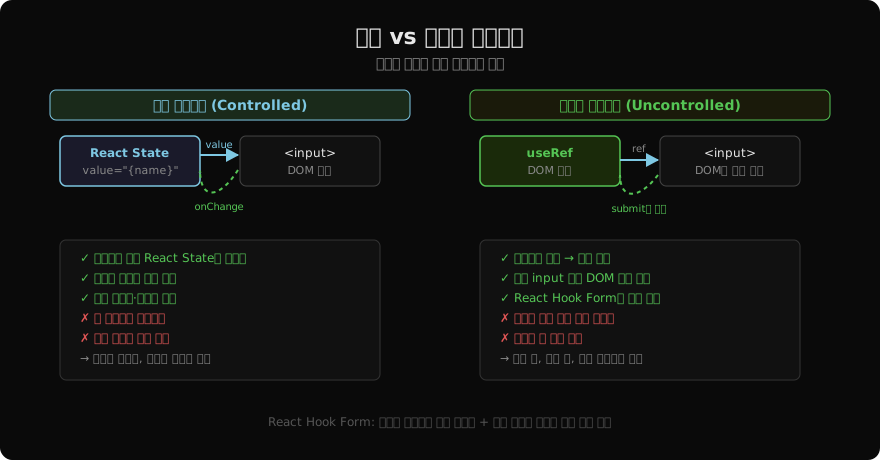
제어 컴포넌트 (Controlled Component)
React State가 진실의 단일 소스(Single Source of Truth)입니다. 사용자가 입력할 때마다 onChange로 State를 업데이트하고, value로 입력 요소에 반영합니다.
import { useState } from 'react';

function LoginForm() {
  const [email,    setEmail]    = useState('');
  const [password, setPassword] = useState('');
  const [error,    setError]    = useState('');

  function validate(email, password) {
    if (!email.includes('@')) return '이메일 형식이 아닙니다';
    if (password.length < 8)  return '비밀번호는 8자 이상이어야 합니다';
    return null;
  }

  function handleSubmit(e) {
    e.preventDefault();
    const err = validate(email, password);
    if (err) { setError(err); return; }
    // 서버로 전송
    login({ email, password });
  }

  return (
    <form onSubmit={handleSubmit}>
      <input
        type="email"
        value={email}
        onChange={e => setEmail(e.target.value)}
        placeholder="이메일"
      />
      <input
        type="password"
        value={password}
        onChange={e => setPassword(e.target.value)}
        placeholder="비밀번호 (8자 이상)"
      />
      {error && <p className="error">{error}</p>}
      <button type="submit">로그인</button>
    </form>
  );
}
제어 방식의 장점
- 실시간 유효성 검사: 입력 중에 즉시 에러 메시지 표시 가능
- 입력 포매팅: 전화번호
010-1234-5678형식으로 자동 변환 - 조건부 필드: 이전 입력값에 따라 다음 필드를 동적으로 표시/숨김
- 서브밋 전 차단: 유효하지 않으면 버튼 비활성화
// 실시간 포매팅 예시
function PhoneInput() {
  const [phone, setPhone] = useState('');

  function handleChange(e) {
    const raw = e.target.value.replace(/\D/g, ''); // 숫자만
    const formatted = raw
      .slice(0, 11)
      .replace(/(\d{3})(\d{0,4})(\d{0,4})/, (_, a, b, c) =>
        [a, b, c].filter(Boolean).join('-')
      );
    setPhone(formatted);
  }

  return <input value={phone} onChange={handleChange} placeholder="010-0000-0000" />;
}
주의: 과도한 리렌더링
필드가 많을수록, 입력이 빠를수록 리렌더링 횟수가 많아집니다. 메모이제이션(useMemo, useCallback, React.memo)이나 비제어 방식으로 전환을 고려합니다.
비제어 컴포넌트 (Uncontrolled Component)
DOM이 직접 값을 관리합니다. React는 ref로 필요할 때만 DOM에서 값을 읽습니다. 입력 중에 리렌더링이 발생하지 않습니다.
import { useRef } from 'react';

function SimpleForm() {
  const nameRef  = useRef(null);
  const emailRef = useRef(null);

  function handleSubmit(e) {
    e.preventDefault();
    const data = {
      name:  nameRef.current.value,
      email: emailRef.current.value,
    };
    console.log(data); // 서밋 시점에 한 번만 읽음
  }

  return (
    <form onSubmit={handleSubmit}>
      <input ref={nameRef}  type="text"  placeholder="이름" />
      <input ref={emailRef} type="email" placeholder="이메일" />
      <button type="submit">제출</button>
    </form>
  );
}defaultValue로 초기값 설정
비제어 컴포넌트는 value 대신 defaultValue로 초기값을 설정합니다.
// ✓ 비제어: 초기값만 설정, 이후 DOM이 관리
<input ref={nameRef} defaultValue={user.name} />

// ❌ 비제어에 value 쓰면 "읽기 전용" 경고
<input ref={nameRef} value={user.name} />
파일 input — 항상 비제어
<input type="file" />은 React에서 항상 비제어로 사용해야 합니다. 파일은 보안상 JS로 값을 설정할 수 없기 때문입니다.
function FileUpload() {
  const fileRef = useRef(null);

  async function handleSubmit(e) {
    e.preventDefault();
    const file = fileRef.current.files[0];
    if (!file) return;

    const formData = new FormData();
    formData.append('file', file);
    await fetch('/api/upload', { method: 'POST', body: formData });
  }

  return (
    <form onSubmit={handleSubmit}>
      <input ref={fileRef} type="file" accept=".pdf,.jpg,.png" />
      <button type="submit">업로드</button>
    </form>
  );
}
React Hook Form — 두 방식의 장점 결합
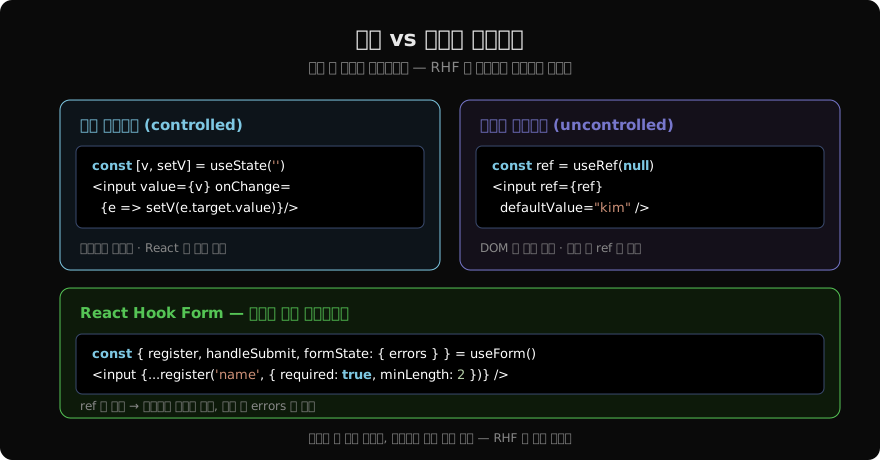
React Hook Form(RHF)은 내부적으로 비제어 방식을 사용해 성능을 최적화하면서, 선언적 유효성 검사와 에러 메시지 같은 제어 방식의 편의성을 제공합니다.
import { useForm } from 'react-hook-form';

function RegisterForm() {
  const {
    register,
    handleSubmit,
    watch,
    formState: { errors, isSubmitting },
  } = useForm({ defaultValues: { name: '', email: '', password: '' } });

  const password = watch('password'); // 특정 필드만 구독

  async function onSubmit(data) {
    await registerUser(data);
  }

  return (
    <form onSubmit={handleSubmit(onSubmit)}>
      <input
        {...register('name', {
          required:  '이름을 입력해 주세요',
          minLength: { value: 2, message: '이름은 2자 이상' },
        })}
        placeholder="이름"
      />
      {errors.name && <p>{errors.name.message}</p>}

      <input
        {...register('email', {
          required: '이메일을 입력해 주세요',
          pattern:  { value: /^[^\s@]+@[^\s@]+\.[^\s@]+$/, message: '이메일 형식' },
        })}
        type="email"
        placeholder="이메일"
      />
      {errors.email && <p>{errors.email.message}</p>}

      <input
        {...register('password', {
          required:  '비밀번호를 입력해 주세요',
          minLength: { value: 8, message: '8자 이상' },
        })}
        type="password"
        placeholder="비밀번호"
      />

      <input
        {...register('confirmPassword', {
          validate: v => v === password || '비밀번호가 일치하지 않습니다',
        })}
        type="password"
        placeholder="비밀번호 확인"
      />
      {errors.confirmPassword && <p>{errors.confirmPassword.message}</p>}

      <button type="submit" disabled={isSubmitting}>
        {isSubmitting ? '가입 중...' : '회원가입'}
      </button>
    </form>
  );
}register()는 ref, onChange, onBlur, name을 반환해 input에 spread합니다. 입력 중에는 리렌더링이 없고, 유효성 검사 에러가 발생할 때만 리렌더링됩니다.
언제 어떤 방식을 선택할까
| 상황 | 추천 |
|---|---|
| 단순 폼, 서밋 시에만 값 필요 | 비제어 또는 RHF |
| 실시간 유효성 검사·포매팅 | 제어 |
| 대형 폼 (10개 이상 필드) | RHF |
| 파일 업로드 | 비제어 (항상) |
| 조건부 필드 많은 복잡한 폼 | RHF + watch() |
| 외부 UI 라이브러리 (MUI, Ant) | RHF + Controller |
지난 글: 페이지네이션 클라이언트 — 커서·오프셋·무한 스크롤 구현
다음 글: 폼 유효성 검사 — RHF + Zod로 견고한 폼 만들기
읽어주셔서 감사합니다. 😊
PALDYN / ARTICLE AI
글의 개념, 수식, 코드에 대해 물어보세요.
질문과 관련된 문단을 골라 답변의 문맥으로 사용합니다.생각 중 · 0초