

Spring AOP @Aspect 실전: Logging·성능·보안 Aspect 작성하기
실무에서 자주 쓰는 Spring AOP Aspect 패턴—요청 로깅, 실행시간 측정, 메서드 보안, 재시도—을 단계별로 작성하고 다중 Aspect 실행 순서와 @Order 제어까지 다룹니다.
지난 글에서 Spring AOP가 JDK 동적 프록시와 CGLIB 중 어느 것을 사용하는지, 그리고 프록시가 언제 만들어지는지 살펴봤습니다. 이번에는 실제로 @Aspect 클래스를 어떻게 구조화하고, 실무에서 자주 필요한 로깅·성능 측정·보안·재시도 패턴을 코드로 작성합니다.
@Aspect 클래스의 기본 구조
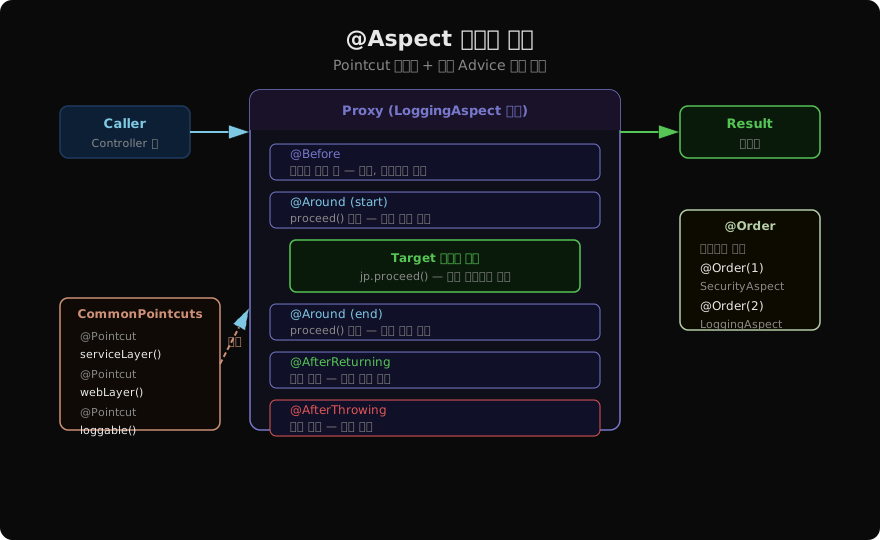
Aspect 클래스는 @Aspect와 @Component를 함께 붙입니다. @Aspect만으로는 Spring 빈으로 등록되지 않기 때문에 두 어노테이션이 모두 필요합니다.
@Aspect
@Component
@Order(10)   // 낮을수록 먼저 실행 (기본값 Integer.MAX_VALUE)
public class RequestLoggingAspect {

    private static final Logger log =
            LoggerFactory.getLogger(RequestLoggingAspect.class);

    // ── Pointcut 선언 (재사용 단위) ──────────────────────────────
    @Pointcut("within(@org.springframework.stereotype.Service *)")
    public void serviceBean() {}

    @Pointcut("@annotation(com.example.annotation.Loggable)")
    public void loggableMethod() {}

    @Pointcut("serviceBean() || loggableMethod()")
    public void logTarget() {}
}
Pointcut을 메서드로 분리해두면 여러 Advice에서 재사용하거나 별도 CommonPointcuts 클래스로 모아 패키지 전체에서 공유할 수 있습니다.
패턴 1: 요청 로깅 + 실행시간 측정 (@Around)
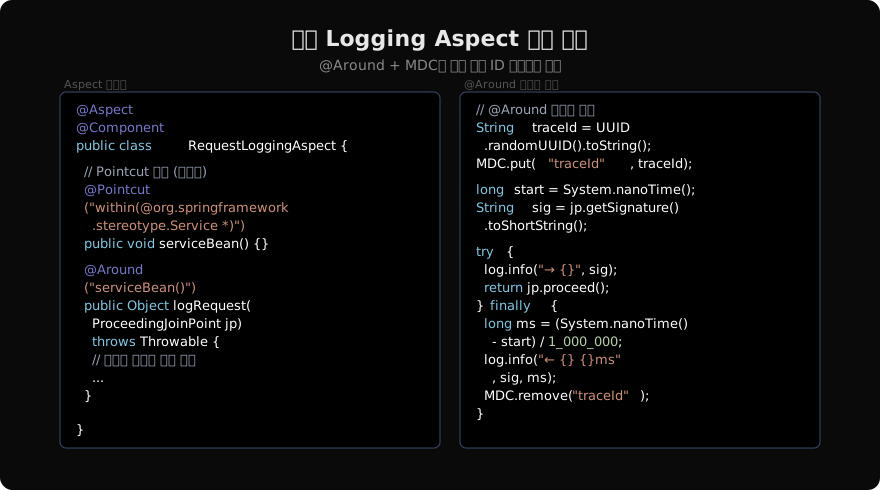
MDC(Mapped Diagnostic Context)를 함께 활용하면 분산 환경에서도 요청 단위로 로그를 추적할 수 있습니다.
@Around("logTarget()")
public Object logRequest(ProceedingJoinPoint jp) throws Throwable {
    String traceId = UUID.randomUUID().toString().substring(0, 8);
    String sig      = jp.getSignature().toShortString();

    MDC.put("traceId", traceId);
    long start = System.nanoTime();
    try {
        log.info("→ {} args={}", sig, Arrays.toString(jp.getArgs()));
        return jp.proceed();
    } catch (Throwable t) {
        log.error("✗ {} threw {}", sig, t.getClass().getSimpleName());
        throw t;
    } finally {
        long ms = (System.nanoTime() - start) / 1_000_000;
        log.info("← {} {}ms", sig, ms);
        MDC.remove("traceId");
    }
}
jp.getArgs() 결과를 그대로 로깅하면 민감 정보(비밀번호, 카드번호 등)가 노출될 수 있습니다. 운영 환경에서는 마스킹 유틸리티를 거쳐야 합니다.
패턴 2: 커스텀 어노테이션 + @Around
특정 메서드에만 적용하고 싶을 때는 커스텀 어노테이션을 Pointcut으로 사용합니다.
// 1. 어노테이션 정의
@Target(ElementType.METHOD)
@Retention(RetentionPolicy.RUNTIME)
public @interface Retry {
    int times() default 3;
    long delayMs() default 200;
    Class<? extends Throwable>[] on() default {TransientDataAccessException.class};
}

// 2. Aspect 구현
@Aspect
@Component
public class RetryAspect {

    @Around("@annotation(retry)")   // 파라미터에 어노테이션 바인딩
    public Object doRetry(ProceedingJoinPoint jp, Retry retry) throws Throwable {
        int maxTimes  = retry.times();
        long delayMs  = retry.delayMs();

        Throwable lastError = null;
        for (int attempt = 1; attempt <= maxTimes; attempt++) {
            try {
                return jp.proceed();
            } catch (Throwable t) {
                if (isRetryable(t, retry.on())) {
                    lastError = t;
                    log.warn("Retry {}/{} for {} — {}",
                             attempt, maxTimes,
                             jp.getSignature().getName(),
                             t.getMessage());
                    Thread.sleep(delayMs * attempt);
                } else {
                    throw t;   // 재시도 대상이 아니면 즉시 전파
                }
            }
        }
        throw lastError;
    }

    private boolean isRetryable(Throwable t,
                                 Class<? extends Throwable>[] targets) {
        for (var cls : targets) {
            if (cls.isInstance(t)) return true;
        }
        return false;
    }
}

// 3. 사용
@Service
public class InventoryService {

    @Retry(times = 3, delayMs = 100)
    public void decreaseStock(Long productId, int qty) {
        // 일시적 DB 락 충돌 발생 가능
    }
}
패턴 3: @Before로 메서드 보안 검증
@Aspect
@Component
@Order(1)   // 보안은 가장 먼저 실행
public class SecurityCheckAspect {

    @Before("@annotation(com.example.annotation.RequiresRole)")
    public void checkRole(JoinPoint jp) {
        MethodSignature ms = (MethodSignature) jp.getSignature();
        RequiresRole ann   = ms.getMethod().getAnnotation(RequiresRole.class);

        Authentication auth =
                SecurityContextHolder.getContext().getAuthentication();

        if (auth == null || !auth.isAuthenticated()) {
            throw new AccessDeniedException("인증 필요");
        }

        boolean hasRole = auth.getAuthorities().stream()
                .anyMatch(a -> a.getAuthority().equals("ROLE_" + ann.value()));
        if (!hasRole) {
            throw new AccessDeniedException("권한 부족: " + ann.value());
        }
    }
}@PreAuthorize가 이미 Spring Security에서 같은 역할을 하므로, 실무에서는 @PreAuthorize를 사용하는 것이 우선입니다. 이 패턴은 Spring Security를 사용하지 않는 환경이나 커스텀 권한 모델이 필요할 때 유용합니다.
패턴 4: @AfterReturning으로 감사 로그 (Audit)
@Aspect
@Component
public class AuditAspect {

    private final AuditRepository auditRepository;

    @AfterReturning(
        pointcut = "execution(* com.example.service.*.*(..)) "
                 + "&& @annotation(com.example.annotation.Auditable)",
        returning = "result"
    )
    public void audit(JoinPoint jp, Object result) {
        MethodSignature sig = (MethodSignature) jp.getSignature();
        String actor = resolveCurrentUser();

        AuditLog log = AuditLog.builder()
                .actor(actor)
                .action(sig.getName())
                .targetType(sig.getDeclaringType().getSimpleName())
                .resultId(extractId(result))
                .timestamp(Instant.now())
                .build();

        auditRepository.save(log);
    }

    private String resolveCurrentUser() {
        Authentication auth =
                SecurityContextHolder.getContext().getAuthentication();
        return auth != null ? auth.getName() : "anonymous";
    }

    private String extractId(Object result) {
        if (result instanceof Identifiable<?> entity) {
            return String.valueOf(entity.getId());
        }
        return "N/A";
    }
}
다중 Aspect 실행 순서: @Order
여러 Aspect가 같은 Pointcut을 대상으로 할 때 실행 순서가 중요합니다.
// 실행 순서: SecurityAspect → LoggingAspect → RetryAspect
@Aspect @Component @Order(1)
public class SecurityAspect { ... }

@Aspect @Component @Order(2)
public class LoggingAspect { ... }

@Aspect @Component @Order(3)
public class RetryAspect { ... }
@Order 값이 낮을수록 먼저 @Before/@Around(start)가 실행되고 나중에 @After/@Around(end)가 실행됩니다. 보안 검증이 가장 바깥쪽(먼저 진입, 나중 종료)에 위치해야 하므로 @Order(1)이 적합합니다.
요청 ──→ SecurityAspect.before
         → LoggingAspect.around(start)
           → RetryAspect.around(start)
             → [Target 메서드]
           ← RetryAspect.around(end)
         ← LoggingAspect.around(end)
       ← SecurityAspect.after
CommonPointcuts 클래스 패턴
Pointcut이 여러 Aspect에서 공유될 때 별도 클래스로 추출합니다.
@Aspect   // Pointcut만 모아두는 클래스도 @Aspect 필요
@Component
public class CommonPointcuts {

    @Pointcut("within(com.example.web..*)")
    public void inWebLayer() {}

    @Pointcut("within(com.example.service..*)")
    public void inServiceLayer() {}

    @Pointcut("within(com.example.repository..*)")
    public void inDataLayer() {}

    @Pointcut("@annotation(org.springframework.transaction.annotation.Transactional)")
    public void transactional() {}
}

// 다른 Aspect에서 참조 (패키지 풀네임으로)
@Aspect @Component
public class PerformanceAspect {

    @Around("com.example.aop.CommonPointcuts.inServiceLayer()")
    public Object measure(ProceedingJoinPoint jp) throws Throwable {
        long start = System.nanoTime();
        try {
            return jp.proceed();
        } finally {
            long ms = (System.nanoTime() - start) / 1_000_000;
            Metrics.timer("service.execution.time")
                   .record(ms, TimeUnit.MILLISECONDS);
        }
    }
}
테스트에서 AOP 동작 확인
@SpringBootTest
class RetryAspectTest {

    @Autowired
    private InventoryService inventoryService;   // 프록시 빈 주입

    @MockBean
    private StockRepository stockRepository;

    @Test
    void retryThreeTimes_thenThrow() {
        // 3번 연속 TransientException 발생 설정
        given(stockRepository.decrease(anyLong(), anyInt()))
                .willThrow(TransientDataAccessException.class);

        assertThatThrownBy(() ->
                inventoryService.decreaseStock(1L, 5)
        ).isInstanceOf(TransientDataAccessException.class);

        // 3회 재시도 확인
        then(stockRepository).should(times(3))
                .decrease(anyLong(), anyInt());
    }
}
핵심 정리
- Aspect 클래스에는 반드시
@Aspect+@Component두 어노테이션이 필요 - Pointcut 메서드를 따로 선언해 두면 여러 Advice에서 재사용 가능
- 커스텀 어노테이션을 Pointcut 대상으로 쓰면
@annotation(ann)으로 어노테이션 인스턴스를 바인딩 가능 - 다중 Aspect는
@Order로 실행 순서 제어 (숫자 낮을수록 바깥 레이어) - 보안 → 로깅 → 비즈니스 순서가 일반적인 배치 전략
@SpringBootTest에서@Autowired로 받은 빈은 이미 프록시이므로 AOP가 동작
지난 글: Spring AOP 프록시: JDK 동적 프록시 vs CGLIB 완전 정리
다음 글: Spring AOP Pointcut 표현식 심화: execution·within·@annotation 완전 정복
읽어주셔서 감사합니다. 😊
PALDYN / ARTICLE AI
글의 개념, 수식, 코드에 대해 물어보세요.
질문과 관련된 문단을 골라 답변의 문맥으로 사용합니다.생각 중 · 0초