

Spring Cloud Config Server: 중앙화된 설정 관리
Spring Cloud Config Server로 마이크로서비스 설정을 Git에서 중앙 관리하는 방법, 프로파일별 분리, @RefreshScope 동적 갱신, 민감 정보 암호화까지 다룹니다.
지난 글에서 Spring Cloud Gateway로 API 진입점을 구성하는 방법을 다뤘다. 이번 글에서는 MSA에서 수십 개의 서비스 설정을 일관되게 관리하는 방법인 Spring Cloud Config Server를 살펴본다.
설정 관리가 왜 어려운가
모놀리스에서는 application.yml 하나로 모든 설정을 관리했다. MSA로 전환하면 서비스가 10개라면 application.yml도 10개다. 더 심각한 문제는 환경(dev, staging, prod)이 늘어날 때다.
- 설정 분산: 각 서비스가 자체 설정 파일을 가지면 동일 설정 변경 시 10곳을 수정해야 한다.
- 비밀 관리: DB 비밀번호, API 키 같은 민감 정보가 코드 저장소에 평문으로 남는다.
- 변경 이력 추적 불가: 누가 언제 어떤 설정을 바꿨는지 추적하기 어렵다.
- 재배포 없이 설정 변경 불가: 설정 하나 바꾸려면 서비스를 재시작해야 한다.
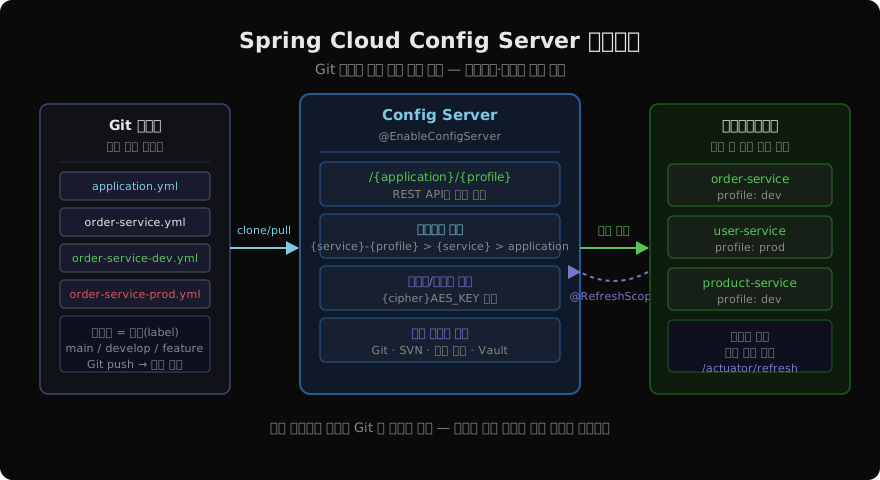
Spring Cloud Config Server는 이 문제들을 Git 기반의 중앙 설정 서버로 해결한다.
설정 서버 구성
독립 Spring Boot 애플리케이션으로 Config Server를 만든다.
<dependency>
    <groupId>org.springframework.cloud</groupId>
    <artifactId>spring-cloud-config-server</artifactId>
</dependency>@SpringBootApplication
@EnableConfigServer
public class ConfigServerApplication {
public static void main(String[] args) {
SpringApplication.run(ConfigServerApplication.class, args);
}
}# config-server/application.yml
server:
port: 8888
spring:
application:
name: config-server
cloud:
config:
server:
git:
uri: https://github.com/myorg/service-configs
default-label: main
search-paths: '{application}' # 서비스 이름으로 된 하위 폴더 탐색
clone-on-start: true
timeout: 10
# private repo면 SSH 키 또는 username/password 추가clone-on-start: true로 설정하면 서버 기동 시 Git 저장소를 미리 클론해서 첫 요청 지연을 방지한다.
Git 저장소 구조
Config Server가 읽어갈 Git 저장소의 권장 구조다.
service-configs/
├── application.yml           # 모든 서비스 공통 설정
├── application-dev.yml       # dev 환경 공통 설정
├── application-prod.yml      # prod 환경 공통 설정
├── order-service/
│   ├── order-service.yml     # order-service 전용 설정
│   ├── order-service-dev.yml # order-service dev 환경
│   └── order-service-prod.yml
└── user-service/
    ├── user-service.yml
    └── user-service-prod.yml
Config Server는 클라이언트가 order-service + dev 프로파일로 요청하면 다음 파일들을 우선순위 높은 순으로 병합해서 반환한다.
order-service/order-service-dev.yml(가장 구체적)order-service/order-service.ymlapplication-dev.ymlapplication.yml(가장 일반적)
더 구체적인 파일의 값이 일반 파일의 값을 덮어쓴다.
Config Server REST API
Config Server는 설정을 REST API로 노출한다.
GET /{application}/{profile}[/{label}]
GET /{application}-{profile}.yml
GET /{label}/{application}-{profile}.yml
예시 요청:
# order-service의 dev 프로파일 설정 조회
curl http://localhost:8888/order-service/dev

# YAML 형식으로 직접 조회
curl http://localhost:8888/order-service-dev.yml

# 특정 브랜치(label) 지정
curl http://localhost:8888/main/order-service-prod.yml
클라이언트 설정
각 마이크로서비스에 config client 의존성을 추가한다.
<dependency>
    <groupId>org.springframework.cloud</groupId>
    <artifactId>spring-cloud-starter-config</artifactId>
</dependency>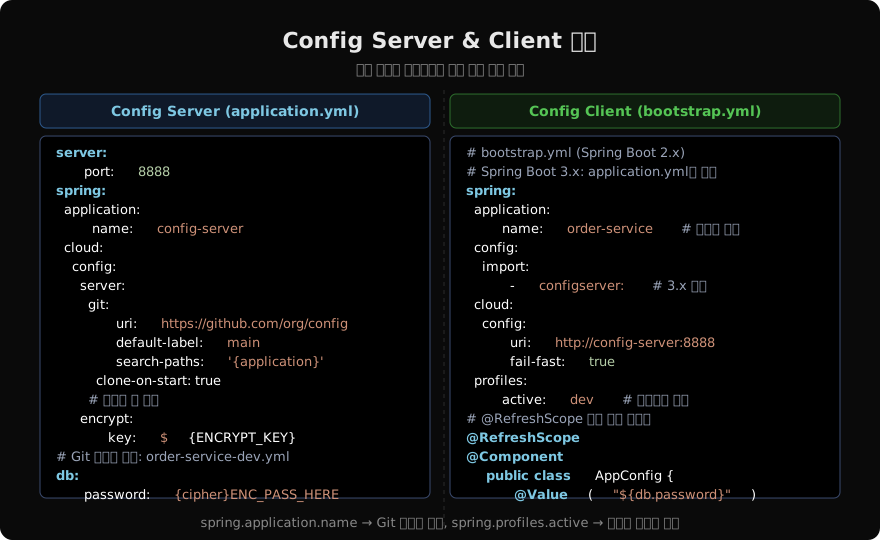
Spring Boot 3.x에서는 bootstrap.yml 대신 application.yml에 spring.config.import를 사용한다.
# application.yml (Spring Boot 3.x 방식)
spring:
  application:
    name: order-service           # Git 파일명과 매칭됨
  profiles:
    active: ${SPRING_PROFILES_ACTIVE:dev}
  config:
    import: "configserver:"       # Config Server에서 설정 가져오기
  cloud:
    config:
      uri: http://config-server:8888
      fail-fast: true             # 서버 연결 실패 시 기동 중단
      retry:
        max-attempts: 6
        initial-interval: 2000
fail-fast: true와 retry 설정은 Config Server가 아직 기동 중일 때 클라이언트가 무한히 기다리거나 잘못된 설정으로 기동되는 것을 방지한다.
@RefreshScope: 재시작 없이 설정 갱신
Spring Cloud Config의 핵심 기능 중 하나는 동적 설정 갱신이다. Git에서 설정을 변경한 후 서비스를 재시작하지 않고 갱신하려면 @RefreshScope를 사용한다.
@RefreshScope
@Component
@ConfigurationProperties(prefix = "app")
@Data
public class AppProperties {
    private String featureFlag;
    private int maxRetries;
    private String externalApiUrl;
}
설정 변경 후 해당 서비스의 /actuator/refresh 엔드포인트를 POST로 호출하면 @RefreshScope 빈이 재생성된다.
# 설정 갱신 트리거
curl -X POST http://order-service:8081/actuator/refresh
# Actuator refresh 엔드포인트 활성화
management:
endpoints:
web:
exposure:
include: refresh, health, infoSpring Cloud Bus로 일괄 갱신
서비스가 많아지면 각 서비스마다 /actuator/refresh를 호출하는 것이 번거롭다. Spring Cloud Bus는 메시지 브로커(RabbitMQ 또는 Kafka)를 통해 모든 서비스에 갱신 신호를 일괄 전파한다.
<!-- RabbitMQ 기반 Bus 사용 -->
<dependency>
    <groupId>org.springframework.cloud</groupId>
    <artifactId>spring-cloud-starter-bus-amqp</artifactId>
</dependency>
Config Server에 /actuator/busrefresh를 POST로 호출하면 모든 클라이언트 서비스가 동시에 설정을 갱신한다. GitHub Webhook을 여기에 연결하면 Git push 한 번으로 전체 설정 갱신이 자동화된다.
# Config Server + Client 모두에 RabbitMQ 설정 추가
spring:
  rabbitmq:
    host: rabbitmq
    port: 5672
    username: guest
    password: guest
민감 정보 암호화
DB 비밀번호, API 키 같은 민감 정보는 Git에 평문으로 저장하면 안 된다. Config Server는 대칭키 또는 비대칭키 암호화를 지원한다.
# Config Server 암호화 키 설정
encrypt:
  key: ${ENCRYPT_KEY}   # 환경 변수로 관리
값을 암호화하려면 Config Server의 /encrypt 엔드포인트를 사용한다.
# 값 암호화
curl -X POST http://config-server:8888/encrypt -d "mySecretPassword"
# → AQB3xyzEncryptedValue...

# 값 복호화 확인
curl -X POST http://config-server:8888/decrypt -d "AQB3xyzEncryptedValue..."
# → mySecretPassword
Git 저장소의 설정 파일에 암호화된 값을 {cipher} 접두사와 함께 저장한다.
# order-service-prod.yml (Git 저장소)
spring:
  datasource:
    password: '{cipher}AQB3xyzEncryptedValue...'
  redis:
    password: '{cipher}AQC9anotherEncryptedValue...'
Config Server가 클라이언트에 설정을 내려줄 때 자동으로 복호화한다.
운영 환경에서는 HashiCorp Vault를 백엔드로 사용하는 것이 더 안전하다.
spring.cloud.config.server.vault설정으로 통합할 수 있다.
네이티브 프로파일: 로컬 파일 백엔드
개발 환경에서 Git 없이 로컬 파일시스템을 백엔드로 사용할 수 있다.
spring:
  profiles:
    active: native
  cloud:
    config:
      server:
        native:
          search-locations:
            - classpath:/configs
            - file:${user.home}/config-repo
실무 고려사항
Config Server 고가용성: 운영 환경에서는 Config Server 2대 이상으로 클러스터를 구성하고, 클라이언트의 uri에 콤마로 구분해 나열한다.
spring:
  cloud:
    config:
      uri: http://config1:8888,http://config2:8888
Kubernetes 환경: k8s에서는 Config Server 대신 ConfigMap과 Secret을 사용하는 것이 더 자연스럽다. spring-cloud-kubernetes-config로 ConfigMap을 Spring Environment로 자동 매핑할 수 있다.
캐시 전략: Config Server는 기본적으로 Git 저장소를 일정 간격으로 refresh한다. 빠른 반영이 필요하면 force-pull: true로 설정하거나 Webhook을 활용한다.
spring:
  cloud:
    config:
      server:
        git:
          force-pull: true
          refresh-rate: 30   # 30초마다 Git pull
Config Server는 설정 파일을 코드처럼 버전 관리하는 방법을 제공한다. Git의 이력 추적, 브랜치 전략, PR 리뷰를 설정 변경에도 적용할 수 있어 운영 안정성이 높아진다.
지난 글: Spring Cloud Gateway: API 진입점 완전 정복
다음 글: Spring Cloud Resilience4j: 장애 격리와 Circuit Breaker
읽어주셔서 감사합니다. 😊
PALDYN / ARTICLE AI
글의 개념, 수식, 코드에 대해 물어보세요.
질문과 관련된 문단을 골라 답변의 문맥으로 사용합니다.생각 중 · 0초