

Spring REST Docs — 테스트 기반 API 문서 자동화
Spring REST Docs를 사용해 테스트 코드에서 API 문서를 자동 생성하는 방법을 다룹니다. MockMvc + document() 스니펫 생성, AsciiDoc 조합으로 HTML 문서 빌드, 요청/응답 필드 문서화, 경로 파라미터 설명, 빌드 설정, Swagger와의 차이점, 두 도구를 함께 사용하는 전략을 설명합니다.
지난 글에서 springdoc-openapi로 OpenAPI 3.0 문서를 자동 생성하는 방법을 살펴봤습니다. Swagger UI 방식은 런타임 스캔으로 빠르게 시작할 수 있지만, 테스트와 별개로 동작하기 때문에 코드를 바꾸고 어노테이션을 갱신하지 않으면 문서가 실제 API와 어긋날 수 있습니다. Spring REST Docs는 이 문제를 다른 방향에서 접근합니다 — 테스트가 통과해야만 문서 스니펫이 생성됩니다. 테스트가 곧 문서이고, 문서가 항상 테스트를 통과한 코드와 동일한 상태를 유지합니다.
Spring REST Docs 핵심 개념
Spring REST Docs는 세 단계로 동작합니다.
- MockMvc 테스트 —
@AutoConfigureRestDocs와document()DSL로 테스트를 작성합니다 - 스니펫 생성 — 테스트가 통과하면
request-fields.adoc,response-fields.adoc,curl-request.adoc등의 AsciiDoc 스니펫 파일이 자동 생성됩니다 - AsciiDoc 조합 — 개발자가 작성한
index.adoc에서include::지시어로 스니펫을 조합하고, 빌드 시 HTML로 변환됩니다
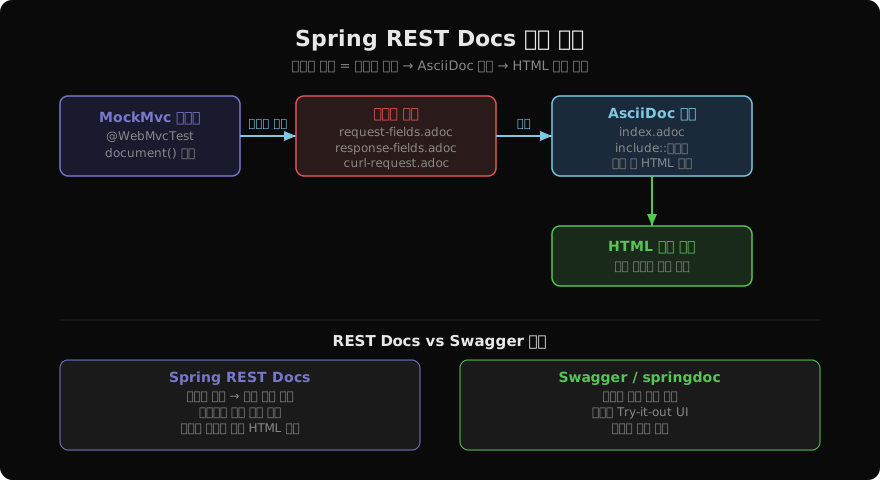
핵심은 테스트 실패 = 문서 빌드 실패 연결 고리입니다. API 스펙이 바뀌면 테스트가 깨지고, 테스트를 고치기 전에는 문서 빌드도 실패합니다. 문서가 코드와 자동으로 동기화됩니다.
의존성 및 빌드 설정
plugins {
    id 'org.asciidoctor.jvm.convert' version '4.0.2'
}

dependencies {
    testImplementation 'org.springframework.restdocs:spring-restdocs-mockmvc'
}

ext {
    snippetsDir = file('build/generated-snippets')
}

test {
    outputs.dir snippetsDir
}

asciidoctor {
    inputs.dir snippetsDir
    dependsOn test  // 테스트 후 asciidoctor 실행

    attributes 'snippets': snippetsDir
    baseDirFollowsSourceFile()
}

bootJar {
    dependsOn asciidoctor
    from("${asciidoctor.outputDir}") {
        into 'static/docs'
    }
}
Maven을 사용한다면 asciidoctor-maven-plugin + spring-restdocs-mockmvc를 설정합니다.
테스트 코드 작성
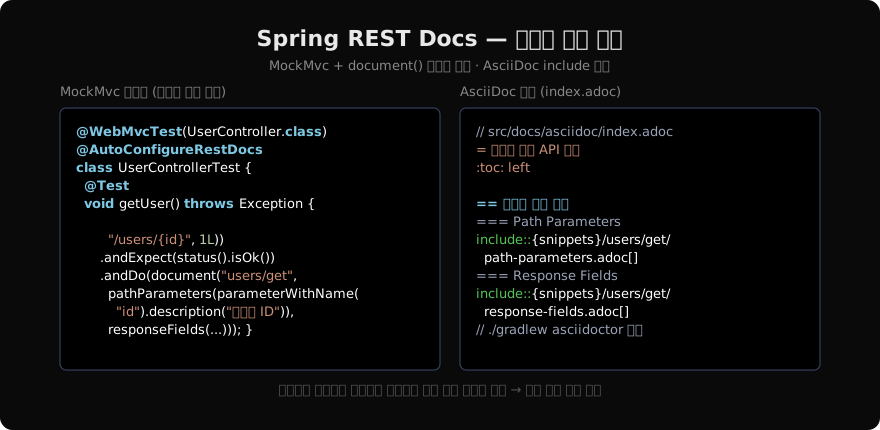
@WebMvcTest(UserController.class)
@AutoConfigureRestDocs(outputDir = "build/generated-snippets")
class UserControllerDocsTest {

    @Autowired
    MockMvc mockMvc;

    @MockBean
    UserService userService;

    @Test
    void getUser() throws Exception {
        given(userService.findById(1L))
                .willReturn(new UserResponse(1L, "user@example.com", Instant.now()));

        mockMvc.perform(get("/api/users/{id}", 1L)
                        .accept(MediaType.APPLICATION_JSON))
                .andExpect(status().isOk())
                .andExpect(jsonPath("$.id").value(1))
                .andDo(document("users/get-one",
                        pathParameters(
                                parameterWithName("id").description("사용자 ID")
                        ),
                        responseFields(
                                fieldWithPath("id").description("사용자 고유 ID"),
                                fieldWithPath("email").description("이메일 주소"),
                                fieldWithPath("createdAt").description("가입 일시 (ISO 8601)")
                        )
                ));
    }
}
document("users/get-one", ...) 호출 시 build/generated-snippets/users/get-one/ 디렉터리 아래 스니펫 파일들이 자동 생성됩니다.
생성되는 스니펫 종류
| 스니펫 파일 | 내용 |
|---|---|
curl-request.adoc | curl 명령어 예시 |
http-request.adoc | HTTP 요청 원문 |
http-response.adoc | HTTP 응답 원문 |
request-fields.adoc | 요청 본문 필드 표 |
response-fields.adoc | 응답 본문 필드 표 |
path-parameters.adoc | 경로 파라미터 표 |
query-parameters.adoc | 쿼리 파라미터 표 |
request-headers.adoc | 요청 헤더 표 |
모든 스니펫을 사용할 필요는 없습니다. AsciiDoc에서 필요한 것만 include합니다.
AsciiDoc 문서 조합
src/docs/asciidoc/index.adoc을 작성합니다.
= 사용자 관리 API 문서
:doctype: book
:toc: left
:toclevels: 2
:source-highlighter: highlightjs

== 소개

사용자 등록, 조회, 수정, 삭제를 위한 REST API입니다.

== 사용자 단건 조회

`GET /api/users/{id}`

=== 요청

include::{snippets}/users/get-one/http-request.adoc[]

=== Path Parameters

include::{snippets}/users/get-one/path-parameters.adoc[]

=== 응답

include::{snippets}/users/get-one/http-response.adoc[]

=== 응답 필드

include::{snippets}/users/get-one/response-fields.adoc[]

=== curl 예시

include::{snippets}/users/get-one/curl-request.adoc[]
./gradlew asciidoctor를 실행하면 build/docs/asciidoc/index.html이 생성됩니다. bootJar 빌드 시 이 파일이 static/docs/로 패키징되므로 앱 실행 후 /docs/index.html에서 바로 접근할 수 있습니다.
요청 본문 문서화
POST/PUT 요청의 본문 필드도 동일한 방식으로 문서화합니다.
@Test
void createUser() throws Exception {
    String requestBody = """
            {
              "email": "user@example.com",
              "password": "secret123",
              "name": "홍길동"
            }
            """;

    mockMvc.perform(post("/api/users")
                    .contentType(MediaType.APPLICATION_JSON)
                    .content(requestBody))
            .andExpect(status().isCreated())
            .andDo(document("users/create",
                    requestFields(
                            fieldWithPath("email").description("이메일 주소 (유일해야 함)"),
                            fieldWithPath("password").description("비밀번호 (8자 이상)"),
                            fieldWithPath("name").description("사용자 이름")
                    ),
                    responseHeaders(
                            headerWithName("Location").description("생성된 리소스 URI")
                    )
            ));
}
선택적 필드 처리
응답에 선택적 필드가 있을 때는 optional()로 표시합니다. 없으면 “Missing field” 오류가 발생합니다.
responseFields(
    fieldWithPath("id").description("사용자 ID"),
    fieldWithPath("email").description("이메일"),
    fieldWithPath("phoneNumber").optional().description("전화번호 (선택)"),
    fieldWithPath("profile").optional().description("프로필 정보 (없을 수 있음)")
)
중첩 객체는 점 표기법으로 경로를 지정합니다.
fieldWithPath("address.city").description("도시명"),
fieldWithPath("address.zipCode").description("우편번호")
배열 항목은 [] 표기법을 씁니다.
fieldWithPath("roles[].name").description("역할 이름"),
fieldWithPath("roles[].level").description("권한 레벨")
MockMvcRestDocumentationConfigurer 커스터마이징
@AutoConfigureRestDocs의 uriScheme, uriHost, uriPort로 문서에 출력되는 호스트를 설정합니다.
@AutoConfigureRestDocs(
    uriScheme = "https",
    uriHost = "api.example.com",
    uriPort = 443
)
또는 @TestConfiguration으로 세밀하게 제어합니다.
@TestConfiguration
static class RestDocsConfig implements RestDocsMockMvcConfigurationCustomizer {

    @Override
    public void customize(MockMvcRestDocumentationConfigurer configurer) {
        configurer.operationPreprocessors()
                .withRequestDefaults(prettyPrint())
                .withResponseDefaults(prettyPrint());
    }
}prettyPrint()를 적용하면 JSON이 정렬된 형태로 스니펫에 출력됩니다.
REST Docs + Swagger 병용 전략
두 도구를 함께 사용하는 전략이 점점 인기를 얻고 있습니다.
| 역할 | 도구 |
|---|---|
| 대화형 API 탐색 (개발 중) | Swagger UI (springdoc) |
| 공식 API 문서 (파트너·외부 공개) | Spring REST Docs |
restdocs-api-spec 라이브러리를 사용하면 REST Docs 테스트에서 OpenAPI 스펙도 함께 생성해 Swagger UI와 연동할 수 있습니다. 단일 테스트로 두 도구를 모두 지원하는 구성입니다.
정리
Spring REST Docs는 테스트가 곧 문서라는 원칙으로 API 명세와 구현의 동기화를 강제합니다. 어노테이션을 프로덕션 코드에 침투시키지 않으면서 신뢰할 수 있는 문서를 만드는 데 강점이 있습니다. 문서 작성 초기 비용이 Swagger보다 높지만, 장기적으로 문서와 코드의 불일치로 인한 혼란을 방지할 수 있습니다. 공개 API나 파트너 연동 문서에는 REST Docs, 내부 개발용 탐색 도구로는 Swagger를 병용하는 전략을 권장합니다.
지난 글: OpenAPI 3.0 & Swagger UI로 REST API 문서화
다음 글: Jackson 심층 분석 — JSON 직렬화·역직렬화 완전 정복
읽어주셔서 감사합니다. 😊
PALDYN / ARTICLE AI
글의 개념, 수식, 코드에 대해 물어보세요.
질문과 관련된 문단을 골라 답변의 문맥으로 사용합니다.생각 중 · 0초