

Spring Security 폼 로그인 구현 — formLogin() 완벽 정리
Spring Security 6에서 formLogin() DSL을 사용해 커스텀 로그인 페이지를 만들고, 인증 성공/실패 핸들러와 리다이렉트 전략까지 실전 예제로 정리합니다.
지난 글에서 UserDetailsService와 PasswordEncoder로 사용자 인증 로직을 구현했습니다. 이번 글에서는 그 인증 로직을 실제 로그인 폼과 연결하는 방법, 즉 Spring Security의 formLogin() DSL을 중심으로 커스텀 로그인 페이지 구성, 성공·실패 처리, 그리고 리다이렉트 전략까지 살펴봅니다.
폼 로그인의 전체 흐름
Spring Security가 폼 로그인을 처리하는 방식은 필터 체인을 통해 이루어집니다. 사용자가 POST /login을 제출하면 UsernamePasswordAuthenticationFilter가 요청을 가로채고 인증 흐름을 시작합니다.
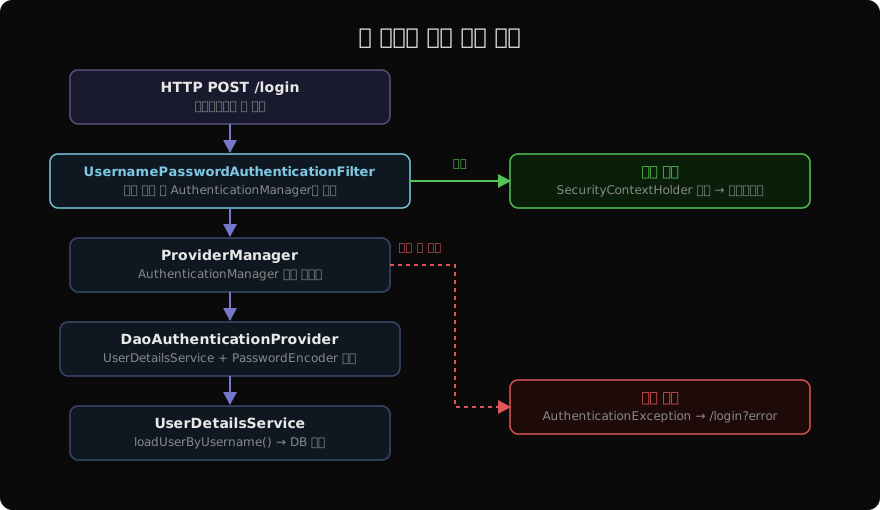
핵심은 UsernamePasswordAuthenticationFilter가 토큰을 만들어 ProviderManager에 위임하고, ProviderManager는 DaoAuthenticationProvider를 통해 UserDetailsService와 PasswordEncoder로 실제 검증을 수행한다는 점입니다. 인증이 성공하면 SecurityContextHolder에 인증 정보가 저장되고, 실패하면 설정된 실패 URL로 리다이렉트됩니다.
SecurityFilterChain 기본 설정
formLogin() DSL은 Spring Security 6에서 람다 방식으로 제공됩니다.
@Configuration
@EnableWebSecurity
public class SecurityConfig {

    @Bean
    public SecurityFilterChain filterChain(HttpSecurity http) throws Exception {
        return http
            .authorizeHttpRequests(auth -> auth
                .requestMatchers("/login", "/register", "/css/**", "/js/**")
                    .permitAll()
                .anyRequest().authenticated())
            .formLogin(form -> form
                .loginPage("/login")
                .loginProcessingUrl("/login")
                .defaultSuccessUrl("/dashboard", true)
                .failureUrl("/login?error"))
            .logout(logout -> logout
                .logoutUrl("/logout")
                .logoutSuccessUrl("/login?logout")
                .invalidateHttpSession(true)
                .deleteCookies("JSESSIONID"))
            .build();
    }
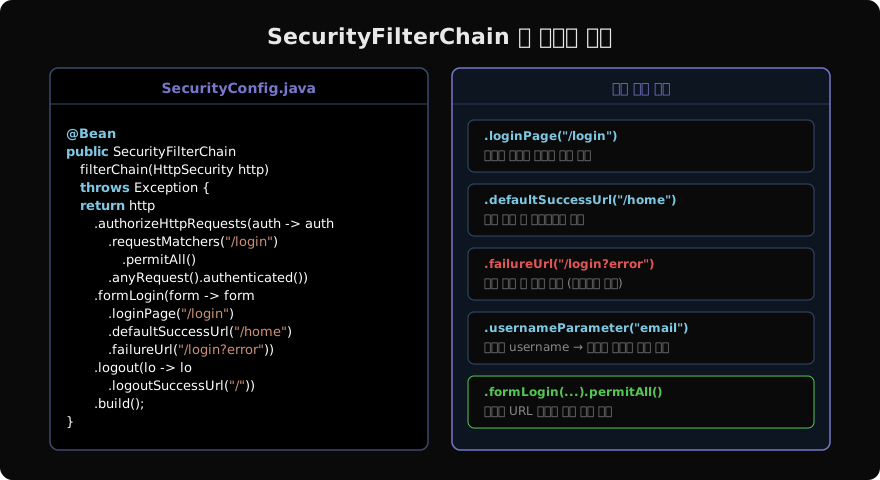
}loginPage("/login")은 GET 요청으로 커스텀 로그인 폼을 렌더링할 URL이고, loginProcessingUrl("/login")은 폼이 실제 POST를 보내는 URL입니다. 둘을 같은 경로로 쓰면 GET은 폼 표시, POST는 인증 처리로 분리됩니다.
defaultSuccessUrl("/dashboard", true)의 두 번째 인수를 true로 설정하면 인증 전에 접근하려 했던 원래 URL이 아닌 항상 /dashboard로 리다이렉트됩니다. false(기본값)면 인증 전에 방문하려던 페이지로 돌아갑니다.
커스텀 로그인 컨트롤러와 Thymeleaf 템플릿
로그인 페이지 컨트롤러는 단순히 뷰를 반환하면 됩니다.
@Controller
public class LoginController {

    @GetMapping("/login")
    public String loginPage(@RequestParam(required = false) String error,
                            @RequestParam(required = false) String logout,
                            Model model) {
        if (error != null) {
            model.addAttribute("errorMsg", "아이디 또는 비밀번호가 올바르지 않습니다.");
        }
        if (logout != null) {
            model.addAttribute("logoutMsg", "로그아웃 되었습니다.");
        }
        return "login";
    }
}
Thymeleaf 로그인 폼의 핵심은 action이 loginProcessingUrl과 일치해야 하고, 필드명이 기본값인 username과 password이어야 한다는 점입니다.
<form th:action="@{/login}" method="post">
  <input type="hidden" th:name="${_csrf.parameterName}" th:value="${_csrf.token}"/>
  <input type="text"     name="username" placeholder="아이디"/>
  <input type="password" name="password" placeholder="비밀번호"/>
  <button type="submit">로그인</button>

  <p th:if="${errorMsg}"  th:text="${errorMsg}"  class="error"/>
  <p th:if="${logoutMsg}" th:text="${logoutMsg}" class="success"/>
</form>
CSRF 토큰은 Thymeleaf 자동 주입으로도 처리되지만, 위처럼 명시적으로 hidden 필드로 추가하면 어떤 상황에서도 안전합니다.
필드명 변경 — usernameParameter / passwordParameter
이메일 기반 로그인처럼 필드명이 username이 아닌 경우에는 usernameParameter()를 사용합니다.
.formLogin(form -> form
    .loginPage("/login")
    .usernameParameter("email")
    .passwordParameter("pwd")
    .defaultSuccessUrl("/dashboard", true))
HTML 폼의 name 속성도 동일하게 맞춰야 합니다.
<input type="email"    name="email" placeholder="이메일"/>
<input type="password" name="pwd"   placeholder="비밀번호"/>
인증 성공/실패 핸들러 커스텀
로그인 성공 후 특정 비즈니스 로직(마지막 로그인 시간 기록, 역할별 다른 페이지 이동 등)이 필요하다면 AuthenticationSuccessHandler를 구현합니다.
@Component
public class CustomSuccessHandler
        implements AuthenticationSuccessHandler {

    @Override
    public void onAuthenticationSuccess(
            HttpServletRequest req,
            HttpServletResponse res,
            Authentication auth) throws IOException {
        Collection<? extends GrantedAuthority> roles = auth.getAuthorities();
        if (roles.stream().anyMatch(r -> r.getAuthority().equals("ROLE_ADMIN"))) {
            res.sendRedirect("/admin");
        } else {
            res.sendRedirect("/dashboard");
        }
    }
}.formLogin(form -> form
.loginPage("/login")
.successHandler(customSuccessHandler)
.failureHandler(customFailureHandler))AuthenticationFailureHandler에서는 실패 원인(비밀번호 오류, 계정 잠금 등)에 따라 다른 메시지를 보여줄 수 있습니다. exception.getClass().getSimpleName() 으로 예외 타입을 분기하면 됩니다.
Remember-Me 기능 연동
“로그인 상태 유지” 체크박스는 rememberMe() DSL로 간단히 추가됩니다.
.rememberMe(rm -> rm
    .key("uniqueAndSecretKey")
    .tokenValiditySeconds(86400 * 14)  // 14일
    .userDetailsService(userDetailsService))
HTML 폼에는 name="remember-me" 체크박스를 추가하면 자동으로 동작합니다. 기본 쿠키 기반 대신 DB 토큰을 사용하려면 PersistentTokenRepository를 구현해 tokenRepository()에 주입하면 됩니다.
Session 관리와 동시 접속 제어
같은 계정의 동시 로그인을 제한하거나 세션 고정 공격을 방어하려면 sessionManagement()를 함께 설정합니다.
.sessionManagement(session -> session
    .sessionCreationPolicy(SessionCreationPolicy.IF_REQUIRED)
    .maximumSessions(1)
    .maxSessionsPreventsLogin(false)  // 기존 세션 만료 (true면 새 로그인 차단)
.sessionRegistry(sessionRegistry()))maxSessionsPreventsLogin(false)는 새 로그인 시 기존 세션을 만료시키는 방식이고, true로 바꾸면 이미 로그인 중이면 새 로그인 자체를 거부합니다.
자주 발생하는 문제
폼 제출 후 계속 로그인 페이지로 돌아오는 경우: loginProcessingUrl과 requestMatchers().permitAll() 경로가 일치하는지 확인하세요. 폼의 action URL도 확인해야 합니다.
CSRF 403 오류: CSRF 토큰이 폼에 포함되지 않았거나 CsrfFilter가 처리하기 전에 요청이 차단됩니다. Thymeleaf를 사용하면 th:action만 써도 CSRF 토큰이 자동 삽입되지만, 순수 HTML 폼이라면 반드시 hidden 필드를 추가해야 합니다.
커스텀 로그인 페이지가 무한 리다이렉트: loginPage("/login")에 지정한 경로를 permitAll()에 포함하지 않으면 로그인 페이지 자체가 인증을 요구해 루프에 빠집니다.
지난 글: UserDetailsService와 PasswordEncoder — 사용자 인증 구현
다음 글: Spring Security CSRF · CORS · CSP 설정
읽어주셔서 감사합니다. 😊
PALDYN / ARTICLE AI
글의 개념, 수식, 코드에 대해 물어보세요.
질문과 관련된 문단을 골라 답변의 문맥으로 사용합니다.생각 중 · 0초