

Spring Security 리소스 서버와 인가 서버 구현
Spring Authorization Server로 OAuth2 인가 서버를 구성하고, Spring Security Resource Server로 JWT를 검증하는 방법을 Authorization Code Flow 전체 흐름과 함께 실전 코드로 설명합니다.
지난 글에서 JJWT 라이브러리로 직접 JWT를 생성하고 검증하는 방법을 구현했습니다. 직접 구현 방식은 소규모 서비스에서 유연하지만, 여러 클라이언트·서비스가 공유하는 인증 인프라를 구축하려면 표준 OAuth2 인가 서버를 별도로 운영하는 것이 좋습니다. 이번 글에서는 Spring Authorization Server로 인가 서버를 구성하고, Spring Security Resource Server로 리소스 API를 보호하는 방법을 Authorization Code Flow 전체 흐름과 함께 살펴봅니다.
Authorization Server vs Resource Server
두 역할의 책임은 명확히 분리됩니다.
| 역할 | 책임 | 주요 엔드포인트 |
|---|---|---|
| Authorization Server | 클라이언트 등록, 사용자 인증, 토큰 발급 | /oauth2/authorize, /oauth2/token, /oauth2/jwks |
| Resource Server | Bearer 토큰 검증, 스코프 기반 인가, API 응답 | /api/** |
두 서버는 JWK(JSON Web Key) 엔드포인트를 통해 공개키를 공유합니다. Resource Server는 Authorization Server의 JWK URI에서 공개키를 한 번 받아 캐싱한 후, 이후 요청에서는 로컬 검증만 수행합니다. Auth Server에 매번 통신하지 않는 것이 핵심입니다.
Authorization Code Flow 전체 흐름
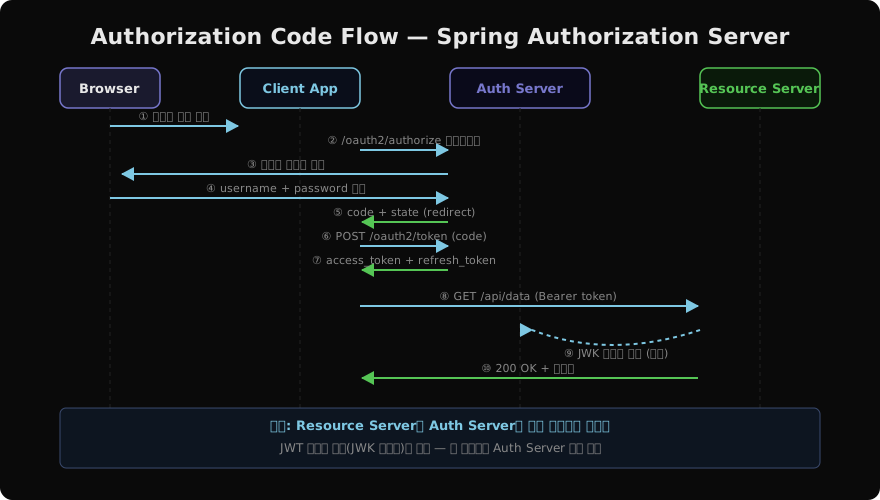
총 10단계입니다. ⑥번에서 클라이언트가 Authorization Code를 Access Token으로 교환하는 단계가 핵심이며, 이 교환은 서버-서버 간 백채널(back-channel)로 이뤄져 토큰이 브라우저에 노출되지 않습니다.
Authorization Server 구성
의존성
// Authorization Server
implementation 'org.springframework.boot:spring-boot-starter-web'
implementation 'org.springframework.boot:spring-boot-starter-security'
implementation 'org.springframework.security:spring-security-oauth2-authorization-server'
Spring Authorization Server는 Spring Security 팀이 직접 관리하는 공식 구현체입니다(Spring Boot 3.x 기준).
클라이언트 등록
@Configuration
public class AuthorizationServerConfig {

    @Bean
    @Order(1)
    public SecurityFilterChain authServerFilterChain(
            HttpSecurity http) throws Exception {
        OAuth2AuthorizationServerConfiguration
                .applyDefaultSecurity(http);
        http.getConfigurer(OAuth2AuthorizationServerConfigurer.class)
                .oidc(Customizer.withDefaults()); // OIDC 활성화
        http.exceptionHandling(e -> e.defaultAuthenticationEntryPointFor(
                new LoginUrlAuthenticationEntryPoint("/login"),
                new MediaTypeRequestMatcher(MediaType.TEXT_HTML)));
        return http.build();
    }

    @Bean
    public RegisteredClientRepository registeredClientRepository() {
        RegisteredClient client = RegisteredClient
                .withId(UUID.randomUUID().toString())
                .clientId("my-client")
                .clientSecret("{bcrypt}" + passwordEncoder()
                        .encode("secret"))
                .authorizationGrantType(
                        AuthorizationGrantType.AUTHORIZATION_CODE)
                .authorizationGrantType(
                        AuthorizationGrantType.REFRESH_TOKEN)
                .redirectUri("http://127.0.0.1:8080/login/oauth2/code/my-client")
                .scope("read").scope("write").scope(OidcScopes.OPENID)
                .clientSettings(ClientSettings.builder()
                        .requireAuthorizationConsent(true).build())
                .build();
        return new InMemoryRegisteredClientRepository(client);
    }
}
운영 환경에서는 InMemoryRegisteredClientRepository 대신 JdbcRegisteredClientRepository를 사용해 데이터베이스에 클라이언트 정보를 저장합니다.
JWK 키 쌍 설정
@Bean
public JWKSource<SecurityContext> jwkSource() {
    KeyPair pair = generateRsaKey();
    RSAPublicKey  pub  = (RSAPublicKey)  pair.getPublic();
    RSAPrivateKey priv = (RSAPrivateKey) pair.getPrivate();
    RSAKey key = new RSAKey.Builder(pub)
            .privateKey(priv)
            .keyID(UUID.randomUUID().toString())
            .build();
    return new ImmutableJWKSet<>(new JWKSet(key));
}

private KeyPair generateRsaKey() {
    try {
        KeyPairGenerator gen = KeyPairGenerator.getInstance("RSA");
        gen.initialize(2048);
        return gen.generateKeyPair();
    } catch (NoSuchAlgorithmException e) {
        throw new IllegalStateException(e);
    }
}

@Bean
public JwtDecoder jwtDecoder(JWKSource<SecurityContext> jwkSource) {
    return OAuth2AuthorizationServerConfiguration.jwtDecoder(jwkSource);
}
운영 환경에서는 애플리케이션 재시작 시마다 키 쌍이 바뀌지 않도록 Vault나 HSM에서 고정된 RSA 키 쌍을 로드해야 합니다.
Resource Server 구성
의존성
// Resource Server
implementation 'org.springframework.boot:spring-boot-starter-security'
implementation 'org.springframework.boot:spring-boot-starter-oauth2-resource-server'
application.yml — JWK URI 지정
spring:
  security:
    oauth2:
      resourceserver:
        jwt:
          jwk-set-uri: http://localhost:9000/oauth2/jwks
Resource Server는 이 URI에서 공개키를 가져와 JWT 서명을 검증합니다. 별도의 JWT 파싱 코드가 필요 없습니다.
SecurityFilterChain 설정
@Configuration
@EnableWebSecurity
public class ResourceServerConfig {

    @Bean
    public SecurityFilterChain resourceServerChain(
            HttpSecurity http) throws Exception {
        http
            .authorizeHttpRequests(auth -> auth
                .requestMatchers("/api/public/**").permitAll()
                .requestMatchers("/api/admin/**")
                    .hasAuthority("SCOPE_write")
                .anyRequest().hasAuthority("SCOPE_read"))
            .oauth2ResourceServer(rs ->
                rs.jwt(Customizer.withDefaults()));
        return http.build();
    }
}
아키텍처 전체 구조
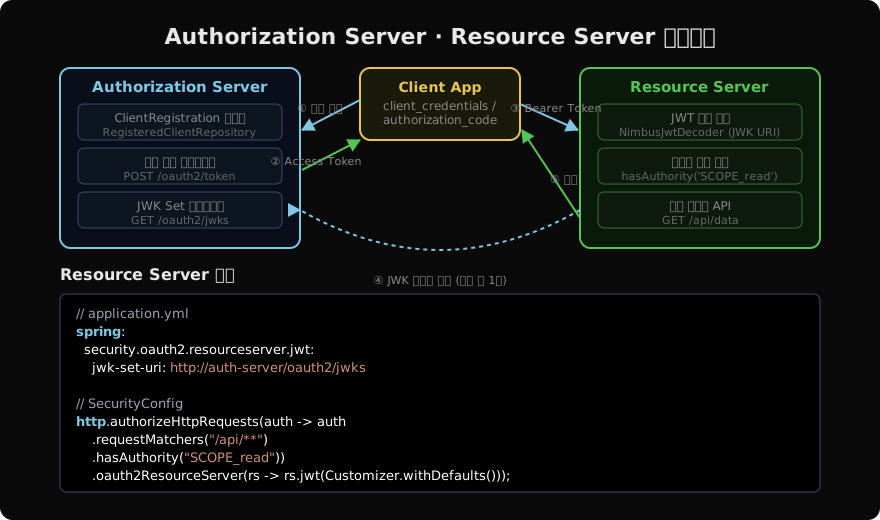
SCOPE_read, SCOPE_write처럼 SCOPE_ 접두사는 Spring Security가 JWT의 scp(scope) 클레임을 GrantedAuthority로 변환할 때 자동으로 붙입니다. 클라이언트가 scope=read로 토큰을 발급받으면, Resource Server에서는 hasAuthority("SCOPE_read")로 검사합니다.
컨트롤러에서 토큰 정보 사용
@RestController
@RequestMapping("/api")
public class DataController {

    @GetMapping("/me")
    public Map<String, Object> me(
            @AuthenticationPrincipal Jwt jwt) {
        return Map.of(
            "sub",    jwt.getSubject(),
            "scopes", jwt.getClaimAsStringList("scp"),
            "exp",    jwt.getExpiresAt()
        );
    }

    @GetMapping("/data")
    public String data() {
        return "보호된 데이터";
    }
}
@AuthenticationPrincipal Jwt로 파싱된 JWT 객체를 직접 주입받을 수 있습니다.
토큰 커스터마이징
Authorization Server에서 발급하는 JWT에 추가 클레임을 넣으려면 OAuth2TokenCustomizer를 빈으로 등록합니다.
@Bean
public OAuth2TokenCustomizer<JwtEncodingContext> tokenCustomizer() {
    return context -> {
        if (context.getTokenType() == OAuth2TokenType.ACCESS_TOKEN) {
            Authentication principal =
                    context.getPrincipal();
            context.getClaims().claim("email",
                    ((UserDetails) principal.getPrincipal())
                            .getUsername());
        }
    };
}
Introspection 방식 (Opaque Token)
JWT 대신 불투명 토큰(Opaque Token)을 사용하면 Resource Server가 매 요청마다 Auth Server의 /oauth2/introspect 엔드포인트를 호출해 토큰을 검증합니다. 토큰 즉시 취소가 필요한 서비스에 적합하지만, Auth Server 호출 비용이 추가됩니다.
spring:
  security:
    oauth2:
      resourceserver:
        opaquetoken:
          introspection-uri: http://localhost:9000/oauth2/introspect
          client-id: my-client
          client-secret: secret
마무리
Spring Authorization Server는 OAuth2 인가 서버 구현의 복잡성을 크게 줄여줍니다. Resource Server는 jwk-set-uri 한 줄로 JWT 검증 로직 없이 Bearer 토큰을 처리합니다. 실무에서는 Auth Server를 별도 서비스로 분리해 여러 클라이언트가 공유하고, 각 마이크로서비스는 Resource Server 역할만 맡는 구조가 일반적입니다.
지난 글: Spring Security JWT 인증 구현
다음 글: Spring Security Remember-Me와 세션 관리
읽어주셔서 감사합니다. 😊
PALDYN / ARTICLE AI
글의 개념, 수식, 코드에 대해 물어보세요.
질문과 관련된 문단을 골라 답변의 문맥으로 사용합니다.생각 중 · 0초