

Spring MVC 정적 리소스 처리: CSS·JS·이미지를 효율적으로 서빙하는 법
Spring Boot의 기본 정적 리소스 경로, WebMvcConfigurer.addResourceHandlers() 커스터마이징, ContentVersionStrategy를 활용한 캐시 무효화 전략, WebJars 지원까지 실무 설정을 체계적으로 정리합니다.
지난 글에서 뷰 렌더링 흐름과 ViewResolver 구조를 살펴봤습니다. 이번 글에서는 HTML 렌더링과는 별개로 처리되는 정적 리소스(CSS, JavaScript, 이미지, 폰트) 서빙 구조와 캐싱 전략을 정리합니다.
Spring Boot의 기본 정적 리소스 처리
DispatcherServlet은 요청 URL이 컨트롤러 핸들러에 매핑되지 않으면 ResourceHttpRequestHandler로 위임합니다. Spring Boot는 다음 4가지 클래스패스 경로를 기본 정적 리소스 위치로 등록합니다.
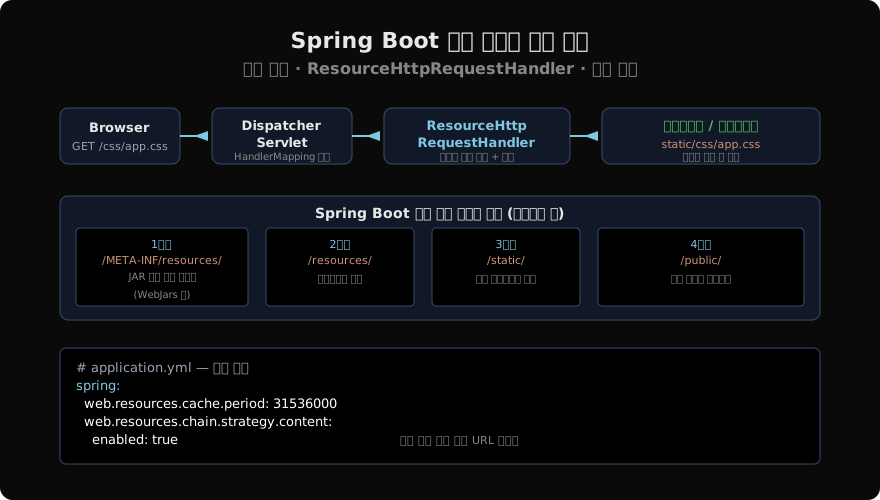
classpath:/META-INF/resources/   (1순위)
classpath:/resources/            (2순위)
classpath:/static/               (3순위) ← 실무에서 가장 많이 사용
classpath:/public/ (4순위)src/main/resources/static/css/app.css에 파일을 두면 GET /css/app.css로 접근할 수 있습니다. 별도 설정 없이도 동작합니다.
addResourceHandlers: 경로 커스터마이징
기본 경로 외에 추가 경로를 등록하거나, 파일시스템 경로를 외부에 노출할 때 WebMvcConfigurer를 사용합니다.
@Configuration
public class WebMvcConfig implements WebMvcConfigurer {

    @Value("${upload.dir:/tmp/uploads}")
    private String uploadDir;

    @Override
    public void addResourceHandlers(ResourceHandlerRegistry registry) {

        // 업로드된 파일 서빙
        registry.addResourceHandler("/uploads/**")
                .addResourceLocations("file:" + uploadDir + "/")
                .setCachePeriod(0);   // 캐싱 비활성 (동적 콘텐츠)

        // 외부 디렉터리의 문서 파일
        registry.addResourceHandler("/docs/**")
                .addResourceLocations("file:/opt/docs/")
                .setCachePeriod(3600);

        // 기본 정적 경로 명시적 재선언 (기본값 유지하면서 캐싱 추가)
        registry.addResourceHandler("/static/**")
                .addResourceLocations("classpath:/static/")
                .setCachePeriod(86400);   // 1일 캐싱
    }
}
file: 접두사는 파일시스템 절대경로, classpath: 접두사는 클래스패스 경로를 의미합니다. 경로 끝에 /를 반드시 붙여야 합니다.
Cache-Control 헤더 설정
setCachePeriod(seconds)는 Cache-Control: max-age=N 헤더를 설정합니다. 더 세밀하게 제어하려면 CacheControl 빌더를 사용합니다.
registry.addResourceHandler("/assets/**")
        .addResourceLocations("classpath:/static/assets/")
        .setCacheControl(
            CacheControl.maxAge(365, TimeUnit.DAYS)
                        .cachePublic()
                        .immutable()   // 내용이 절대 변경되지 않음을 브라우저에 알림
        );
immutable() 지시어는 Firefox와 Chrome에서 만료 전에도 서버 재검증 요청을 완전히 생략하게 합니다. 파일명에 콘텐츠 해시가 포함된 경우에만 안전합니다.
버전 관리 전략
정적 리소스를 장기 캐싱하면 파일이 변경되어도 브라우저가 캐시된 버전을 계속 사용합니다. 이를 해결하는 두 가지 전략이 있습니다.
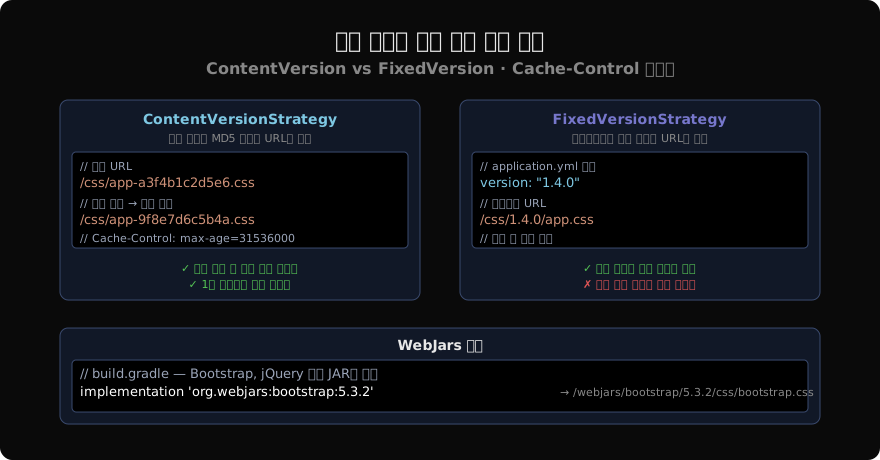
ContentVersionStrategy (권장)
파일 내용의 MD5 해시를 URL에 삽입합니다. 파일이 변경되면 URL이 바뀌어 캐시가 자동으로 무효화됩니다.
# application.yml
spring:
  web:
    resources:
      chain:
        strategy:
          content:
            enabled: true
            paths: /**
      cache:
        period: 31536000   # 1년 (초 단위)
// Thymeleaf에서 버전화된 URL 생성
// src/main/resources/templates/layout.html<!-- th:href 사용 시 자동으로 버전 해시 URL 생성 -->
<link th:href="@{/css/app.css}" rel="stylesheet">
<!-- 출력: /css/app-a3f4b1c2d5e6.css -->Thymeleaf의 @{...} 표현식이 ResourceUrlEncodingFilter를 거쳐 자동으로 버전화된 URL을 생성합니다.
ResourceUrlEncodingFilter를 빈으로 등록해야 Thymeleaf에서 버전 URL이 동작합니다.
@Bean
public ResourceUrlEncodingFilter resourceUrlEncodingFilter() {
    return new ResourceUrlEncodingFilter();
}
Spring Boot에서는 spring.web.resources.chain.enabled=true로 설정하면 이 필터가 자동 등록됩니다.
FixedVersionStrategy
배포 버전 번호를 URL 앞에 삽입합니다.
spring:
  web:
    resources:
      chain:
        strategy:
          fixed:
            enabled: true
            paths: /js/**,/css/**
            version: "${app.version:1.0.0}"
/css/app.css 요청이 /css/1.0.0/app.css로 매핑됩니다. 배포할 때 app.version 프로퍼티를 변경하면 모든 정적 리소스 캐시가 무효화됩니다.
WebJars 지원
jQuery, Bootstrap, Vue.js 같은 프론트엔드 라이브러리를 JAR 의존성으로 관리합니다.
// build.gradle
implementation 'org.webjars:bootstrap:5.3.2'
implementation 'org.webjars:jquery:3.7.1'
// 버전 없이 접근하려면 webjars-locator-core 추가
runtimeOnly 'org.webjars:webjars-locator-core:0.55'
<!-- 버전 명시 접근 -->
<link href="/webjars/bootstrap/5.3.2/css/bootstrap.min.css" rel="stylesheet">
<!-- webjars-locator-core 사용 시 버전 생략 가능 -->
<link href="/webjars/bootstrap/css/bootstrap.min.css" rel="stylesheet">CDN 없이 내부 네트워크에서 프론트엔드 의존성을 관리할 때 유용합니다.
기본 경로 재정의
Spring Boot의 기본 정적 리소스 경로를 완전히 교체하려면 다음 프로퍼티를 사용합니다.
spring:
  web:
    resources:
      static-locations:
        - classpath:/my-static/
        - file:/opt/my-resources/
기존 4개 경로가 모두 사라지고 위 경로만 탐색됩니다.
Security와 정적 리소스
Spring Security를 사용할 때 정적 리소스를 인증 없이 접근하도록 설정합니다.
@Bean
public SecurityFilterChain filterChain(HttpSecurity http) throws Exception {
    http.authorizeHttpRequests(auth -> auth
            .requestMatchers(
                "/css/**", "/js/**", "/images/**",
                "/webjars/**", "/favicon.ico"
            ).permitAll()
            .anyRequest().authenticated()
    );
    return http.build();
}
또는 WebSecurityCustomizer로 Security 필터 체인 자체를 건너뜁니다.
@Bean
public WebSecurityCustomizer webSecurityCustomizer() {
    return web -> web.ignoring()
            .requestMatchers("/css/**", "/js/**", "/images/**");
}ignoring()은 Security 필터 체인을 완전히 우회하므로 SecurityContext도 채워지지 않습니다. 인증된 사용자에게도 다른 콘텐츠를 보여줄 필요가 없는 순수 정적 파일에 적합합니다.
개발/운영 환경 분리
개발 중에는 정적 리소스 캐싱을 끄고, 운영에서는 활성화합니다.
# application-dev.yml
spring:
  web:
    resources:
      cache:
        period: 0
      chain:
        cache: false

# application-prod.yml
spring:
  web:
    resources:
      cache:
        period: 31536000
      chain:
        strategy:
          content:
            enabled: true
Spring Boot DevTools(spring-boot-devtools)를 사용하면 dev 프로필 없이도 캐싱이 자동으로 비활성화됩니다.
핵심 정리
- Spring Boot는
classpath:/static/(포함 3가지 더)에서 정적 리소스를 자동 서빙합니다. WebMvcConfigurer.addResourceHandlers()로 추가 경로나 파일시스템 경로를 등록합니다.CacheControl.maxAge().immutable()로 장기 캐싱 헤더를 설정합니다.ContentVersionStrategy는 파일 내용 해시를 URL에 삽입해 캐시 무효화를 자동화합니다.- WebJars로 jQuery, Bootstrap 등을 JAR 의존성으로 관리합니다.
- Spring Security와 함께 사용할 때는 정적 리소스 경로에
permitAll()또는ignoring()을 설정합니다.
지난 글: Spring MVC Model과 ViewResolver: 데이터를 뷰에 전달하는 방법
다음 글: Spring HttpMessageConverter: JSON·XML 자동 변환의 핵심 원리
읽어주셔서 감사합니다. 😊
PALDYN / ARTICLE AI
글의 개념, 수식, 코드에 대해 물어보세요.
질문과 관련된 문단을 골라 답변의 문맥으로 사용합니다.생각 중 · 0초