

Spring 테스트 — MockMvc 심화 완전 정복
MockMvc 요청 빌더(GET/POST/PUT/DELETE/multipart), ResultActions 검증(status·jsonPath·header·content), 커스텀 RequestPostProcessor, ResultHandler, MockMvc 설정 방식(standaloneSetup vs webAppContextSetup), Security 통합까지 실전 예제로 정리합니다.
지난 글에서 @SpringBootTest로 전체 컨텍스트를 올려 통합 테스트를 작성하는 방법을 알아봤습니다. @SpringBootTest든 @WebMvcTest든 Controller 레이어 검증에는 MockMvc가 핵심 도구입니다. 이번 글에서는 MockMvc를 실전에서 활용하는 패턴을 깊이 있게 살펴봅니다.
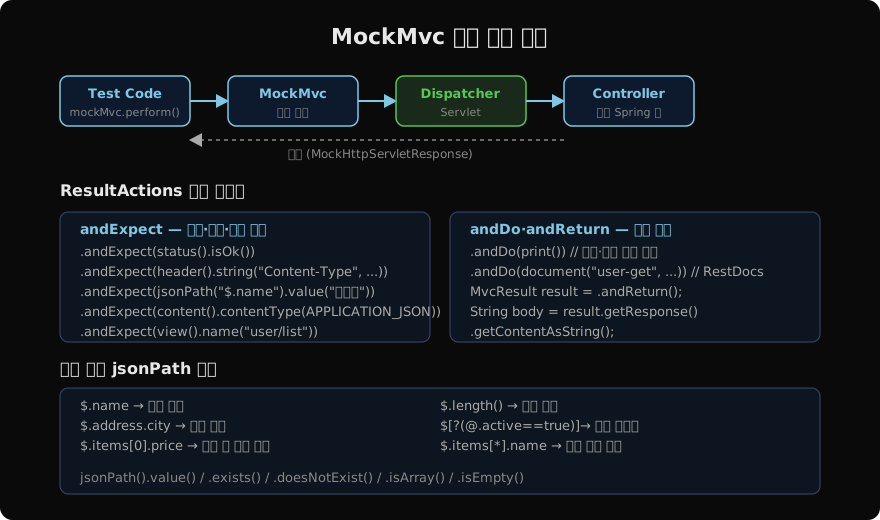
MockMvc 요청 처리 흐름
MockMvc는 실제 HTTP 서버 없이 DispatcherServlet을 직접 호출합니다. Filter → DispatcherServlet → HandlerMapping → Controller → 응답 직렬화 전체 파이프라인이 실행되므로 Spring MVC 통합을 실질적으로 검증합니다.
MockMvc 초기화 방식
standaloneSetup — 단일 컨트롤러
Spring Context 없이 특정 컨트롤러만 테스트합니다. 가장 빠르지만 자동 구성이 없어 직접 설정해야 합니다.
class UserControllerStandaloneTest {

    MockMvc mockMvc;

    @BeforeEach
    void setUp() {
        UserController controller = new UserController(mock(UserService.class));
        mockMvc = MockMvcBuilders
            .standaloneSetup(controller)
            .setControllerAdvice(new GlobalExceptionHandler())
            .addFilter(new CharacterEncodingFilter("UTF-8", true))
            .build();
    }
}
@WebMvcTest 없이 순수 Mockito 테스트처럼 사용하고 싶을 때 적합합니다.
webAppContextSetup — 전체 WebApplicationContext
@SpringBootTest 또는 @WebMvcTest와 함께 전체 컨텍스트를 활용합니다.
@WebMvcTest(UserController.class)
class UserControllerTest {

    @Autowired
    MockMvc mockMvc;  // @WebMvcTest가 자동 구성

    @MockBean
    UserService userService;
}@AutoConfigureMockMvc를 @SpringBootTest와 함께 쓰면 동일한 효과입니다.
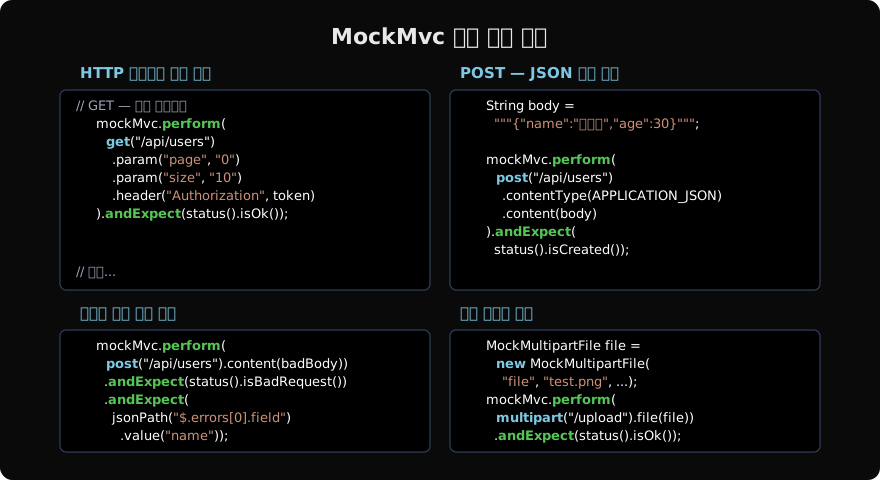
요청 빌더 상세
GET — 쿼리 파라미터, 헤더
@Test
void 사용자_목록_페이지_조회() throws Exception {
    given(userService.findAll(any(Pageable.class)))
        .willReturn(Page.empty());

    mockMvc.perform(get("/api/users")
            .param("page", "0")
            .param("size", "20")
            .param("sort", "createdAt,desc")
            .header("Accept-Language", "ko")
            .contentType(MediaType.APPLICATION_JSON))
        .andExpect(status().isOk())
        .andExpect(jsonPath("$.content").isArray())
        .andExpect(jsonPath("$.totalElements").value(0));
}
POST/PUT — JSON 바디
@Test
void 사용자_생성() throws Exception {
    UserCreateRequest request = new UserCreateRequest("홍길동", "hong@example.com");
    UserDto created = new UserDto(1L, "홍길동", "hong@example.com");

    given(userService.create(any(UserCreateRequest.class)))
        .willReturn(created);

    mockMvc.perform(post("/api/users")
            .contentType(MediaType.APPLICATION_JSON)
            .content(objectMapper.writeValueAsString(request)))
        .andExpect(status().isCreated())
        .andExpect(header().string("Location", "/api/users/1"))
        .andExpect(jsonPath("$.id").value(1))
        .andExpect(jsonPath("$.name").value("홍길동"));
}ObjectMapper를 @Autowired로 주입받아 DTO를 직렬화하면 실제 Jackson 설정이 그대로 반영됩니다.
파일 업로드 — MockMultipartFile
@Test
void 프로필_이미지_업로드() throws Exception {
    MockMultipartFile imageFile = new MockMultipartFile(
        "file",
        "profile.png",
        MediaType.IMAGE_PNG_VALUE,
        "fake-image-content".getBytes()
    );
    MockMultipartFile metadata = new MockMultipartFile(
        "metadata",
        "",
        MediaType.APPLICATION_JSON_VALUE,
        """{"description": "프로필 이미지"}""".getBytes()
    );

    mockMvc.perform(multipart("/api/users/1/image")
            .file(imageFile)
            .file(metadata))
        .andExpect(status().isOk())
        .andExpect(jsonPath("$.imageUrl").exists());
}
DELETE — PathVariable
@Test
void 사용자_삭제() throws Exception {
    mockMvc.perform(delete("/api/users/{id}", 1L))
        .andExpect(status().isNoContent());

    verify(userService).delete(1L);
}
ResultActions 상세 검증
status 검증
.andExpect(status().isOk())           // 200
.andExpect(status().isCreated())      // 201
.andExpect(status().isNoContent())    // 204
.andExpect(status().isBadRequest())   // 400
.andExpect(status().isUnauthorized()) // 401
.andExpect(status().isForbidden())    // 403
.andExpect(status().isNotFound())     // 404
.andExpect(status().is(HttpStatus.UNPROCESSABLE_ENTITY.value())) // 직접 지정
jsonPath 검증
// 값 존재 여부
.andExpect(jsonPath("$.id").exists())
.andExpect(jsonPath("$.deletedAt").doesNotExist())

// 값 타입
.andExpect(jsonPath("$.items").isArray())
.andExpect(jsonPath("$.items").isEmpty())

// 값 비교
.andExpect(jsonPath("$.name").value("홍길동"))
.andExpect(jsonPath("$.count").value(greaterThan(0)))  // Hamcrest 매처

// 배열 순회
.andExpect(jsonPath("$.items[0].name").value("아이템1"))
.andExpect(jsonPath("$.items", hasSize(3)))
.andExpect(jsonPath("$.items[*].active", everyItem(is(true))))

// 필터
.andExpect(jsonPath("$[?(@.role == 'ADMIN')]").isArray())
바디 전체 비교
.andExpect(content().json("""
    {"id": 1, "name": "홍길동"}
    """, false))  // false = 추가 필드 허용 (lenient)

.andExpect(content().string(containsString("홍길동")))
MockMvc 코드 패턴 한눈에 보기
RequestPostProcessor — 요청 커스터마이징
with() 메서드로 요청 전처리기를 추가합니다. Spring Security 테스트에서 특히 유용합니다.
// spring-security-test 의존성 필요
mockMvc.perform(get("/api/admin/users")
        .with(user("admin").roles("ADMIN"))
        .with(csrf()))  // CSRF 토큰 추가
    .andExpect(status().isOk());

// 특정 UserDetails로 인증
mockMvc.perform(get("/api/profile")
        .with(user(customUserDetails)))
    .andExpect(status().isOk());

// 익명 사용자 명시
mockMvc.perform(get("/api/public")
        .with(anonymous()))
    .andExpect(status().isOk());
커스텀 RequestPostProcessor를 만들어 공통 인증 헤더를 추가할 수도 있습니다.
static RequestPostProcessor bearerToken(String token) {
    return request -> {
        request.addHeader("Authorization", "Bearer " + token);
        return request;
    };
}

// 사용
mockMvc.perform(get("/api/users").with(bearerToken(jwtToken)))
    .andExpect(status().isOk());
andDo — 부가 처리
print() — 요청/응답 출력
mockMvc.perform(get("/api/users/1"))
    .andDo(print())  // 콘솔에 요청·응답 전체 출력
    .andExpect(status().isOk());
테스트 실패 시 디버깅에 유용합니다. CI에서는 불필요한 노이즈가 될 수 있으므로 선택적으로 사용합니다.
log() — 로그 레벨 출력
mockMvc.perform(get("/api/users"))
    .andDo(log())  // DEBUG 레벨로 로그 출력
    .andExpect(status().isOk());
andReturn — 응답 가공
검증 이후 응답 바디를 추가로 가공할 때 andReturn()을 사용합니다.
@Test
void 생성된_ID_추출() throws Exception {
    MvcResult result = mockMvc.perform(post("/api/users")
            .contentType(MediaType.APPLICATION_JSON)
            .content("""{"name":"홍길동","email":"hong@example.com"}"""))
        .andExpect(status().isCreated())
        .andReturn();

    String location = result.getResponse().getHeader("Location");
    String body = result.getResponse().getContentAsString(StandardCharsets.UTF_8);
    UserDto created = objectMapper.readValue(body, UserDto.class);

    assertThat(created.getId()).isPositive();
    assertThat(location).endsWith("/api/users/" + created.getId());
}
비동기 컨트롤러 테스트
@Async 또는 DeferredResult를 반환하는 컨트롤러는 asyncDispatch()를 사용합니다.
@Test
void 비동기_응답_검증() throws Exception {
    MvcResult asyncResult = mockMvc.perform(get("/api/async/users"))
        .andReturn();

    mockMvc.perform(asyncDispatch(asyncResult))
        .andExpect(status().isOk())
        .andExpect(jsonPath("$.name").value("홍길동"));
}
MockMvc 공통 설정 팩토리
여러 테스트 클래스에서 동일한 MockMvc 설정을 반복하지 않도록 팩토리 메서드를 만듭니다.
abstract class MockMvcTestSupport {

    @Autowired
    protected MockMvc mockMvc;

    @Autowired
    protected ObjectMapper objectMapper;

    protected String toJson(Object obj) throws Exception {
        return objectMapper.writeValueAsString(obj);
    }

    protected <T> T fromJson(String json, Class<T> type) throws Exception {
        return objectMapper.readValue(json, type);
    }
}
지난 글: Spring 테스트 — @SpringBootTest 통합 테스트 완전 정복
다음 글: Spring 테스트 — Testcontainers로 실제 DB 테스트
읽어주셔서 감사합니다. 😊
PALDYN / ARTICLE AI
글의 개념, 수식, 코드에 대해 물어보세요.
질문과 관련된 문단을 골라 답변의 문맥으로 사용합니다.생각 중 · 0초