

Spring WebFlux와 리액티브 프로그래밍 개념
블로킹 vs 논블로킹 I/O 모델 비교, Reactive Streams 스펙, 배압(Backpressure), Spring WebFlux 스택 구조를 처음 접하는 개발자도 이해할 수 있도록 설명합니다.
지난 글에서 분산 트랜잭션을 Saga 패턴으로 해결하는 방법을 살펴봤다. 이번 글부터는 Spring의 또 다른 축인 Spring WebFlux를 다룬다. WebFlux는 Spring MVC와 다른 패러다임인 리액티브 프로그래밍을 기반으로 하며, 논블로킹 I/O로 높은 동시성을 적은 리소스로 처리한다.
왜 리액티브 프로그래밍인가
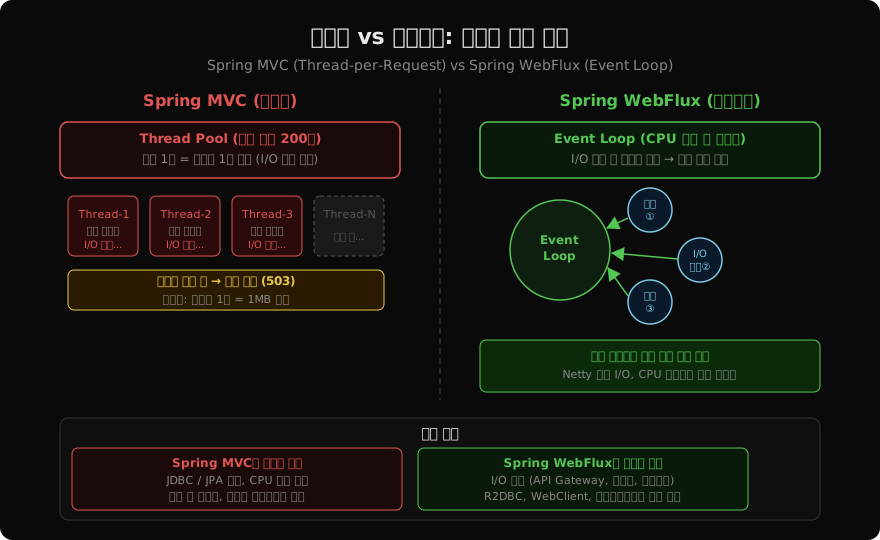
전통적인 Spring MVC는 Thread-per-Request 모델이다. 요청이 들어오면 스레드 풀에서 스레드 하나를 할당하고, 그 스레드가 요청 처리를 완료할 때까지 점유한다. DB 쿼리나 외부 API 호출처럼 I/O를 기다리는 동안에도 스레드는 블록된 채로 유지된다.
요청 1 → Thread-1 [처리 중...DB 쿼리 대기...응답]  → 반환
요청 2 → Thread-2 [처리 중...API 호출 대기...응답] → 반환
요청 N → Thread 없음 → 대기열 또는 거절
스레드 수를 늘리면? 스레드 하나가 약 1MB 스택 메모리를 차지하고, 컨텍스트 스위칭 비용이 급증한다. 1만 동시 요청을 처리하려면 1만 개 스레드가 필요하고, 이는 약 10GB 메모리를 스레드 스택만으로 소모한다는 의미다.
리액티브 프로그래밍은 이 문제를 이벤트 루프(Event Loop) 로 해결한다.
[Event Loop (CPU 코어 수 스레드)]
  ↓
요청 1 수신 → I/O 시작 → 스레드 반환 (다른 요청 처리)
I/O 완료 이벤트 → 스레드 재사용하여 나머지 처리 → 응답
I/O 대기 중에 스레드를 반환하므로 소수의 스레드로 수만 건의 동시 요청을 처리할 수 있다. Nginx나 Node.js가 이 방식으로 동작한다.
Reactive Streams 스펙
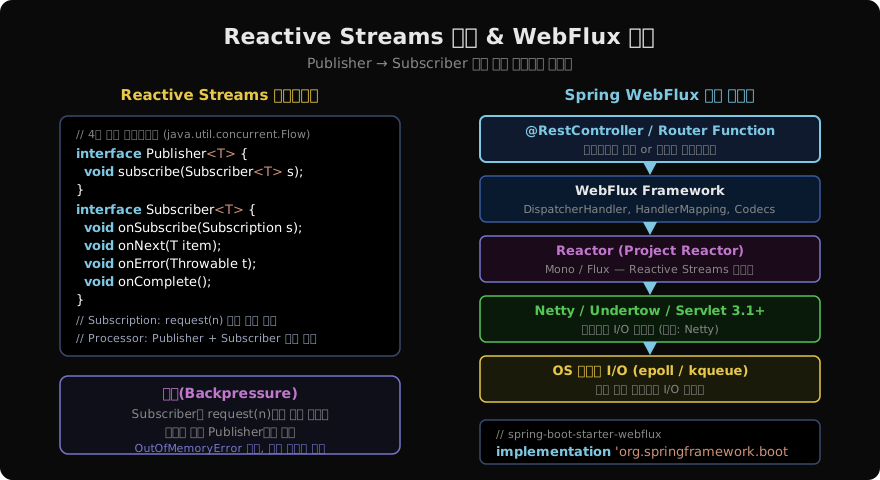
Java의 리액티브 프로그래밍 표준 인터페이스가 Reactive Streams다. JDK 9부터 java.util.concurrent.Flow에 포함되었고, Spring WebFlux는 이 스펙 위에 구축된다.
// Reactive Streams 4대 인터페이스

// 1. Publisher — 데이터 생산자
public interface Publisher<T> {
    void subscribe(Subscriber<? super T> subscriber);
}

// 2. Subscriber — 데이터 소비자
public interface Subscriber<T> {
    void onSubscribe(Subscription s);   // 구독 시작
    void onNext(T item);                // 데이터 수신
    void onError(Throwable t);          // 에러 처리
    void onComplete();                  // 완료
}

// 3. Subscription — 구독 제어
public interface Subscription {
    void request(long n);   // 배압: n개 데이터 요청
    void cancel();          // 구독 취소
}

// 4. Processor — Publisher + Subscriber 동시 구현 (변환 처리)
public interface Processor<T, R> extends Subscriber<T>, Publisher<R> {}
Publisher와 Subscriber 사이의 계약:
- Subscriber가
subscribe()호출 → Publisher가onSubscribe()호출 - Subscriber가
request(n)호출 → Publisher가 최대 n개onNext()호출 - 완료 시
onComplete(), 에러 시onError()호출
배압(Backpressure)
리액티브 스트리밍의 핵심 개념이 배압(Backpressure) 이다. 생산자가 소비자보다 빠르게 데이터를 생성하면, 소비자의 버퍼가 넘쳐 OutOfMemoryError가 발생할 수 있다.
// 배압 없는 Push 방식의 문제
// Producer (1,000,000 items/sec) → Consumer (100 items/sec) → 버퍼 폭발
Reactive Streams는 Subscription.request(n)으로 소비자가 처리 가능한 양만큼만 요청할 수 있다.
// 배압을 적용한 구독 예시
publisher.subscribe(new Subscriber<String>() {
    private Subscription subscription;
    private int processed = 0;
    private final int BATCH = 10;

    @Override
    public void onSubscribe(Subscription s) {
        this.subscription = s;
        s.request(BATCH);   // 처음에 10개만 요청
    }

    @Override
    public void onNext(String item) {
        process(item);
        if (++processed % BATCH == 0) {
            subscription.request(BATCH);    // 10개 처리 후 10개 더 요청
        }
    }
    // ...
});
실제로 Project Reactor의 Flux를 사용할 때는 대부분의 배압 처리가 내부적으로 이루어지므로 직접 request(n)을 호출할 일은 드물다.
Project Reactor — Spring WebFlux의 구현체
Spring WebFlux는 Reactive Streams 스펙의 구현체로 Project Reactor를 사용한다. Reactor는 두 가지 핵심 타입을 제공한다.
// Mono<T> — 0개 또는 1개의 아이템을 비동기적으로 처리
Mono<User> findUserById(Long id);
Mono<Void> deleteUser(Long id);

// Flux<T> — 0개에서 N개의 아이템 스트림
Flux<Product> findAllProducts();
Flux<String> streamLogs();
이 두 타입은 다음 장에서 자세히 다루고, 이번 글에서는 개념만 잡아둔다.
// 간단한 Mono/Flux 생성 예시
Mono<String> mono = Mono.just("Hello WebFlux");
Flux<Integer> flux = Flux.range(1, 10);  // 1부터 10까지

// 구독 없이는 아무것도 실행되지 않는다 — Cold Publisher
mono.subscribe(value -> System.out.println("받은 값: " + value));
Reactor의 타입들은 Cold Publisher 다. subscribe()가 호출되기 전까지 아무런 작업도 수행하지 않는다. 이는 메서드 호출 즉시 실행되는 전통적인 방식과의 핵심 차이다.
Spring WebFlux 의존성과 기본 설정
dependencies {
    // spring-boot-starter-web 대신 사용
    implementation 'org.springframework.boot:spring-boot-starter-webflux'

    // 논블로킹 DB 드라이버 (JPA 대신)
    implementation 'org.springframework.boot:spring-boot-starter-data-r2dbc'
    runtimeOnly 'io.r2dbc:r2dbc-postgresql'
}spring-boot-starter-webflux를 추가하면 내장 서버가 Tomcat 대신 Netty로 자동 설정된다.
@SpringBootApplication
public class WebFluxApplication {
    public static void main(String[] args) {
        SpringApplication.run(WebFluxApplication.class, args);
    }
}
[로그] Netty started on port 8080기존 Spring MVC와 달리 Servlet API에 의존하지 않으므로, WAR 배포 대신 독립 실행 JAR이 기본이다.
첫 WebFlux 컨트롤러
어노테이션 방식은 Spring MVC와 거의 동일하다. 반환 타입이 Mono/Flux로 바뀐 것이 핵심 차이다.
@RestController
@RequestMapping("/products")
@RequiredArgsConstructor
public class ProductController {

    private final ProductRepository productRepository;

    // Spring MVC: List<Product> findAll()
    // WebFlux: Flux<Product>로 교체
    @GetMapping
    public Flux<Product> findAll() {
        return productRepository.findAll();
    }

    // Spring MVC: ResponseEntity<Product> findById(Long id)
    @GetMapping("/{id}")
    public Mono<ResponseEntity<Product>> findById(@PathVariable Long id) {
        return productRepository.findById(id)
            .map(ResponseEntity::ok)
            .defaultIfEmpty(ResponseEntity.notFound().build());
    }

    @PostMapping
    @ResponseStatus(HttpStatus.CREATED)
    public Mono<Product> create(@RequestBody Product product) {
        return productRepository.save(product);
    }

    // SSE(Server-Sent Events) 스트리밍
    @GetMapping(value = "/stream", produces = MediaType.TEXT_EVENT_STREAM_VALUE)
    public Flux<Product> streamProducts() {
        return productRepository.findAll()
            .delayElements(Duration.ofMillis(100));  // 100ms 간격 스트리밍
    }
}
함수형 엔드포인트 방식
어노테이션 방식 외에 Router Function 방식도 있다. 라우팅 로직을 코드로 명시적으로 정의한다.
@Configuration
public class ProductRouter {

    @Bean
    public RouterFunction<ServerResponse> productRoutes(ProductHandler handler) {
        return RouterFunctions
            .route(GET("/products"), handler::findAll)
            .andRoute(GET("/products/{id}"), handler::findById)
            .andRoute(POST("/products"), handler::create);
    }
}

@Component
@RequiredArgsConstructor
public class ProductHandler {

    private final ProductRepository repository;

    public Mono<ServerResponse> findAll(ServerRequest request) {
        return ServerResponse.ok()
            .contentType(MediaType.APPLICATION_JSON)
            .body(repository.findAll(), Product.class);
    }

    public Mono<ServerResponse> findById(ServerRequest request) {
        Long id = Long.parseLong(request.pathVariable("id"));
        return repository.findById(id)
            .flatMap(product -> ServerResponse.ok().bodyValue(product))
            .switchIfEmpty(ServerResponse.notFound().build());
    }
}
Router Function 방식은 람다 기반으로 더 함수형에 가깝고, 테스트에서 WebTestClient 없이 RouterFunctions.toHttpHandler()로 직접 테스트할 수 있다는 장점이 있다.
리액티브 프로그래밍이 어려운 이유
WebFlux를 처음 접하면 코드가 낯설고, 오류 추적이 어렵다는 단점이 있다.
// 스택 트레이스가 이벤트 루프 내부를 가리켜 디버깅 어려움
Hooks.onOperatorDebug();    // 개발 환경에서만 — 성능 영향 있음
또한 리액티브 전파(reactive propagation) 의 법칙을 이해해야 한다.
// 틀린 예 — subscribe() 안에서 블로킹 코드 실행
Flux.range(1, 10)
    .subscribe(i -> {
        Thread.sleep(100);   // 절대 금지! 이벤트 루프 스레드 블록
    });

// 올바른 예 — delayElements로 비동기 딜레이
Flux.range(1, 10)
    .delayElements(Duration.ofMillis(100))
    .subscribe(System.out::println);
절대 규칙: 이벤트 루프 스레드에서 블로킹 작업을 실행하지 않는다. Thread.sleep(), JDBC, 동기 파일 I/O는 모두 금지다. 블로킹이 필요한 경우 Schedulers.boundedElastic()으로 별도 스레드 풀에서 실행한다.
// 블로킹 작업을 별도 스케줄러에서 실행
Mono.fromCallable(() -> blockingJdbcCall())
    .subscribeOn(Schedulers.boundedElastic());
WebFlux와 Spring MVC 공존
같은 프로젝트에서 WebFlux와 MVC를 혼용하는 것은 권장하지 않는다. WebFlux의 이점은 전체 스택이 논블로킹일 때 발휘된다. JDBC(블로킹)를 그대로 사용하면서 WebFlux만 도입해도 성능 이점이 없다.
| 전체 스택 조합 | 효과 |
|---|---|
| WebFlux + R2DBC + WebClient | 완전 논블로킹, 최고 성능 |
| WebFlux + JDBC (블로킹) | 이벤트 루프 차단, 역효과 가능 |
| MVC + WebClient | 외부 호출만 논블로킹, 부분 이점 |
| MVC + RestTemplate | 완전 블로킹, 전통 방식 |
지난 글: 분산 트랜잭션과 Saga 패턴: Choreography vs Orchestration
다음 글: Reactor Mono·Flux 완전 정복
읽어주셔서 감사합니다. 😊
PALDYN / ARTICLE AI
글의 개념, 수식, 코드에 대해 물어보세요.
질문과 관련된 문단을 골라 답변의 문맥으로 사용합니다.생각 중 · 0초