

커스텀 Spring Boot Starter & Auto-configuration 만들기
spring-boot-starter-web처럼 의존성 하나만 추가하면 동작하는 커스텀 스타터를 직접 만들어 봅니다. autoconfigure 모듈 구조, AutoConfiguration.imports 등록, @EnableConfigurationProperties 연동, 메타데이터 설정까지 단계별로 다룹니다.
지난 글에서 @Conditional 어노테이션이 조건에 따라 Bean 등록을 결정하는 원리를 살펴봤습니다. 이제 그 원리를 직접 활용해 나만의 Spring Boot 스타터를 만들어 봅니다. “의존성 하나만 추가하면 자동 설정이 적용된다”는 Spring Boot의 마법은 사실 매우 단순한 규약을 따릅니다. 이 규약을 이해하면 팀 내 공통 인프라 코드를 스타터로 패키징해 재사용할 수 있습니다.
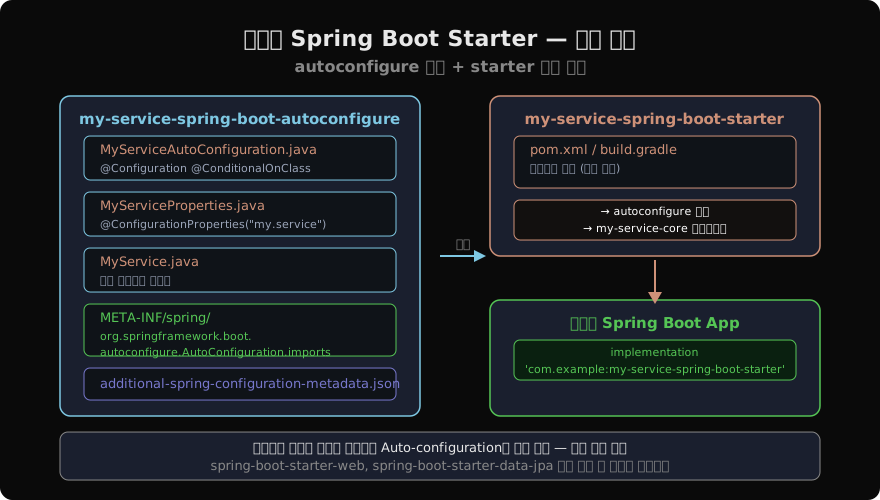
스타터의 두 모듈
Spring Boot 공식 스타터는 두 개의 모듈로 나뉩니다.
- autoconfigure 모듈: 실제 Auto-configuration 클래스, Properties 클래스, 핵심 라이브러리 포함
- starter 모듈:
pom.xml(또는build.gradle) 의존성 선언만 있는 래퍼. 코드는 없음
사용자는 starter 모듈 하나만 추가하면 autoconfigure 모듈이 전이 의존성으로 딸려옵니다.
단계별 구현
1단계 — autoconfigure 모듈 생성
Gradle 멀티 프로젝트 기준으로 두 모듈을 만듭니다.
my-service-spring-boot-autoconfigure/
├── src/main/java/com/example/
│   ├── MyService.java
│   ├── MyServiceProperties.java
│   └── MyServiceAutoConfiguration.java
└── src/main/resources/
    └── META-INF/spring/
        └── org.springframework.boot.autoconfigure.AutoConfiguration.imports

my-service-spring-boot-starter/
└── build.gradle   (의존성 선언만)
2단계 — Properties 클래스
@ConfigurationProperties(prefix = "my.service")
public class MyServiceProperties {

    private String endpoint = "http://localhost:8080";
    private int timeout = 3000;
    private boolean enabled = true;

    // getters / setters
    public String getEndpoint() { return endpoint; }
    public void setEndpoint(String endpoint) { this.endpoint = endpoint; }
    public int getTimeout() { return timeout; }
    public void setTimeout(int timeout) { this.timeout = timeout; }
    public boolean isEnabled() { return enabled; }
    public void setEnabled(boolean enabled) { this.enabled = enabled; }
}
3단계 — Auto-configuration 클래스
@AutoConfiguration
@ConditionalOnClass(MyService.class)
@ConditionalOnProperty(
    prefix = "my.service",
    name = "enabled",
    havingValue = "true",
    matchIfMissing = true   // 프로퍼티 없어도 기본 활성화
)
@EnableConfigurationProperties(MyServiceProperties.class)
public class MyServiceAutoConfiguration {

    @Bean
    @ConditionalOnMissingBean   // 사용자가 직접 Bean 정의 시 건너뜀
    public MyService myService(MyServiceProperties props) {
        return new MyService(props.getEndpoint(), props.getTimeout());
    }
}@AutoConfiguration은 Spring Boot 2.7에서 도입된 전용 어노테이션입니다. 이전 버전에서는 @Configuration을 사용했지만 @AutoConfiguration을 쓰면 컴포넌트 스캔 대상에서 제외되어 의도치 않은 중복 등록을 방지합니다.
4단계 — AutoConfiguration.imports 등록
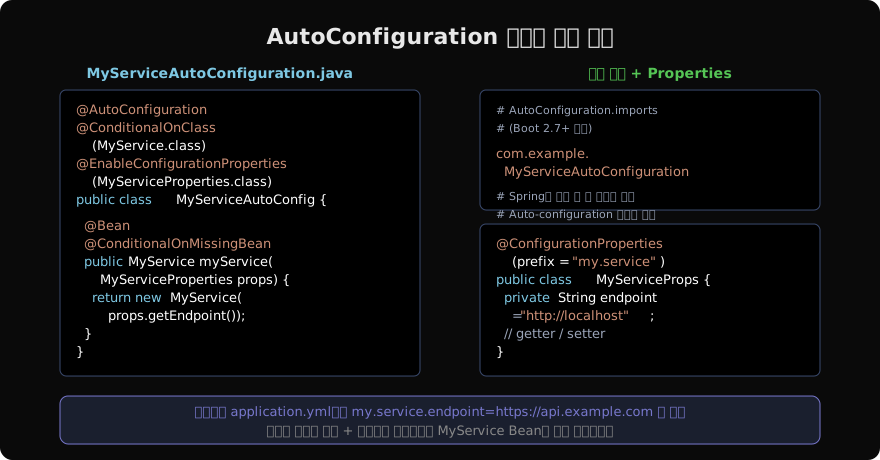
Spring Boot 2.7 이상에서는 spring.factories 대신 이 파일을 사용합니다.
# src/main/resources/META-INF/spring/
# org.springframework.boot.autoconfigure.AutoConfiguration.imports

com.example.MyServiceAutoConfiguration
한 줄만 추가하면 됩니다. Spring Boot가 부팅 시 이 파일을 읽어 Auto-configuration 후보 목록에 등록합니다.
Boot 2.6 이하 호환이 필요하다면
META-INF/spring.factories도 함께 작성합니다:org.springframework.boot.autoconfigure.EnableAutoConfiguration=\ com.example.MyServiceAutoConfiguration
5단계 — starter 모듈의 build.gradle
// my-service-spring-boot-starter/build.gradle
plugins {
    id 'java-library'
}

dependencies {
    // autoconfigure 모듈 의존
    api project(':my-service-spring-boot-autoconfigure')

    // 스타터가 자동으로 끌어올 다른 라이브러리들
    api 'org.springframework.boot:spring-boot-autoconfigure'
}
6단계 — IDE 자동완성을 위한 메타데이터
spring-boot-configuration-processor를 autoconfigure 모듈에 추가하면 빌드 시 additional-spring-configuration-metadata.json을 자동 생성합니다.
// autoconfigure 모듈 build.gradle
dependencies {
    annotationProcessor 'org.springframework.boot:spring-boot-configuration-processor'
    compileOnly 'org.springframework.boot:spring-boot-autoconfigure'
}
이제 application.yml에서 my.service. 까지 입력하면 IDE가 endpoint, timeout, enabled 등을 자동완성해줍니다.
사용자 측 사용법
// 사용자 프로젝트 build.gradle
dependencies {
    implementation 'com.example:my-service-spring-boot-starter:1.0.0'
}
# application.yml — 필요한 값만 오버라이드
my:
service:
endpoint: https://api.production.example.com
timeout: 5000// 자동 주입
@Service
public class OrderService {
private final MyService myService; // Auto-configuration이 만든 Bean
public OrderService(MyService myService) {
this.myService = myService;
}
}팀 내 공통 스타터 활용 패턴
| 사용 사례 | 스타터 내용 |
|---|---|
| 공통 로깅 | MDC 설정, 로그 포맷 통일 |
| 내부 API 클라이언트 | RestClient/WebClient Bean + 재시도 설정 |
| 공통 보안 정책 | SecurityFilterChain 기본 설정 |
| 공통 예외 처리 | @ControllerAdvice + RFC 7807 포맷 |
@ConditionalOnMissingBean 덕분에 각 서비스는 필요하면 오버라이드하고, 아니면 그냥 쓰면 됩니다.
정리
커스텀 스타터는 세 가지 파일이 핵심입니다.
MyServiceAutoConfiguration.java—@AutoConfiguration+@Conditional*+@BeanMyServiceProperties.java—@ConfigurationProperties(prefix = "...")AutoConfiguration.imports— 클래스 FQCN 한 줄 등록
이 세 파일만 제대로 작성하면 어떤 Spring Boot 프로젝트에서도 의존성 추가 하나로 기능이 활성화됩니다.
지난 글: Spring Boot @Conditional — 조건부 Bean 등록 완전 정복
다음 글: Spring Boot DataSource Auto-configuration 파헤치기
읽어주셔서 감사합니다. 😊
PALDYN / ARTICLE AI
글의 개념, 수식, 코드에 대해 물어보세요.
질문과 관련된 문단을 골라 답변의 문맥으로 사용합니다.생각 중 · 0초