

비동기 이터레이터 타이핑
비동기 이터레이터와 async 제너레이터를 TypeScript로 타이핑하는 법을 정리합니다. async function*의 AsyncGenerator 반환 타입, for await...of의 타입 흐름, AsyncIterable·AsyncIterator·AsyncGenerator의 차이, 페이지네이션과 스트림 처리에 적용하는 실전 예시까지 다룹니다.
지난 글에서 단일 비동기 값인 Promise를 깊게 봤다. 그런데 현실에는 “비동기로 도착하는 값들의 연속”도 많다 — 페이지네이션 API, 실시간 스트림, 파일을 청크 단위로 읽기 같은. 이런 흐름을 다루는 도구가 비동기 이터레이터와 async 제너레이터이고, for await...of로 소비한다. TypeScript는 이 영역도 꽤 매끄럽게 타이핑하지만, 관련 타입이 여럿이라 역할을 구분해 둘 필요가 있다.
async 제너레이터 — 값을 하나씩 흘려보내기
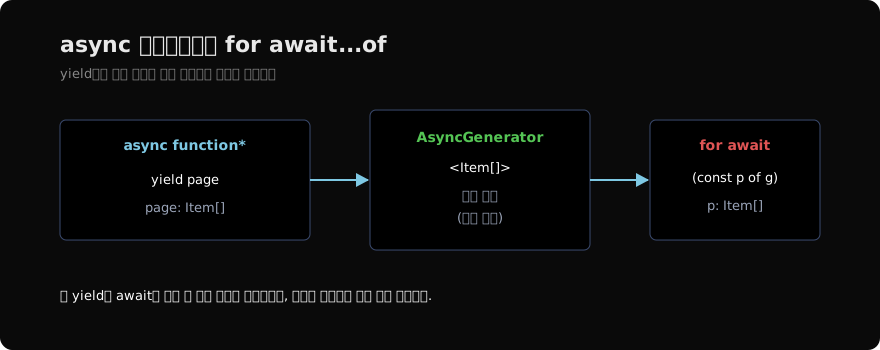
async function*는 비동기 제너레이터다. await로 비동기 작업을 기다리면서 yield로 값을 하나씩 내보낸다. 반환 타입은 명시하지 않아도 AsyncGenerator<T>로 추론된다.
async function* fetchPages(url: string) {
  let next: string | null = url;
  while (next) {
    const res = await fetch(next);
    const page: { items: Item[]; next: string | null } = await res.json();
    yield page.items; // Item[]을 yield
    next = page.next;
  }
}
// 반환 타입: AsyncGenerator<Item[], void, unknown>
yield page.items에서 내보내는 값이 Item[]이므로, 제너레이터의 타입 인자 T가 Item[]으로 추론된다. 이 T가 소비하는 쪽까지 흘러간다.
for await…of로 소비하기
for await...of는 비동기 이터러블을 한 번에 하나씩, 각 단계마다 await하며 순회한다. 루프 변수의 타입은 yield한 값의 타입과 정확히 일치한다.
for await (const items of fetchPages("/api/items")) {
  // items: Item[] — 자동으로 좁혀짐
  for (const item of items) {
    console.log(item.name);
  }
}items에 타입을 명시하지 않아도 Item[]로 안다. 메모리에 전체를 올리지 않고 페이지가 도착할 때마다 처리하므로, 큰 데이터셋이나 무한 스트림에 적합하다. 타입 안전과 스트리밍을 동시에 얻는 셈이다.
세 가지 타입 구분하기
비동기 이터레이터 영역에는 비슷해 보이는 타입이 셋 있다. 어디에 무엇을 쓰는지 구분하면 헷갈리지 않는다.
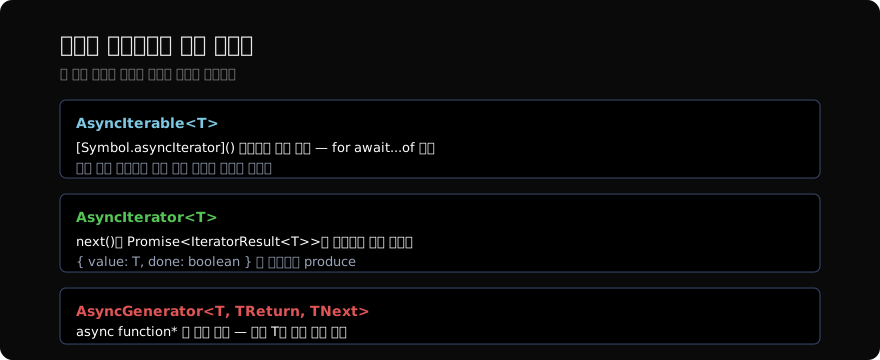
AsyncGenerator<T>는 async function*의 반환 타입이다. 함수를 만드는 쪽에서 추론으로 채워지므로 직접 쓸 일은 적다. 반면 함수가 비동기 이터러블을 인자로 받을 때는 더 넓은 AsyncIterable<T>를 쓰는 게 좋다. 제너레이터든 직접 구현한 객체든 모두 받아들이기 때문이다.
// 소비하는 유틸 함수는 AsyncIterable로 받는다
async function collect<T>(source: AsyncIterable<T>): Promise<T[]> {
  const result: T[] = [];
  for await (const value of source) {
    result.push(value); // value: T
  }
  return result;
}

const allItems = await collect(fetchPages("/api/items")); // Item[][]AsyncIterable<T>로 받으면 제네릭 T가 그대로 흘러서, collect의 반환이 Item[][]로 정확히 추론된다. AsyncIterator<T>는 그보다 한 겹 안쪽, next()가 Promise<IteratorResult<T>>를 반환하는 실제 반복자다 — 직접 구현할 때만 마주친다.
직접 구현하기 — Symbol.asyncIterator
제너레이터 없이 비동기 이터러블을 직접 만들려면, [Symbol.asyncIterator]() 메서드를 구현한다. 타입으로는 AsyncIterable<T>를 implements하면 컴파일러가 모양을 검사해 준다.
class Countdown implements AsyncIterable<number> {
  constructor(private from: number) {}

  async *[Symbol.asyncIterator](): AsyncIterator<number> {
    for (let n = this.from; n > 0; n--) {
      await new Promise((r) => setTimeout(r, 1000));
      yield n;
    }
  }
}

for await (const n of new Countdown(3)) {
  console.log(n); // n: number — 3, 2, 1
}
implements AsyncIterable<number>를 붙이면, [Symbol.asyncIterator]의 반환이 올바른 모양인지 검사한다. 메서드 자체를 async *로 두면 제너레이터가 AsyncIterator<number>를 만들어주니 구현이 간결하다.
tsconfig 주의 — 타깃과 lib
비동기 이터레이터는 for await...of와 Symbol.asyncIterator에 의존하므로, 컴파일 설정이 이를 지원해야 한다. target과 lib 설정에서 target이 ES2018 이상이거나, 낮은 타깃이라면 lib에 "esnext.asynciterable"(또는 "es2018.asynciterable")을 포함해야 Symbol.asyncIterator를 인식한다.
{
  "compilerOptions": {
    "target": "ES2018",
    "lib": ["ES2018", "DOM"]
  }
}
이 설정이 빠지면 “Symbol.asyncIterator를 찾을 수 없다”는 류의 에러가 난다. 타입 자체의 문제가 아니라 환경 설정 문제이므로, 비동기 이터레이터를 처음 쓸 때 한 번 점검해 두면 된다.
정리하면, async function*로 값을 비동기로 흘려보내고 for await...of로 소비하며, 그 사이로 yield 타입이 그대로 전파된다. 만드는 쪽은 AsyncGenerator<T>(추론), 받는 쪽 함수는 넓은 AsyncIterable<T>, 직접 구현엔 AsyncIterator<T>를 쓴다. 다음 글에서는 이런 비동기 작업을 취소하는 표준 도구인 AbortController를 타이핑한다.
지난 글: Promise 깊이 타이핑하기
다음 글: AbortController 타이핑
읽어주셔서 감사합니다. 😊
PALDYN / ARTICLE AI
글의 개념, 수식, 코드에 대해 물어보세요.
질문과 관련된 문단을 골라 답변의 문맥으로 사용합니다.생각 중 · 0초