

함수 오버로드 — 여러 시그니처로 정밀한 타입 표현
TypeScript 함수 오버로드의 개념과 문법, 오버로드 시그니처와 구현 시그니처의 관계, 제네릭과의 선택 기준, 메서드 오버로드까지 실전 패턴을 정리합니다.
지난 글에서 함수 타입을 표현하는 기본 방법을 살펴봤다. 이번에는 함수 오버로드(Function Overload) 를 다룬다. 오버로드는 동일한 함수가 입력 타입에 따라 다른 타입의 값을 반환하거나, 서로 다른 형태의 인수를 받을 때 호출자에게 정확한 타입 정보를 제공하는 기법이다.
왜 오버로드가 필요한가
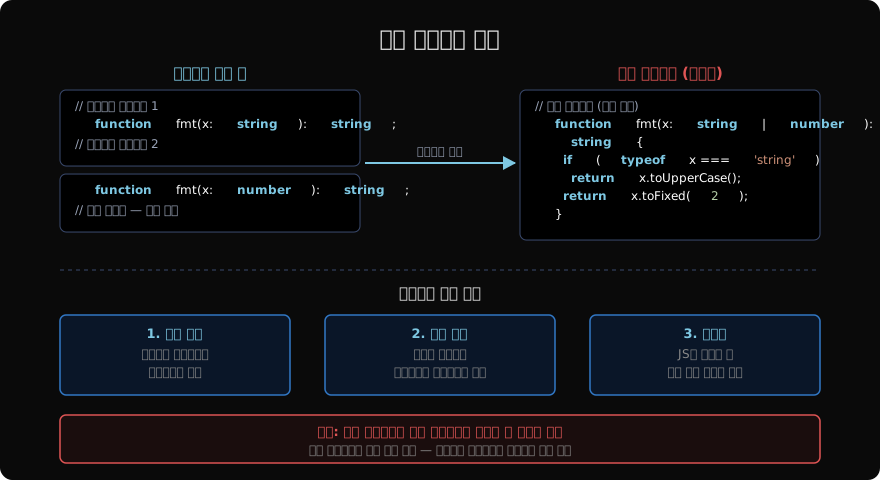
유니언 타입만으로는 입력과 출력의 대응 관계를 표현할 수 없다.
// ❌ 유니언 타입 — 입력과 출력의 관계가 불명확
function format(input: string | number): string | number {
  if (typeof input === "string") return input.toUpperCase();
  return input.toFixed(2);
}

const result = format("hello"); // 타입: string | number — 좁혀지지 않음
result.toUpperCase(); // TS2339: Property 'toUpperCase' does not exist on type 'string | number'

// ✅ 오버로드 — 입력-출력 대응 관계 명확
function format(input: string): string;
function format(input: number): string;
function format(input: string | number): string {
  if (typeof input === "string") return input.toUpperCase();
  return input.toFixed(2);
}

const r1 = format("hello"); // 타입: string
const r2 = format(3.14); // 타입: stringformat("hello")를 호출하면 반환 타입이 string으로 정확히 결정된다. 유니언으로는 이 관계를 표현할 수 없다.
오버로드 시그니처와 구현 시그니처
TypeScript의 함수 오버로드는 두 가지 부분으로 구성된다.
- 오버로드 시그니처: 외부에 보이는 타입 계약. 구현 없이 타입만 선언한다.
- 구현 시그니처: 실제 로직을 담은 함수 본문. 외부에서는 보이지 않는다.
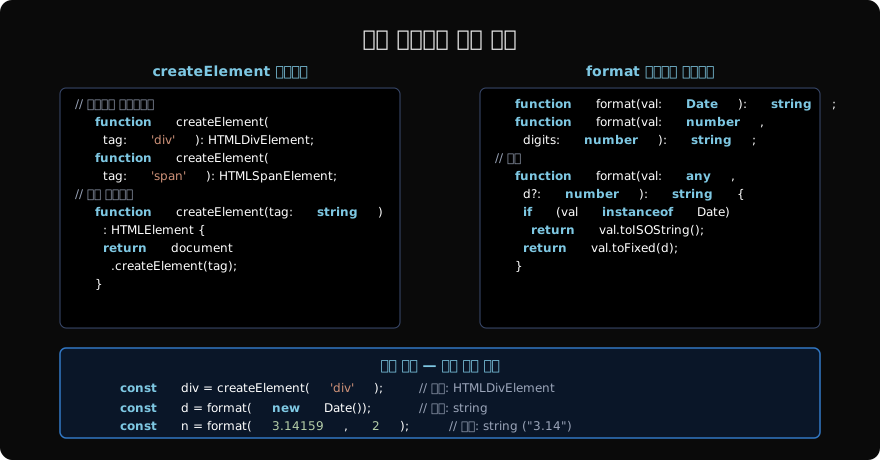
// 오버로드 시그니처 (여러 개 가능)
function createElement(tag: "div"): HTMLDivElement;
function createElement(tag: "a"): HTMLAnchorElement;
function createElement(tag: "input"): HTMLInputElement;

// 구현 시그니처 (하나만 존재, 외부에 노출되지 않음)
function createElement(tag: string): HTMLElement {
  return document.createElement(tag);
}

// 호출 — 오버로드 시그니처 기준으로 타입 결정
const div = createElement("div");    // HTMLDivElement
const link = createElement("a");     // HTMLAnchorElement
const input = createElement("input"); // HTMLInputElement

// 구현 시그니처는 외부에 노출되지 않음
createElement("span"); // ❌ 오버로드 시그니처에 없으므로 에러
구현 시그니처는 모든 오버로드 시그니처를 수용할 수 있을 만큼 충분히 넓은 타입이어야 한다. 하지만 외부 호출자는 오버로드 시그니처만 보기 때문에, 구현 시그니처의 넓은 타입(string)은 노출되지 않는다.
오버로드 개수 제한 없음
오버로드 시그니처는 필요한 만큼 정의할 수 있다.
// 다양한 형태의 인수를 받는 함수
function makeDate(timestamp: number): Date;
function makeDate(year: number, month: number, day: number): Date;
function makeDate(yearOrTimestamp: number, month?: number, day?: number): Date {
  if (month !== undefined && day !== undefined) {
    return new Date(yearOrTimestamp, month - 1, day);
  }
  return new Date(yearOrTimestamp);
}

const d1 = makeDate(1717200000000);  // timestamp → Date
const d2 = makeDate(2026, 6, 1);     // year/month/day → Date

// ❌ 두 개 인수 — 어떤 오버로드에도 해당하지 않음
const d3 = makeDate(2026, 6);        // Error: No overload matches this call
makeDate(2026, 6)처럼 오버로드 시그니처에 정의되지 않은 형태는 구현 시그니처가 허용하더라도 컴파일 에러가 발생한다. 오버로드 시그니처가 외부 계약의 전부이기 때문이다.
오버로드 해석 순서
TypeScript는 오버로드 시그니처를 선언 순서대로 시도한다. 첫 번째로 매칭되는 시그니처를 사용한다.
function len(x: string): number;
function len(x: unknown[]): number;
function len(x: string | unknown[]): number {
  return x.length;
}

len("hello");          // 첫 번째 오버로드 (string)
len([1, 2, 3]);        // 두 번째 오버로드 (unknown[])
len(Math.random() > 0.5 ? "hello" : [1, 2, 3]); // ❌ 어느 오버로드도 string | unknown[] 를 직접 수용하지 않음
마지막 호출이 에러가 나는 이유는 유니언 string | unknown[]이 string과도, unknown[]과도 정확히 매칭되지 않기 때문이다. 이런 경우 오버로드 대신 단일 유니언 시그니처가 더 적합하다.
제네릭 vs 오버로드 — 선택 기준
제네릭과 오버로드 모두 여러 타입을 처리할 수 있다. 선택 기준은 명확하다.
// ✅ 제네릭 — 입력과 출력 타입이 동일한 경우
function identity<T>(value: T): T {
  return value;
}

identity("hello"); // string
identity(42);      // number

// ✅ 오버로드 — 입력 타입에 따라 출력 타입이 달라지는 경우
function process(input: string): string[];
function process(input: number): number;
function process(input: string | number): string[] | number {
  if (typeof input === "string") return input.split("");
  return input * 2;
}

process("abc"); // string[]
process(5); // number제네릭: 타입이 입력에서 출력으로 “흘러가는” 경우. T가 입력 타입을 캡처하고 출력에서 동일하게 사용된다.
오버로드: 입력 타입에 따라 출력 타입이 다른 경우. 또는 인수 개수/형태가 경우에 따라 달라지는 경우.
메서드 오버로드
클래스 메서드에도 오버로드를 적용할 수 있다.
class Formatter {
  // 오버로드 시그니처
  format(value: string): string;
  format(value: number, decimals: number): string;

  // 구현
  format(value: string | number, decimals?: number): string {
    if (typeof value === "string") {
      return value.trim();
    }
    return value.toFixed(decimals ?? 0);
  }
}

const f = new Formatter();
f.format("  hello  ");    // "hello"
f.format(3.14159, 2);    // "3.14"
f.format(3.14159);       // ❌ 두 번째 시그니처는 decimals가 필수
인터페이스 오버로드
인터페이스 콜 시그니처도 여러 개 정의하면 오버로드처럼 동작한다.
interface StringParser {
  (input: string): number;
  (input: string, radix: number): number;
}

const parse: StringParser = (input: string, radix?: number) => {
  return parseInt(input, radix);
};

parse("42");      // number
parse("ff", 16);  // number (16진수 파싱)
실전: 이벤트 에미터 오버로드
오버로드가 실제로 빛나는 예제는 이벤트 시스템이다.
type EventMap = {
  click: MouseEvent;
  keydown: KeyboardEvent;
  resize: UIEvent;
};

interface TypedEventEmitter {
  on<K extends keyof EventMap>(event: K, handler: (e: EventMap[K]) => void): void;
  emit<K extends keyof EventMap>(event: K, data: EventMap[K]): void;
}

// 오버로드로 구체적인 이벤트별 타입 표현도 가능
function addEventListener(event: "click", handler: (e: MouseEvent) => void): void;
function addEventListener(event: "keydown", handler: (e: KeyboardEvent) => void): void;
function addEventListener(event: string, handler: (e: Event) => void): void {
  document.addEventListener(event, handler);
}

addEventListener("click", (e) => {
  e.clientX; // MouseEvent — 정확한 타입
});

addEventListener("keydown", (e) => {
  e.key; // KeyboardEvent — 정확한 타입
});
주의사항: 오버로드는 구현을 검증하지 않는다
오버로드 시그니처가 선언됐다고 해서 구현이 자동으로 검증되는 것은 아니다.
function bad(x: string): string;
function bad(x: number): number;
// 구현이 시그니처를 위반해도 에러가 없을 수 있음
function bad(x: string | number): string { // number 입력 시 string 반환 — 오버로드와 불일치
  return String(x); // 런타임에서 문제가 생길 수 있음
}
오버로드 구현은 개발자의 책임이다. 모든 오버로드 시그니처를 처리하는 완전한 구현을 작성해야 한다.
지난 글: 함수 타입 — TypeScript에서 함수를 타입으로 표현하는 방법
다음 글: 선택적 매개변수와 기본값 — 유연한 함수 시그니처 설계
읽어주셔서 감사합니다. 😊
PALDYN / ARTICLE AI
글의 개념, 수식, 코드에 대해 물어보세요.
질문과 관련된 문단을 골라 답변의 문맥으로 사용합니다.생각 중 · 0초