

in 연산자 타입 가드 — 프로퍼티 존재 여부로 타입 구분하기
TypeScript in 연산자를 활용한 타입 좁히기 원리, 판별 유니언(discriminated union)과의 연계, 선택적 프로퍼티 체크, in vs instanceof vs typeof 비교를 정리합니다.
지난 글에서 typeof와 instanceof 타입 가드를 살펴봤다. 이번에는 in 연산자 를 이용한 타입 좁히기를 다룬다. in 연산자는 인터페이스나 구조적 타입을 사용하는 경우처럼 instanceof를 쓸 수 없을 때 특히 유용하다.
in 연산자 기본 동작
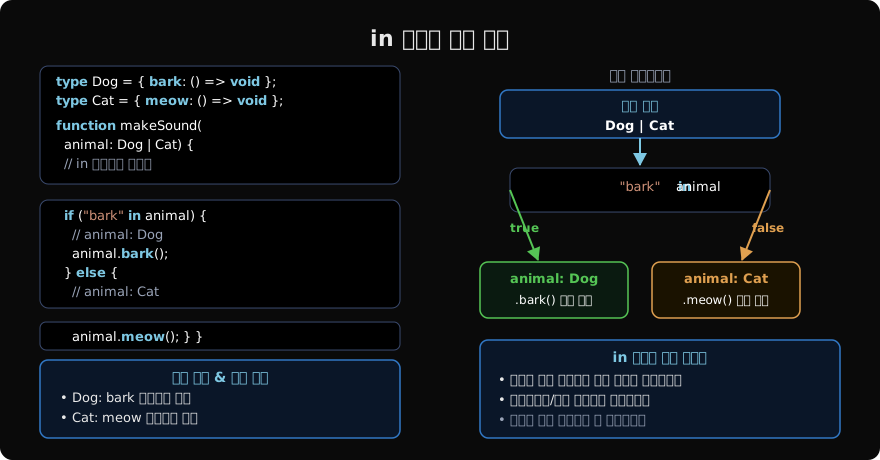
"프로퍼티명" in 객체 표현식은 객체(또는 프로토타입 체인)에 해당 프로퍼티가 존재하면 true를 반환한다. TypeScript는 이 패턴을 타입 가드로 인식한다.
type Cat = { meow(): void };
type Dog = { bark(): void };

function makeSound(animal: Cat | Dog) {
  if ("meow" in animal) {
    // animal: Cat — meow 프로퍼티가 있으므로
    animal.meow();
  } else {
    // animal: Dog — meow가 없으면 Dog만 남음
    animal.bark();
  }
}

// 여러 프로퍼티 체크
type Fish = { swim(): void; breatheUnderwater: boolean };
type Bird = { fly(): void; wingspan: number };

function describe(creature: Fish | Bird): string {
  if ("swim" in creature) {
    // creature: Fish
    return `물고기, 수중호흡: ${creature.breatheUnderwater}`;
  }
  // creature: Bird
  return `새, 날개폭: ${creature.wingspan}cm`;
}
in vs instanceof — 인터페이스에는 instanceof 불가
instanceof는 클래스 인스턴스에만 사용할 수 있다. 순수한 인터페이스나 타입 별칭으로 정의된 타입에는 in 연산자가 유일한 런타임 검사 방법이다.
interface Circle {
  kind: "circle";
  radius: number;
}

interface Rectangle {
  kind: "rect";
  width: number;
  height: number;
}

type Shape = Circle | Rectangle;

// ❌ 인터페이스에는 instanceof 불가
// shape instanceof Circle; // 컴파일 에러

// ✅ in 연산자 사용
function area(shape: Shape): number {
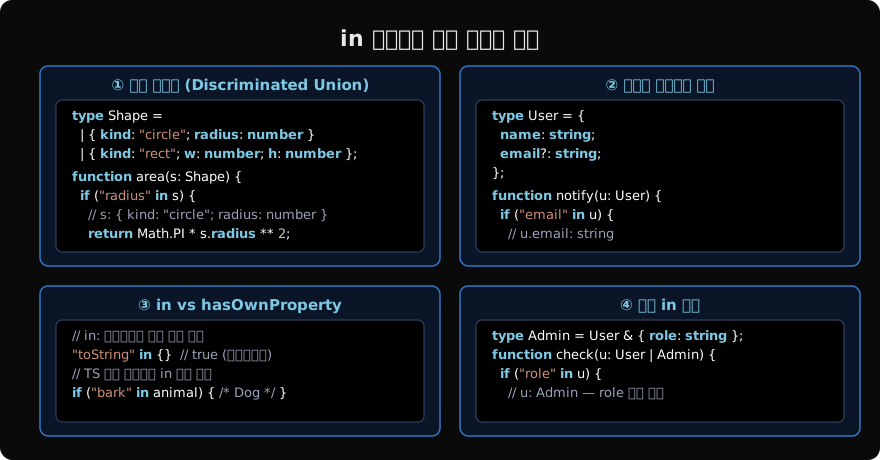
  if ("radius" in shape) {
    // shape: Circle
    return Math.PI * shape.radius ** 2;
  }
  // shape: Rectangle
  return shape.width * shape.height;
}
판별 유니언(Discriminated Union)과 in
판별 유니언은 공통 리터럴 타입 프로퍼티(kind, type, tag 등)를 가진 유니언이다. in 연산자 대신 해당 프로퍼티를 직접 비교하면 더 명확하고 완전성 검사(exhaustive check)도 가능하다.
type Result<T> =
  | { status: "success"; data: T }
  | { status: "error"; error: Error }
  | { status: "loading" };

function handleResult<T>(result: Result<T>): T | null {
  // status 프로퍼티는 모든 케이스에 공통 — in 불필요
  if (result.status === "success") {
    return result.data; // result: { status: "success"; data: T }
  }
  if (result.status === "error") {
    console.error(result.error.message); // result: { status: "error"; error: Error }
    return null;
  }
  // result: { status: "loading" }
  return null;
}

// in 연산자로 선택적 프로퍼티 구분
type WithId = { id: number; name: string };
type WithSlug = { slug: string; name: string };

function getPath(resource: WithId | WithSlug): string {
  if ("id" in resource) {
    // resource: WithId
    return `/items/${resource.id}`;
  }
  // resource: WithSlug
  return `/items/${resource.slug}`;
}
공통 판별자(discriminant) 프로퍼티가 있으면 판별 유니언 패턴을, 고유 프로퍼티가 다른 경우에는 in 연산자를 사용한다.
선택적 프로퍼티와 in 연산자
선택적 프로퍼티(?)가 있는 타입에서 in을 사용할 때는 주의가 필요하다.
interface Config {
  host: string;
  port?: number; // 선택적
}

interface ExtendedConfig {
  host: string;
  port: number; // 필수
  timeout: number;
}

function process(cfg: Config | ExtendedConfig) {
  if ("timeout" in cfg) {
    // cfg: ExtendedConfig — timeout이 있으면 ExtendedConfig
    console.log(`타임아웃: ${cfg.timeout}ms`);
    console.log(`포트: ${cfg.port}`); // number (필수)
  } else {
    // cfg: Config — timeout이 없으면 Config
    console.log(`포트: ${cfg.port ?? 3000}`); // number | undefined
  }
}

// 선택적 프로퍼티 — undefined와 구분
interface A {
  x: string;
  y?: number; // 없거나 number
}

interface B {
  x: string;
  y: string; // 반드시 string
}

function check(obj: A | B) {
  if ("y" in obj && typeof obj.y === "string") {
    // obj: B
    obj.y.toUpperCase();
  }
}
"y" in obj는 y가 undefined로 존재해도 true다. y: undefined와 y가 없는 것은 다르다. 선택적 프로퍼티는 in 검사가 true를 반환할 수 있으므로 타입 추가 체크가 필요한 경우가 있다.
커스텀 타입 가드와 in 연산자 조합
복잡한 타입 검사는 in 연산자를 타입 서술어(type predicate)와 함께 캡슐화한다.
interface APIResponse {
  data: unknown;
}

interface APIError {
  error: string;
  code: number;
}

type APIResult = APIResponse | APIError;

// in 연산자를 사용한 타입 서술어
function isAPIError(result: APIResult): result is APIError {
  return "error" in result && "code" in result;
}

function handleAPIResult(result: APIResult) {
  if (isAPIError(result)) {
    // result: APIError
    console.error(`에러 ${result.code}: ${result.error}`);
  } else {
    // result: APIResponse
    console.log("데이터:", result.data);
  }
}

// unknown 타입에서 안전한 in 연산자
function isRecord(value: unknown): value is Record<string, unknown> {
  return typeof value === "object" && value !== null;
}

function hasProperty<T extends object>(
  obj: T,
  key: PropertyKey,
): key is keyof T {
  return key in obj;
}
unknown 타입에 in 연산자를 직접 사용하면 에러가 발생한다. typeof value === "object" && value !== null 체크로 먼저 object 타입으로 좁혀야 한다.
세 가지 타입 가드 비교
typeof | instanceof | in | |
|---|---|---|---|
| 용도 | 원시 타입 구분 | 클래스 인스턴스 구분 | 프로퍼티 존재 여부 |
| 인터페이스 | ❌ | ❌ | ✅ |
| 순수 객체 | ❌ | ❌ | ✅ |
| 클래스 | ✅ (function) | ✅ | ✅ |
| 런타임 비용 | 낮음 | 중간 | 낮음 |
function processAny(value: string | Date | { name: string } | null): string {
  if (value === null) return "null";

  // typeof: 원시 타입
  if (typeof value === "string") {
    return `문자열: ${value}`;
  }

  // instanceof: 클래스 인스턴스
  if (value instanceof Date) {
    return `날짜: ${value.toISOString()}`;
  }

  // in: 순수 객체 / 인터페이스
  if ("name" in value) {
    return `이름: ${value.name}`;
  }

  return "알 수 없음";
}
세 가지를 조합하면 거의 모든 타입 좁히기 시나리오를 처리할 수 있다.
주의사항: in 연산자의 정확성 한계
in 연산자는 타입이 중복된 프로퍼티를 가질 때 완벽하지 않을 수 있다.
interface A {
  common: string;
  uniqueA: number;
}

interface B {
  common: string;
  uniqueB: boolean;
}

function process(x: A | B) {
  if ("uniqueA" in x) {
    // x: A — 정확
    x.uniqueA.toFixed();
  }
  // else: x: B — 정확
}

// 두 타입 모두 같은 프로퍼티 — in으로 구분 불가
interface C { x: number }
interface D { x: string }

function handleCD(val: C | D) {
  // "x" in val은 항상 true — 구분 불가
  // typeof 또는 추가 조건 필요
  if (typeof (val as C).x === "number") {
    (val as C).x.toFixed();
  }
}
두 타입에 같은 이름의 프로퍼티가 있으면 in으로는 구분할 수 없다. 이 경우 판별자 프로퍼티를 추가하거나 typeof로 값의 타입을 추가 확인해야 한다.
다음 글에서는 TypeScript 제어 흐름 분석(Control Flow Analysis)의 작동 원리와 고급 패턴을 살펴본다.
지난 글: typeof와 instanceof 타입 가드 — 원시 타입과 클래스 인스턴스 구분
다음 글: 제어 흐름 분석 — TypeScript가 타입을 추적하는 방식
읽어주셔서 감사합니다. 😊
PALDYN / ARTICLE AI
글의 개념, 수식, 코드에 대해 물어보세요.
질문과 관련된 문단을 골라 답변의 문맥으로 사용합니다.생각 중 · 0초