

파라미터 프로퍼티 — 생성자 단축 선언
TypeScript 파라미터 프로퍼티 문법으로 클래스 선언을 줄이는 방법, public/private/readonly 조합, 주의사항과 실무 가이드를 정리합니다.
지난 글에서 extends와 super를 이용한 상속을 살펴봤다. 이번에는 TypeScript만의 편리한 문법인 파라미터 프로퍼티(Parameter Properties)를 다룬다. 생성자 파라미터에 접근 제한자를 붙이는 것만으로 프로퍼티 선언과 초기화를 한 번에 처리하는 기법이다.
문제: 반복되는 보일러플레이트
일반적으로 클래스에 프로퍼티를 추가하려면 세 단계가 필요하다.
// 1. 프로퍼티 선언
// 2. 생성자 파라미터 선언
// 3. this.x = x 초기화
class User {
  name:  string;
  email: string;
  age:   number;

  constructor(name: string, email: string, age: number) {
    this.name  = name;
    this.email = email;
    this.age   = age;
  }
}
프로퍼티가 늘어날수록 반복이 심해진다.
해결: 파라미터 프로퍼티
생성자 파라미터 앞에 public, private, protected, readonly 중 하나를 붙이면 TypeScript가 자동으로 프로퍼티 선언과 this.x = x 초기화를 생성한다.
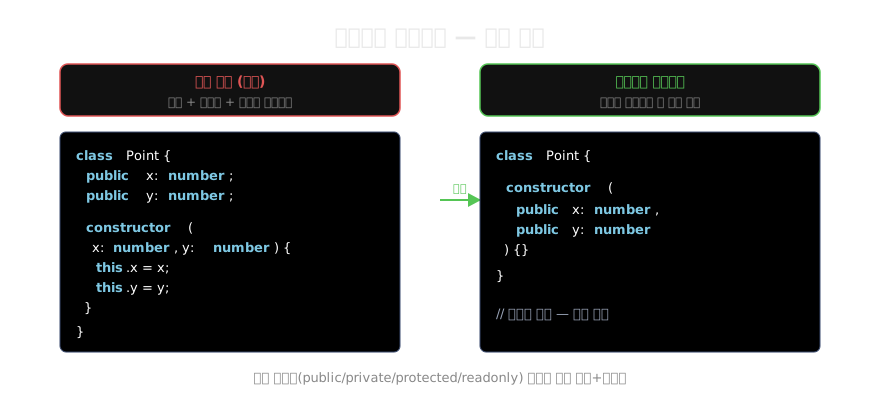
class User {
  constructor(
    public  name:  string,
    public  email: string,
    private age:   number
  ) {}
  // 프로퍼티 선언, this.name = name 등 자동 처리
}

const alice = new User("Alice", "alice@example.com", 30);
console.log(alice.name);  // "Alice"
console.log(alice.email); // "alice@example.com"
// alice.age; // Error ❌ private
사용 가능한 제한자 조합
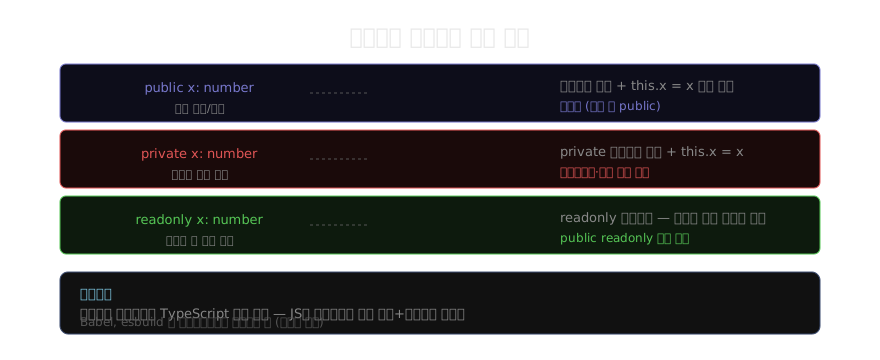
public readonly처럼 조합도 가능하다.
class Config {
  constructor(
    public  readonly host: string,
    private readonly port: number = 3000
  ) {}

  getEndpoint(): string {
    return `${this.host}:${this.port}`;
  }
}

const cfg = new Config("localhost");
console.log(cfg.host);        // "localhost"
console.log(cfg.getEndpoint()); // "localhost:3000"
// cfg.host = "new"; // Error ❌ readonly
파라미터 프로퍼티에도 기본값을 줄 수 있다(port = 3000).
일반 파라미터와 혼용
모든 파라미터가 파라미터 프로퍼티일 필요는 없다. 일반 파라미터와 혼용하면 된다.
class Logger {
  private logs: string[] = [];

  constructor(
    private readonly prefix: string,  // 파라미터 프로퍼티
    level: "debug" | "info" | "warn"  // 일반 파라미터 — 프로퍼티 아님
  ) {
    if (level === "debug") {
      this.logs.push(`[DEBUG] 로거 초기화`);
    }
  }

  log(msg: string): void {
    this.logs.push(`[${this.prefix}] ${msg}`);
  }
}level은 생성자 안에서만 사용되는 일반 파라미터이므로 접근 제한자를 붙이지 않는다.
상속과 파라미터 프로퍼티
서브클래스 생성자에서 파라미터 프로퍼티를 사용하면서 super()도 호출할 수 있다.
class Animal {
  constructor(public name: string) {}
}

class Dog extends Animal {
  constructor(
    name: string,
    public breed: string
  ) {
    super(name); // 부모 생성자 호출 후 breed 파라미터 프로퍼티 생성
  }
}

const d = new Dog("Rex", "Labrador");
console.log(d.name, d.breed); // "Rex Labrador"
언제 쓰고 언제 피할까
써도 좋은 경우: 단순한 데이터 클래스나 값 객체처럼 생성자 로직이 거의 없고 프로퍼티만 많은 클래스.
피하는 것이 나은 경우: 생성자 안에서 복잡한 초기화 로직이 있거나, 팀 내 스타일 가이드가 명시적 선언을 선호하는 경우. 파라미터 프로퍼티는 TypeScript 전용 문법이므로, 소스 코드를 그대로 읽으면서 “이게 멤버야 아니야?”를 헷갈리는 개발자도 있다.
핵심 정리
파라미터 프로퍼티는 TypeScript의 대표적인 편의 문법이다. 클래스 선언을 절반 이하로 줄일 수 있지만, 팀 컨벤션에 맞게 사용 여부를 결정하는 것이 좋다. 다음 글에서는 프로퍼티 접근을 세밀하게 제어하는 게터와 세터를 살펴본다.
지난 글: 클래스 상속 — extends와 super 완전 정리
다음 글: 게터와 세터 — 프로퍼티 접근 제어
읽어주셔서 감사합니다. 😊
PALDYN / ARTICLE AI
글의 개념, 수식, 코드에 대해 물어보세요.
질문과 관련된 문단을 골라 답변의 문맥으로 사용합니다.생각 중 · 0초