

보안 설정 오류: 잘못된 기본 설정의 위험
OWASP Top 10의 Security Misconfiguration이 어떻게 발생하는지, 기본 자격증명·디버그 모드·노출된 에러 메시지·잘못된 권한의 실제 사례와 자동화 점검 방법을 다룹니다.
지난 글에서 매스 어사인먼트 취약점을 살펴봤다. 이번에는 OWASP Top 10에서 지속적으로 상위권을 차지하는 보안 설정 오류(Security Misconfiguration) 를 다룬다. 개발자가 코드 한 줄도 잘못 쓰지 않았는데 시스템이 뚫리는 이유가 여기에 있다.
보안 설정 오류의 6가지 유형
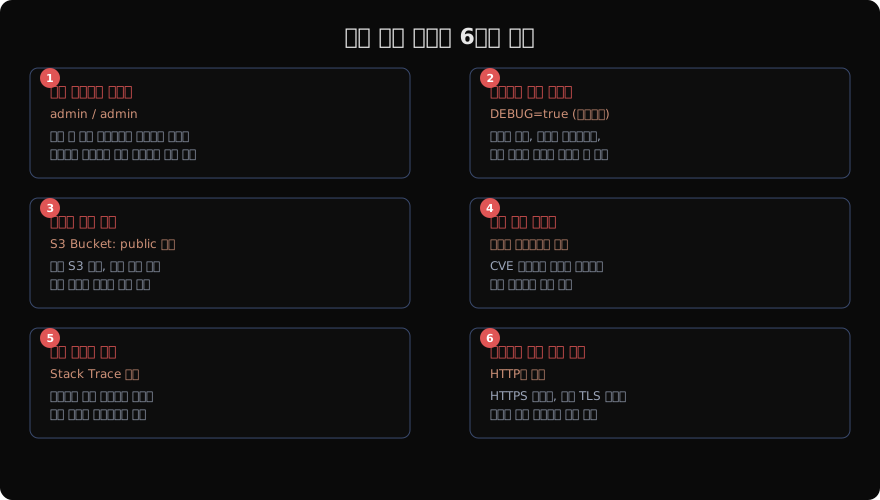
보안 설정 오류는 코드 취약점이 아니라 환경 설정의 문제다. 다음 여섯 가지 유형이 가장 흔하다.
① 기본 자격증명 미변경: 설치 후 admin/admin, root/toor, changeme를 그대로 두는 경우. 공격자는 이 조합을 자동화된 스크립트로 가장 먼저 시도한다.
② 불필요한 기능 활성화: Spring Boot Actuator 엔드포인트(/actuator/env, /actuator/heapdump)를 프로덕션에 노출하거나, Django DEBUG=True를 배포 환경에서 유지하는 경우.
③ 잘못된 접근 권한: AWS S3 버킷을 공개로 설정하거나, 데이터베이스 포트(3306, 5432)를 인터넷에 직접 노출하는 경우.
④ 보안 패치 미적용: 알려진 CVE가 있는 구버전 라이브러리를 계속 사용하는 경우.
⑤ 오류 메시지 노출: 스택 트레이스나 데이터베이스 쿼리 오류를 사용자에게 그대로 보여주는 경우.
⑥ 안전하지 않은 기본 설정: 보안 헤더 미설정, HTTPS 미적용, 세션 타임아웃 없음.
실제 공격 시나리오
Spring Boot Actuator 노출
# 공격자의 정찰
curl https://victim.com/actuator/env
# → DB 비밀번호, AWS 키, 내부 설정 등 민감 정보 노출

curl https://victim.com/actuator/mappings
# → 모든 API 엔드포인트 목록 노출

# 최악의 경우 — heapdump 다운로드 후 메모리에서 시크릿 추출
curl -O https://victim.com/actuator/heapdump
strings heapdump | grep -i "password\|secret\|key"
Django DEBUG 모드
# ❌ 프로덕션 배포 시 절대 금지
DEBUG = True  # 스택 트레이스 + 로컬 변수 + 설정값 전체 노출

# ✅ 반드시 False로 설정
DEBUG = False
ALLOWED_HOSTS = ['yourdomain.com']
AWS S3 퍼블릭 버킷
# 버킷 ACL 확인
aws s3api get-bucket-acl --bucket my-bucket

# 취약: "Grantee": "AllUsers" 가 있으면 공개됨
# 정보 유출 시 다음과 같이 파일 목록 조회 가능
curl https://my-bucket.s3.amazonaws.com/?list-type=2
체크리스트 및 방어
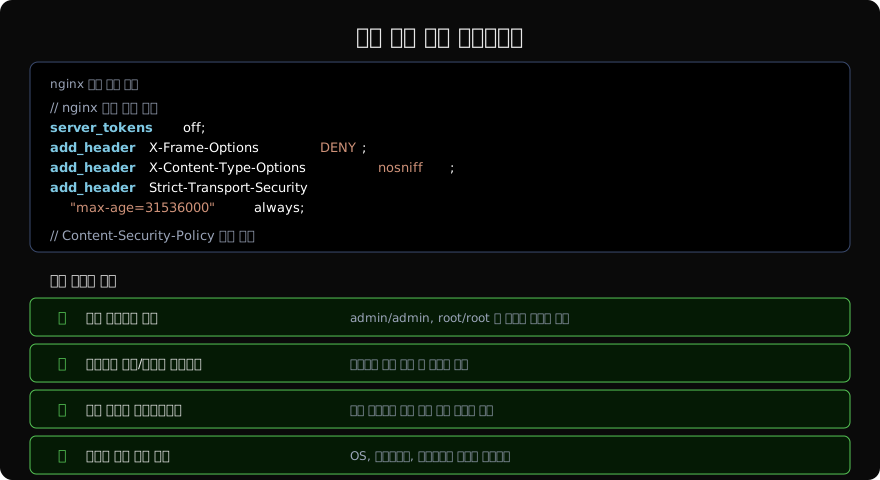
보안 헤더 설정
# nginx 보안 헤더 설정
server {
    server_tokens off;  # Nginx 버전 숨기기

    add_header X-Frame-Options "DENY";
    add_header X-Content-Type-Options "nosniff";
    add_header X-XSS-Protection "1; mode=block";
    add_header Referrer-Policy "strict-origin-when-cross-origin";
    add_header Strict-Transport-Security "max-age=31536000; includeSubDomains" always;
    add_header Content-Security-Policy "default-src 'self'; script-src 'self'" always;

    # 디렉토리 목록 비활성화
    autoindex off;
}
Spring Boot Actuator 보안 설정
# application.yml — 프로덕션 설정
management:
  endpoints:
    web:
      exposure:
        include: "health,info"  # health, info 만 노출
        exclude: "env,heapdump,mappings,beans"
  endpoint:
    health:
      show-details: never
자동화된 보안 점검
# Mozilla Observatory로 헤더 점검
curl -s "https://http-observatory.security.mozilla.org/api/v1/analyze?host=yoursite.com" | jq '.grade'

# Nmap으로 불필요한 포트 확인
nmap -sV --script=banner -p 1-65535 yourserver.com

# AWS Trusted Advisor / Security Hub 활성화
aws securityhub enable-security-hub --enable-default-standards
환경별 설정 분리
# Django — 환경별 설정 분리
# settings/base.py
DEBUG = False
ALLOWED_HOSTS = []

# settings/development.py
from .base import *
DEBUG = True
ALLOWED_HOSTS = ['localhost', '127.0.0.1']

# settings/production.py
from .base import *
DEBUG = False
ALLOWED_HOSTS = ['yourdomain.com']
SECURE_HSTS_SECONDS = 31536000
SECURE_SSL_REDIRECT = True
SESSION_COOKIE_SECURE = True
CSRF_COOKIE_SECURE = True
IaC 보안 스캔 자동화
Infrastructure as Code 도구를 사용한다면 배포 전 자동 보안 검사를 파이프라인에 포함한다.
# GitHub Actions CI 보안 스캔 예시
- name: Terraform Security Scan
  uses: bridgecrewio/checkov-action@master
  with:
    directory: infrastructure/
    framework: terraform
    soft_fail: false

- name: Docker Security Scan
  run: |
    docker run --rm -v $(pwd):/project \
      hadolint/hadolint hadolint /project/Dockerfile
핵심 원칙
보안 설정 오류는 개발팀이 아니라 조직 전체의 문제다. 코드 리뷰만큼 설정 리뷰도 정기적으로 이루어져야 한다. 새 서비스를 배포할 때마다 보안 체크리스트를 확인하는 것을 개발 프로세스의 일부로 만들어야 한다.
지난 글: 매스 어사인먼트: 자동 속성 바인딩의 함정
다음 글: 민감 데이터 노출: 정보 유출 방지하기
읽어주셔서 감사합니다. 😊
PALDYN / ARTICLE AI
글의 개념, 수식, 코드에 대해 물어보세요.
질문과 관련된 문단을 골라 답변의 문맥으로 사용합니다.생각 중 · 0초