

지식
Security
스토리지 버킷 잘못된 설정: S3 공개 노출 방어
S3 버킷 공개 ACL, 잘못된 버킷 정책, 암호화 미설정으로 인한 데이터 유출 사례와 Block Public Access, VPC 접근 제한, SSE-KMS, Macie 탐지 설정을 다룹니다.
지난 글에서 IAM 잘못된 설정을 살펴봤다. 이번 글은 클라우드 데이터 침해 사고의 핵심 원인 중 하나인 오브젝트 스토리지(S3, GCS, Azure Blob) 잘못된 설정을 다룬다.
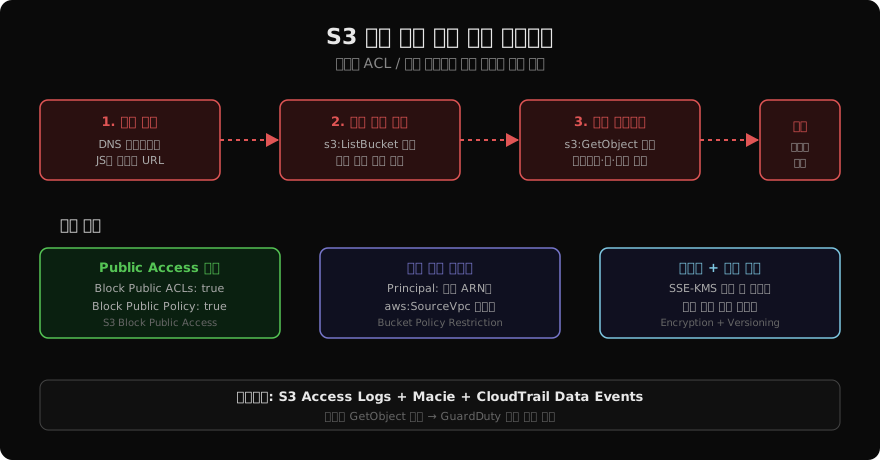
왜 S3 버킷이 자주 노출되는가
2017년 Verizon 1억 4천만 명 레코드 유출, 2019년 Capital One 1억 명 데이터 유출, 2023년 Microsoft Power Apps 테이블 공개 노출 — 이 사고들의 공통점은 스토리지 접근 권한을 Public으로 잘못 설정했다는 것이다.
원인별 분류:
- ACL
public-read: 버킷 생성 시 실수로 공개 ACL 적용 - 와일드카드 버킷 정책:
"Principal": "*","Action": "s3:GetObject"조합 - 정적 웹사이트 호스팅 활성화: 의도치 않게 전체 버킷이 HTTP로 서빙
- 서드파티 데이터 공유용 임시 설정 방치
S3 Block Public Access
# CLI: 버킷 수준 공개 접근 차단
aws s3api put-public-access-block \
  --bucket my-sensitive-bucket \
  --public-access-block-configuration \
    "BlockPublicAcls=true,\
     IgnorePublicAcls=true,\
     BlockPublicPolicy=true,\
     RestrictPublicBuckets=true"

# 계정 수준 전체 적용 (신규 버킷 포함)
aws s3control put-public-access-block \
  --account-id 123456789012 \
  --public-access-block-configuration \
    "BlockPublicAcls=true,\
     IgnorePublicAcls=true,\
     BlockPublicPolicy=true,\
     RestrictPublicBuckets=true"

# 현재 설정 확인
aws s3api get-public-access-block \
  --bucket my-sensitive-bucket
버킷 정책 보안 설정
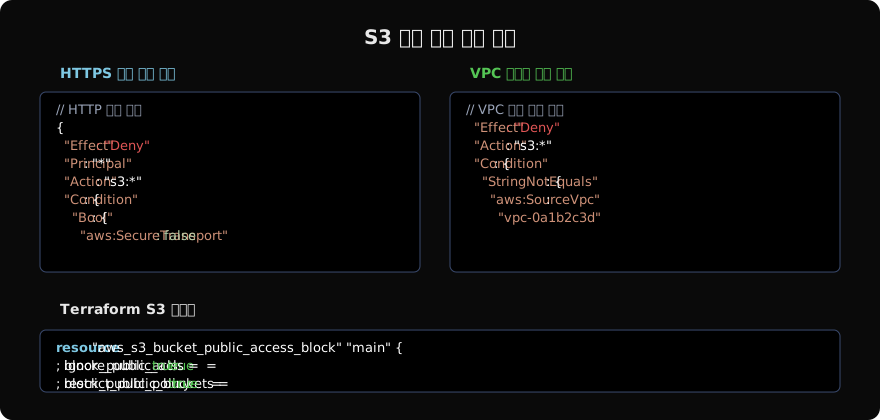
{
  "Version": "2012-10-17",
  "Statement": [
    {
      "Sid": "DenyHTTP",
      "Effect": "Deny",
      "Principal": "*",
      "Action": "s3:*",
      "Resource": [
        "arn:aws:s3:::my-bucket",
        "arn:aws:s3:::my-bucket/*"
      ],
      "Condition": {
        "Bool": {
          "aws:SecureTransport": "false"
        }
      }
    },
    {
      "Sid": "AllowOnlyVPC",
      "Effect": "Deny",
      "Principal": "*",
      "Action": "s3:*",
      "Resource": "arn:aws:s3:::my-bucket/*",
      "Condition": {
        "StringNotEquals": {
          "aws:SourceVpc": "vpc-0a1b2c3d4e5f"
        }
      }
    }
  ]
}
서버 측 암호화 (SSE)
# SSE-KMS로 버킷 기본 암호화 설정
aws s3api put-bucket-encryption \
  --bucket my-bucket \
  --server-side-encryption-configuration '{
    "Rules": [{
      "ApplyServerSideEncryptionByDefault": {
        "SSEAlgorithm": "aws:kms",
        "KMSMasterKeyID": "arn:aws:kms:ap-northeast-2:123:key/my-key"
      },
      "BucketKeyEnabled": true
    }]
  }'

# 암호화 없는 업로드 거부 정책
{
  "Effect": "Deny",
  "Principal": "*",
  "Action": "s3:PutObject",
  "Resource": "arn:aws:s3:::my-bucket/*",
  "Condition": {
    "StringNotEquals": {
      "s3:x-amz-server-side-encryption": "aws:kms"
    }
  }
}
Presigned URL 보안
공개 버킷 대신 Presigned URL을 사용하면 특정 사용자에게 시간 제한 접근을 부여할 수 있다.
import boto3
from datetime import datetime, timedelta

s3 = boto3.client("s3", region_name="ap-northeast-2")

def generate_presigned_url(bucket: str, key: str, expiry_seconds: int = 3600) -> str:
    url = s3.generate_presigned_url(
        ClientMethod="get_object",
        Params={"Bucket": bucket, "Key": key},
        ExpiresIn=expiry_seconds
    )
    return url

# 업로드용 Presigned POST (클라이언트에서 직접 S3로 업로드)
presigned_post = s3.generate_presigned_post(
    Bucket="my-bucket",
    Key="uploads/${filename}",
    Fields={"Content-Type": "image/jpeg"},
    Conditions=[
        {"Content-Type": "image/jpeg"},
        ["content-length-range", 1, 5_000_000]  # 최대 5MB
    ],
    ExpiresIn=300
)
Amazon Macie로 민감 데이터 자동 탐지
# Macie 활성화 및 S3 검사 작업 생성
aws macie2 enable-macie

aws macie2 create-classification-job \
  --name "SensitiveDataScan" \
  --job-type ONE_TIME \
  --s3-job-definition '{
    "bucketDefinitions": [{
      "accountId": "123456789012",
      "buckets": ["my-bucket-1", "my-bucket-2"]
    }]
  }' \
  --managed-data-identifier-selector ALL

# 발견된 민감 데이터 확인
aws macie2 list-findings \
  --finding-criteria '{
    "criterion": {
      "severity.description": {"eq": ["HIGH", "CRITICAL"]}
    }
  }' \
  --query 'findingIds[:10]'
Macie는 PII(개인식별정보), 신용카드 번호, AWS 자격증명, 개인 키 등을 자동으로 탐지한다.
CloudTrail Data Events 모니터링
# S3 Data Events 활성화 (객체 수준 API 로깅)
aws cloudtrail put-event-selectors \
  --trail-name my-trail \
  --event-selectors '[{
    "ReadWriteType": "All",
    "IncludeManagementEvents": true,
    "DataResources": [{
      "Type": "AWS::S3::Object",
      "Values": ["arn:aws:s3:::my-sensitive-bucket/"]
    }]
  }]'

# GuardDuty: S3 이상 탐지 활성화
aws guardduty update-detector \
  --detector-id $(aws guardduty list-detectors --query 'DetectorIds[0]' --output text) \
  --data-sources '{"S3Logs": {"Enable": true}}'
대규모 GetObject 호출(크리덴셜 스터핑 이후 데이터 수집), 비정상 리전에서의 접근, 새 IAM 엔터티의 버킷 접근이 GuardDuty 탐지 대상이다.
지난 글: 클라우드 IAM 잘못된 설정: 과도한 권한과 방어 전략
다음 글: Dependency Confusion: 공급망 패키지 하이재킹 공격
읽어주셔서 감사합니다. 😊
PALDYN / ARTICLE AI
글의 개념, 수식, 코드에 대해 물어보세요.
질문과 관련된 문단을 골라 답변의 문맥으로 사용합니다.생각 중 · 0초