

지식
Security
WebAuthn과 패스키: 피싱 불가능한 인증
WebAuthn/FIDO2의 공개키 기반 인증 원리, 도메인 바인딩으로 피싱을 차단하는 메커니즘, 패스키 등록/인증 서버 구현을 py_webauthn 코드와 함께 설명합니다.
지난 글에서 다양한 MFA 방식을 비교했다. 그중 FIDO2/WebAuthn은 피싱 자체가 불가능한 유일한 인증 방식이다. 이번 글에서는 WebAuthn의 작동 원리와 서버 구현을 다룬다.
WebAuthn이 피싱을 차단하는 이유
전통적인 OTP는 사용자가 코드를 어떤 사이트에든 입력할 수 있다. 공격자가 bank-1ogin.com 같은 가짜 사이트를 만들어 OTP를 실시간으로 릴레이하면 MFA를 우회할 수 있다.
WebAuthn은 다르다. 개인키는 특정 rpId(Relying Party ID)에 바인딩된다. 브라우저가 서명을 생성할 때 현재 접속 중인 도메인이 등록된 rpId와 일치하는지 검증한다. 가짜 사이트에서는 진짜 도메인의 개인키로 서명할 수 없다.
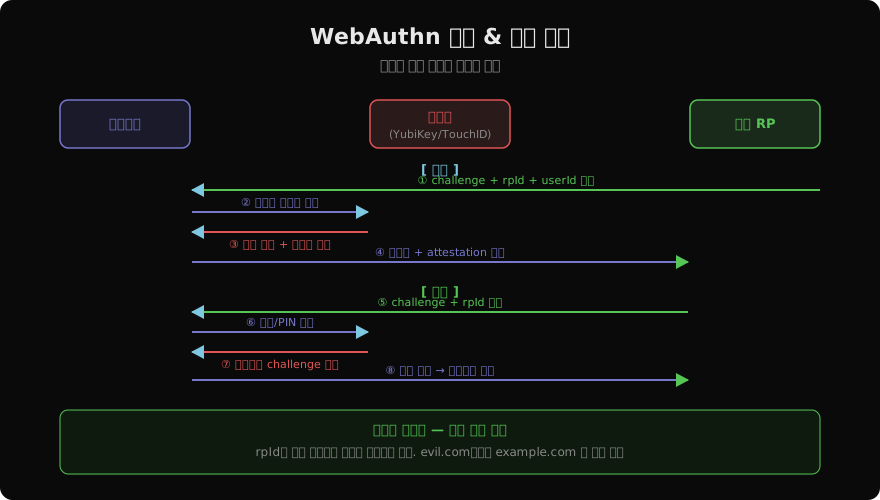
패스키 등록 구현
서버: 등록 옵션 생성
from webauthn import generate_registration_options
from webauthn.helpers.structs import (
    AuthenticatorSelectionCriteria,
    ResidentKeyRequirement,
    UserVerificationRequirement,
)
import secrets, base64

def get_registration_options(user_id: str, username: str, session):
    challenge = secrets.token_bytes(32)
    session["reg_challenge"] = base64.b64encode(challenge).decode()

    options = generate_registration_options(
        rp_id="example.com",
        rp_name="My App",
        user_id=user_id.encode(),
        user_name=username,
        challenge=challenge,
        authenticator_selection=AuthenticatorSelectionCriteria(
            resident_key=ResidentKeyRequirement.PREFERRED,  # 패스키 활성화
            user_verification=UserVerificationRequirement.REQUIRED,  # 생체/PIN 필수
        ),
    )
    return options
서버: 등록 완료 검증
from webauthn import verify_registration_response
from webauthn.helpers.structs import RegistrationCredential
import base64

def verify_registration(credential_json: str, session, db):
    credential = RegistrationCredential.parse_raw(credential_json)
    challenge = base64.b64decode(session.pop("reg_challenge"))

    verification = verify_registration_response(
        credential=credential,
        expected_challenge=challenge,
        expected_rp_id="example.com",
        expected_origin="https://example.com",
        require_user_verification=True,
    )

    # DB 저장: 공개키만 저장 (개인키는 기기에)
    db.save_credential(
        credential_id=verification.credential_id,
        public_key=verification.credential_public_key,
        sign_count=verification.sign_count,
        user_id=session["user_id"],
        aaguid=str(verification.aaguid),
    )
    return True
패스키 인증 구현
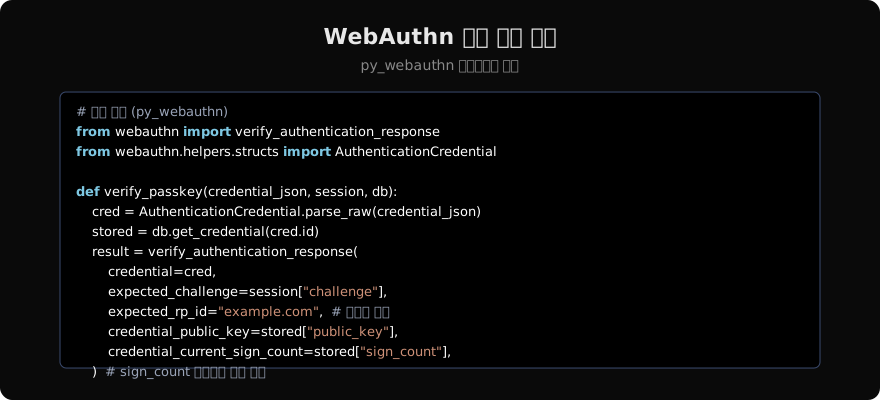
from webauthn import generate_authentication_options, verify_authentication_response

def get_auth_options(session):
    challenge = secrets.token_bytes(32)
    session["auth_challenge"] = base64.b64encode(challenge).decode()

    options = generate_authentication_options(
        rp_id="example.com",
        challenge=challenge,
        user_verification=UserVerificationRequirement.REQUIRED,
    )
    return options

def verify_auth(credential_json: str, session, db):
    credential = AuthenticationCredential.parse_raw(credential_json)
    stored = db.get_credential(credential.id)

    challenge = base64.b64decode(session.pop("auth_challenge"))

    result = verify_authentication_response(
        credential=credential,
        expected_challenge=challenge,
        expected_rp_id="example.com",
        expected_origin="https://example.com",
        credential_public_key=stored["public_key"],
        credential_current_sign_count=stored["sign_count"],
        require_user_verification=True,
    )

    # sign_count 업데이트 (복제 감지)
    if result.new_sign_count > 0:
        db.update_sign_count(credential.id, result.new_sign_count)

    return stored["user_id"]
클라이언트 JavaScript
async function registerPasskey() {
  // 서버에서 옵션 가져오기
  const options = await fetch('/auth/passkey/register/options')
    .then(r => r.json());

  // Base64URL 디코딩
  options.challenge = base64urlDecode(options.challenge);
  options.user.id = base64urlDecode(options.user.id);

  // 브라우저 WebAuthn API 호출
  const credential = await navigator.credentials.create({ publicKey: options });

  // 서버에 전송
  await fetch('/auth/passkey/register', {
    method: 'POST',
    body: JSON.stringify(encodeCredential(credential)),
    headers: { 'Content-Type': 'application/json' },
  });
}

async function authenticatePasskey() {
  const options = await fetch('/auth/passkey/auth/options').then(r => r.json());
  options.challenge = base64urlDecode(options.challenge);

  const credential = await navigator.credentials.get({ publicKey: options });

  await fetch('/auth/passkey/auth', {
    method: 'POST',
    body: JSON.stringify(encodeCredential(credential)),
    headers: { 'Content-Type': 'application/json' },
  });
}
sign_count로 복제 감지
하드웨어 인증기는 서명마다 카운터를 증가시킨다. 저장된 카운터보다 낮은 카운터가 오면 인증기가 복제됐을 가능성이 있다.
if result.new_sign_count > 0:
    if result.new_sign_count <= stored["sign_count"]:
        # 복제된 인증기 가능성 — 경고 또는 차단
        alert_security_team(user_id, "sign_count regression detected")
        raise SecurityError("인증기 복제 의심")
    db.update_sign_count(credential.id, result.new_sign_count)
보안 체크리스트
-
expected_rp_id서버에서 하드코딩 (요청에서 읽지 않음) -
expected_originHTTPS URL 고정 -
require_user_verification=True(생체/PIN 강제) - sign_count 검증 및 이상 감지
- challenge는 32바이트 이상 랜덤, 1회 사용
- attestation 검증 (고보안 환경)
지난 글: 다중 인증(MFA)
다음 글: SSO(Single Sign-On) 구현과 보안
읽어주셔서 감사합니다. 😊
PALDYN / ARTICLE AI
글의 개념, 수식, 코드에 대해 물어보세요.
질문과 관련된 문단을 골라 답변의 문맥으로 사용합니다.생각 중 · 0초