

MCP 프로토콜 심층: 서버 구현과 통합
Model Context Protocol(MCP) 아키텍처, JSON-RPC 2.0 메시지 형식, Python SDK로 MCP Server 구현, Tools·Resources·Prompts·Sampling 완전 해설.
지난 글에서 에이전트의 도구 사용 메커니즘을 살펴봤다. Tool Use는 단일 LLM-도구 상호작용을 다루지만, 실제 프로덕션 환경에서는 수십 개의 도구를 여러 에이전트와 공유하는 표준화된 인프라가 필요하다. Model Context Protocol(MCP)이 바로 이 문제를 해결한다.
MCP가 탄생한 배경
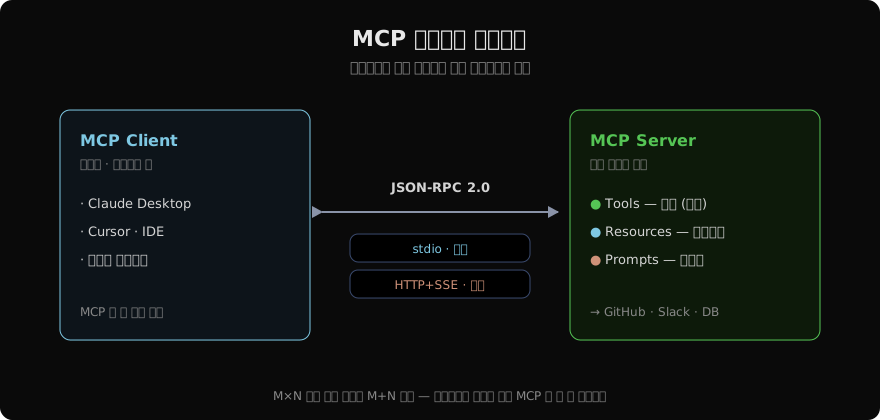
LLM 에이전트 생태계의 문제는 M×N 통합 폭발이다. M개의 에이전트 프레임워크(Claude Desktop, Cursor, LangChain, AutoGen…)와 N개의 외부 시스템(GitHub, Slack, DB, 파일시스템…)이 있으면 M×N개의 개별 통합 코드가 필요하다. MCP는 이를 M+N으로 줄인다. 에이전트는 MCP Client를, 외부 시스템은 MCP Server를 한 번씩만 구현하면 된다.
MCP 핵심 개념
세 가지 기능 타입
Tools: LLM이 호출할 수 있는 함수. 웹 검색, DB 쿼리, 파일 작성 등 행동을 담당한다.
Resources: LLM이 읽을 수 있는 데이터. 파일 내용, 데이터베이스 스키마, API 문서 등 컨텍스트를 제공한다.
Prompts: LLM에게 제공하는 재사용 가능한 프롬프트 템플릿. 특정 태스크에 최적화된 지시문을 서버 측에서 관리한다.
전송 방식
stdio: 로컬 프로세스 간 표준 입출력으로 통신. 가장 단순하고, Claude Desktop 기본 방식.
HTTP + SSE: 원격 서버와 HTTP로 통신. 서버 → 클라이언트는 SSE(Server-Sent Events), 클라이언트 → 서버는 HTTP POST.
Python으로 MCP Server 구현
pip install mcpimport asyncio
import json
from mcp.server import Server
from mcp.server.stdio import stdio_server
from mcp import types
# 서버 인스턴스 생성
app = Server("weather-and-db-server")
# ── Tools 구현 ──
@app.list_tools()
async def list_tools() -> list[types.Tool]:
return [
types.Tool(
name="get_weather",
description="도시의 현재 날씨를 조회합니다.",
inputSchema={
"type": "object",
"properties": {
"city": {"type": "string", "description": "도시명 (한국어)"},
"units": {
"type": "string",
"enum": ["celsius", "fahrenheit"],
"default": "celsius",
},
},
"required": ["city"],
},
),
types.Tool(
name="run_sql",
description="읽기 전용 SQL 쿼리를 실행합니다. SELECT만 허용.",
inputSchema={
"type": "object",
"properties": {
"query": {"type": "string", "description": "실행할 SELECT 쿼리"},
},
"required": ["query"],
},
),
]
@app.call_tool()
async def call_tool(name: str, arguments: dict) -> list[types.TextContent]:
if name == "get_weather":
city = arguments["city"]
# 실제 날씨 API 호출 (예시)
weather = {"temp": 18, "condition": "흐림", "humidity": 75, "rain_prob": 80}
return [types.TextContent(
type="text",
text=json.dumps({**weather, "city": city}, ensure_ascii=False),
)]
elif name == "run_sql":
query = arguments["query"].strip()
if not query.upper().startswith("SELECT"):
return [types.TextContent(
type="text",
text='{"error": "SELECT 쿼리만 허용됩니다."}',
)]
# 실제 DB 실행
results = [{"id": 1, "name": "테스트"}] # 예시
return [types.TextContent(
type="text",
text=json.dumps(results, ensure_ascii=False),
)]
raise ValueError(f"Unknown tool: {name}")
# ── Resources 구현 ──
@app.list_resources()
async def list_resources() -> list[types.Resource]:
return [
types.Resource(
uri="db://schema/main",
name="데이터베이스 스키마",
description="현재 데이터베이스의 테이블 구조",
mimeType="application/json",
),
types.Resource(
uri="file:///docs/api-guide.md",
name="API 가이드",
description="내부 API 사용 가이드",
mimeType="text/markdown",
),
]
@app.read_resource()
async def read_resource(uri: str) -> str:
if uri == "db://schema/main":
schema = {
"tables": [
{"name": "users", "columns": ["id", "name", "email", "created_at"]},
{"name": "orders", "columns": ["id", "user_id", "amount", "status"]},
]
}
return json.dumps(schema, ensure_ascii=False, indent=2)
elif uri == "file:///docs/api-guide.md":
with open("/docs/api-guide.md", "r", encoding="utf-8") as f:
return f.read()
raise ValueError(f"Unknown resource: {uri}")
# ── Prompts 구현 ──
@app.list_prompts()
async def list_prompts() -> list[types.Prompt]:
return [
types.Prompt(
name="data-analyst",
description="데이터 분석 전문가 역할 프롬프트",
arguments=[
types.PromptArgument(
name="focus_area",
description="분석 집중 영역 (예: 매출, 사용자, 재고)",
required=False,
)
],
)
]
@app.get_prompt()
async def get_prompt(name: str, arguments: dict | None) -> types.GetPromptResult:
if name == "data-analyst":
focus = (arguments or {}).get("focus_area", "전반적인 비즈니스 지표")
return types.GetPromptResult(
description="데이터 분석가 시스템 프롬프트",
messages=[
types.PromptMessage(
role="user",
content=types.TextContent(
type="text",
text=f"""당신은 데이터 분석 전문가입니다.
현재 분석 집중 영역: {focus}
run_sql 도구로 데이터를 조회하고, 명확한 인사이트를 제공하세요.""",
),
)
],
)
raise ValueError(f"Unknown prompt: {name}")
# ── 서버 실행 ──
async def main():
async with stdio_server() as (read_stream, write_stream):
await app.run(
read_stream,
write_stream,
app.create_initialization_options(),
)
if __name__ == "__main__":
asyncio.run(main())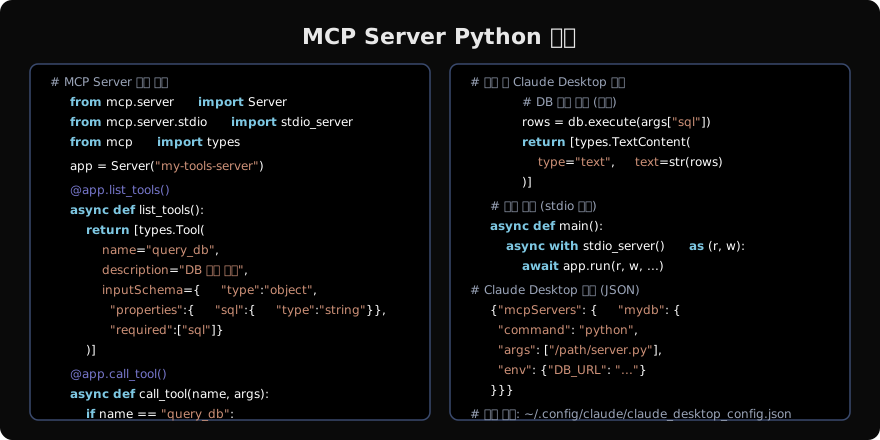
HTTP SSE 전송 방식 (원격 서버)
from mcp.server.sse import SseServerTransport
from starlette.applications import Starlette
from starlette.routing import Route, Mount
import uvicorn

# HTTP SSE 서버 (원격 접속용)
sse = SseServerTransport("/messages")

async def handle_sse(request):
    async with sse.connect_sse(
        request.scope, request.receive, request._send
    ) as streams:
        await app.run(streams[0], streams[1], app.create_initialization_options())

starlette_app = Starlette(
    routes=[
        Route("/sse", endpoint=handle_sse),
        Mount("/messages", app=sse.handle_post_message),
    ]
)

if __name__ == "__main__":
    uvicorn.run(starlette_app, host="0.0.0.0", port=8080)
Claude Code에서 MCP 서버 사용
Claude Code 환경에서도 MCP를 활용할 수 있다.
# Claude Code에 MCP 서버 추가
claude mcp add my-server --command python --args /path/to/server.py

# 환경변수 포함
claude mcp add db-server \
  --command python \
  --args /path/to/db_server.py \
  --env DB_URL=postgresql://localhost:5432/mydb

# 추가된 서버 목록 확인
claude mcp list

# 서버 제거
claude mcp remove my-server
MCP 클라이언트 직접 구현
from mcp import ClientSession, StdioServerParameters
from mcp.client.stdio import stdio_client

async def use_mcp_tools():
    """MCP 서버에 직접 연결해 도구 사용"""
    server_params = StdioServerParameters(
        command="python",
        args=["/path/to/server.py"],
        env={"API_KEY": "secret"},
    )

    async with stdio_client(server_params) as (read, write):
        async with ClientSession(read, write) as session:
            # 초기화
            await session.initialize()

            # 도구 목록 조회
            tools = await session.list_tools()
            print("사용 가능한 도구:", [t.name for t in tools.tools])

            # 도구 호출
            result = await session.call_tool(
                "get_weather",
                {"city": "서울"},
            )
            print("날씨 결과:", result.content[0].text)

            # 리소스 조회
            resources = await session.list_resources()
            content = await session.read_resource("db://schema/main")
            print("스키마:", content)

import asyncio
asyncio.run(use_mcp_tools())
보안 고려사항
# MCP Server 보안 패턴
import re

@app.call_tool()
async def safe_tool_handler(name: str, arguments: dict):
    if name == "run_sql":
        query = arguments.get("query", "")

        # SQL Injection 방지: 허용 패턴만 실행
        if not re.match(r'^\s*SELECT\b', query, re.IGNORECASE):
            return [types.TextContent(type="text", text='{"error": "SELECT만 허용"}')]

        # 위험 키워드 차단
        dangerous = ["DROP", "DELETE", "UPDATE", "INSERT", "EXEC", "--", ";--"]
        if any(kw in query.upper() for kw in dangerous):
            return [types.TextContent(type="text", text='{"error": "금지된 키워드"}')]

        # 결과 크기 제한
        if "LIMIT" not in query.upper():
            query = query.rstrip(";") + " LIMIT 100"

        rows = db.execute(query)
        return [types.TextContent(type="text", text=json.dumps(rows))]
정리
MCP는 에이전트 생태계의 표준 인터페이스다:
- M×N → M+N: 각 에이전트와 도구가 MCP 한 번씩만 구현
- 세 가지 기능: Tools(행동), Resources(컨텍스트), Prompts(재사용 지시문)
- 두 가지 전송: stdio(로컬), HTTP+SSE(원격)
- Python SDK: 몇 십 줄로 완전한 MCP 서버 구현 가능
실제 서비스에서는 GitHub, Slack, DB 등 기업 시스템을 MCP 서버로 감싸 Claude Desktop이나 자체 에이전트에서 즉시 활용할 수 있다.
지난 글: 에이전트 도구 사용: Tool Use 완전 가이드
다음 글: LangChain 완전 가이드: 에이전트 프레임워크의 표준
읽어주셔서 감사합니다. 😊