

지식
AI
에이전트 도구 사용: Tool Use 완전 가이드
Claude·GPT-4의 Tool Use(Function Calling) 동작 원리, 도구 정의 형식, 병렬 도구 호출, 오류 처리, 실전 도구 구현까지 완전 해설합니다.
지난 글에서 에이전트 아키텍처 패턴을 살펴봤다. 어떤 아키텍처를 쓰든 에이전트의 핵심 능력은 도구 사용(Tool Use)이다. LLM이 외부 함수를 호출하고 그 결과를 다음 추론에 활용하는 이 메커니즘을 완전히 이해해야 실용적인 에이전트를 만들 수 있다.
Tool Use의 작동 원리
Tool Use(Function Calling이라고도 한다)는 LLM이 실제 코드를 실행하는 것이 아니다. LLM은 어떤 함수를 어떤 파라미터로 호출해야 하는지 텍스트로 결정하고, 실제 실행은 호스트(애플리케이션)가 담당한다.
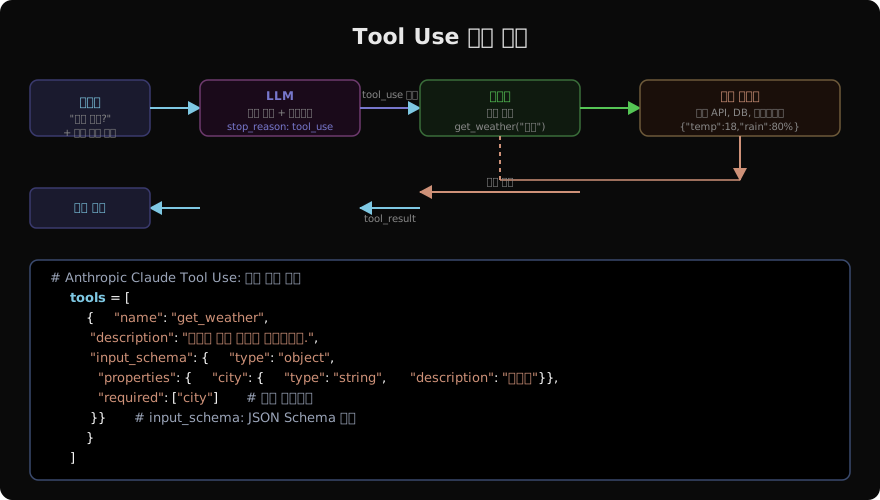
흐름 요약:
- 사용자 요청 + 도구 목록 → LLM
- LLM이
tool_use블록으로 도구 선택 + 파라미터 반환 - 호스트가 실제 함수 실행
- 실행 결과를
tool_result로 LLM에 전달 - LLM이 결과를 바탕으로 최종 응답 생성
도구 정의: JSON Schema 완전 가이드
도구 정의의 품질이 에이전트 품질을 결정한다. LLM은 description과 input_schema를 보고 언제, 어떻게 도구를 써야 할지 결정한다.
# 고품질 도구 정의 예시
tools = [
    {
        "name": "search_database",
        "description": """제품 데이터베이스에서 조건에 맞는 제품을 검색합니다.
사용 시점: 사용자가 특정 제품이나 카테고리를 찾을 때.
반환값: 제품 목록 (id, name, price, category 포함)
주의: 검색어는 한국어로 입력하세요.""",
        "input_schema": {
            "type": "object",
            "properties": {
                "query": {
                    "type": "string",
                    "description": "검색할 제품명 또는 키워드. 예: '블루투스 이어폰'",
                },
                "category": {
                    "type": "string",
                    "enum": ["전자", "의류", "식품", "가구", "기타"],
                    "description": "필터링할 카테고리. 없으면 생략 가능.",
                },
                "max_price": {
                    "type": "number",
                    "description": "최대 가격 (원). 예: 50000",
                    "minimum": 0,
                },
                "limit": {
                    "type": "integer",
                    "description": "반환할 최대 결과 수. 기본값 10, 최대 50",
                    "default": 10,
                    "minimum": 1,
                    "maximum": 50,
                },
            },
            "required": ["query"],  # query만 필수, 나머지는 선택
        },
    },
    {
        "name": "send_email",
        "description": """지정된 이메일 주소로 이메일을 전송합니다.
사용 시점: 사용자가 이메일 발송을 명시적으로 요청할 때만 사용.
주의: 자동으로 호출하지 말 것 — 반드시 사용자 확인 후 사용.""",
        "input_schema": {
            "type": "object",
            "properties": {
                "to": {"type": "string", "format": "email"},
                "subject": {"type": "string", "maxLength": 200},
                "body": {"type": "string"},
            },
            "required": ["to", "subject", "body"],
        },
    },
]
기본 Tool Use 구현 (Claude API)
from anthropic import Anthropic
import json

client = Anthropic()

# 실제 도구 함수들
def search_database(query: str, category: str = None, max_price: float = None, limit: int = 10) -> list:
    """실제 DB 조회 (예시)"""
    results = [
        {"id": 1, "name": "무선 이어폰 A", "price": 39000, "category": "전자"},
        {"id": 2, "name": "블루투스 이어폰 B", "price": 55000, "category": "전자"},
    ]
    if category:
        results = [r for r in results if r["category"] == category]
    if max_price:
        results = [r for r in results if r["price"] <= max_price]
    return results[:limit]

TOOL_REGISTRY = {
    "search_database": search_database,
}

def run_tool_use_loop(user_message: str) -> str:
    messages = [{"role": "user", "content": user_message}]

    while True:
        response = client.messages.create(
            model="claude-sonnet-4-6",
            max_tokens=4096,
            tools=tools,
            messages=messages,
        )

        # 텍스트 응답으로 끝난 경우
        if response.stop_reason == "end_turn":
            return " ".join(
                b.text for b in response.content if b.type == "text"
            )

        # 도구 호출이 있는 경우
        if response.stop_reason == "tool_use":
            messages.append({"role": "assistant", "content": response.content})
            tool_results = []

            for block in response.content:
                if block.type == "tool_use":
                    func = TOOL_REGISTRY.get(block.name)
                    if func:
                        result = func(**block.input)
                    else:
                        result = {"error": f"Unknown tool: {block.name}"}

                    tool_results.append({
                        "type": "tool_result",
                        "tool_use_id": block.id,
                        "content": json.dumps(result, ensure_ascii=False),
                    })

            messages.append({"role": "user", "content": tool_results})
        else:
            break

    return "처리 중 오류 발생"

# 테스트
result = run_tool_use_loop("5만원 이하 블루투스 이어폰 추천해줘")
print(result)
병렬 도구 호출
Claude는 독립적인 여러 도구를 한 번에 호출할 수 있다. 이를 활용하면 순차 실행보다 지연을 크게 줄일 수 있다.
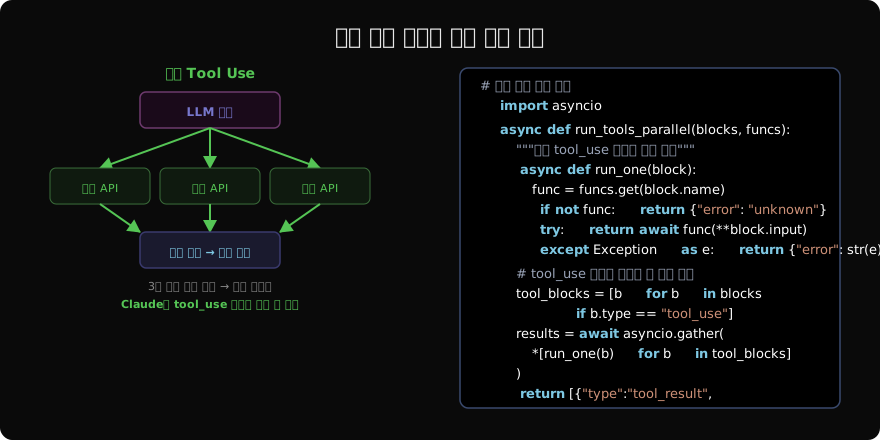
import asyncio
from anthropic import AsyncAnthropic

client = AsyncAnthropic()

# 비동기 도구 함수들
async def get_weather(city: str) -> dict:
    await asyncio.sleep(0.5)  # API 지연 시뮬레이션
    return {"city": city, "temp": 18, "condition": "흐림"}

async def get_traffic(route: str) -> dict:
    await asyncio.sleep(0.8)
    return {"route": route, "duration": "42분", "status": "정체"}

async def get_news(topic: str) -> list:
    await asyncio.sleep(0.3)
    return [{"title": f"{topic} 관련 최신 뉴스", "url": "..."}]

ASYNC_TOOL_REGISTRY = {
    "get_weather": get_weather,
    "get_traffic": get_traffic,
    "get_news": get_news,
}

async def run_parallel_tools(blocks: list) -> list[dict]:
    """여러 tool_use 블록을 병렬로 실행"""
    tool_blocks = [b for b in blocks if b.type == "tool_use"]

    async def execute_one(block):
        func = ASYNC_TOOL_REGISTRY.get(block.name)
        if not func:
            result = {"error": f"Unknown: {block.name}"}
        else:
            try:
                result = await func(**block.input)
            except Exception as e:
                result = {"error": str(e)}
        return {
            "type": "tool_result",
            "tool_use_id": block.id,
            "content": json.dumps(result, ensure_ascii=False),
        }

    return await asyncio.gather(*[execute_one(b) for b in tool_blocks])

async def parallel_agent(user_message: str) -> str:
    messages = [{"role": "user", "content": user_message}]
    parallel_tools = [...]  # 도구 정의 (생략)

    while True:
        response = await client.messages.create(
            model="claude-sonnet-4-6",
            max_tokens=4096,
            tools=parallel_tools,
            messages=messages,
        )

        if response.stop_reason == "end_turn":
            return " ".join(b.text for b in response.content if b.type == "text")

        messages.append({"role": "assistant", "content": response.content})
        # 병렬 실행 (순차 대비 최대 N배 빠름)
        tool_results = await run_parallel_tools(response.content)
        messages.append({"role": "user", "content": tool_results})

result = asyncio.run(parallel_agent("오늘 서울 날씨, 강남-강북 교통, AI 뉴스 알려줘"))
오류 처리와 재시도
from tenacity import retry, stop_after_attempt, wait_exponential

@retry(stop=stop_after_attempt(3), wait=wait_exponential(multiplier=1, min=1, max=10))
def resilient_tool_call(func, **kwargs):
    """재시도 로직을 포함한 안전한 도구 호출"""
    return func(**kwargs)

def safe_tool_executor(block, tool_registry: dict) -> dict:
    """도구 실행 오류를 LLM이 이해할 수 있는 형식으로 반환"""
    func = tool_registry.get(block.name)
    if not func:
        return {
            "type": "tool_result",
            "tool_use_id": block.id,
            "is_error": True,
            "content": f"도구 '{block.name}'을 찾을 수 없습니다.",
        }

    try:
        result = resilient_tool_call(func, **block.input)
        return {
            "type": "tool_result",
            "tool_use_id": block.id,
            "content": json.dumps(result, ensure_ascii=False),
        }
    except Exception as e:
        return {
            "type": "tool_result",
            "tool_use_id": block.id,
            "is_error": True,
            "content": f"도구 실행 오류: {e}. 다른 방법을 시도해주세요.",
        }
도구 설계 best practice
# ✅ 좋은 도구 설계
good_tool = {
    "name": "get_product_by_id",
    "description": "상품 ID로 특정 상품의 상세 정보를 조회합니다. 상품 ID를 알고 있을 때 사용하세요.",
    "input_schema": {
        "type": "object",
        "properties": {
            "product_id": {"type": "integer", "description": "조회할 상품 ID"},
        },
        "required": ["product_id"],
    },
}

# ❌ 나쁜 도구 설계 (너무 넓은 범위, 불명확한 설명)
bad_tool = {
    "name": "do_thing",
    "description": "여러 가지 작업을 수행합니다.",
    "input_schema": {
        "type": "object",
        "properties": {
            "data": {"type": "object"},  # 너무 모호
        },
    },
}

# 도구 설계 원칙
# 1. 하나의 도구는 하나의 명확한 역할
# 2. description에 사용 시점 명시
# 3. input_schema에 타입과 예시 포함
# 4. enum으로 허용 값 제한 (가능한 경우)
# 5. required 필드 최소화 (선택적 파라미터 활용)
정리
Tool Use는 에이전트의 핵심이다:
- 작동 원리: LLM이 도구 선택 → 호스트가 실행 → 결과를 LLM에 피드백
- 도구 정의:
description이 도구 품질 결정. 사용 시점을 명확히 기술 - 병렬 호출: Claude는 여러
tool_use블록을 동시 반환 → 병렬 실행으로 지연 최소화 - 오류 처리:
is_error: true로 실패를 LLM에 알리면 대안 전략 수립 가능
지난 글: 에이전트 아키텍처: ReAct·Plan-and-Execute·Reflexion
다음 글: MCP 프로토콜 심층: 서버 구현과 통합
읽어주셔서 감사합니다. 😊