

AI 에이전트와 MCP: 자율적으로 행동하는 AI 시스템
AI 에이전트의 개념, ReAct 루프, 도구 사용, Model Context Protocol(MCP) 아키텍처를 Python 코드와 함께 완전 해설합니다.
지난 글에서 LLM 서빙 비용을 최적화하는 전략을 다뤘다. 이제 LLM을 단순 텍스트 생성 도구로 쓰는 것을 넘어, 스스로 목표를 분석하고 도구를 사용해 행동하는 AI 에이전트의 세계로 넘어간다. 에이전트는 현재 AI 개발의 가장 뜨거운 영역이며, Model Context Protocol(MCP)은 에이전트 생태계를 표준화하는 핵심 인프라다.
AI 에이전트란 무엇인가
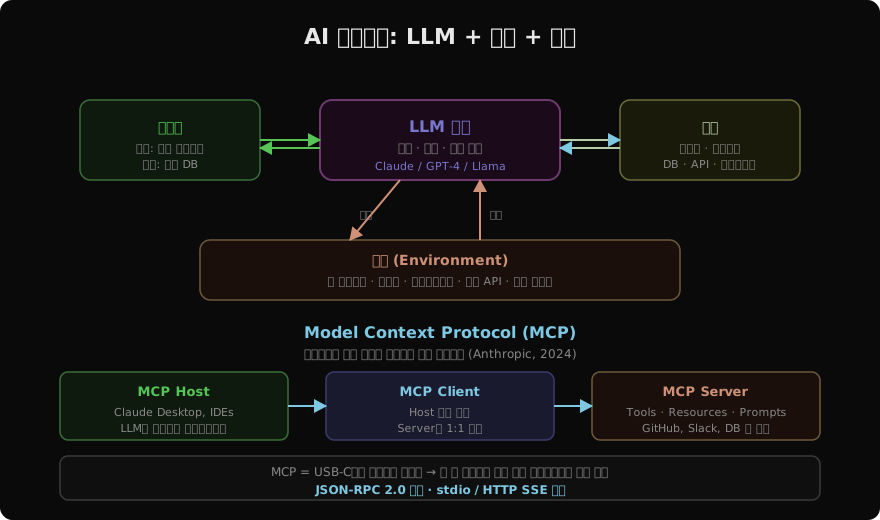
일반 LLM은 입력을 받아 텍스트를 출력하는 정적 시스템이다. AI 에이전트는 이를 넘어서 목표를 향해 자율적으로 행동하는 시스템이다. 에이전트는 주어진 목표를 달성하기 위해:
- 추론(Reasoning): 목표 분석, 계획 수립
- 행동(Action): 도구 호출, 환경과 상호작용
- 관찰(Observation): 결과 수집, 다음 단계 결정
- 반복(Loop): 목표 달성까지 위 과정 반복
ReAct: 추론과 행동의 통합
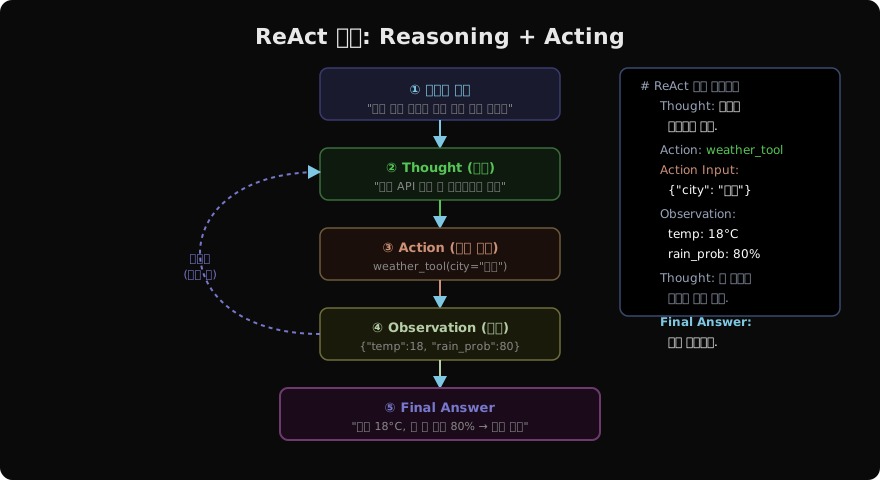
가장 영향력 있는 에이전트 패턴은 2022년 제안된 ReAct(Reasoning + Acting)다. LLM이 생각을 텍스트로 명시하고(Thought), 도구를 호출하며(Action), 결과를 관찰(Observation)하는 사이클을 반복한다.
from anthropic import Anthropic

client = Anthropic()

# 도구 정의
tools = [
    {
        "name": "get_weather",
        "description": "특정 도시의 현재 날씨를 조회합니다.",
        "input_schema": {
            "type": "object",
            "properties": {
                "city": {"type": "string", "description": "도시 이름 (한국어)"},
            },
            "required": ["city"],
        },
    },
    {
        "name": "web_search",
        "description": "웹에서 정보를 검색합니다.",
        "input_schema": {
            "type": "object",
            "properties": {
                "query": {"type": "string", "description": "검색어"},
            },
            "required": ["query"],
        },
    },
]

def get_weather(city: str) -> dict:
    """실제로는 날씨 API 호출"""
    return {"city": city, "temp": 18, "condition": "흐림", "rain_prob": 80}

def web_search(query: str) -> str:
    """실제로는 검색 API 호출"""
    return f"'{query}' 검색 결과: [관련 정보들...]"

TOOL_FUNCS = {"get_weather": get_weather, "web_search": web_search}

def run_agent(user_message: str) -> str:
    """ReAct 루프: 목표 달성까지 반복"""
    messages = [{"role": "user", "content": user_message}]

    while True:
        response = client.messages.create(
            model="claude-opus-4-7",
            max_tokens=4096,
            tools=tools,
            messages=messages,
        )

        # 도구 호출 없이 최종 답변 생성 시 종료
        if response.stop_reason == "end_turn":
            text_blocks = [b for b in response.content if b.type == "text"]
            return text_blocks[-1].text if text_blocks else ""

        # 도구 호출 처리
        if response.stop_reason == "tool_use":
            messages.append({"role": "assistant", "content": response.content})
            tool_results = []

            for block in response.content:
                if block.type == "tool_use":
                    func = TOOL_FUNCS.get(block.name)
                    if func:
                        result = func(**block.input)
                        tool_results.append({
                            "type": "tool_result",
                            "tool_use_id": block.id,
                            "content": str(result),
                        })

            messages.append({"role": "user", "content": tool_results})

result = run_agent("오늘 서울 날씨와 우산이 필요한지 알려줘")
print(result)
Model Context Protocol (MCP)
MCP는 Anthropic이 2024년 발표한 에이전트-도구 연결 표준 프로토콜이다. USB-C가 다양한 기기를 표준 커넥터로 연결하듯, MCP는 에이전트와 외부 도구를 표준 인터페이스로 연결한다.
MCP의 세 가지 구성요소
Host: LLM을 실행하는 애플리케이션 (Claude Desktop, Cursor IDE 등)
Client: Host 안에서 MCP Server와 통신하는 컴포넌트
Server: 도구(Tools), 리소스(Resources), 프롬프트(Prompts)를 제공하는 서버
# MCP Server 구현 예 (Python SDK)
from mcp.server import Server
from mcp.server.stdio import stdio_server
from mcp import types

app = Server("weather-server")

@app.list_tools()
async def list_tools() -> list[types.Tool]:
    return [
        types.Tool(
            name="get_weather",
            description="도시 날씨 조회",
            inputSchema={
                "type": "object",
                "properties": {
                    "city": {"type": "string", "description": "도시명"},
                },
                "required": ["city"],
            },
        )
    ]

@app.call_tool()
async def call_tool(name: str, arguments: dict) -> list[types.TextContent]:
    if name == "get_weather":
        city = arguments["city"]
        # 실제 날씨 API 호출
        weather_data = {"temp": 20, "condition": "맑음", "humidity": 65}
        return [types.TextContent(
            type="text",
            text=f"{city} 날씨: {weather_data['temp']}°C, {weather_data['condition']}"
        )]
    raise ValueError(f"Unknown tool: {name}")

# 서버 실행 (stdio 전송)
async def main():
    async with stdio_server() as (read_stream, write_stream):
        await app.run(read_stream, write_stream, app.create_initialization_options())

import asyncio
asyncio.run(main())
MCP Resources: 컨텍스트 데이터 제공
도구(Tools)는 함수 호출이고, 리소스(Resources)는 LLM이 참조할 수 있는 데이터다.
@app.list_resources()
async def list_resources() -> list[types.Resource]:
    return [
        types.Resource(
            uri="file:///data/company-docs.md",
            name="회사 문서",
            description="회사 내부 정책 및 절차 문서",
            mimeType="text/markdown",
        )
    ]

@app.read_resource()
async def read_resource(uri: str) -> str:
    if uri == "file:///data/company-docs.md":
        with open("/data/company-docs.md") as f:
            return f.read()
    raise ValueError(f"Unknown resource: {uri}")
Claude Desktop에서 MCP 서버 연결
// ~/.config/claude/claude_desktop_config.json
{
  "mcpServers": {
    "weather": {
      "command": "python",
      "args": ["/path/to/weather_server.py"],
      "env": {"WEATHER_API_KEY": "your-key"}
    },
    "github": {
      "command": "npx",
      "args": ["-y", "@modelcontextprotocol/server-github"],
      "env": {"GITHUB_PERSONAL_ACCESS_TOKEN": "ghp_..."}
    }
  }
}
에이전트 vs 단순 도구 사용
단순 도구 호출:
  사용자 → "날씨 알려줘" → LLM → 날씨 API → LLM → 답변

에이전트:
  사용자 → "내일 부산 출장 준비해줘"
    → LLM: "날씨·교통·숙박·일정 확인 필요"
    → 날씨 API → 교통 API → 숙박 검색 → 캘린더 API
    → LLM: "모든 정보 통합 → 출장 준비 완료 보고"

차이점:
- 에이전트는 **다단계 자율 계획**이 가능
- 이전 도구 결과를 바탕으로 **다음 도구 선택**
- 목표 달성 여부를 **스스로 판단**
에이전트의 한계와 주의사항
# 에이전트 안전 가드레일 예시
class SafeAgent:
    MAX_STEPS = 10       # 무한 루프 방지
    SENSITIVE_TOOLS = {"delete_file", "send_email", "transfer_money"}

    async def run(self, goal: str) -> str:
        steps = 0
        messages = [{"role": "user", "content": goal}]

        while steps < self.MAX_STEPS:
            response = await self.llm.generate(messages)

            # 위험 도구 호출 시 사용자 확인
            for tool_call in response.tool_calls:
                if tool_call.name in self.SENSITIVE_TOOLS:
                    confirm = input(f"'{tool_call.name}' 실행 허용? (y/n): ")
                    if confirm.lower() != 'y':
                        return "사용자 승인 거부로 중단"

            if response.is_final:
                return response.text

            steps += 1

        return f"최대 단계({self.MAX_STEPS}) 도달로 중단"
정리
AI 에이전트는 LLM에 행동 능력을 부여하는 시스템이다:
- ReAct 패턴: Thought → Action → Observation 반복으로 목표 달성
- MCP: 에이전트와 도구를 표준화된 프로토콜로 연결
- 핵심 구성: LLM 코어 + 도구 + 메모리 + 환경
에이전트는 강력하지만 무한 루프, 비용 폭발, 잘못된 도구 실행 등의 위험이 있다. 항상 최대 단계 제한과 민감 동작 사전 승인 가드레일을 설정해야 한다.
지난 글: LLM 서빙 비용 최적화: 토큰·GPU·캐싱 전략
다음 글: 에이전트 아키텍처: ReAct·Plan-and-Execute·Reflexion
읽어주셔서 감사합니다. 😊