

Cache API 완전 이해
브라우저 Cache API의 CacheStorage·Cache 인터페이스, Cache-First·Network-First 전략, Service Worker와의 연동, 캐시 버전 관리까지 정리합니다.
지난 글에서 IndexedDB로 구조화된 데이터를 저장하는 방법을 살펴봤습니다. 이번에는 HTTP 요청과 응답 쌍을 저장하는 Cache API를 정리합니다. Cache API는 Service Worker와 함께 오프라인 지원·네트워크 최적화의 핵심입니다.
Cache API란
Cache API는 Request/Response 쌍을 키-값 형태로 저장하는 브라우저 스토리지입니다. localStorage가 문자열을 저장하고 IndexedDB가 구조화 객체를 저장하는 것과 달리, Cache API는 HTTP 응답 자체를 그대로 저장합니다. Service Worker의 fetch 이벤트와 결합하면 네트워킹 전략(Cache-First, Network-First 등)을 세밀하게 제어할 수 있습니다.
주요 구성:
CacheStorage(window.caches/self.caches): 캐시 저장소를 관리하는 전역 인터페이스.Cache: 실제 Request-Response 쌍을 저장하는 객체.
기본 사용
// 캐시 열기 (없으면 생성)
const cache = await caches.open('v1-static');

// URL 프리캐시
await cache.addAll([
  '/index.html',
  '/app.js',
  '/style.css',
  '/logo.svg',
]);

// 수동 저장
const response = await fetch('/api/data');
await cache.put('/api/data', response.clone()); // response는 단 1회 소비 → clone 필수

// 캐시에서 읽기
const cached = await caches.match('/app.js');
if (cached) {
  const text = await cached.text();
}

// 단일 항목 삭제
await cache.delete('/old-asset.js');

// 캐시 전체 삭제 (버전 교체 시)
await caches.delete('v1-static');
Response는 스트림이라 한 번만 소비할 수 있습니다. cache.put()에 전달한 뒤 동일한 응답을 읽으려 하면 빈 body가 됩니다. response.clone()으로 복사본을 만들어 쓰세요.
주요 메서드
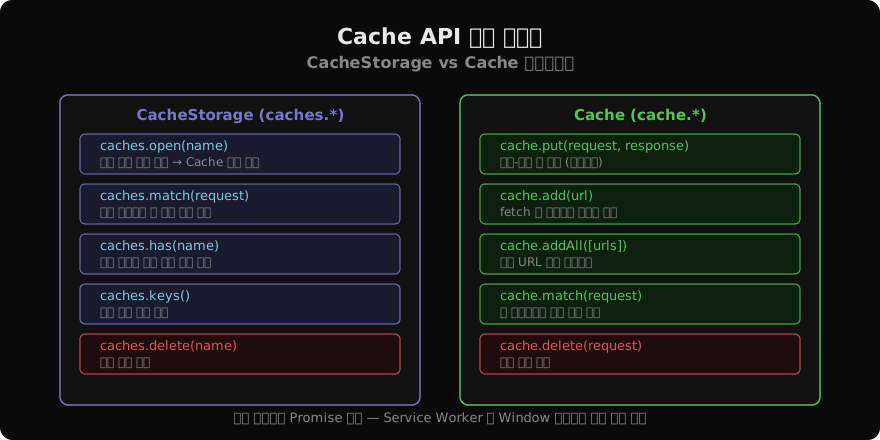
Service Worker와 연동: 캐싱 전략
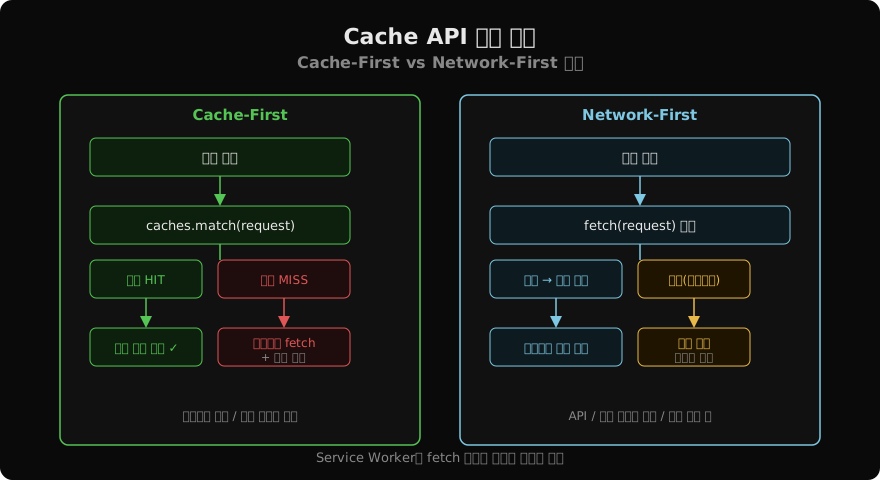
Cache-First (오프라인 우선)
정적 에셋처럼 자주 변하지 않는 리소스에 적합합니다.
// service-worker.js
self.addEventListener('fetch', (event) => {
  event.respondWith(
    caches.match(event.request).then((cached) => {
      if (cached) return cached; // 캐시 HIT → 즉시 반환

      // 캐시 MISS → 네트워크에서 받아 캐시 저장
      return fetch(event.request).then((response) => {
        const clone = response.clone();
        caches.open('v1-static').then((cache) => cache.put(event.request, clone));
        return response;
      });
    })
  );
});
Network-First (최신 데이터 우선)
API 응답처럼 항상 최신 데이터가 필요하지만 오프라인 폴백도 있어야 할 때 사용합니다.
self.addEventListener('fetch', (event) => {
  if (!event.request.url.includes('/api/')) return;

  event.respondWith(
    fetch(event.request)
      .then((response) => {
        const clone = response.clone();
        caches.open('v1-api').then((cache) => cache.put(event.request, clone));
        return response;
      })
      .catch(() => caches.match(event.request)) // 오프라인 → 캐시 폴백
  );
});
Stale-While-Revalidate
캐시를 먼저 반환해 빠른 응답을 주면서, 백그라운드에서 네트워크 갱신을 수행합니다.
self.addEventListener('fetch', (event) => {
  event.respondWith(
    caches.open('v1-dynamic').then(async (cache) => {
      const cached = await cache.match(event.request);
      const networkFetch = fetch(event.request).then((response) => {
        cache.put(event.request, response.clone());
        return response;
      });
      return cached ?? networkFetch; // 캐시 있으면 즉시, 없으면 네트워크 대기
    })
  );
});
캐시 버전 관리
Service Worker를 업데이트할 때 구버전 캐시를 정리해야 합니다.
const CACHE_VERSION = 'v2-static';
const PRECACHE_URLS = ['/index.html', '/app.v2.js', '/style.v2.css'];

self.addEventListener('install', (event) => {
  event.waitUntil(
    caches.open(CACHE_VERSION).then((cache) => cache.addAll(PRECACHE_URLS))
  );
  self.skipWaiting(); // 즉시 활성화
});

self.addEventListener('activate', (event) => {
  event.waitUntil(
    caches.keys().then((keys) =>
      Promise.all(
        keys
          .filter((key) => key !== CACHE_VERSION) // 현재 버전 외 모두 삭제
          .map((key) => caches.delete(key))
      )
    )
  );
  self.clients.claim(); // 열린 탭 즉시 제어
});
캐시 매칭 옵션
caches.match()와 cache.match()는 두 번째 인자로 CacheQueryOptions를 받습니다.
const response = await caches.match('/api/data', {
  ignoreSearch: true,   // ?query 파라미터 무시
  ignoreMethod: false,  // GET/POST 구분 여부
  ignoreVary: false,    // Vary 헤더 무시 여부
});
ignoreSearch: true는 /api/data?v=1과 /api/data?v=2를 동일 요청으로 처리합니다.
Cache API vs 다른 스토리지
| 스토리지 | 저장 대상 | 크기 제한 | Service Worker |
|---|---|---|---|
| localStorage | 문자열 | ~5 MB | 사용 불가 |
| IndexedDB | 구조화 객체 | 수백 MB+ | 사용 가능 |
| Cache API | HTTP 응답 | 수백 MB+ | 핵심 용도 |
Cache API는 HTTP 캐싱 레이어를 JS로 제어한다는 점에서 독특합니다. Cache-Control 헤더를 존중하는 HTTP 캐시와 달리, Cache API는 JS 코드가 완전한 제어권을 갖습니다.
지난 글: IndexedDB 완전 이해
다음 글: Geolocation API 완전 이해
읽어주셔서 감사합니다. 😊
PALDYN / ARTICLE AI
글의 개념, 수식, 코드에 대해 물어보세요.
질문과 관련된 문단을 골라 답변의 문맥으로 사용합니다.생각 중 · 0초