

지식
JavaScript
Geolocation API 완전 이해
navigator.geolocation의 getCurrentPosition·watchPosition 사용법, PositionOptions 튜닝, 오류 코드 처리, 권한 관리, React 훅 패턴까지 정리합니다.
지난 글에서 Cache API로 HTTP 응답을 캐싱하는 방법을 살펴봤습니다. 이번에는 브라우저에서 사용자 위치를 얻는 Geolocation API를 정리합니다. 지도, 배달, 날씨 앱에서 필수적으로 사용되는 API입니다.
기본 개념
navigator.geolocation은 사용자의 지리적 위치를 반환하는 브라우저 내장 객체입니다. 내부적으로는 GPS, Wi-Fi 기반 위치, 셀 타워 삼각측량, IP 주소 위치 순으로 가용한 소스를 선택합니다.
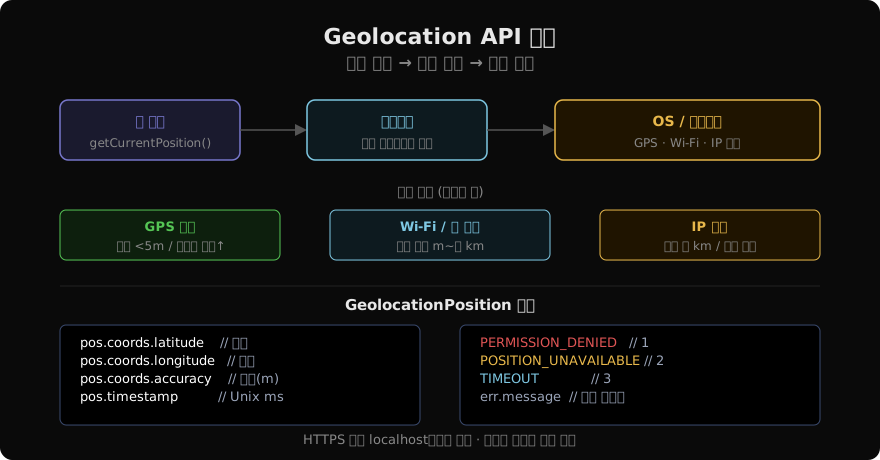
보안 제약:
- HTTPS(또는 localhost)에서만 동작합니다.
- 사용자가 명시적으로 위치 공유를 허가해야 합니다.
- 허가 상태는
navigator.permissions로 조회할 수 있습니다.
getCurrentPosition — 단건 조회
navigator.geolocation.getCurrentPosition(
  (position) => {
    const { latitude, longitude, accuracy, altitude, heading, speed } = position.coords;
    console.log(`위도: ${latitude}, 경도: ${longitude}, 정확도: ${accuracy}m`);
    console.log(`타임스탬프: ${new Date(position.timestamp).toLocaleString()}`);
  },
  (error) => {
    switch (error.code) {
      case error.PERMISSION_DENIED:
        console.error('위치 권한 거부됨');
        break;
      case error.POSITION_UNAVAILABLE:
        console.error('위치를 가져올 수 없음');
        break;
      case error.TIMEOUT:
        console.error('타임아웃');
        break;
    }
  },
  {
    enableHighAccuracy: true, // GPS 우선 사용 (배터리 소모↑)
    timeout: 5000,            // 5초 내 응답 없으면 TIMEOUT 에러
    maximumAge: 60000,        // 1분 이내 캐시된 위치 허용
  }
);
Promise 래퍼
콜백 API를 async/await로 쓰려면 래퍼가 필요합니다.
function getCurrentPosition(options = {}) {
  return new Promise((resolve, reject) => {
    navigator.geolocation.getCurrentPosition(resolve, reject, options);
  });
}

// 사용
try {
  const pos = await getCurrentPosition({ enableHighAccuracy: true, timeout: 8000 });
  console.log(pos.coords.latitude, pos.coords.longitude);
} catch (err) {
  console.error(err.message);
}
watchPosition — 실시간 추적
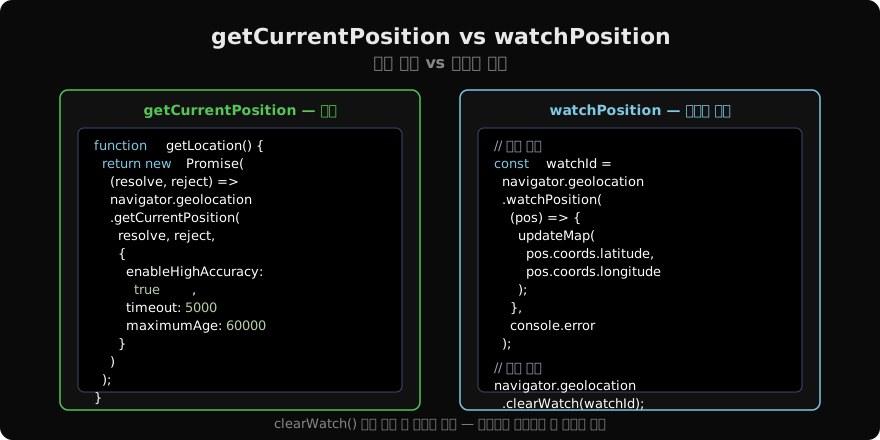
watchPosition은 위치가 바뀔 때마다 콜백을 반복 호출합니다. 반환된 ID로 clearWatch()를 호출해 구독을 해제해야 합니다.
let watchId = null;

function startTracking(onUpdate, onError) {
  if (!navigator.geolocation) {
    onError(new Error('Geolocation 미지원'));
    return;
  }
  watchId = navigator.geolocation.watchPosition(onUpdate, onError, {
    enableHighAccuracy: true,
    timeout: 10000,
    maximumAge: 0, // 캐시 사용 안 함
  });
}

function stopTracking() {
  if (watchId !== null) {
    navigator.geolocation.clearWatch(watchId);
    watchId = null;
  }
}
PositionOptions 상세
| 옵션 | 타입 | 기본값 | 설명 |
|---|---|---|---|
enableHighAccuracy | boolean | false | true이면 GPS 우선. 배터리·시간 소모↑ |
timeout | number | Infinity | 위치 응답 대기 최대 ms. 초과 시 TIMEOUT |
maximumAge | number | 0 | 허용할 캐시 위치의 최대 나이(ms). 0이면 항상 새로 조회 |
React 훅 패턴
import { useState, useEffect, useCallback } from 'react';

function useGeolocation(options = {}) {
  const [state, setState] = useState({
    loading: true,
    position: null,
    error: null,
  });

  const onSuccess = useCallback((position) => {
    setState({ loading: false, position, error: null });
  }, []);

  const onError = useCallback((error) => {
    setState({ loading: false, position: null, error });
  }, []);

  useEffect(() => {
    if (!navigator.geolocation) {
      onError(new Error('Geolocation API 미지원'));
      return;
    }
    const watchId = navigator.geolocation.watchPosition(onSuccess, onError, options);
    return () => navigator.geolocation.clearWatch(watchId); // 언마운트 시 정리
  }, []); // eslint-disable-line react-hooks/exhaustive-deps

  return state;
}

// 사용
function LocationDisplay() {
  const { loading, position, error } = useGeolocation({ enableHighAccuracy: true });

  if (loading) return <p>위치 조회 중...</p>;
  if (error) return <p>오류: {error.message}</p>;
  return (
    <p>
      위도 {position.coords.latitude.toFixed(6)},
      경도 {position.coords.longitude.toFixed(6)}
    </p>
  );
}
권한 상태 사전 확인
위치 요청 전에 navigator.permissions로 권한 상태를 확인하면 사용자 경험을 개선할 수 있습니다.
async function checkGeolocationPermission() {
  const result = await navigator.permissions.query({ name: 'geolocation' });
  // result.state: 'granted' | 'denied' | 'prompt'

  if (result.state === 'denied') {
    showManualGuide(); // 브라우저 설정에서 직접 허가하도록 안내
    return false;
  }

  result.addEventListener('change', () => {
    console.log('권한 변경:', result.state);
  });

  return true;
}
거리 계산 — Haversine 공식
두 좌표 사이의 거리를 구하려면 Haversine 공식을 씁니다.
function haversine(lat1, lon1, lat2, lon2) {
  const R = 6371e3; // 지구 반지름 (m)
  const toRad = (deg) => (deg * Math.PI) / 180;
  const dLat = toRad(lat2 - lat1);
  const dLon = toRad(lon2 - lon1);
  const a =
    Math.sin(dLat / 2) ** 2 +
    Math.cos(toRad(lat1)) * Math.cos(toRad(lat2)) * Math.sin(dLon / 2) ** 2;
  return R * 2 * Math.atan2(Math.sqrt(a), Math.sqrt(1 - a)); // 미터 단위
}

const distance = haversine(37.5665, 126.9780, 35.1796, 129.0756);
console.log(`서울-부산: ${(distance / 1000).toFixed(0)}km`);
주의사항 정리
- HTTPS 필수: HTTP 페이지에서는
navigator.geolocation이undefined입니다. - clearWatch 누락: 컴포넌트 언마운트나 페이지 전환 시 반드시 호출해야 배터리 소모와 메모리 누수를 막습니다.
- maximumAge 설정: 불필요한 GPS 가동을 줄이려면 적절한 캐시 나이를 설정하세요.
- iOS Safari 제약: iOS에서는 허가 후 앱이 백그라운드로 가면 위치 추적이 제한될 수 있습니다.
지난 글: Cache API 완전 이해
다음 글: Notifications API 완전 이해
읽어주셔서 감사합니다. 😊
PALDYN / ARTICLE AI
글의 개념, 수식, 코드에 대해 물어보세요.
질문과 관련된 문단을 골라 답변의 문맥으로 사용합니다.생각 중 · 0초