

Performance API 완전 이해
performance.now()·mark()·measure(), PerformanceObserver로 LCP·CLS·FID·INP를 측정하는 방법, Navigation Timing·Resource Timing API를 정리합니다.
지난 글에서 Web Cryptography API를 살펴봤습니다. 이번에는 브라우저 Performance API를 정리합니다. 페이지 로딩 속도·렌더링·사용자 상호작용을 정밀하게 측정해서 Core Web Vitals와 실사용 성능을 개선하는 데 사용합니다.
performance.now() — 고정밀 타임스탬프
Date.now()는 밀리초 정수를 반환하지만, performance.now()는 페이지 로드 기준 상대 시간을 소수점 이하까지 반환합니다(보안상 일부 브라우저에서 1ms 단위로 반올림).
const start = performance.now();

// 측정할 작업
for (let i = 0; i < 1_000_000; i++) {}

const end = performance.now();
console.log(`소요 시간: ${(end - start).toFixed(3)}ms`);
mark와 measure — 사용자 정의 측정
// 마크 찍기
performance.mark('init-start');
initApp();
performance.mark('init-end');

// 두 마크 사이 구간 측정
performance.measure('init-duration', 'init-start', 'init-end');

// 결과 읽기
const [entry] = performance.getEntriesByName('init-duration');
console.log(`앱 초기화: ${entry.duration.toFixed(2)}ms`);

// 정리
performance.clearMarks();
performance.clearMeasures();
performance.measure(name, startMark, endMark) — 세 번째 인자를 생략하면 현재 시각까지 측정합니다.
Performance Timeline 항목 유형
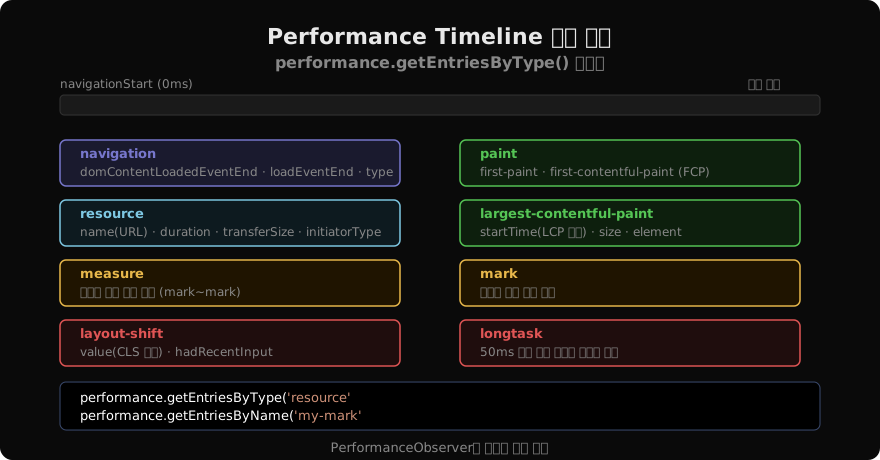
performance.getEntries()는 모든 항목을, getEntriesByType(type)은 특정 유형만 반환합니다.
// 모든 리소스 로딩 시간 확인
const resources = performance.getEntriesByType('resource');
resources.forEach((r) => {
  console.log(`${r.name}: ${r.duration.toFixed(0)}ms, ${r.transferSize}bytes`);
});

// 네비게이션 타이밍
const [nav] = performance.getEntriesByType('navigation');
console.log(`TTFB: ${nav.responseStart - nav.requestStart}ms`);
console.log(`DOMContentLoaded: ${nav.domContentLoadedEventEnd}ms`);
console.log(`Load: ${nav.loadEventEnd}ms`);
PerformanceObserver — 실시간 관찰
getEntries()는 이미 발생한 항목만 반환하지만, PerformanceObserver는 앞으로 발생할 항목도 실시간으로 받습니다.
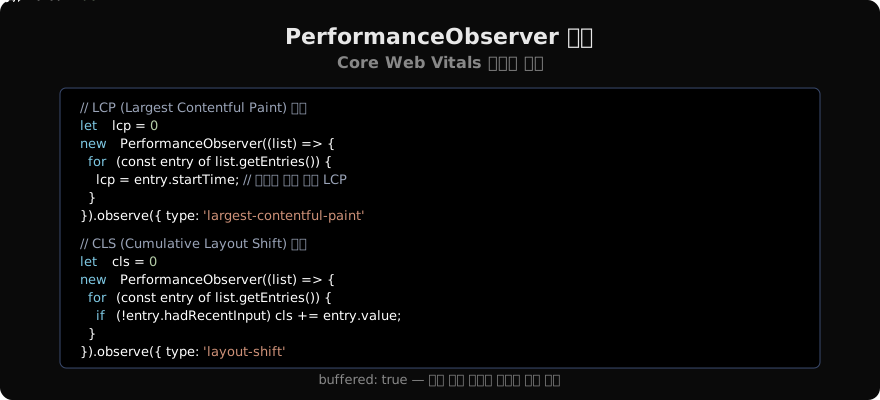
Core Web Vitals 측정
FCP (First Contentful Paint)
new PerformanceObserver((list) => {
  for (const entry of list.getEntries()) {
    if (entry.name === 'first-contentful-paint') {
      console.log(`FCP: ${entry.startTime.toFixed(0)}ms`);
      // 좋음 < 1800ms, 개선 필요 < 3000ms, 나쁨 ≥ 3000ms
    }
  }
}).observe({ type: 'paint', buffered: true });
INP (Interaction to Next Paint) — Chrome 108+
new PerformanceObserver((list) => {
  for (const entry of list.getEntries()) {
    console.log(`INP 후보: ${entry.duration}ms (${entry.interactionType})`);
  }
}).observe({ type: 'event', durationThreshold: 16, buffered: true });
FID (First Input Delay)
new PerformanceObserver((list) => {
  for (const entry of list.getEntries()) {
    console.log(`FID: ${entry.processingStart - entry.startTime}ms`);
  }
}).observe({ type: 'first-input', buffered: true });
Long Tasks — 메인 스레드 블로킹 감지
50ms 이상 메인 스레드를 막는 작업은 longtask로 기록됩니다.
const observer = new PerformanceObserver((list) => {
  for (const entry of list.getEntries()) {
    console.warn(`Long Task: ${entry.duration.toFixed(0)}ms at ${entry.startTime.toFixed(0)}ms`);
    // entry.attribution으로 원인 iframe/script 확인
  }
});
observer.observe({ type: 'longtask', buffered: true });
측정값 서버로 전송
성능 데이터를 수집하려면 sendBeacon()을 사용해야 페이지 언로드 시에도 데이터가 전송됩니다.
function sendVitals(metric) {
  const body = JSON.stringify(metric);
  navigator.sendBeacon('/analytics', body) ||
    fetch('/analytics', { method: 'POST', body, keepalive: true });
}

// 페이지 숨김 시 LCP 전송
document.addEventListener('visibilitychange', () => {
  if (document.visibilityState === 'hidden') {
    sendVitals({ name: 'LCP', value: lcp, url: location.href });
  }
});
web-vitals 라이브러리
Google의 web-vitals 라이브러리는 CWV 측정의 표준 구현체입니다.
import { onLCP, onCLS, onINP } from 'web-vitals';

onLCP(({ name, value, rating }) => {
  console.log(`${name}: ${value}ms (${rating})`); // 'good'|'needs-improvement'|'poor'
  sendVitals({ name, value, rating });
});
onCLS(({ name, value }) => sendVitals({ name, value }));
onINP(({ name, value }) => sendVitals({ name, value }));
지난 글: Web Cryptography API 완전 이해
다음 글: requestAnimationFrame · requestIdleCallback 완전 이해
읽어주셔서 감사합니다. 😊
PALDYN / ARTICLE AI
글의 개념, 수식, 코드에 대해 물어보세요.
질문과 관련된 문단을 골라 답변의 문맥으로 사용합니다.생각 중 · 0초