

지식
JavaScript
Web Cryptography API 완전 이해
crypto.subtle의 해시·대칭키 암호화(AES-GCM)·비대칭키·서명·키 파생, crypto.getRandomValues()와 randomUUID() 사용법을 정리합니다.
지난 글에서 Permissions API를 살펴봤습니다. 이번에는 브라우저 내장 암호화 라이브러리인 Web Cryptography API를 정리합니다. 외부 라이브러리 없이 해시, 대칭키 암호화, 디지털 서명, 키 파생을 처리할 수 있습니다.
두 인터페이스
window.crypto는 두 부분으로 나뉩니다.
crypto.getRandomValues(typedArray): 암호학적으로 안전한 난수를 채웁니다. 동기 API.crypto.subtle:SubtleCrypto인터페이스. 해시, 암호화, 서명, 키 파생 등 비동기 API.
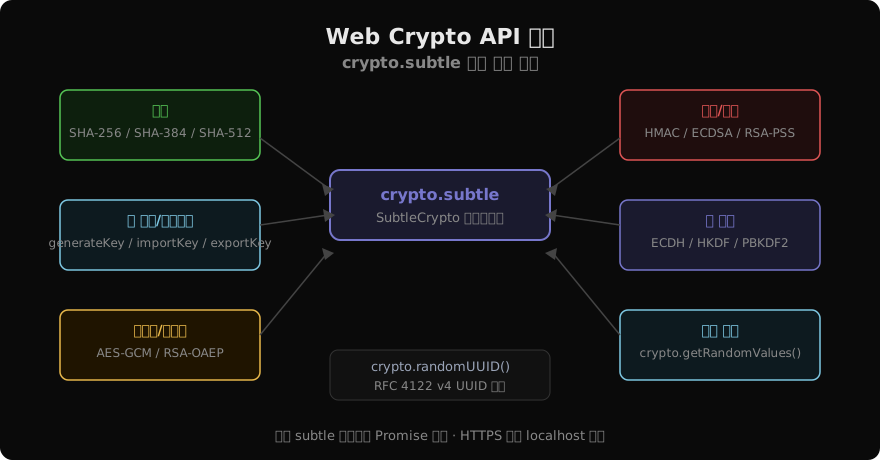
모든 subtle 메서드는 Promise를 반환합니다. HTTPS(또는 localhost)에서만 동작합니다.
안전한 난수와 UUID
// 32바이트 안전한 난수 (Math.random() 절대 사용 금지)
const randomBytes = new Uint8Array(32);
crypto.getRandomValues(randomBytes);

// RFC 4122 v4 UUID — 고유 ID 생성에 사용
const uuid = crypto.randomUUID();
// 예: "550e8400-e29b-41d4-a716-446655440000"

// 토큰 생성 예시 (hex 인코딩)
function generateToken(byteLength = 32) {
  const bytes = new Uint8Array(byteLength);
  crypto.getRandomValues(bytes);
  return Array.from(bytes, (b) => b.toString(16).padStart(2, '0')).join('');
}
SHA-256 해시
async function sha256(message) {
  const encoded = new TextEncoder().encode(message);
  const hashBuffer = await crypto.subtle.digest('SHA-256', encoded);
  const hashArray = Array.from(new Uint8Array(hashBuffer));
  return hashArray.map((b) => b.toString(16).padStart(2, '0')).join(''); // hex
}

const hash = await sha256('Hello, World!');
// "dffd6021bb2bd5b0af676290809ec3a53191dd81c7f70a4b28688a362182986d"
지원 알고리즘: SHA-1(레거시), SHA-256, SHA-384, SHA-512.
AES-GCM 대칭키 암호화
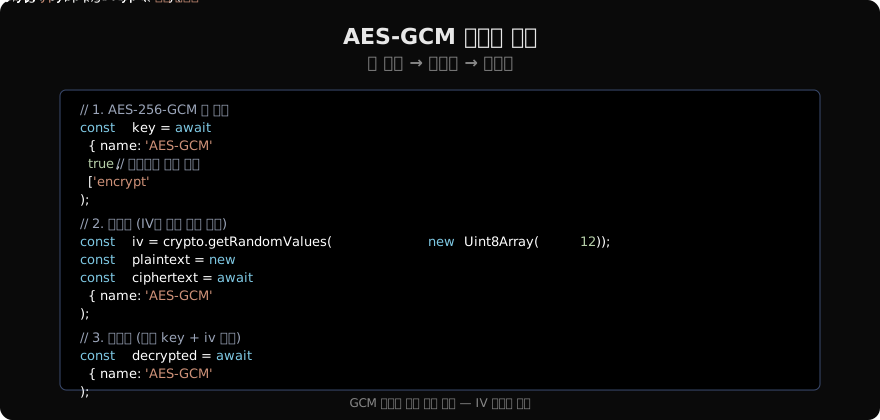
GCM(Galois/Counter Mode)은 기밀성과 무결성을 동시에 제공하므로 AES 모드 중 가장 권장됩니다.
// 암호화
async function encrypt(plaintext, key) {
  const iv = crypto.getRandomValues(new Uint8Array(12)); // 96-bit IV
  const encoded = new TextEncoder().encode(plaintext);
  const ciphertext = await crypto.subtle.encrypt({ name: 'AES-GCM', iv }, key, encoded);
  // IV를 함께 저장해야 복호화 가능
  return { iv, ciphertext };
}

// 복호화
async function decrypt({ iv, ciphertext }, key) {
  const decrypted = await crypto.subtle.decrypt({ name: 'AES-GCM', iv }, key, ciphertext);
  return new TextDecoder().decode(decrypted);
}

// 사용
const key = await crypto.subtle.generateKey(
  { name: 'AES-GCM', length: 256 },
  true,
  ['encrypt', 'decrypt']
);
const encrypted = await encrypt('비밀 메시지', key);
const decrypted = await decrypt(encrypted, key);
console.log(decrypted); // "비밀 메시지"중요: IV는 절대 재사용하지 않습니다. 같은 키로 같은 IV를 두 번 쓰면 암호화가 깨집니다.
키 내보내기와 가져오기
키를 스토리지에 저장하거나 전송하려면 직렬화가 필요합니다.
// 내보내기 (raw: 대칭키, jwk: JSON Web Key)
const exported = await crypto.subtle.exportKey('raw', key);
const base64Key = btoa(String.fromCharCode(...new Uint8Array(exported)));

// 가져오기
const rawKey = Uint8Array.from(atob(base64Key), (c) => c.charCodeAt(0));
const importedKey = await crypto.subtle.importKey(
  'raw',
  rawKey,
  { name: 'AES-GCM', length: 256 },
  false,
  ['encrypt', 'decrypt']
);
HMAC 서명
무결성 검증에 HMAC을 씁니다.
const hmacKey = await crypto.subtle.generateKey(
  { name: 'HMAC', hash: 'SHA-256' },
  true,
  ['sign', 'verify']
);

const data = new TextEncoder().encode('검증할 데이터');
const signature = await crypto.subtle.sign('HMAC', hmacKey, data);

const isValid = await crypto.subtle.verify('HMAC', hmacKey, signature, data);
console.log(isValid); // true
PBKDF2 — 패스워드 기반 키 파생
사용자 비밀번호에서 암호화 키를 만들 때 씁니다.
async function deriveKey(password, salt) {
  const passwordKey = await crypto.subtle.importKey(
    'raw',
    new TextEncoder().encode(password),
    'PBKDF2',
    false,
    ['deriveKey']
  );
  return crypto.subtle.deriveKey(
    { name: 'PBKDF2', salt, iterations: 310_000, hash: 'SHA-256' },
    passwordKey,
    { name: 'AES-GCM', length: 256 },
    false,
    ['encrypt', 'decrypt']
  );
}

const salt = crypto.getRandomValues(new Uint8Array(16));
const derivedKey = await deriveKey('사용자비밀번호', salt);
RSA-OAEP 비대칭키 암호화
// 키 쌍 생성
const keyPair = await crypto.subtle.generateKey(
  {
    name: 'RSA-OAEP',
    modulusLength: 2048,
    publicExponent: new Uint8Array([1, 0, 1]), // 65537
    hash: 'SHA-256',
  },
  true,
  ['encrypt', 'decrypt']
);

const message = new TextEncoder().encode('공개키로 암호화');
const encrypted = await crypto.subtle.encrypt({ name: 'RSA-OAEP' }, keyPair.publicKey, message);
const decrypted = await crypto.subtle.decrypt({ name: 'RSA-OAEP' }, keyPair.privateKey, encrypted);
주의사항
crypto.subtle에서 오류가 나면 대부분DOMException으로 던져집니다.try/catch필수.- 키 소재는 절대
console.log로 출력하지 않습니다. Math.random()은 암호학적으로 안전하지 않습니다. 보안 목적에는 반드시crypto.getRandomValues()를 사용하세요.
지난 글: Permissions API 완전 이해
다음 글: Performance API 완전 이해
읽어주셔서 감사합니다. 😊
PALDYN / ARTICLE AI
글의 개념, 수식, 코드에 대해 물어보세요.
질문과 관련된 문단을 골라 답변의 문맥으로 사용합니다.생각 중 · 0초