

비디오 생성 모델: Sora·AnimateDiff·Stable Video Diffusion 완전 해설
비디오 확산 모델의 시간 어텐션 구조, AnimateDiff·SVD·CogVideoX 비교, diffusers 비디오 생성 코드, Sora·Veo·Kling 등 SOTA 모델 분석을 완전 해설합니다.
지난 글에서 AI 이미지 편집 기법들을 살펴봤다. 이번 글에서는 정지 이미지를 넘어 움직이는 영상을 생성하는 비디오 생성 모델의 구조와 실전 사용법을 다룬다. 2024년 Sora의 등장으로 AI 비디오 생성은 연구 수준에서 실용 수준으로 도약했다.
이미지 vs 비디오 확산 모델 구조 차이
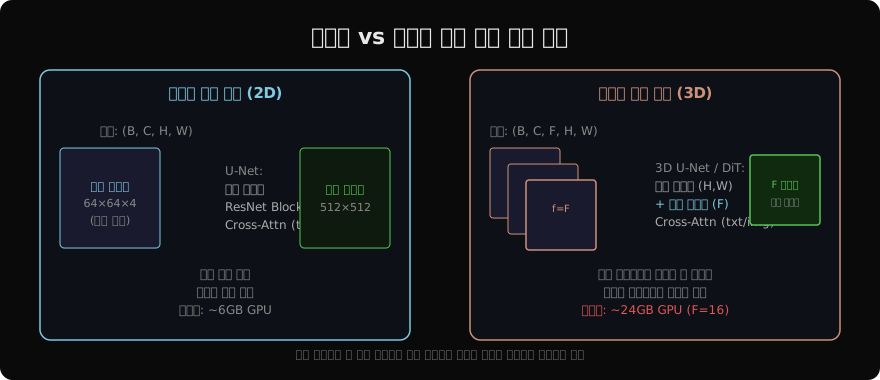
이미지 확산 모델이 (B, C, H, W) 형태의 공간 텐서를 처리한다면, 비디오 확산 모델은 (B, C, F, H, W) 형태의 시공간 텐서를 다룬다. F는 프레임 수다. 핵심 추가 요소는 시간 어텐션(Temporal Attention)으로, 각 공간 위치에서 모든 프레임에 걸쳐 어텐션을 계산해 프레임 간 일관성을 학습한다.
비디오 생성 모델 비교
AnimateDiff로 이미지 애니메이션
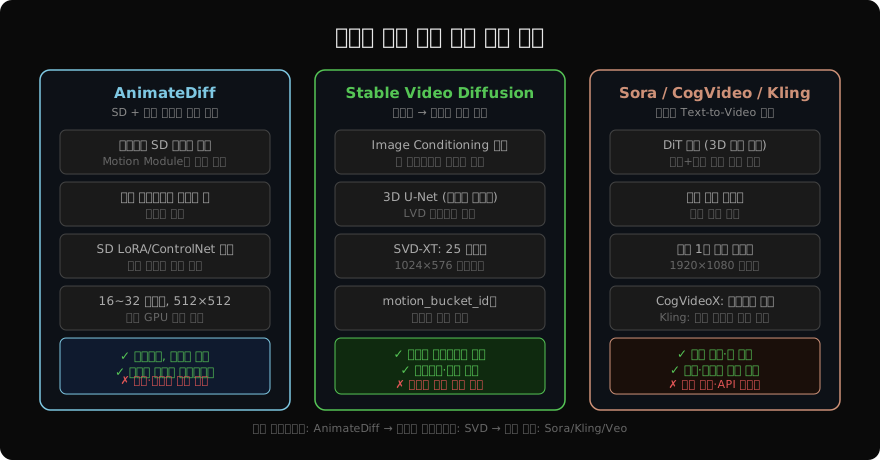
AnimateDiff는 기존 Stable Diffusion 파이프라인에 Motion Module만 삽입해 비디오를 생성한다. 기존 SD LoRA와 완벽히 호환된다.
import torch
from diffusers import AnimateDiffPipeline, MotionAdapter, DDIMScheduler
from diffusers.utils import export_to_gif

# Motion Adapter 로드
adapter = MotionAdapter.from_pretrained(
    "guoyww/animatediff-motion-adapter-v1-5-2",
    torch_dtype=torch.float16,
)

pipe = AnimateDiffPipeline.from_pretrained(
    "SG161222/Realistic_Vision_V5.1_noVAE",
    motion_adapter=adapter,
    torch_dtype=torch.float16,
)
pipe.scheduler = DDIMScheduler.from_config(
    pipe.scheduler.config,
    clip_sample=False,
    timestep_spacing="linspace",
    beta_schedule="linear",
    steps_offset=1,
)
pipe.to("cuda")
pipe.enable_vae_slicing()
pipe.enable_model_cpu_offload()

output = pipe(
    prompt=(
        "a beautiful woman walking along a beach at sunset, "
        "cinematic, 4k, smooth camera motion"
    ),
    negative_prompt=(
        "low quality, blurry, distorted, ugly"
    ),
    num_frames=16,           # 생성할 프레임 수
    num_inference_steps=25,
    guidance_scale=7.5,
    generator=torch.Generator(device="cuda").manual_seed(42),
)

# GIF로 저장
frames = output.frames[0]
export_to_gif(frames, "animation.gif")

# MP4로 저장
from diffusers.utils import export_to_video
export_to_video(frames, "animation.mp4", fps=8)
MotionCtrl — 카메라 모션 제어
AnimateDiff에 MotionCtrl을 결합하면 카메라 방향·이동을 정밀하게 제어할 수 있다.
# 카메라 궤적 정의
def create_camera_trajectory(
    trajectory_type: str = "pan_right",
    num_frames: int = 16,
) -> list:
    """카메라 이동 행렬 생성"""
    if trajectory_type == "pan_right":
        # x축 방향으로 점진적 이동
        return [
            [[1, 0, 0, i * 0.05],
             [0, 1, 0, 0],
             [0, 0, 1, 0],
             [0, 0, 0, 1]]
            for i in range(num_frames)
        ]
    elif trajectory_type == "zoom_in":
        return [
            [[1, 0, 0, 0],
             [0, 1, 0, 0],
             [0, 0, 1, -i * 0.1],
             [0, 0, 0, 1]]
            for i in range(num_frames)
        ]
Stable Video Diffusion — 이미지 애니메이션
SVD는 정지 이미지를 입력으로 받아 자연스러운 움직임을 생성하는 데 특화되어 있다.
from diffusers import StableVideoDiffusionPipeline
from diffusers.utils import load_image, export_to_video
import torch

pipe_svd = StableVideoDiffusionPipeline.from_pretrained(
    "stabilityai/stable-video-diffusion-img2vid-xt",
    torch_dtype=torch.float16,
    variant="fp16",
)
pipe_svd.enable_model_cpu_offload()
pipe_svd.unet.enable_forward_chunking()

# 입력 이미지 (1024×576 권장)
image = load_image("input.jpg")
image = image.resize((1024, 576))

frames = pipe_svd(
    image,
    num_frames=25,            # SVD-XT: 25 프레임
    num_inference_steps=25,
    decode_chunk_size=8,      # VRAM 절약
    motion_bucket_id=127,     # 0=정지, 255=빠른 움직임
    noise_aug_strength=0.02,  # 약간의 노이즈로 다양성 추가
    generator=torch.Generator("cuda").manual_seed(42),
).frames[0]

export_to_video(frames, "animated.mp4", fps=7)motion_bucket_id는 움직임 강도를 제어한다. 낮은 값(050)은 미세한 움직임(나뭇잎 흔들림), 높은 값(200255)은 큰 움직임을 생성한다.
CogVideoX — 오픈소스 고품질 Text-to-Video
from diffusers import CogVideoXPipeline
from diffusers.utils import export_to_video
import torch

pipe_cog = CogVideoXPipeline.from_pretrained(
    "THUDM/CogVideoX-5b",
    torch_dtype=torch.bfloat16,
)
pipe_cog.enable_model_cpu_offload()
pipe_cog.enable_sequential_cpu_offload()
pipe_cog.vae.enable_slicing()
pipe_cog.vae.enable_tiling()

video = pipe_cog(
    prompt=(
        "A majestic eagle soaring over snow-capped mountains, "
        "4K cinematic footage, smooth flight, dramatic lighting"
    ),
    num_videos_per_prompt=1,
    num_inference_steps=50,
    num_frames=49,      # 약 6초 (8fps)
    guidance_scale=6,
    generator=torch.Generator("cuda").manual_seed(42),
).frames[0]

export_to_video(video, "eagle.mp4", fps=8)
비디오 생성의 주요 과제
시간 일관성: 등장인물의 얼굴이나 물체가 프레임마다 달라지는 문제. 시간 어텐션이 핵심 해결책이다.
물리 법칙 준수: 물이 흐르고 불이 타는 방식을 물리적으로 올바르게 생성하는 것. Sora는 이 영역에서 큰 진전을 보였다.
긴 클립 생성: 현재 오픈소스 모델은 대부분 2~6초 수준이다. 오토리그레시브 방식으로 이어 붙이면 끊김이 발생한다.
계산 비용: 16 프레임, 512×512 기준 24GB VRAM이 필요하다. 1080p 1분 클립은 현재 소비자 GPU로 불가능하다.
# VRAM 최적화 설정
pipe.enable_vae_slicing()          # VAE를 프레임 단위로 슬라이싱
pipe.enable_vae_tiling()           # VAE를 타일 단위로 처리
pipe.enable_model_cpu_offload()    # GPU ↔ CPU 자동 오프로드
pipe.unet.enable_forward_chunking(
    chunk_size=1, dim=1            # 배치 청킹으로 피크 메모리 감소
)
다음 글에서는 비디오에서 한 걸음 더 나아가 3D 오브젝트와 3D 장면을 생성하는 3D 생성 모델(NeRF·3D Gaussian Splatting·Point-E)을 다룬다.
지난 글: AI 이미지 편집: 인페인팅·아웃페인팅·스타일 전이
다음 글: 3D 생성 AI: NeRF·3D Gaussian Splatting·Point-E 완전 해설
읽어주셔서 감사합니다. 😊