

docker/build-push-action 완전 정복
docker/build-push-action의 모든 주요 파라미터 해설, metadata-action 연동, 멀티 플랫폼·시크릿·SBOM 빌드, 이미지 digest 활용, 실전 완성 워크플로 패턴을 다룹니다.
지난 글에서 docker buildx bake로 복잡한 빌드를 선언형으로 관리하는 방법을 살펴봤다. GitHub Actions에서 단일 이미지를 빌드하고 레지스트리에 푸시하는 가장 일반적인 시나리오는 docker/build-push-action 하나로 해결한다. 이 글에서는 이 액션의 주요 파라미터를 하나씩 짚고 실전 패턴을 정리한다.
핵심 파라미터
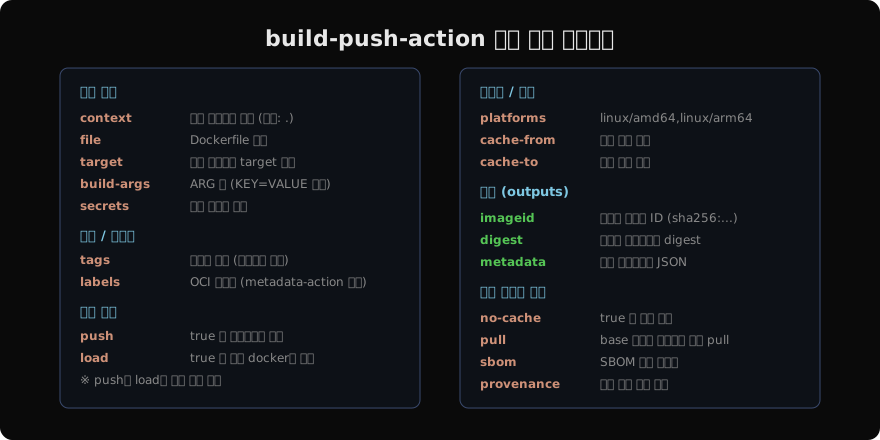
기본 구조: 3단계 조합
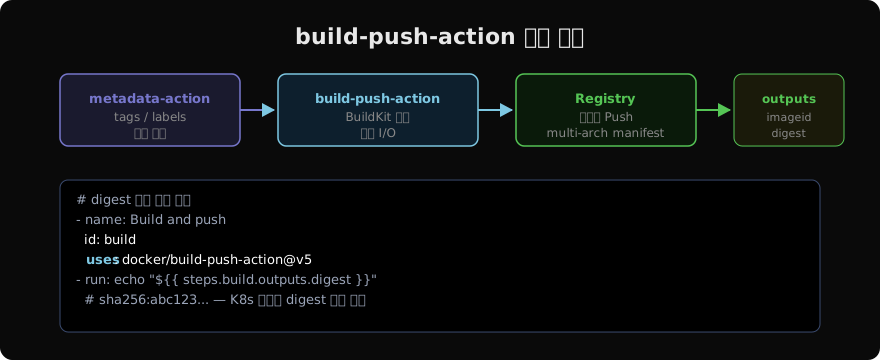
login-action → metadata-action → build-push-action 순서로 조합하는 것이 표준 패턴이다.
# .github/workflows/build.yml
name: Build and Push

on:
  push:
    branches: [main]
    tags: ['v*.*.*']
  pull_request:
    branches: [main]

jobs:
  build:
    runs-on: ubuntu-latest
    steps:
      - uses: actions/checkout@v4

      - name: Set up Docker Buildx
        uses: docker/setup-buildx-action@v3

      - name: Login to GHCR
        if: github.event_name != 'pull_request'
        uses: docker/login-action@v3
        with:
          registry: ghcr.io
          username: ${{ github.actor }}
          password: ${{ secrets.GITHUB_TOKEN }}

      - name: Docker metadata
        id: meta
        uses: docker/metadata-action@v5
        with:
          images: ghcr.io/${{ github.repository }}
          tags: |
            type=ref,event=branch
            type=ref,event=pr
            type=semver,pattern={{version}}
            type=sha,prefix=sha-

      - name: Build and push
        id: build
        uses: docker/build-push-action@v5
        with:
          context: .
          push: ${{ github.event_name != 'pull_request' }}
          tags: ${{ steps.meta.outputs.tags }}
          labels: ${{ steps.meta.outputs.labels }}
          cache-from: type=gha
          cache-to: type=gha,mode=max
          platforms: linux/amd64,linux/arm64

      - name: Print digest
        run: echo "Pushed ${{ steps.build.outputs.digest }}"
빌드 시크릿 주입
- name: Build with secret
  uses: docker/build-push-action@v5
  with:
    context: .
    push: true
    tags: myapp:latest
    secrets: |
      GIT_AUTH_TOKEN=${{ secrets.GH_TOKEN }}
      NPM_TOKEN=${{ secrets.NPM_TOKEN }}
Dockerfile에서 --mount=type=secret으로 접근한다.
# Dockerfile
RUN --mount=type=secret,id=NPM_TOKEN \
    NPM_TOKEN=$(cat /run/secrets/NPM_TOKEN) npm install
시크릿은 이미지 레이어에 남지 않는다. ARG로 토큰을 받는 방식과 달리 docker history에도 노출되지 않는다.
멀티 플랫폼 빌드
- name: Set up QEMU
  uses: docker/setup-qemu-action@v3

- name: Set up Buildx
  uses: docker/setup-buildx-action@v3

- name: Build multi-platform
  uses: docker/build-push-action@v5
  with:
    context: .
    platforms: linux/amd64,linux/arm64,linux/arm/v7
    push: true
    tags: myuser/myapp:latest
멀티 플랫폼 빌드는 push: true일 때만 manifest list가 생성된다. load: true는 단일 플랫폼만 지원한다.
SBOM과 Provenance
공급망 보안을 위해 SBOM(소프트웨어 구성 목록)과 빌드 출처 증명을 이미지에 첨부할 수 있다.
- name: Build with SBOM
  uses: docker/build-push-action@v5
  with:
    context: .
    push: true
    tags: myapp:latest
    sbom: true          # SBOM 생성 및 첨부
    provenance: true    # 빌드 출처 증명 (SLSA 레벨 3)
# 첨부된 SBOM 확인
docker buildx imagetools inspect myapp:latest --format \
'{{ json .SBOM.SPDX }}'조건부 플랫폼 설정
PR에서는 빠른 피드백을 위해 단일 플랫폼, main에서는 멀티 플랫폼으로 나누는 패턴이 효율적이다.
- name: Build and push
  uses: docker/build-push-action@v5
  with:
    context: .
    push: ${{ github.event_name != 'pull_request' }}
    tags: ${{ steps.meta.outputs.tags }}
    platforms: >-
      ${{ github.event_name == 'pull_request'
        && 'linux/amd64'
        || 'linux/amd64,linux/arm64' }}
    cache-from: type=gha
    cache-to: type=gha,mode=max
build-args로 빌드 타임 변수 주입
- name: Build with args
  uses: docker/build-push-action@v5
  with:
    context: .
    push: true
    tags: myapp:${{ github.sha }}
    build-args: |
      APP_VERSION=${{ github.ref_name }}
      BUILD_DATE=${{ github.event.head_commit.timestamp }}
      GIT_COMMIT=${{ github.sha }}
# Dockerfile
ARG APP_VERSION
ARG BUILD_DATE
ARG GIT_COMMIT
LABEL org.opencontainers.image.version="${APP_VERSION}"
LABEL org.opencontainers.image.created="${BUILD_DATE}"
LABEL org.opencontainers.image.revision="${GIT_COMMIT}"digest를 이용한 불변 배포
태그는 가변적이다. 동일한 latest 태그가 다른 이미지를 가리킬 수 있다. 프로덕션 배포에는 digest를 사용한다.
- name: Build and push
  id: build
  uses: docker/build-push-action@v5
  with:
    push: true
    tags: myapp:latest

- name: Deploy with digest
  run: |
    # digest는 sha256:... 형식의 불변 참조
    kubectl set image deployment/myapp \
      app=myapp@${{ steps.build.outputs.digest }}
digest는 이미지 내용에서 파생되므로 이미지가 변하지 않는 한 항상 같은 값이다.
지난 글: docker buildx bake — 복잡한 빌드를 선언형으로
다음 글: 컨테이너 안에서 테스트 실행하기
읽어주셔서 감사합니다. 😊
PALDYN / ARTICLE AI
글의 개념, 수식, 코드에 대해 물어보세요.
질문과 관련된 문단을 골라 답변의 문맥으로 사용합니다.생각 중 · 0초