

docker buildx bake — 복잡한 빌드를 선언형으로
docker buildx bake의 개념, HCL·JSON bake 파일 작성법, variable·group·target 블록, 멀티 플랫폼 빌드, CI 통합 패턴, compose.yaml을 bake 파일로 활용하는 방법을 다룹니다.
지난 글에서 GitHub Actions와 docker/build-push-action으로 이미지를 자동 빌드하는 방법을 살펴봤다. 마이크로서비스처럼 빌드 대상이 여러 개이거나 플랫폼·버전 조합이 복잡해지면 docker build 명령을 반복 조합하는 것이 한계에 달한다. docker buildx bake는 빌드 설정을 파일로 선언해 여러 대상을 병렬로 빌드하는 고수준 빌드 도구다.
bake란 무엇인가
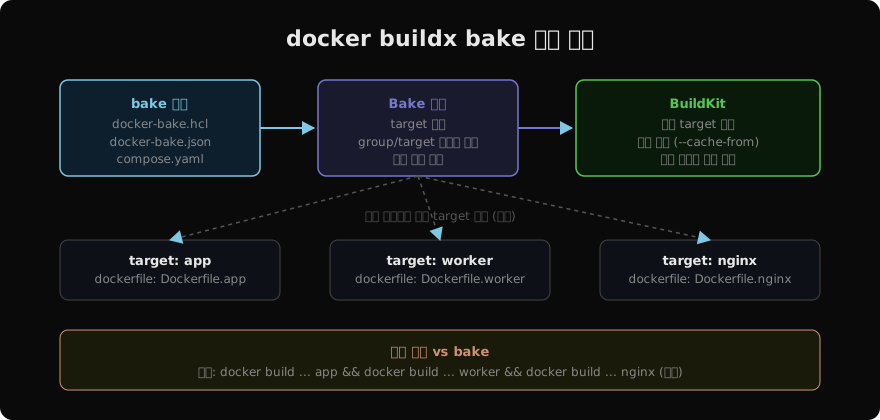
bake는 docker-bake.hcl(또는 .json, compose.yaml)에서 target을 정의하고 docker buildx bake 한 줄로 여러 이미지를 동시에 빌드한다. BuildKit의 병렬 실행을 완전히 활용하므로 N개의 이미지를 순차 빌드할 때보다 훨씬 빠르다.
# bake 명령 기본 형태
docker buildx bake                    # default group 전체 빌드
docker buildx bake app                # 특정 target만
docker buildx bake --push             # 빌드 + 레지스트리 푸시
docker buildx bake --no-cache         # 캐시 무시

# 미리 어떤 명령이 실행될지 확인 (dry-run)
docker buildx bake --print
HCL bake 파일 구조
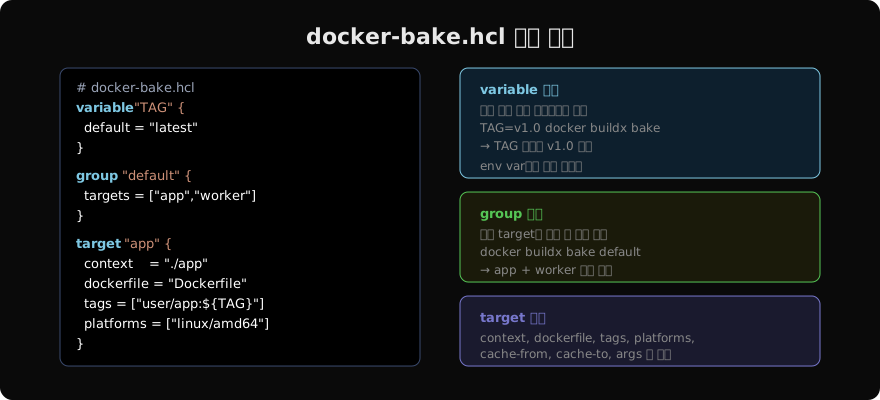
HCL(HashiCorp Configuration Language)은 Terraform과 같은 형식이다. JSON보다 변수·표현식·주석을 쓰기 편하다.
# docker-bake.hcl

variable "REGISTRY" {
  default = "ghcr.io/myorg"
}

variable "TAG" {
  default = "latest"
}

group "default" {
  targets = ["app", "worker", "nginx"]
}

target "app" {
  context    = "./services/app"
  dockerfile = "Dockerfile"
  tags       = ["${REGISTRY}/app:${TAG}"]
  platforms  = ["linux/amd64", "linux/arm64"]
  cache-from = ["type=registry,ref=${REGISTRY}/app:cache"]
  cache-to   = ["type=registry,ref=${REGISTRY}/app:cache,mode=max"]
}

target "worker" {
  context    = "./services/worker"
  dockerfile = "Dockerfile"
  tags       = ["${REGISTRY}/worker:${TAG}"]
  platforms  = ["linux/amd64", "linux/arm64"]
  cache-from = ["type=registry,ref=${REGISTRY}/worker:cache"]
  cache-to   = ["type=registry,ref=${REGISTRY}/worker:cache,mode=max"]
}

target "nginx" {
  context    = "./services/nginx"
  dockerfile = "Dockerfile"
  tags       = ["${REGISTRY}/nginx:${TAG}"]
  platforms  = ["linux/amd64"]
}
환경 변수로 variable 주입
variable 블록에 선언한 이름과 동일한 환경 변수가 있으면 자동으로 오버라이드된다.
# TAG 변수를 Git 커밋 SHA로 설정
export TAG=$(git rev-parse --short HEAD)
export REGISTRY="ghcr.io/myorg"

docker buildx bake --push

# 결과:
# ghcr.io/myorg/app:a3f9c12
# ghcr.io/myorg/worker:a3f9c12
# ghcr.io/myorg/nginx:a3f9c12
target 상속 (inherits)
공통 설정을 _base target에 정의하고 다른 target이 상속한다.
target "_base" {
  platforms  = ["linux/amd64", "linux/arm64"]
  cache-from = ["type=gha"]
  cache-to   = ["type=gha,mode=max"]
  labels = {
    "org.opencontainers.image.source" = "https://github.com/myorg/myapp"
  }
}

target "app" {
  inherits   = ["_base"]
  context    = "./services/app"
  tags       = ["${REGISTRY}/app:${TAG}"]
}

target "worker" {
  inherits   = ["_base"]
  context    = "./services/worker"
  tags       = ["${REGISTRY}/worker:${TAG}"]
}
compose.yaml을 bake 파일로 활용
bake는 compose.yaml도 읽을 수 있다. 별도 bake 파일 없이 Compose 프로젝트의 build: 섹션을 그대로 활용한다.
# compose.yaml
services:
  app:
    build:
      context: ./services/app
      dockerfile: Dockerfile
      args:
        NODE_ENV: production
    image: ghcr.io/myorg/app:latest

  worker:
    build:
      context: ./services/worker
    image: ghcr.io/myorg/worker:latest
# compose.yaml의 build 섹션으로 bake 실행
docker buildx bake -f compose.yaml --pushGitHub Actions 통합
# .github/workflows/bake.yml
jobs:
  bake:
    runs-on: ubuntu-latest
    steps:
      - uses: actions/checkout@v4

      - name: Set up Docker Buildx
        uses: docker/setup-buildx-action@v3

      - name: Login to GHCR
        uses: docker/login-action@v3
        with:
          registry: ghcr.io
          username: ${{ github.actor }}
          password: ${{ secrets.GITHUB_TOKEN }}

      - name: Build and push with bake
        uses: docker/bake-action@v4
        with:
          push: true
          files: docker-bake.hcl
        env:
          REGISTRY: ghcr.io/${{ github.repository_owner }}
TAG: ${{ github.sha }}docker/bake-action은 build-push-action의 bake 특화 버전이다. files에 bake 파일 경로를 지정하고, 환경 변수로 variable을 주입한다.
주요 target 필드 정리
| 필드 | 설명 | 예시 |
|---|---|---|
context | 빌드 컨텍스트 경로 | "./services/app" |
dockerfile | Dockerfile 경로 | "Dockerfile.prod" |
tags | 이미지 태그 목록 | ["myapp:v1.0"] |
platforms | 타깃 플랫폼 | ["linux/amd64","linux/arm64"] |
args | --build-arg | {NODE_ENV:"production"} |
target | 멀티 스테이지 target | "production" |
cache-from | 캐시 소스 | ["type=gha"] |
cache-to | 캐시 저장 | ["type=gha,mode=max"] |
secret | 빌드 시크릿 | ["id=mysecret"] |
no-cache | 캐시 비활성화 | true |
지난 글: GitHub Actions로 Docker 이미지 빌드 자동화하기
다음 글: docker/build-push-action 완전 정복
읽어주셔서 감사합니다. 😊
PALDYN / ARTICLE AI
글의 개념, 수식, 코드에 대해 물어보세요.
질문과 관련된 문단을 골라 답변의 문맥으로 사용합니다.생각 중 · 0초