

GitHub Actions로 Docker 이미지 빌드 자동화하기
GitHub Actions에서 docker/build-push-action을 활용한 이미지 빌드·푸시 자동화, metadata-action으로 태그 관리, gha·registry 캐시 전략, 멀티 플랫폼 빌드까지 다룹니다.
지난 글에서 컨테이너 기반 CI의 개념과 GitLab CI·Jenkins 예제를 살펴봤다. GitHub를 쓴다면 GitHub Actions가 가장 자연스러운 선택이다. Docker 공식 액션 3종—setup-buildx-action, login-action, build-push-action—을 조합하면 보일러플레이트 없이 프로덕션 수준의 빌드 파이프라인을 만들 수 있다.
기본 워크플로 구조
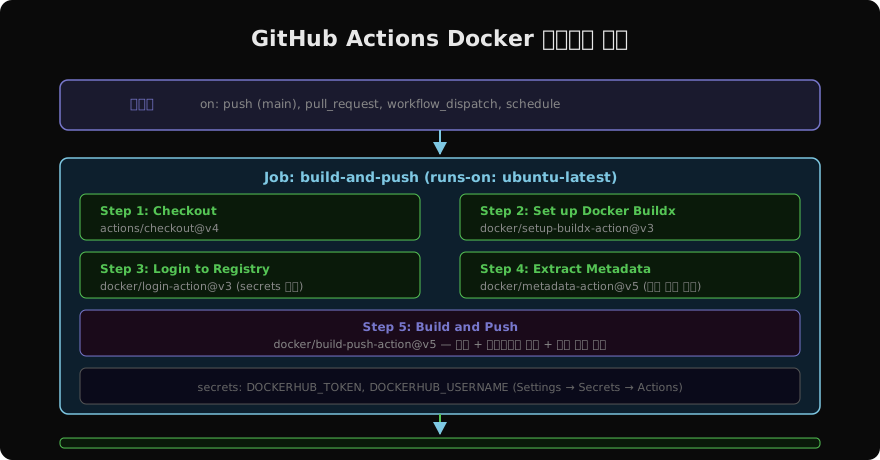
워크플로 파일은 .github/workflows/ 디렉터리에 YAML로 작성한다.
# .github/workflows/docker-build.yml
name: Docker Build & Push

on:
  push:
    branches: [main]
  pull_request:
    branches: [main]

jobs:
  build:
    runs-on: ubuntu-latest
    steps:
      - name: Checkout
        uses: actions/checkout@v4

      - name: Set up Docker Buildx
        uses: docker/setup-buildx-action@v3

      - name: Login to Docker Hub
        if: github.event_name == 'push'
        uses: docker/login-action@v3
        with:
          username: ${{ secrets.DOCKERHUB_USERNAME }}
          password: ${{ secrets.DOCKERHUB_TOKEN }}

      - name: Extract metadata
        id: meta
        uses: docker/metadata-action@v5
        with:
          images: myuser/myapp

      - name: Build and push
        uses: docker/build-push-action@v5
        with:
          context: .
          push: ${{ github.event_name == 'push' }}
          tags: ${{ steps.meta.outputs.tags }}
          labels: ${{ steps.meta.outputs.labels }}
          cache-from: type=gha
          cache-to: type=gha,mode=max
metadata-action으로 태그 자동 생성
docker/metadata-action은 Git 이벤트를 읽어 태그를 자동으로 생성한다. 직접 태그 문자열을 조립할 필요가 없다.
- name: Extract metadata
  id: meta
  uses: docker/metadata-action@v5
  with:
    images: |
      myuser/myapp
      ghcr.io/myorg/myapp
    tags: |
      type=ref,event=branch
      type=ref,event=pr
      type=semver,pattern={{version}}
      type=semver,pattern={{major}}.{{minor}}
      type=sha,prefix=sha-,format=short
위 설정은 아래와 같은 태그를 자동 생성한다:
main브랜치 푸시 →myuser/myapp:main- PR →
myuser/myapp:pr-42 v1.2.3태그 →myuser/myapp:1.2.3,myuser/myapp:1.2- 커밋 →
myuser/myapp:sha-a3f9c12
빌드 캐시 전략
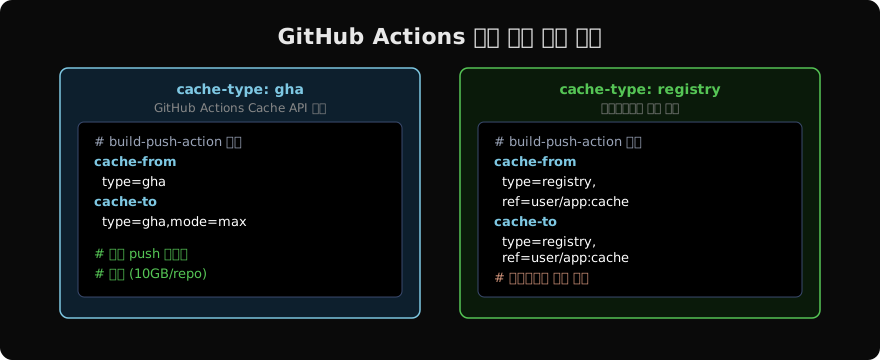
GitHub Actions 환경에서는 러너가 매번 새로 생성되므로 로컬 캐시가 없다. 두 가지 캐시 모드를 선택한다.
gha 캐시 (권장: 공개 저장소, 소규모 팀)
cache-from: type=gha
cache-to: type=gha,mode=max
GitHub Actions Cache API를 사용한다. 저장소당 10GB 무료. 추가 설정 없이 바로 쓸 수 있다.
registry 캐시 (권장: 대규모 프로젝트, 사내 레지스트리)
cache-from: type=registry,ref=ghcr.io/myorg/myapp:cache
cache-to: type=registry,ref=ghcr.io/myorg/myapp:cache,mode=max
캐시가 레지스트리에 저장돼 여러 워크플로·브랜치가 공유할 수 있다.
GitHub Container Registry(GHCR) 연동
- name: Login to GHCR
  uses: docker/login-action@v3
  with:
    registry: ghcr.io
    username: ${{ github.actor }}
    password: ${{ secrets.GITHUB_TOKEN }}   # 자동 발급
GHCR은 GITHUB_TOKEN으로 인증하므로 별도 시크릿 없이 바로 사용할 수 있다. 이미지 이름은 ghcr.io/{owner}/{repo}:{tag} 형식이다.
멀티 플랫폼 빌드 (amd64 + arm64)
- name: Set up QEMU
  uses: docker/setup-qemu-action@v3

- name: Set up Docker Buildx
  uses: docker/setup-buildx-action@v3

- name: Build and push multi-platform
  uses: docker/build-push-action@v5
  with:
    context: .
    platforms: linux/amd64,linux/arm64
    push: true
    tags: ${{ steps.meta.outputs.tags }}
    cache-from: type=gha
    cache-to: type=gha,mode=max
QEMU를 설치하면 amd64 러너에서도 arm64 이미지를 에뮬레이션으로 빌드할 수 있다. M1/M2 Mac, AWS Graviton 대응 이미지가 필요할 때 유용하다.
조건부 푸시 — PR은 빌드만, main은 푸시
- name: Build and push
  uses: docker/build-push-action@v5
  with:
    context: .
    push: ${{ github.ref == 'refs/heads/main' }}
    tags: ${{ steps.meta.outputs.tags }}
push: false로 설정하면 이미지가 레지스트리에 업로드되지 않는다. PR에서는 빌드만 검증하고, main 머지 후에만 실제로 푸시하는 패턴이 안전하다.
시크릿 등록 방법
GitHub 저장소 → Settings → Secrets and variables → Actions → New repository secret
| 시크릿 이름 | 값 |
|---|---|
DOCKERHUB_USERNAME | Docker Hub 아이디 |
DOCKERHUB_TOKEN | Docker Hub Access Token (Settings → Security) |
비밀번호 대신 Access Token을 쓴다. 토큰은 필요한 권한만 부여하고 언제든 폐기할 수 있다.
지난 글: Docker CI 기초 — 컨테이너로 빌드 파이프라인 구성하기
다음 글: docker buildx bake — 복잡한 빌드를 선언형으로
읽어주셔서 감사합니다. 😊
PALDYN / ARTICLE AI
글의 개념, 수식, 코드에 대해 물어보세요.
질문과 관련된 문단을 골라 답변의 문맥으로 사용합니다.생각 중 · 0초