

지식
JavaScript
Document · Element · Node · Text — DOM의 핵심 인터페이스
DOM의 네 가지 핵심 인터페이스인 Node, Element, Document, Text의 상속 관계와 각각이 제공하는 프로퍼티·메서드 차이를 실무 코드로 정리합니다.
지난 글에서 DOM 트리의 전체 구조와 노드 타입을 살펴봤습니다. 이번에는 DOM의 핵심 인터페이스인 Node, Element, Document, Text의 관계와 각각이 제공하는 API를 자세히 파헤칩니다.
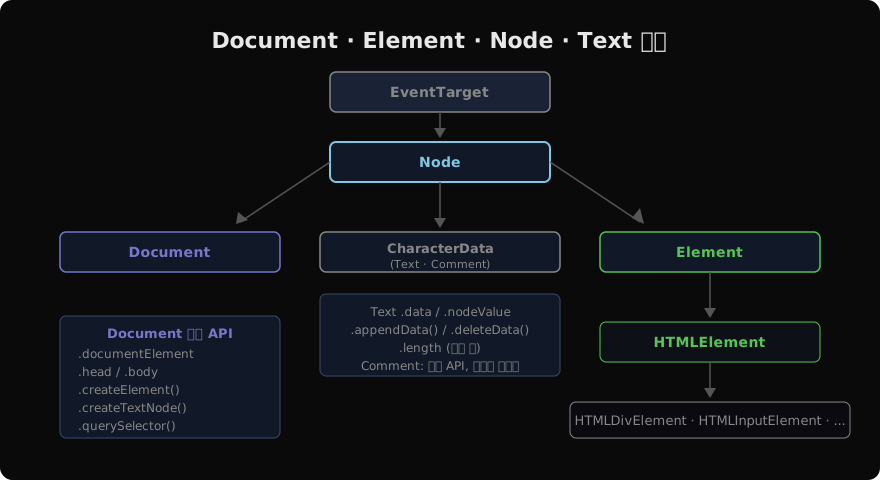
인터페이스 상속 계층
DOM은 인터페이스 기반 계층 구조를 따릅니다.
EventTarget
  └── Node
       ├── Document → HTMLDocument
       ├── DocumentFragment
       ├── CharacterData
       │    ├── Text
       │    └── Comment
       └── Element → HTMLElement → HTMLDivElement, HTMLInputElement ...
모든 DOM 객체는 EventTarget을 최상위로 상속하므로 addEventListener를 공통으로 사용할 수 있습니다.
Node — 모든 노드의 공통 기반
Node는 DOM 트리의 모든 노드가 공유하는 기반 인터페이스입니다.
const div = document.createElement('div');
div.textContent = '안녕하세요';

// 노드 정보
div.nodeType;    // 1 (ELEMENT_NODE)
div.nodeName;    // 'DIV'
div.nodeValue;   // null (Element)

// 텍스트 노드 정보
const text = div.firstChild; // TextNode
text.nodeType;   // 3
text.nodeName;   // '#text'
text.nodeValue;  // '안녕하세요'
text.data;       // '안녕하세요' (CharacterData)
textContent
const el = document.querySelector('#app');

// 읽기: 모든 하위 텍스트 연결
el.textContent; // HTML 태그 제거 후 순수 텍스트

// 쓰기: 기존 자식 노드 전부 교체 (HTML 이스케이프됨)
el.textContent = '<script>alert(1)</script>'; // XSS 안전
// 화면에 "<script>alert(1)</script>" 텍스트로 표시됨
노드 복제
const original = document.getElementById('card');

// 얕은 복사 (자식 없음)
const shallow = original.cloneNode(false);

// 깊은 복사 (자식 포함)
const deep = original.cloneNode(true);
// 주의: id는 그대로 복사되어 중복 id 발생 — 복사 후 id 변경 필요
deep.id = 'card-copy';
Element — HTML 요소의 인터페이스
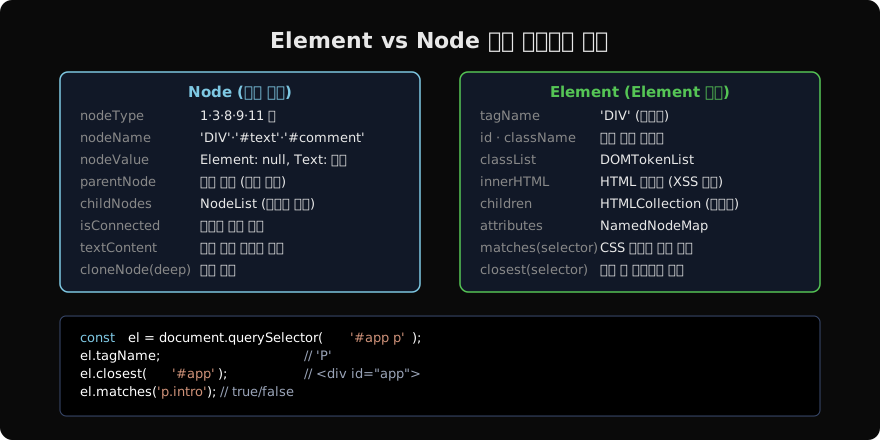
Element는 Node를 상속하며 태그, 속성, 자식 요소 조작 API를 추가합니다.
기본 프로퍼티
const el = document.querySelector('div.container');

el.tagName;      // 'DIV'
el.id;           // 'container' (없으면 '')
el.className;    // 'container active' (공백 구분 문자열)
el.classList;    // DOMTokenList

el.innerHTML;    // 자식 HTML 문자열 (읽기/쓰기)
el.outerHTML;    // 자신 포함 HTML 문자열
el.textContent;  // 하위 텍스트 합산 (Node 상속)

el.children;     // HTMLCollection (Element 자식만)
el.childElementCount; // 자식 Element 개수
matches / closest
const btn = document.querySelector('button.primary');

// 이 요소가 선택자와 일치하는지
btn.matches('.primary');             // true
btn.matches('button[disabled]');     // false

// 자신부터 위로 올라가며 선택자에 맞는 첫 조상
btn.closest('.modal');    // 가장 가까운 .modal 조상
btn.closest('body');      // <body>
btn.closest('.없는것');   // null
이벤트 위임(delegation) 패턴에서 closest와 matches가 핵심적으로 활용됩니다.
HTMLElement — HTML 전용 확장
HTMLElement는 Element를 상속하며 HTML 전용 기능을 추가합니다.
const input = document.querySelector('input');

// HTMLElement 전용
input.hidden;         // true/false (display:none 토글)
input.tabIndex;       // 탭 순서
input.title;          // 툴팁
input.lang;           // 언어 코드
input.draggable;      // 드래그 가능 여부

input.focus();        // 포커스
input.blur();         // 포커스 해제
input.click();        // 클릭 시뮬레이션

// HTMLInputElement 전용
input.value;          // 입력값
input.checked;        // 체크 여부
input.disabled;       // 비활성화
input.form;           // 소속 <form>
Document — 문서 진입점
Document는 Node를 상속하며 DOM 트리의 루트입니다.
// 루트 요소
document.documentElement; // <html>
document.head;             // <head>
document.body;             // <body>
document.doctype;          // DocumentType 노드

// 문서 정보
document.title;            // 읽기/쓰기
document.URL;              // 현재 URL
document.charset;          // 'UTF-8'
document.readyState;       // 'loading'|'interactive'|'complete'
document.hidden;           // 탭이 숨겨졌는지
노드 생성
// 요소 생성
const div = document.createElement('div');
const svg = document.createElementNS('http://www.w3.org/2000/svg', 'svg');

// 텍스트 노드 생성
const text = document.createTextNode('Hello, World!');

// 주석 노드 생성
const comment = document.createComment('개발자만 보이는 주석');

// DocumentFragment 생성
const frag = document.createDocumentFragment();
importNode / adoptNode
// 다른 Document에서 노드 가져오기
const iframe = document.querySelector('iframe');
const foreignEl = iframe.contentDocument.querySelector('.item');

// importNode: 복사 (원본 유지)
const imported = document.importNode(foreignEl, true);
document.body.appendChild(imported);

// adoptNode: 이동 (원본에서 제거됨)
const adopted = document.adoptNode(foreignEl);
document.body.appendChild(adopted);
Text — 텍스트 노드
// 직접 생성
const textNode = document.createTextNode('Hello');

// 요소의 첫 텍스트 자식
const p = document.querySelector('p');
const t = p.firstChild; // 텍스트 노드 (공백일 수 있음)

// CharacterData API
t.data;                    // 텍스트 내용
t.length;                  // 문자 수
t.substringData(0, 5);     // 부분 추출
t.appendData(' World');    // 뒤에 추가
t.insertData(0, 'Hi ');    // 삽입
t.deleteData(0, 3);        // 삭제
t.replaceData(0, 2, 'Hey');// 교체

// 텍스트 노드 분리/결합
t.splitText(5);            // 인덱스 5에서 두 노드로 분리
p.normalize();             // 인접 텍스트 노드 병합
타입 좁히기 (Type Narrowing)
function processNode(node) {
  // nodeType으로 분기
  if (node.nodeType === Node.ELEMENT_NODE) {
    // Element로 처리
    const el = /** @type {Element} */ (node);
    console.log(el.tagName);
  } else if (node.nodeType === Node.TEXT_NODE) {
    console.log(node.nodeValue);
  }
}

// instanceof 사용 (더 명확)
function processNode2(node) {
  if (node instanceof HTMLInputElement) {
    console.log(node.value);
  } else if (node instanceof Text) {
    console.log(node.data);
  }
}
지난 글: DOM 트리 구조 — 문서를 객체로 표현하는 방법
다음 글: DOM 요소 선택 — querySelector와 선택 API 완전 정복
읽어주셔서 감사합니다. 😊
PALDYN / ARTICLE AI
글의 개념, 수식, 코드에 대해 물어보세요.
질문과 관련된 문단을 골라 답변의 문맥으로 사용합니다.생각 중 · 0초