

DOM 트리 구조 — 문서를 객체로 표현하는 방법
브라우저가 HTML을 파싱해 DOM 트리를 구성하는 방식, 노드 타입 계층, 부모·자식·형제 관계 탐색 API, 그리고 DOM이 렌더링과 어떻게 연결되는지 정리합니다.
지난 글에서 파일과 이진 데이터를 다루는 API를 살펴봤습니다. 이번 글부터는 브라우저 환경의 핵심인 DOM을 다룹니다. 첫 번째 주제는 DOM 트리의 구조입니다.
DOM이란
DOM(Document Object Model)은 HTML·XML 문서를 트리 구조의 객체로 표현하는 API입니다. 브라우저가 HTML 파일을 수신하면 파서가 태그를 읽어 노드 객체를 생성하고, 이를 계층적으로 연결해 트리를 만듭니다. JavaScript는 이 트리를 통해 문서를 읽고 수정합니다.
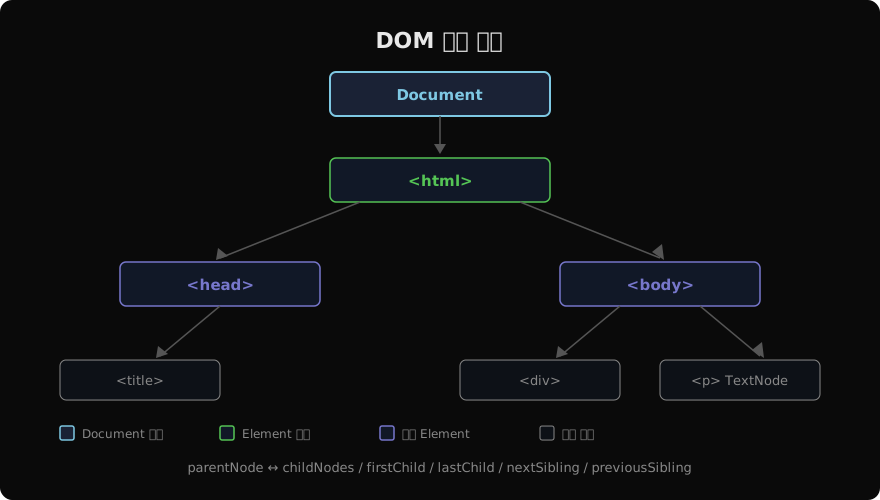
<!DOCTYPE html>
<html>
  <head><title>My Page</title></head>
  <body>
    <div id="app"><p>Hello</p></div>
  </body>
</html>
위 HTML은 아래와 같은 트리로 파싱됩니다.
노드 타입
DOM의 모든 것은 Node를 상속합니다. 각 노드는 nodeType 숫자로 종류를 구분합니다.
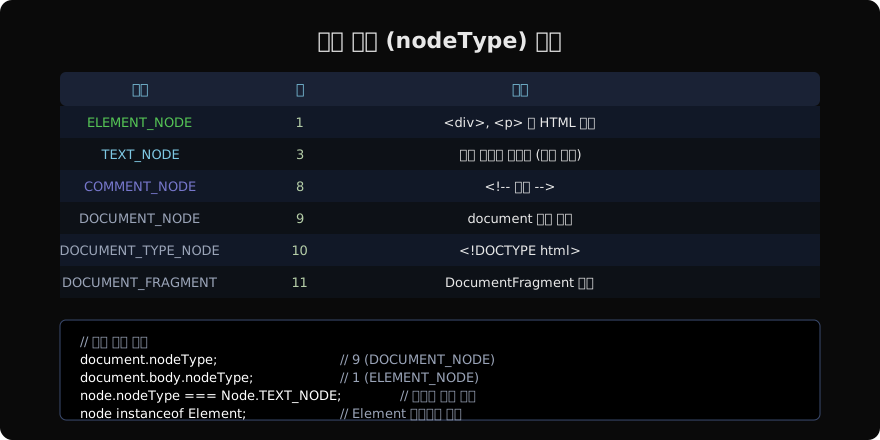
// 가장 자주 만나는 노드 타입
document.nodeType;        // 9
document.body.nodeType;   // 1
document.body.firstChild; // TextNode (줄바꿈 공백)

// nodeType 상수는 Node 객체에 정의됨
Node.ELEMENT_NODE;          // 1
Node.TEXT_NODE;             // 3
Node.COMMENT_NODE;          // 8
Node.DOCUMENT_NODE;         // 9
Node.DOCUMENT_FRAGMENT_NODE; // 11
HTML의 태그 사이 공백과 줄바꿈도 TEXT_NODE로 표현됩니다. 이는 직접 자식 탐색 시 주의해야 하는 이유입니다.
Node 인터페이스 계층
EventTarget
  └─ Node
       ├─ Document
       │    └─ HTMLDocument
       ├─ DocumentFragment
       ├─ CharacterData
       │    ├─ Text
       │    └─ Comment
       └─ Element
            └─ HTMLElement
                 ├─ HTMLDivElement
                 ├─ HTMLParagraphElement
                 └─ ... (모든 HTML 요소 클래스)
instanceof 체크:
document.body instanceof Node;        // true
document.body instanceof Element;     // true
document.body instanceof HTMLElement; // true
document.body instanceof EventTarget; // true
트리 탐색 프로퍼티
Node 기반 (모든 노드 타입 포함)
const body = document.body;

body.parentNode;       // <html> 요소
body.childNodes;       // NodeList (텍스트·주석 포함)
body.firstChild;       // 첫 번째 노드 (공백 텍스트일 수 있음)
body.lastChild;        // 마지막 노드
body.nextSibling;      // 다음 형제 노드
body.previousSibling;  // 이전 형제 노드
Element 기반 (요소만)
const div = document.querySelector('div');

div.parentElement;          // 부모 Element
div.children;               // HTMLCollection (Element만)
div.firstElementChild;      // 첫 번째 자식 Element
div.lastElementChild;       // 마지막 자식 Element
div.nextElementSibling;     // 다음 형제 Element
div.previousElementSibling; // 이전 형제 Element
div.childElementCount;      // 자식 Element 수
공백 텍스트 노드를 건너뛰어야 할 때는 Element 기반 프로퍼티를 사용합니다.
문서 탐색
// 루트 접근
document.documentElement; // <html>
document.head;             // <head>
document.body;             // <body>
document.doctype;          // <!DOCTYPE html>

// 소유 문서
element.ownerDocument === document; // true

// 루트 찾기 (Shadow DOM 포함)
element.getRootNode(); // Document 또는 ShadowRoot
트리 관계 확인
const parent = document.getElementById('parent');
const child = document.getElementById('child');

// 포함 관계
parent.contains(child);      // true (자신 포함)
parent.contains(parent);     // true

// 비교
const pos = parent.compareDocumentPosition(child);
// 비트마스크: DOCUMENT_POSITION_CONTAINED_BY = 16
pos & Node.DOCUMENT_POSITION_CONTAINED_BY; // 16 (child가 parent 안에 있음)
NodeList vs HTMLCollection
// NodeList — childNodes, querySelectorAll 반환
// 정적(querySelectorAll) vs 실시간(childNodes)
const nodes = document.querySelectorAll('p'); // 정적 NodeList
[...nodes]; // Array로 변환 가능

// HTMLCollection — children, getElementsByTagName 반환
// 항상 실시간 (DOM 변경 즉시 반영)
const divs = document.getElementsByTagName('div'); // 실시간 HTMLCollection

// ⚠ HTMLCollection 순회 중 DOM 수정 — 무한루프 위험
// 안전하게: 먼저 배열로 변환
[...divs].forEach(div => div.remove());
DOM과 렌더링 파이프라인
DOM 트리는 브라우저 렌더링의 시작점입니다.
HTML 파싱
   ↓
DOM 트리 생성
   ↓              CSS 파싱 → CSSOM 트리
DOM + CSSOM = Render Tree (표시되는 노드만)
   ↓
Layout (위치·크기 계산)
   ↓
Paint (픽셀로 그리기)
   ↓
Compositing
display: none 요소는 DOM에는 있지만 Render Tree에는 없습니다. visibility: hidden은 Render Tree에 포함되지만 투명합니다.
DOM 파싱 타이밍
// HTML 파싱 완료 시 (DOMContentLoaded)
document.addEventListener('DOMContentLoaded', () => {
  // DOM 트리는 완성, 이미지·CSS는 아직 로딩 중일 수 있음
  const el = document.getElementById('app');
});

// 모든 리소스 로딩 완료 시 (load)
window.addEventListener('load', () => {
  // 이미지, CSS, 폰트 모두 로딩 완료
});

// 파싱 중 동기 script 만나면 파싱 일시 중지
// → <script defer> 또는 </body> 바로 전에 배치
노드 정보 프로퍼티
const el = document.querySelector('p.intro');

el.nodeName;      // 'P' (대문자)
el.nodeType;      // 1
el.nodeValue;     // null (Element는 null, Text는 텍스트 내용)
el.tagName;       // 'P' (Element 전용)
el.localName;     // 'p' (소문자)
el.namespaceURI;  // 'http://www.w3.org/1999/xhtml'
el.isConnected;   // true (문서에 연결된 경우)
지난 글: Blob · File · FileReader — 파일과 이진 데이터 다루기
다음 글: Document · Element · Node · Text — DOM의 핵심 인터페이스
읽어주셔서 감사합니다. 😊
PALDYN / ARTICLE AI
글의 개념, 수식, 코드에 대해 물어보세요.
질문과 관련된 문단을 골라 답변의 문맥으로 사용합니다.생각 중 · 0초